A reliable charging dock keeps controllers ready for play, reduces cable clutter, and makes shared gaming spaces easier to manage. The best option depends on your console ecosystem, controller count, charging speed, and how much organization your setup requires.
We compared these 10 charging stations for compatibility, capacity, charging convenience, indicators, and everyday practicality across Xbox, PlayStation, Nintendo Switch, and multi-platform setups.
Best 10 Commercial-Grade Controller Charging Docks Picks for 2026
Flexible Xbox Charging

- Two 4320mWh rechargeable battery packs
- Four covers for supported original Xbox controllers
- USB-C charging with indicator and protection features
Best For: Xbox households needing batteries and covers for multiple original controllers
Official Switch Support
HORI Four-Controller Joy-Con Stand

- Charges up to four Joy-Con controllers
- Officially licensed by Nintendo
- LEDs show charge status and it connects to the Switch Dock
Best For: Nintendo Switch owners charging multiple Joy-Con controllers
High-Capacity Xbox Charging

- Two 5280mWh Ni-MH battery packs included
- Charges two compatible controllers at once
- Four covers and multiple charging-protection features
Best For: Xbox One and Series X|S users prioritizing battery capacity
PlayStation 4 Essentials
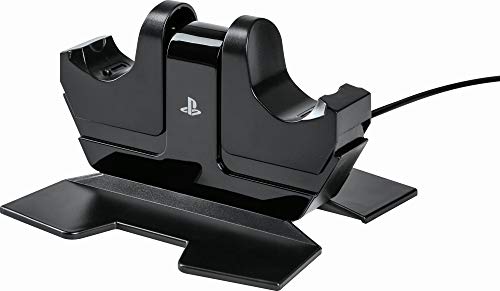
- Charges two DualShock 4 controllers simultaneously
- Powered through an AC adapter
- Officially licensed and styled for PS4
Best For: PS4 owners wanting a dedicated two-controller charging station
Top Pick for Multi-Controller Setups
FASTSNAIL 10-in-1 Switch Charging Dock

- Charges up to four Joy-Con and two Pro controllers
- Works with Switch 2, Switch, and OLED controllers
- Includes safety protection, RGB modes, and two USB ports
Best For: Nintendo Switch households with multiple official controllers
Best Xbox-Specific Dock
8BitDo Xbox Controller Charging Dock

- Officially licensed for Xbox controllers
- Includes an 1100mAh NiMH battery pack
- Magnetic charging with amber and white indicators
Best For: Xbox players seeking a dedicated rechargeable controller dock
Best Budget Switch Organizer
HEATFUN 6-in-1 Switch Charging Dock

- Charges four Joy-Con and two Pro controllers
- Adds LED status indicators and tabletop organization
- Includes short-circuit protection and three USB ports
Best For: Nintendo Switch owners with official controllers
Best Dual-Controller Value
Nyko Xbox Dual Charging Station

- Charges two Xbox controllers at once
- Includes two 1100 mAh rechargeable batteries
- Adds LED indicators and an extra USB port
Best For: Xbox households needing simultaneous charging
Best Magnetic Fit
8Bitdo Xbox Dual Charging Dock

- Officially licensed for Xbox controllers
- Uses magnetic contacts for secure charging
- Includes two batteries and adjustable ambient lighting
Best For: Xbox setups prioritizing secure placement and lighting
Best Multi-Platform Option
2-Port Universal Controller Dock

- Supports selected Switch, PS5, and Xbox controllers
- Includes removable USB-C charging adapters
- LED status and smart protection simplify charging
Best For: Multi-console setups using supported first-party controllers
Flexible Xbox Charging – Dual-Battery Controller Dock
This commercial-grade controller charging dock is a practical option for Xbox households using original Series X/S, Xbox One, or Elite controllers. It charges two included 4320mWh battery packs and includes four covers for different supported controller generations.
Best For: Xbox players who want a dual charging dock with rechargeable batteries and multiple original-controller covers.
Pros:
- Includes two 4320mWh rechargeable battery packs.
- Provides four battery covers for Xbox One and Xbox Series controllers.
- Features charging indicators, fast charging, and short-circuit protection.
- Uses USB-C connectivity and includes a charging cable.
Cons:
- Compatibility is limited to original controllers.
- The supplied specifications list one USB port.
- A wall adapter is not identified in the supplied details.
With dual-battery charging and broad cover support across original Xbox generations, this dock is a useful centralized charging solution. Confirm your controller model and power-adapter needs before buying.
Official Switch Support – HORI Four-Controller Joy-Con Stand
HORI Nintendo Switch Joy-Con Charge Stand by HORI Officially Licensed by Nintendo
Check Price On AmazonThe HORI Joy-Con stand is a straightforward commercial-grade controller charging dock for Nintendo Switch setups. It can charge up to four Joy-Con controllers at once and connects directly to the Nintendo Switch Dock.
Best For: Nintendo Switch owners who want an officially licensed, compact way to charge four Joy-Con controllers together.
Pros:
- Officially licensed by Nintendo.
- Charges up to four Joy-Con controllers simultaneously.
- LEDs indicate charging status.
- Plugs into the Nintendo Switch Dock.
Cons:
- Designed for Joy-Con controllers rather than standard gamepads.
- The supplied details identify one connector port.
- It does not include rechargeable battery packs.
This is a focused charging accessory rather than a universal station, but its four-slot capacity and Nintendo licensing make it a sensible fit for multi-player Switch use.
High-Capacity Xbox Charging – NEWDERY Dual Dock
This commercial-grade controller charging dock combines dual-controller charging with two 5280mWh Ni-MH battery packs. It supports original Xbox One and Series X|S controllers, includes four covers, and uses visible LED indicators to show charging progress.
Best For: Xbox One and Series X|S owners seeking longer-rated battery capacity and a drop-on charging setup for two controllers.
Pros:
- Includes two 5280mWh rechargeable battery packs.
- Charges two controllers simultaneously without removing the included batteries.
- Includes four covers for supported Xbox One and Series controllers.
- Offers over-charge, over-current, over-voltage, overheating, and short-circuit protection.
Cons:
- Not compatible with Elite, Elite Series 2, Xbox 360, or third-party controllers.
- Wall adapter is not included.
- Requires use of the two included battery packs.
The higher-capacity packs and clear charging indicators make this a strong choice for regular Xbox use. Its compatibility limits are important, so verify both the controller generation and model first.
PlayStation 4 Essentials – PowerA DualShock 4 Station
The PowerA DualShock Charging Station is a simple commercial-grade controller charging dock for PlayStation 4. It charges up to two DualShock 4 controllers simultaneously through an included AC-powered setup and matches the PS4 system’s design.
Best For: PlayStation 4 owners who need a dedicated two-controller charging station for DualShock 4 gamepads.
Pros:
- Charges up to two DualShock 4 controllers at the same time.
- Uses a corded AC power source.
- Officially licensed for PlayStation 4.
- Designed to match the PS4 system and DualShock 4 controllers.
Cons:
- Compatible with PlayStation 4 and DualShock 4 controllers rather than newer systems.
- Does not include replacement rechargeable battery packs.
- Uses a dedicated AC adapter instead of USB-only power.
For a PS4 setup, this station keeps two DualShock 4 controllers charging in one tabletop location. It is best suited to users who want a purpose-built accessory rather than cross-platform compatibility.
Top Pick for Multi-Controller Setups – FASTSNAIL 10-in-1 Switch Charging Dock
The FASTSNAIL dock is a practical commercial-grade controller charging dock for Nintendo Switch 2, Switch, and OLED owners who need to charge and organize several official controllers in one station. It supports up to four Joy-Con controllers and two Pro controllers at once, though the included Y-Type cable and an official NS2 dock are recommended as the power source.
Best For: Nintendo Switch households with multiple official Joy-Con and Pro controllers.
Pros:
- Charges up to four Joy-Con controllers and two Pro controllers simultaneously.
- Supports Nintendo Switch 2, Switch, and OLED controller configurations.
- Offers charging indicators, over-charge protection, short-circuit protection, and two USB 2.0 ports.
- Includes 11 RGB lighting modes with touch controls and memory function.
Cons:
- Not compatible with third-party controllers.
- Full charging takes about 3 to 3.5 hours.
- An official NS2 dock is recommended as the power source.
With its high capacity, status indicators, safety protections, and storage-focused design, this is the most versatile option here for a busy Switch setup. Its compatibility limits make it less suitable for mixed-brand controller collections.
Best Xbox-Specific Dock – 8BitDo Xbox Controller Charging Dock
The 8BitDo dock is a compact commercial-grade controller charging dock for Xbox Series X|S and Xbox One controllers. Its magnetic charging connection, included 1100mAh NiMH battery pack, and officially licensed design make it a focused replacement for disposable batteries or loose charging cables.
Best For: Xbox players who want a dedicated dock with an included rechargeable battery pack.
Pros:
- Officially licensed by Xbox and designed for first-party controllers.
- Compatible with Xbox Series X|S and Xbox One controllers.
- Includes an 1100mAh NiMH battery pack and battery doors for both controller generations.
- Uses magnetic charging and provides amber and white charging indicators.
Cons:
- USB power adapter is not included.
- Designed for Xbox controllers rather than multi-platform setups.
- Provides one charging position.
This 8BitDo model is a straightforward choice when reliable Xbox compatibility matters more than charging several controllers at once. The included battery accessories add value, while the single-dock format keeps the setup simple.
Best Budget Switch Organizer – HEATFUN 6-in-1 Switch Charging Dock
The HEATFUN dock is a compact commercial-grade controller charging dock for Nintendo Switch users who want one station for four Joy-Con controllers and two compatible Pro controllers. It uses a 5V/2A USB power adapter and combines charging with tabletop storage organization.
Best For: Nintendo Switch owners using official Joy-Con and compatible Pro controllers who want a simple six-controller station.
Pros:
- Charges up to four Joy-Con controllers and two compatible Pro controllers simultaneously.
- Combines charging and controller organization in a space-saving design.
- Uses clear red and green LED indicators for charging status.
- Includes short-circuit protection and three USB ports.
Cons:
- Not compatible with Switch 2 controllers.
- Not compatible with PowerA, HORI, or other third-party controllers.
- Requires a 5V/2A USB power adapter.
The HEATFUN is a sensible option for a traditional Nintendo Switch setup, especially when keeping six official controllers charged and organized is the priority. Its narrow compatibility makes checking your controller models essential before buying.
Best Dual-Controller Value – Nyko Xbox Dual Charging Station
For Xbox owners comparing commercial-grade controller charging docks, the Nyko Charging Station offers a straightforward dual-controller setup. It charges two Xbox Series X|S or Xbox One controllers at the same time, includes rechargeable batteries, and adds an extra USB port for convenient desk or entertainment-center use.
Best For: Xbox households that want two controllers charging together with included batteries.
Pros:
- Charges two compatible Xbox controllers simultaneously.
- Includes two 1100 mAh rechargeable batteries rated for up to 15 hours of playtime per charge.
- Drop-and-charge design, LED completion indicators, USB-C cable, and an extra USB port.
Cons:
- Designed for Xbox controllers rather than a broad range of console platforms.
- Rechargeable batteries and charging base add a stationary footprint to a desk or TV setup.
Choose this Nyko model when dual charging and included battery packs matter more than cross-platform compatibility. Its simple dock design makes it a practical option for keeping two Xbox controllers ready.
Best Magnetic Fit – 8Bitdo Xbox Dual Charging Dock
The 8Bitdo Dual Charging Dock is a polished choice among commercial-grade controller charging docks for Xbox users. Its magnetic contacts help secure each controller, while the dock includes two 1100 mAh battery packs, charging-status lighting, and adjustable ambient illumination.
Best For: Xbox players who want a secure magnetic connection and adjustable dock lighting.
Pros:
- Officially licensed by Xbox and compatible with Xbox Series and Xbox One wireless controllers.
- Magnetic contacts help hold controllers securely on the dock.
- Includes two 1100 mAh rechargeable battery packs and four battery doors.
- Amber and white indicators show charging and full-charge status; ambient lighting is adjustable.
Cons:
- Its compatibility is focused on Xbox wireless controllers.
- Ambient lighting may be unnecessary for users seeking a minimal charging stand.
This 8Bitdo dock stands out for its magnetic charging connection and presentation-focused lighting. It is a strong fit for an Xbox setup where secure placement and visual polish are priorities.
Best Multi-Platform Option – 2-Port Universal Controller Dock
For shoppers seeking commercial-grade controller charging docks across several console platforms, this two-port station supports selected Switch Pro, Switch 2 Pro, PS5, Xbox Series X|S, and Xbox Elite Series 2 controllers. Removable USB-C adapters enable drop-in charging, while the front LED and smart protection help make everyday use predictable.
Best For: Multi-console households with supported first-party controllers and a 5V/2A USB adapter.
Pros:
- Charges two compatible controllers simultaneously across several listed platforms.
- Includes removable USB-C adapters for drop-in charging and reduced connector wear.
- Front LED changes from red while charging to green when full.
- Built-in smart-chip protection and a compact, stable base suit desk or TV setups.
Cons:
- Not compatible with PowerA, Luna, or other listed third-party pro controllers.
- USB wall adapter is not included; a 5V/2A adapter is recommended for faster, stable charging.
- Thick protective cases may need to be removed, and adapters must be fully inserted.
This dock is the most versatile choice of the three when your controllers match its supported models. Confirm compatibility before buying, then pair it with the recommended power adapter for more reliable charging.
How We Picked the Best Commercial-Grade Controller Charging Docks
We focused on charging docks that can support frequent use in home theaters, gaming rooms, offices, esports spaces, and other shared environments. Our comparison considers console compatibility, the number of controllers each dock can charge, included rechargeable batteries, connection stability, physical organization, LED status indicators, and useful extras such as additional USB ports.
Because “commercial-grade” can describe different needs, we prioritized practical durability and dependable day-to-day operation rather than assuming every dock is suitable for a public venue. Always confirm the manufacturer’s compatibility details before purchasing, particularly for newer console revisions and third-party controllers.
Quick Comparison
- Xbox-focused setups: Look for docks designed specifically for Xbox One and Xbox Series X|S controllers, especially models with included battery packs or magnetic charging contacts.
- PlayStation 4: A dedicated DualShock 4 station is usually the simplest and most secure choice.
- Nintendo Switch: Joy-Con and Pro Controller docks vary considerably, so check whether the design supports Switch, Switch OLED, Switch 2, or multiple controller types.
- Multi-platform rooms: Universal two-port stations can reduce clutter, but verify that each controller receives the correct charging adapter or contact alignment.
- Large controller collections: Six-in-one and multi-bay designs are useful where several controllers need a consistent storage location.
Key Buying Factors for Commercial-Grade Controller Charging Docks
Compatibility and Charging Method
Confirm the exact console generation and controller model. Some docks use replacement battery packs, while others connect directly through USB-C, proprietary contacts, or included adapters. Battery-pack systems are convenient, but replacement packs must remain compatible with the controller’s battery cover and charging circuit.
Capacity and Footprint
Choose enough bays for the controllers used during a typical session, not merely the maximum number owned. A compact dual dock suits most households; a larger station makes more sense for family rooms, gaming lounges, and shared equipment areas. Measure the available shelf space before buying.
Build Quality and Stability
A good dock should stay planted when controllers are inserted or removed. Favor weighted bases, secure contact points, tidy cable routing, and construction that can tolerate repeated handling. LED indicators are helpful when they remain visible without being distracting.
Power, Safety, and Maintenance
Check whether the dock includes a power adapter or relies on a console USB port. Consider cable length, charging-status indicators, overcharge protection claims, and how easily the contacts can be cleaned. Keep firmware and controller batteries in mind when evaluating long-term reliability.
Who Should Buy Which Commercial-Grade Controller Charging Docks?
Buy a dedicated Xbox dock if your room primarily uses Xbox One or Series X|S controllers and you want replacement batteries, secure placement, or simultaneous charging. Choose a PlayStation-specific station for the simplest DualShock 4 setup with minimal compatibility uncertainty.
Choose a Joy-Con or Switch-focused dock if your priority is Nintendo multiplayer and compact storage. A higher-capacity Switch station is better for households with several controllers. Select a universal dock when multiple console brands share the same charging area, but verify every controller’s fit before ordering.
For shared or high-traffic spaces, prioritize stable construction, clear charging indicators, easy cable replacement, and enough capacity to prevent controllers from being left unplugged. The best Commercial-Grade Controller Charging Docks are the ones that match your controller fleet and make the correct storage habit effortless.