Managing laptops, tablets, and phones across a remote-work setup is easier when charging has a dedicated, secure home. The best device charging cabinets for remote work combine organized cable storage with dependable charging and protection from everyday clutter.
Our roundup includes lockable cabinets for shared spaces, portable designs for flexible offices, and compact charging furniture for smaller rooms. Use the guide below to match capacity, security, mobility, and charging features to your work routine.
Best 10 Device Charging Cabinets for Remote Work Picks for 2026
Best Wall-Mount Pick
Learniture 12-Device Charging Cabinet

- Charges and stores up to 12 devices
- Lockable steel cabinet with cable clips
- French-cleat wall mounting saves floor space
Best For: Small offices and remote-work hubs needing secure wall-mounted charging
Best Fully Assembled Option
16-Device Combination-Lock Cabinet
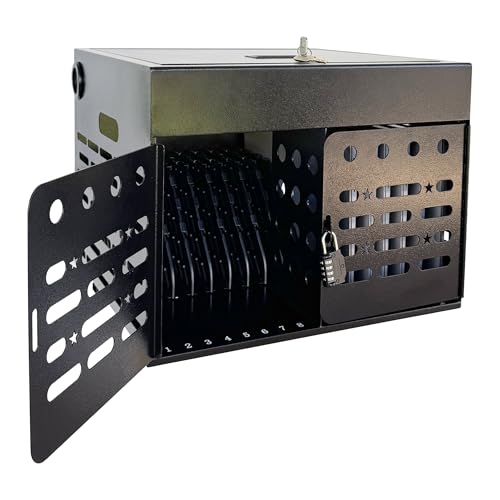
- Holds up to 16 devices up to 15.6 inches
- Arrives fully assembled
- Ventilated steel design with combination lock
Best For: Shared offices and training spaces seeking quick, organized deployment
Best Lightweight 12-Device Choice
Portable Wall-Mount Charging Cabinet

- Stores and charges 12 devices
- Includes power strip and cable management
- Steel, ventilated, lockable, and wall mountable
Best For: Small offices needing portable charging for a 12-device collection
Best Dual-Lock Design
POCHAR 16-Device Steel Charging Cabinet

- Stores and charges up to 16 devices
- Front and top doors use key locks
- All-side ventilation and wall-mount hardware included
Best For: Shared offices prioritizing keyed security and flexible placement
Stylish Home Office Pick
HULALA HOME Auburn Charging Cabinets

- Two-drawer storage with concealed charging
- Transitional wood-style furniture design
- Sold as a two-cabinet set
Best For: Home offices needing attractive storage and everyday device charging
High-Capacity Workstation Choice
Pearington 16-Device Charging Cabinet

- Charges and stores 16 devices
- Fits devices up to 17-inch screens
- Locking, portable cabinet with casters
Best For: Shared workspaces managing multiple laptops, Chromebooks, or tablets
Flexible Lighting Add-On
EZVALO Wireless Charging Station Lights

- Five rechargeable motion-sensing LED lights
- Three-slot USB-C charging dock
- Remote control, dimming, and timers
Best For: Adding cordless task lighting and light-duty charging near a home office
Compact Office Security

- Charges and stores up to eight devices
- Dual locking doors help secure equipment
- Desktop or wall-mount placement
Best For: Small teams needing secure laptop and tablet charging
High-Capacity Shared Workspace
30-Device Phone Charging Locker

- Provides 30 USB charging slots
- Lockable ventilated steel cabinet
- Wheels and brakes support mobility
Best For: Large shared spaces charging phones and USB devices
Under-Cabinet Convenience
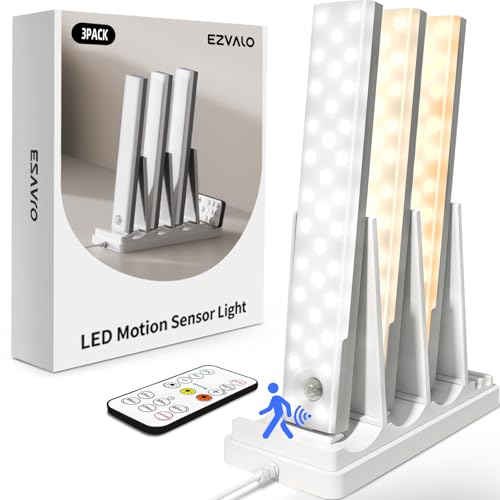
- Three-slot USB-C charging station
- Includes three rechargeable motion lights
- Tool-free magnetic or adhesive mounting
Best For: Home offices needing task lighting and accessory charging
Best Wall-Mount Pick – Learniture 12-Device Charging Cabinet
For teams comparing device charging cabinets for remote work, the Learniture Structure Series offers a compact wall-mounted setup for organizing and charging up to 12 laptops, Chromebooks, or tablets. Its lockable steel cabinet, cable clips, and rotated outlet strip are designed to keep shared devices secure and ready.
Best For: Small offices or remote-work hubs that need secure, wall-mounted storage for up to 12 devices.
Pros:
- Stores and charges 12 devices with a rotated 12-outlet strip.
- Includes interior steel dividers and 12 cable-management clips.
- Lockable cabinet supports charging while devices remain secured.
- French-cleat wall mounting helps save floor space.
Cons:
- Mounting hardware is not included.
- Slots are 1.25 inches wide, which may limit thicker devices or cases.
- Uses a key lock rather than a combination lock.
Choose this model when wall space matters and your devices fit its defined slot dimensions. Its 65-pound capacity and orderly interior make it a practical option for a small shared-device collection.
Best Fully Assembled Option – 16-Device Combination-Lock Cabinet
This 16-device cabinet is a convenient choice among device charging cabinets for remote work because it arrives fully assembled and supports laptops, Chromebooks, iPads, and tablets up to 15.6 inches. Ventilated steel construction, cable-routing slots, and a combination lock support organized shared-device management.
Best For: Offices, libraries, and training spaces that want a ready-to-use cabinet with combination-lock access.
Pros:
- Stores and charges up to 16 devices up to 15.6 inches.
- Ships fully assembled for immediate deployment.
- Combination lock and enclosed steel construction help limit unauthorized access.
- Ventilated side panels and a dedicated adapter compartment improve organization.
Cons:
- The 16-inch depth may require more space than smaller cabinets.
- Combination-lock convenience may not suit teams that prefer keyed access.
- Specific charger hardware is not listed among the included components.
This is a strong fit when capacity and quick setup outweigh the need for a particularly compact cabinet. Desktop or wall-mounted installation gives it flexibility across shared workspaces.
Best Lightweight 12-Device Choice – Portable Wall-Mount Charging Cabinet
For smaller teams seeking device charging cabinets for remote work, this 12-slot portable cabinet combines lockable storage with an included power strip and cable management. Ventilation holes, steel construction, and a wall-mountable French-wedge design support use in offices and other shared spaces.
Best For: Small offices that need a relatively lightweight, portable cabinet for 12 tablets, Chromebooks, iPads, or laptops.
Pros:
- Charges and stores 12 devices simultaneously.
- Includes an internal 12-hole power socket and cable-management function.
- Steel construction and ventilation holes support durability and airflow.
- Lockable design can be wall mounted, with four wheels listed in the specifications.
Cons:
- Installation hardware is sold separately.
- Its 1.18-inch slot width may not accommodate bulkier cases.
- At 17 pounds, it has less listed weight than some larger steel cabinets.
The cabinet suits users who value portability and a smaller 12-device footprint. Confirm the slot height and width before buying, particularly if devices will be stored with protective cases.
Best Dual-Lock Design – POCHAR 16-Device Steel Charging Cabinet
The POCHAR cabinet is a substantial option for device charging cabinets for remote work, holding up to 16 devices with screens up to 15.6 inches and thicknesses up to 1 inch. Its steel body, dual key-locked doors, ventilation on all four sides, and 16-outlet power strip emphasize secure, organized charging.
Best For: Offices and shared facilities that prioritize keyed security, broad ventilation, and flexible tabletop or wall-mounted placement.
Pros:
- Charges and stores up to 16 compatible devices.
- Front and top doors each have key locks for added access control.
- Ventilation holes on all four sides help dissipate heat.
- Includes cable-management slots, grounding protection, handles, and wall-mount hardware.
Cons:
- Assembly is required.
- The 38-pound maximum capacity is lower than the listed capacity of some comparable cabinets.
- Its 21.4-inch width and 17-inch depth require a relatively large footprint.
This model is appealing when security and placement flexibility are more important than minimal size or setup time. Check the 38-pound capacity against the combined weight of your devices and chargers.
Stylish Home Office Pick – HULALA HOME Auburn Charging Cabinets
For remote workers who want device charging cabinets for remote work to blend into a living space, this two-pack of HULALA HOME accent cabinets offers a furniture-style solution. Each cabinet has two drawers, with a built-in charging station inside a drawer for compatible phones and tablets.
Best For: Home offices, living rooms, and reading areas where concealed storage and a transitional furniture look matter.
Pros:
- Two drawers help organize office supplies, accessories, remotes, and books.
- Built-in charging station keeps compatible devices and cords contained inside a drawer.
- Transitional styling includes a wood-grain surface, bronze-tone pulls, tapered legs, and beveled details.
- Adjustable plastic feet help level the cabinets on slightly uneven floors.
Cons:
- The charging station is located inside a drawer, so devices are not immediately visible while charging.
- At 28 inches wide by 15.7 inches deep by 26.57 inches high, each cabinet may require more floor space than a compact charging box.
- The notes specify phones, tablets, and other compatible devices rather than a multi-device laptop capacity.
This set is better suited to residential organization than institutional device storage. Choose it when appearance, concealed storage, and integrated charging are more important than securing a large fleet of laptops.
High-Capacity Workstation Choice – Pearington 16-Device Charging Cabinet
For teams comparing device charging cabinets for remote work, the Pearington cabinet is designed to store and charge up to 16 devices at once. Its padded slots accommodate iPads, Chromebooks, and laptops with screens up to 17 inches, while a locking front door and portable side handles support organized, controlled storage.
Best For: Shared home workspaces, small teams, classrooms, or offices managing multiple tablets and laptops in one location.
Pros:
- Stores and charges up to 16 devices simultaneously.
- Padded slots are sized for devices with screens up to 17 inches.
- Locking front door with key-fob entry adds controlled access.
- Side handles, four swivel casters, and cord-management slots support portability and organization.
Cons:
- At 17 inches deep, 17 inches wide, and 20 inches high, it still requires dedicated tabletop or floor space.
- The supplied details do not specify charging speed, cable type, or individual power-management features.
- Its black metal-and-plastic construction has a utility-focused appearance rather than a residential furniture style.
This is the strongest option in the group for centralized multi-device storage. Its capacity, lockable front door, and mobility make it practical when several remote workers or household members share equipment.
Flexible Lighting Add-On – EZVALO Wireless Charging Station Lights
Although not a traditional cabinet, this EZVALO five-pack can complement device charging cabinets for remote work by adding rechargeable task lighting and a compact charging dock. The lights use motion sensing, magnetic or adhesive mounting, and a three-slot USB-C station that can also power phones or headphones.
Best For: Remote workers who need cordless illumination around a desk, shelf, closet, kitchen, or storage area alongside a separate device-storage solution.
Pros:
- Five rechargeable LED lights provide flexible illumination for home-office and storage areas.
- Three motion modes include night motion, all-day motion, and always-on operation.
- USB-C charging dock charges multiple lights and can also power phones or headphones.
- Remote control, dimming from 20% to 100%, timers, and memory settings add convenience.
Cons:
- This is a lighting kit, not a lockable cabinet or dedicated laptop-storage system.
- The charging station has three slots, so it is not intended to charge a large device fleet at once.
- The lights are battery powered and not water resistant.
Consider this kit as an accessory rather than a replacement for a charging cabinet. It is useful when a remote-work setup needs better visibility and a small charging point for personal devices, especially in dim shelves or storage areas.
Compact Office Security – 8-Device Charging Cabinet
For remote teams sharing Chromebooks, tablets, and laptops, the POCHAR cabinet is a compact option among device charging cabinets for remote work. It stores and charges up to eight devices, fits screens up to 14 inches and devices up to 1 inch thick, and can sit on a desk or mount to a wall.
Best For: Small offices, shared workspaces, training rooms, and teams that need secure charging for a limited number of laptops or tablets.
Pros:
- Stores and charges up to eight compatible devices simultaneously.
- Dual locking system includes a combination-lock front door and key-lock top door.
- Pre-drilled mounting holes, side handles, and compact dimensions support flexible placement.
- Includes an 8-outlet power strip and cable-management features.
Cons:
- Capacity is limited to eight devices.
- Designed for devices up to 14-inch screens and 1-inch thickness.
- The blue metal cabinet may not suit every office décor.
Its fully assembled design makes setup straightforward, while the metal construction and locking compartments add organization and security. It is a practical fit when a remote-work area needs a small, movable charging hub rather than a large storage cart.
High-Capacity Shared Workspace – 30-Device Phone Charging Locker
The 30-device locker is built for shared environments that need centralized charging. As device charging cabinets for remote work, it provides 30 USB charging ports for phones and other USB devices, with a wheeled steel cabinet that can move between meeting rooms, offices, and collaborative areas.
Best For: Larger remote teams, conference spaces, corporate offices, gyms, and shared workspaces managing many phones, tablets, or Bluetooth headsets.
Pros:
- Offers 30 individual charging compartments and USB ports.
- Each port provides 5V/2A output and includes five-layer security protection.
- Lockable transparent magnetic door and ventilation holes support controlled storage.
- Silent 360-degree casters with brakes make the cabinet easy to reposition and secure.
Cons:
- Primarily suited to phones and other USB devices rather than larger laptops.
- Its larger floor-standing design requires more space than a desktop cabinet.
- Assembly is listed as required.
This model makes the most sense when capacity and mobility matter more than a small footprint. The 30-slot layout can reduce charging clutter, while the lockable door and rolling base support shared-office routines.
Under-Cabinet Convenience – Rechargeable Lighting Dock
The EZVALO system is a different take on device charging cabinets for remote work: it combines under-cabinet lighting with a three-slot USB-C charging dock. Rather than securing laptops or phones in a cabinet, it keeps rechargeable lights organized and can also charge phones or earbuds while adding task lighting to a desk, kitchen, closet, or storage area.
Best For: Remote workers who want rechargeable task lights, an accessible charging dock, and flexible illumination in a home office or nearby utility space.
Pros:
- Three-slot dock charges multiple lights and can charge phones or earbuds.
- Motion, always-on, and night-motion modes offer flexible operation.
- Three color temperatures and stepless dimming help tailor the lighting.
- Tool-free magnetic or adhesive installation avoids wiring and screws.
Cons:
- It is not a lockable cabinet or general-purpose device storage solution.
- Battery-powered operation requires periodic recharging.
- The lights are not water resistant.
This product works best as a compact charging-and-lighting accessory, not as a replacement for a secure laptop cabinet. Its strongest appeal is convenience: the dock keeps compatible lights ready while motion sensing and adjustable brightness support focused tasks.
How We Picked These Device Charging Cabinets for Remote Work
We focused on cabinets and charging stations that support common remote-work devices, including laptops, tablets, Chromebooks, and phones. Selection criteria included stated device capacity, compatibility with larger screens, lockability, cable management, portability, cabinet construction, and suitability for desks, walls, or shared work areas.
Because charging hardware varies by product, check whether a model includes a power strip, USB ports, charging cables, or only storage and cable-routing space. Always confirm the cabinet’s electrical requirements and the dimensions of your devices before buying.
Quick Comparison
| Best for | Look for | Recommended capacity |
|---|---|---|
| Individual remote offices | Compact footprint and simple cable management | 8–12 devices |
| Families or shared workspaces | Locking doors and adjustable organization | 12–16 devices |
| Small teams or classrooms at home | High capacity and durable construction | 16–30 devices |
| Flexible work areas | Portable or tabletop design | 8–16 devices |
Key Buying Factors for Device Charging Cabinets for Remote Work
Capacity and Device Fit
Count the devices you need to charge at the same time, then leave room for future additions. Capacity claims may refer to phones, tablets, or laptops, so verify compartment dimensions and maximum screen size. Thick cases and power adapters can reduce usable space.
Security and Construction
A combination lock or keyed lock helps protect devices in shared homes, offices, and multipurpose rooms. Steel cabinets generally provide stronger impact resistance, while furniture-style cabinets may blend better with home décor. Look for ventilation and sturdy hinges when devices will charge for long periods.
Power and Cable Management
Separate compartments, cable pass-throughs, and built-in cable management reduce tangles and make it easier to identify a device. Confirm outlet count, USB compatibility, included power strips, and cord length. Avoid overloading a circuit, particularly when charging several laptops simultaneously.
Placement and Mobility
Wall-mounted units save floor space but require suitable mounting hardware and a safe installation location. Tabletop cabinets are easier to reposition, while larger floor cabinets suit shared charging areas. Measure the available clearance, door swing, and nearby outlet before ordering.
Who Should Buy Which Device Charging Cabinets for Remote Work?
Choose a Compact Cabinet for One Home Office
If you primarily charge a laptop, tablet, and phone, an 8- or 12-device station can provide useful organization without taking over your workspace. Prioritize a small footprint, accessible outlets, and compatibility with your laptop size.
Choose a Lockable 12- or 16-Device Model for Shared Spaces
Families, hybrid workers, and shared home offices benefit from individual slots and a lock. These models help keep devices separated and reduce accidental swaps while charging.
Choose a 30-Device Locker for High-Volume Charging
High-capacity phone or device lockers make sense for teams, training rooms, and households with many connected devices. Confirm that the electrical system and ventilation are appropriate for the intended load.
Choose a Furniture-Style or Lighting Station for Décor-First Setups
If appearance matters as much as storage, an accent cabinet or under-cabinet charging solution may fit better than an industrial locker. These options are best when you need discreet charging for fewer devices and do not require maximum security.