Finding affordable Christmas gift ideas for gamers is easier when you match the gift to how they play. These picks cover useful upgrades for a desk setup, console gaming, streaming, and taking gear on the go.
15 Christmas Gifts for Gamers
1. GameSir G7 Pro Wireless Controller
A Flexible Controller Upgrade
GameSir G7 Pro Wireless Controller

- Switches among wired Xbox, 2.4G or wired PC, and Bluetooth Android connections.
- TMR sticks and Hall Effect triggers offer precise control options.
- Includes four customizable buttons and a charging station.
Best For: Xbox, PC, or Android gamers who prefer controller play.
2. NETGEAR Nighthawk WiFi 6 Router
A Home Network Refresh
NETGEAR Nighthawk WiFi 6 Router

- WiFi 6 router supports up to 20 connected devices across up to 1,500 sq. ft.
- Four Gigabit LAN ports allow wired connections for consoles and computers.
- Works with an existing modem or gateway; setup is guided by the Nighthawk app.
Best For: Gamers seeking a home WiFi upgrade with wired connection options.
3. Quntis Curved Monitor Light Bar
A More Comfortable Desk Glow
Quntis Curved Monitor Light Bar

- Extends up to 26 inches and is designed for curved monitors over 34 inches or large flat screens.
- Adjustable front light offers stepless brightness and color temperature settings.
- Choose from 15 RGB backlight modes for evening gaming or desk ambience.
Best For: Gamers with a large curved monitor who play or work at a desk.
4. EMEET C960 1080p Webcam
A Video Call and Streaming Essential

- Captures 1080p video with a 90-degree field of view.
- Two built-in microphones and a removable privacy cover are included.
- Connects by USB Type-A or with the included A-to-C adapter.
Best For: Gamers who join video calls or stream from a compatible computer.
5. FIFINE AmpliGame A6T USB Microphone Kit
A Voice Chat Upgrade
FIFINE AmpliGame A6T USB Microphone Kit

- USB microphone kit includes a boom arm, shock mount, and detachable pop filter.
- Top touch-mute button and a volume knob provide handy controls.
- Two-tone gradient RGB lighting adds color to a gaming desk.
Best For: PC gamers who stream, record, or want a desk-mounted chat microphone.
6. Acer USB 3.0 HDMI Capture Card
A Starter Kit for Capturing Gameplay
Acer USB 3.0 HDMI Capture Card

- Accepts 4K input and supports 1080p at 60Hz output.
- Includes mic-in for commentary and USB Type-A and Type-C ports.
- Works with listed consoles and apps including Switch, PS5, OBS, and YouTube.
Best For: Console players who want to capture or stream gameplay through a computer.
7. Redragon K668 Hot-Swap RGB Keyboard
A Customizable Keyboard for Long Sessions
Redragon K668 Hot-Swap RGB Keyboard

- Full-size 108-key wired keyboard has four shortcut keys and hot-swappable sockets.
- Choose among 19 preset RGB lighting modes and two included keycap sets.
- Adjustable feet and software customization support a personalized setup.
Best For: PC gamers who enjoy customizing their keyboard and desk lighting.
8. SMALLRT Tower Power Strip with USB
A Tidier Charging Station
SMALLRT Tower Power Strip with USB

- Tower design provides 12 AC outlets and four USB ports, including one USB-C.
- A 6.5-foot cord gives some flexibility in where to place the tower.
- Built-in circuit breaker provides overload protection.
Best For: Gamers with several devices and chargers around one desk.
9. NEWDERY Dual PS5 Controller Charging Dock
A Place for Controllers Between Matches
NEWDERY Dual PS5 Controller Charging Dock

- Charges two PS5 or DualSense Edge controllers simultaneously.
- LED indicators show charging and charged or standby status.
- Includes a USB cable and has four anti-slip mats.
Best For: PS5 players who keep two controllers ready for multiplayer.
10. Large Extended Gaming Mouse Pad
A Roomier Mouse Surface
Large Extended Gaming Mouse Pad

- 31.5-by-15.7-inch mat fits a mouse, keyboard, and other desk items.
- Non-slip rubber base and stitched edges help keep the mat in place.
- Waterproof surface coating is designed for easier cleanup.
Best For: Gamers who want more consistent mouse space across the desk.
11. LG UltraGear 24-Inch 1080p Gaming Monitor
A Smoother Screen for PC Play
LG UltraGear 24-Inch 1080p Gaming Monitor

- 24-inch Full HD IPS display has a 120Hz native refresh rate and up to 144Hz overclocked.
- HDMI and DisplayPort connections are included.
- G-SYNC compatibility and AMD FreeSync support adaptive sync.
Best For: PC gamers looking to upgrade to a higher-refresh-rate display.
12. Razer DeathAdder V3 HyperSpeed Mouse
A Lightweight Wireless Mouse
Razer DeathAdder V3 HyperSpeed Mouse

- Wireless mouse weighs 55 grams and has a right-handed ergonomic shape.
- USB-C rechargeable battery is listed for up to 100 hours of use.
- Features a 26K optical sensor and eight programmable controls.
Best For: Right-handed PC gamers who value lightweight wireless aiming.
13. Huuger 47-Inch Electric Standing Desk
A Flexible Gaming Workspace
Huuger 47-Inch Electric Standing Desk

- Height adjusts from 28.7 to 46.5 inches with three memory presets.
- Built-in charging station has four AC outlets, one USB port, and one USB-C port.
- 47.2-by-23.6-inch desktop includes cable management.
Best For: Gamers setting up a home workspace with adjustable desk height.
14. Ergonomic Gaming Chair with Footrest
A Lounge-Friendly Seat
Ergonomic Gaming Chair with Footrest
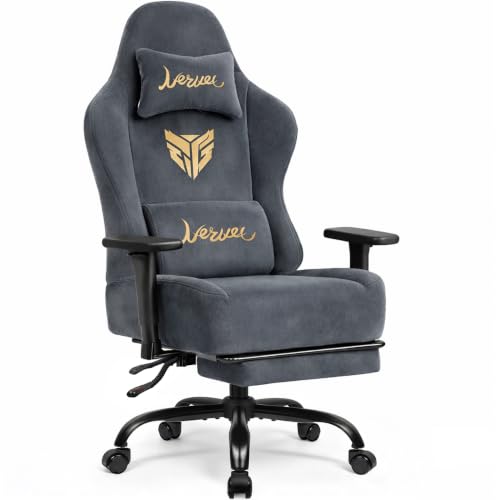
- Wide wingless seat has pocket springs and high-density foam.
- Armrests adjust in three directions, and the back reclines up to 140 degrees.
- Pull-out footrest, headrest, and lumbar pillow are included.
Best For: Gamers building a dedicated space for gaming and relaxing.
15. MATEIN 18-Inch Gaming Laptop Backpack
A Protective Bag for Gaming Gear
MATEIN 18-Inch Gaming Laptop Backpack

- Padded laptop compartment fits laptops up to 18.4 inches; confirm dimensions before gifting.
- Main compartment includes pockets for two controllers and a lanyard for a headset.
- Hard shell front shield and detachable rain cover help protect gear in transit.
Best For: Gamers who carry a large laptop and accessories to school, meetups, or travel.
How to Choose a Gift for a Gamer
Start with the way the recipient plays and the gear they already use. A PC player might appreciate a mouse, keyboard, monitor, microphone, or capture card. A console player may get more use from a controller, charging dock, or capture setup. For someone who streams or chats with friends, a webcam or microphone can make the social side of gaming easier. If you are unsure what they own, choose an item that adds convenience around the setup, such as a desk mat, light bar, or power strip.
Pay attention to the detail that makes a gift useful. A large mouse mat needs desk space. A monitor light bar is intended for large curved screens or wide flat displays, so check the screen shape and size. A chair or desk is a bigger commitment because it takes room and may require assembly. Smaller accessories are easier to fit into an existing setup and can still make everyday play more comfortable or organized.
Set a Budget That Fits the Upgrade
Affordable does not have to mean novelty. A practical accessory can improve a routine the gamer already has. Mouse mats, controller docks, webcams, and power strips are straightforward ways to add convenience. A microphone or hot-swappable keyboard is more personalized while remaining smaller than a full furniture or display purchase. For a larger gift, a monitor, standing desk, or gaming chair may be a more substantial upgrade; consider whether the recipient has asked for one and has room for it.
Think about the complete setup before choosing. A capture card may be most useful alongside a computer and streaming software. A microphone kit needs a suitable place to clamp its boom arm. A router connects to an existing modem or gateway, and home layout and internet service affect what it can do. If the person already has a preferred brand or model, check whether the proposed upgrade fills a gap rather than duplicating what they own.
Check Compatibility and Personalization
Compatibility is one of the most thoughtful checks you can make. Match a controller to the recipient’s console or devices: the GameSir supports Xbox, PC, and Android modes, while the NEWDERY dock is for PS5 and DualSense Edge controllers. The EMEET webcam is for compatible computers and listed video-call apps; its notes exclude game consoles, tablets, and Windows Hello. For the capture card, check the computer’s USB 3.0 port and the console or camera connections.
For workspace gifts, measure first. The LG monitor uses HDMI or DisplayPort, and the gamer’s computer needs a connection that supports the screen they want to use. Check the monitor’s available space and how a light bar would attach. For the MATEIN backpack, compare the laptop’s dimensions with its stated 18.4-inch compartment. A keyboard, mouse, or lighting accessory can also reflect personal taste: the Redragon includes two keycap sets and RGB modes, while the Quntis light bar offers selectable backlighting.
Timing and Last-Minute Decisions
For Christmas, order decisions should account for setup and fit, not only the calendar. Large furniture and displays need space, assembly, and time to connect; ask casually about desk dimensions or preferred equipment if needed. Smaller gifts are usually simpler to wrap and integrate, but still verify the recipient’s platform and ports. When choosing close to the holiday, a known-compatible accessory is a safer pick than a device whose usefulness depends on several unconfirmed details.
If timing is tight, prioritize gifts that work with gear they already have and have a clear role: a desk mat for mouse movement, a dock for controllers, or a webcam for calls. For technical upgrades, confirm requirements before buying and leave time for the recipient to set up any software or network changes. A useful gaming gift is one that fits the person’s actual play habits, their space, and the devices they own.