Choosing a gamer’s gift gets easier when you start with how they play and what their setup could use. This list covers desk comfort, controls, audio, lighting, and storage, with compatibility details to check before choosing.
Christmas Gifts for Gamers
1. KTC 24.5-Inch 240Hz FHD Gaming Monitor
A Faster-Feeling Display Upgrade
KTC 24.5-Inch 240Hz FHD Gaming Monitor
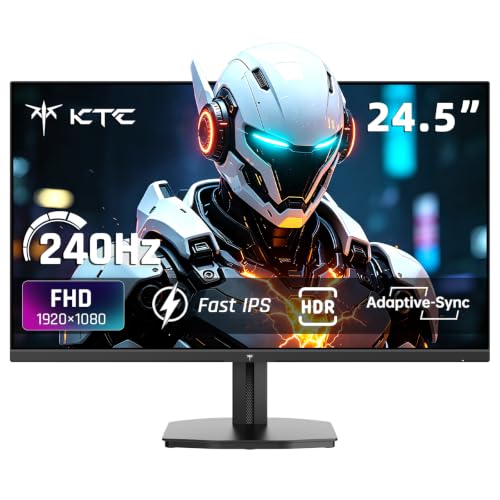
- 24.5-inch 1080p Fast IPS screen with a 240Hz refresh rate and 1ms response time.
- HDMI 2.0 and DisplayPort 1.4 connect compatible PCs, laptops, and consoles.
- Tilt adjustment and VESA support offer options for positioning the display.
Best For: A PC gamer looking to upgrade their display
2. NETGEAR Nighthawk WiFi 6 Router R6700AX
A Shared-Network Gift
NETGEAR Nighthawk WiFi 6 Router R6700AX

- WiFi 6 router rated for coverage up to 1,500 square feet and up to 20 devices.
- Four Gigabit Ethernet LAN ports support wired connections for a console or computer.
- Works with an existing modem or gateway; provider and setup compatibility may vary.
Best For: A gamer sharing home WiFi with multiple devices
3. EasySMX D10 Wireless Gaming Controller
A Customizable Controller
EasySMX D10 Wireless Gaming Controller

- Connects by 2.4G wireless, Bluetooth, or USB-C to supported PC, Switch, Android, and iOS devices.
- Two programmable back buttons and mechanical ABXY buttons and D-pad.
- Includes a charging dock; the listed compatibility excludes Xbox and PlayStation.
Best For: A PC or Switch player who prefers controller gaming
4. ComfiLife Adjustable Memory Foam Footrest
A Desk Comfort Upgrade
ComfiLife Adjustable Memory Foam Footrest

- Memory foam footrest with adjustable height for desk or gaming-chair setups.
- Removable cover is machine washable; the cushion can also be used as a rocker.
- Lightweight design makes it easy to move between workspaces.
Best For: A desk-based gamer who wants a cushioned place to rest their feet
5. Redragon K617 60% Hot-Swap RGB Keyboard
A Compact Control Center
Redragon K617 60% Hot-Swap RGB Keyboard

- Compact 61-key layout leaves more desk space for mouse movement.
- Wired PC keyboard with hot-swappable sockets for compatible 3-pin or 5-pin switches.
- Offers preset RGB lighting modes and software for lighting and macro customization.
Best For: A PC gamer who values desk space and keyboard customization
6. FIFINE AmpliGame A6V USB Gaming Microphone
A Clearer Chat Setup
FIFINE AmpliGame A6V USB Gaming Microphone

- USB desktop microphone listed for PS4, PS5, PC, and laptop use.
- Tap-to-mute button, gain knob, and RGB lighting make controls easy to reach.
- Includes a tripod stand, shock mount, pop filter, and detachable USB cable.
Best For: A gamer or streamer who joins voice chat or records audio
7. KANTUTOE RGB Monitor Light Bars
A Colorful Desk Accent
KANTUTOE RGB Monitor Light Bars

- Two USB-powered RGB light bars designed for a monitor or TV setup.
- Choose colors and modes with the included remote or a phone app.
- Music mode changes the lighting in response to sound.
Best For: A gamer who enjoys adding ambient color to their desk
8. Redragon GS550 Compact Desktop Speakers
A Headset-Free Audio Gift
Redragon GS550 Compact Desktop Speakers

- USB-powered 2.0 stereo speakers for PC, laptop, or TV setups.
- Use as separate speakers or combine them beneath a monitor.
- Volume knob includes an on/off switch; audio and microphone ports are included.
Best For: A gamer who wants desktop audio without wearing a headset
9. Philips 9418 Wireless Gaming Mouse
A Lightweight Mouse Upgrade
Philips 9418 Wireless Gaming Mouse

- 52-gram mouse with an optical sensor rated up to 12,000 DPI and five programmable buttons.
- Switch between 2.4GHz wireless, Bluetooth, and wired connections.
- Rechargeable battery charges by USB-C; listed for right-handed use.
Best For: A right-handed PC gamer who wants a lightweight mouse
10. Large Extended Gaming Mouse Pad
A More Unified Desktop
Large Extended Gaming Mouse Pad

- 31.5-by-15.7-inch mat provides space for a keyboard, mouse, and other desk items.
- Smooth tracking surface and nonslip natural rubber base.
- Waterproof coating and stitched edges are listed in the product details.
Best For: A PC gamer who wants to cover more of their desk
11. GTPLAYER Big and Tall Gaming Chair
A Roomier Gaming Seat
GTPLAYER Big and Tall Gaming Chair

- Designed for larger users, with a listed 400-pound weight capacity.
- Features spring lumbar support, a high back, and a seat cushion with a saddle shape.
- Backrest reclines from 90 to 135 degrees; includes a footrest and throw pillow.
Best For: A larger-framed gamer looking for a supportive desk chair
12. SSK Portable 500GB External SSD
Extra Space for a Game Library
SSK Portable 500GB External SSD

- Portable 500GB SSD with USB-C and USB-A cables included.
- Listed as compatible with Xbox Series X and PlayStation 5; check console requirements before gifting.
- External drive offers read speeds up to 1,050 MB/s and write speeds up to 1,000 MB/s.
Best For: A console gamer who needs more external storage
How to Choose for the Gamer
Start with the recipient’s platform and the part of their setup they use most. A PC player with limited desk space may appreciate a compact keyboard or extended mouse pad, while someone who plays from a console may get more use from a compatible controller or storage drive. For frequent voice chat, a USB microphone adds an accessible mute button and desktop controls. If you are unsure about their preferences, desk accessories such as a footrest, speakers, or monitor lights can be easier to match than a major piece of equipment.
Think about the problem the gift should solve. A mouse or keyboard is personal: hand preference, layout, switch feel, connection type, and game genre all matter. A display is an especially substantial change, so check that the recipient has room for it and that their computer or console can connect through its available ports. A router may help organize a shared network, but its benefit depends on the current modem, internet service, home layout, and WiFi needs.
Keep the Budget in View
For Christmas gift ideas for gamers under $50, smaller upgrades can be useful without replacing the core setup. A mouse pad, lighting, footrest, or compact speakers can refresh a desk. A controller, microphone, or external drive can address a more specific need. Product prices can change, so verify the current price before buying and consider whether any cables, mounts, or compatible devices are already available at home.
A low-cost accessory is a stronger gift when it fits an existing routine. For example, a desk mat makes sense for someone who uses a keyboard and mouse; light bars need a suitable place to mount and a USB power source. Read the included-contents and connection details, and avoid assuming an accessory includes equipment beyond what the listing names.
Check Compatibility and Personalization
Check the recipient’s system before choosing electronics. The EasySMX controller lists PC, Switch, Android, and iOS support, while excluding Xbox and PlayStation. The FIFINE microphone lists PS4, PS5, PC, and laptop compatibility. The Philips mouse lists multiple connection modes and operating systems, but its right-handed shape may not suit everyone. For the external SSD, confirm the console’s current storage rules and whether the player wants a drive for installed games, backups, or media.
Personalization does not need to mean guessing a favorite color. Consider desk size, available ports, existing accessories, and whether the recipient prefers wired or wireless gear. A monitor light bar set, RGB keyboard, or speakers bring a visible change; a footrest or SSD is more utility-focused. If you can, discreetly check the model of their console, computer, chair, or router before selecting a product that needs to fit or connect.
Timing and Last-Minute Decisions
For a last-minute choice, prioritize clear compatibility and simple setup. A mouse pad, footrest, or speakers have straightforward roles, while a router, monitor, and chair require more planning around the room and existing equipment. Check the product’s current shipping estimate and return terms at checkout; delivery dates depend on the seller and destination. If timing is tight, choose a gift the recipient can use with gear they already own, and include a note explaining why it suits their setup.
These Christmas gift ideas for gamers under $50 span practical comfort, play controls, chat, and desk personalization. Matching the gift to a real need—and checking the connection or fit details—makes a modest upgrade feel thoughtful.