Routers, switches, and network cabinets can build up significant heat during continuous operation. The right cooling fan helps improve airflow, reduce hot spots, and support more reliable equipment performance.
This roundup compares 10 commercial-grade router cooling fans, including rack-mounted kits, high-airflow AC fans, and adjustable multi-fan systems for different installation needs.
Best 10 Commercial-Grade Router Cooling Fans Picks for 2026
Best Rack Roof Kit
AC Infinity Dual-Fan Rack Roof Kit

- Two 120mm fans deliver 200 CFM
- PWM controller supports quiet speed adjustment
- Steel rack-ready frame with mounting hardware
Best For: Standard 19-inch network, AV, and home-theater racks
Best High-Pressure Fan

- Reaches 3000 RPM for demanding cooling
- 4-pin PWM control spans 750-3000 RPM
- Rugged, IP52-rated industrial construction
Best For: High-heat enclosures requiring strong static pressure
Best Adjustable Multi-Fan Pad
Four-Fan Adjustable Cooling Pad

- Four 120mm dual-ball-bearing fans
- AC variable-speed control for quiet or max cooling
- Filters, grilles, and non-slip feet included
Best For: Routers, modems, consoles, and desktop network equipment
Best AC Rack Muffin Fan

- 107 CFM airflow for rack ventilation
- 115V AC power with cord included
- Solid metal frame and installation hardware
Best For: Simple AC-powered server, AV, and network cabinets
Adjustable Cooling Station

- Four 120mm fans for broad equipment coverage
- Variable 3V–12V speed control
- AC-powered with dual-ball bearings
Best For: DIY router cabinets and larger electronics
High-Airflow Rack Cooler

- 82 CFM per fan at full speed
- Variable control with on/off capability
- Vertical or horizontal installation
Best For: Server racks, AV cabinets, and high-airflow setups
Compact EC Cooling Pair

- Two compact 90mm EC axial fans
- 54.8 CFM airflow per fan
- 24–230V rating and 67,000-hour bearings
Best For: Compact router cases and DIY equipment cooling
High-Airflow Pick
120mm Dual Cabinet Cooling Fans

- 166 CFM airflow with adjustable speed control
- Two 120mm fans with mounting hardware
- AC 100-240V plug-and-play operation
Best For: Server racks, NAS systems, network cabinets, and routers needing strong airflow
Humidity-Ready Pick
120mm AC Cooling Fan with Speed Control
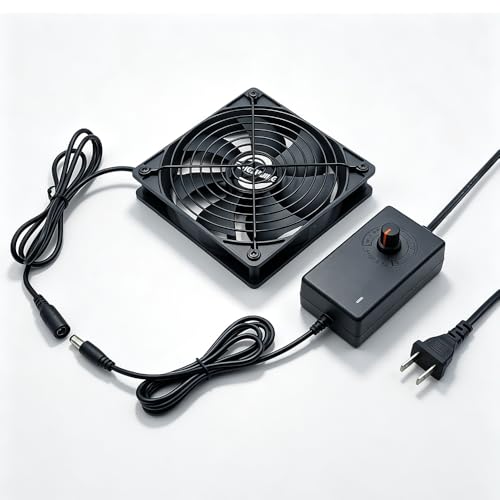
- Direct wall-outlet plug-and-play design
- IP54 moisture-proof motor
- Includes speed controller and metal guard
Best For: Router cabinets and electronics in humid or space-constrained locations
Long-Life Pick
120mm Variable-Speed AC Plug Fan

- Dual-ball bearings rated for 50,000 hours
- 700-2800 RPM adjustable speed range
- 95.8 CFM airflow in a standard 120mm frame
Best For: Routers, servers, DVRs, and equipment needing durable adjustable cooling
Best Rack Roof Kit – AC Infinity Dual-Fan Rack Roof Kit
For standard 19-inch racks, this commercial-grade router cooling fans kit adds roof-mounted ventilation with two 120mm fans and a 200 CFM combined airflow rating. Its PWM speed controller helps balance cooling and noise, while the steel frame suits rack, AV, home-theater, and network equipment installations.
Best For: Standard 19-inch network racks, AV cabinets, and installations that need adjustable, relatively quiet roof ventilation.
Pros:
- Dual 120mm fans provide 200 CFM of airflow.
- PWM speed control adjusts fan speed without generating controller noise.
- Heavy-duty steel construction, spiral guards, mounting hardware, and power adapter are included.
- Can link with compatible CLOUDPLATE rack fans to share programming.
Cons:
- Designed around standard 19-inch racks rather than general desktop placement.
- At 26 dBA, it is quiet but not silent.
This is a strong choice when you want a purpose-built rack ventilation kit rather than a loose replacement fan. Its dual-ball bearings, backup memory, and adjustable control add practical value for permanent equipment installations.
Best High-Pressure Fan – Noctua NF-F12 iPPC-3000 PWM
The Noctua NF-F12 iPPC-3000 PWM is a heavy-duty 120mm option for commercial-grade router cooling fans applications that demand high static pressure and sustained performance. Its 4-pin PWM control spans 750 to 3000 RPM, while the reinforced construction and IP52 protection support demanding environments.
Best For: High-heat equipment, dense enclosures, and installations where high static pressure and durable industrial construction matter more than minimum noise.
Pros:
- 3000 RPM maximum speed and focused-flow frame target demanding cooling jobs.
- Broad 750-3000 RPM range supports automatic PWM speed control.
- Fibre-glass reinforced polyamide construction is ruggedized for industrial use.
- IP52 water and dust protection and a rated MTTF over 150,000 hours add durability.
Cons:
- Maximum noise reaches 43.5 dB(A), making it louder than quieter rack-focused options.
- This is a single fan, so additional units or mounting hardware may be needed for a complete system.
Choose this model when airflow performance and industrial resilience are priorities. It is less suited to noise-sensitive rooms, but its PWM range lets you reduce speed when full output is unnecessary.
Best Adjustable Multi-Fan Pad – Four-Fan Adjustable Cooling Pad
This four-fan cooling pad offers a flexible approach to commercial-grade router cooling fans for routers, modems, network cabinets, consoles, and other heat-producing electronics. Four 120mm dual-ball-bearing fans sit in a protective base with an AC variable-speed controller, dust filters, and non-slip feet.
Best For: Desktop or shelf-mounted routers, modems, network cabinets, and mixed home-office equipment needing easy placement and adjustable airflow.
Pros:
- Four 120mm fans provide broad, concentrated cooling coverage.
- Variable-speed AC controller supports quiet operation or higher airflow as needed.
- Dual-sided dust filters and protective grilles help limit debris and accidental contact.
- Tool-free setup, rubber feet, and wide device compatibility simplify installation.
Cons:
- The plastic frame is less substantial than the steel construction of rack-specific systems.
- It is a place-under-or-under-device cooling base, not a dedicated rack-roof mounting kit.
- Its listed maximum speed is 2000 RPM, below the Noctua’s 3000 RPM maximum.
This pad is a practical choice when you need adaptable cooling without wiring a rack. The variable controller and filters make it especially convenient for equipment that changes workload or sits in a dusty home-office environment.
Best AC Rack Muffin Fan – StarTech 120mm Axial Rack Fan
The StarTech ACFANKIT12 is a straightforward AC-powered option among commercial-grade router cooling fans for server racks, cabinets, AV gear, and computer equipment. Its 120mm by 38mm metal-frame fan produces 107 CFM and connects directly to a 115V AC outlet with the included power cord.
Best For: Rack or cabinet users who want simple AC-powered ventilation with a metal frame and included installation hardware.
Pros:
- 107 CFM airflow helps reduce heat buildup in racks and cabinets.
- Standard 115V AC connection and included power cord simplify setup.
- Solid metal 120mm by 38mm frame is designed for rack, AV, and computer use.
- Operating range of -10°C to 70°C suits many equipment environments.
Cons:
- Its 45.7 dBA noise rating is relatively high for quiet-room installations.
- There is no listed variable-speed controller.
- Single-fan airflow may be insufficient for larger or densely populated racks.
This model favors uncomplicated installation and AC compatibility over advanced controls. It makes sense for adding direct ventilation to an existing rack or cabinet, particularly where the included screws, nuts, washers, and power cord are useful.
Adjustable Cooling Station – 4-Fan 120mm Router Cooler
This four-fan cooling station is a flexible option for anyone comparing commercial-grade router cooling fans for cabinets, gateways, modems, DVRs, and other electronics. Its AC-powered variable-speed controller lets you tune airflow from off to full output, while the 120mm fans provide broad coverage for larger equipment.
Best For: DIY cooling setups, router cabinets, gaming equipment, streaming boxes, and other electronics that need adjustable airflow.
Pros:
- Four 120mm fans provide wide-area cooling.
- Variable control from 3V to 12V supports fine airflow adjustment.
- AC 100–240V input supports direct outlet operation.
- Dual-ball bearings are rated for up to 65,000 hours.
Cons:
- The four-fan arrangement may require more installation space than a single fan.
- It is a DIY cooling solution rather than a purpose-built router enclosure.
Choose this model when you want strong coverage and hands-on control over noise and airflow. Its included metal grills and long-life bearings add practical durability for ongoing equipment cooling.
High-Airflow Rack Cooler – 4 x 120mm AC Fan System
For buyers seeking commercial-grade router cooling fans with high airflow, this four-fan AC system combines 82 CFM per fan at full speed with adjustable output. The vertical or horizontal design suits server racks, AV cabinets, mining rigs, and other equipment where ventilation and hot-air removal matter.
Best For: Server racks, router and AV cabinets, mining rigs, consoles, and larger DIY ventilation projects.
Pros:
- Four fans are rated at 82 CFM each at 12V.
- Variable speed control adjusts from 4V to 12V and can switch the fans off.
- Supports both vertical and horizontal placement.
- Dual metal protective grilles improve physical protection.
Cons:
- The full four-fan assembly measures about 9.45 by 4.72 by 1 inch.
- High-speed operation may be less suitable for noise-sensitive spaces despite the stated 32 dB rating.
This is the strongest fit for installations that prioritize airflow and flexible placement over compactness. The included Y cable also allows two fans to be positioned up to 16.5 inches apart.
Compact EC Cooling Pair – 90mm Dual-Bearing AC Fans
This two-pack offers a compact alternative for commercial-grade router cooling fans when installation space is limited. The 90mm EC axial fans support a broad 24–230V rating, deliver 54.8 CFM each, and include protective grilles and mounting hardware for straightforward DIY installation.
Best For: Compact router cases, computer cases, servers, power supplies, and equipment needing a smaller AC fan solution.
Pros:
- Two 90mm fans fit tighter spaces than larger 120mm systems.
- 24–230V rating supports a wide range of AC applications.
- Each fan provides 54.8 CFM of stated airflow.
- Dual-ball bearings are rated for up to 67,000 hours.
Cons:
- No variable-speed controller is listed in the supplied specifications.
- The 90mm format provides less coverage per fan than a 120mm model.
- Installation may require checking the supplied fan and grille dimensions against the equipment.
Pick this pair when compact dimensions, broad voltage compatibility, and long bearing life are more important than integrated speed adjustment. The included screws, nuts, and grilles make it practical for custom cooling projects.
High-Airflow Pick – 120mm Dual Cabinet Cooling Fans
For demanding setups, these commercial-grade router cooling fans combine a 166 CFM airflow rating with adjustable speed control. The dual 120mm fan kit is designed for server racks, cabinets, NAS systems, and routers, while its plug-and-play AC design simplifies installation.
Best For: Server racks, network cabinets, NAS systems, and routers that need strong, adjustable airflow.
Pros:
- High 166 CFM airflow for rapid heat dissipation
- Variable speed controller for customized cooling
- Two 120mm fans with mounting hardware and anti-vibration feet
- Wide AC 100-240V compatibility and a 7.7-foot power cord
Cons:
- Reported noise is approximately 35-36.63 dBA, so it is not completely silent
- The 120mm size may not fit compact enclosures
This is the strongest airflow-oriented option in the group and a practical choice when a router or cabinet needs more than basic ventilation. Its two-fan configuration and included hardware also suit larger cooling upgrades.
Humidity-Ready Pick – 120mm AC Cooling Fan with Speed Control
This 120mm fan is a flexible option for commercial-grade router cooling fans when direct wall-outlet power and moisture resistance matter. It includes an adjustable controller, protective metal guard, and a 5-foot cord for straightforward installation around router cabinets, AV equipment, and other electronics.
Best For: Router cabinets, AV receivers, PC enclosures, and installations in humid environments.
Pros:
- Plugs directly into standard 110-240V outlets without an adapter
- Built-in speed controller allows airflow adjustment
- IP54 moisture-proof motor for humid environments
- Includes a metal finger guard and 5-foot power cord
Cons:
- One-fan kit provides less total airflow than a dual-fan setup
- Reported noise level is 44 dB
- Its listed airflow is lower than the 166 CFM rating of the dual-fan alternative
Choose this model for simple wall-powered ventilation or locations where humidity is a concern. Its compact 25mm thickness and flexible mounting options make it useful when installation space is limited.
Long-Life Pick – 120mm Variable-Speed AC Plug Fan
For buyers comparing commercial-grade router cooling fans with a focus on service life and speed flexibility, this 120mm axial fan offers dual-ball bearings rated for up to 50,000 hours. Its controller supports speeds from 700 to 2800 RPM, allowing you to balance cooling performance and noise for routers, servers, DVRs, and other equipment.
Best For: Router, server, DVR, and entertainment-equipment cooling where adjustable operation and long bearing life are priorities.
Pros:
- Dual-ball bearings rated for a 50,000-hour lifespan
- Variable speed range from 700 to 2800 RPM
- 95.8 CFM airflow in a standard 120mm x 120mm x 25mm frame
- AC plug enables direct outlet operation
Cons:
- Single-fan design offers less coverage than a multi-fan kit
- Noise is listed at less than 41 dB, rather than silent operation
- The included controller uses a 3V to 12V multi-speed range, which may require careful adjustment
This model is a balanced choice for equipment owners who want a durable fan with adjustable output. Its standard dimensions and broad device compatibility make it a useful replacement or supplemental cooler for router and server setups.
How We Picked These Commercial-Grade Router Cooling Fans
We focused on fans suited to continuous equipment cooling rather than ordinary desktop case fans. Key considerations included airflow potential, power compatibility, speed control, installation flexibility, noise characteristics, and suitability for rack cabinets, enclosures, network closets, and DIY cooling projects.
The selection includes purpose-built rack fans, industrial 120mm models, multi-fan cooling pads, and AC-powered axial fans. Because specifications and seller listings can vary, confirm the exact voltage, airflow rating, dimensions, connector, and included controller before ordering.
Quick Comparison
| Fan type | Best suited for | Main advantage |
|---|---|---|
| Rack roof or cabinet kit | Network racks and enclosed cabinets | Purpose-built installation |
| Industrial 120mm fan | High-duty cooling and replacements | Strong airflow and rugged construction |
| Multi-fan AC cooling pad | DIY shelves, consoles, and equipment bays | Broad airflow coverage |
| Variable-speed AC fan | Flexible home or commercial setups | Adjustable cooling and noise |
Key Buying Factors for Commercial-Grade Router Cooling Fans
Airflow and Static Pressure
Higher CFM can move more air, but it does not guarantee effective cooling in a restricted cabinet. For racks, filters, vents, and dense equipment, consider a fan with useful static pressure as well as a strong airflow rating. Plan the airflow direction so hot air exits rather than recirculates.
Voltage and Power Connection
Many options in this roundup use an AC plug and may support 110V, 115V, 120V, or a wide 100–240V range. Match the fan to your local mains voltage and verify whether the plug, controller, and wiring are appropriate for your installation. Do not assume an AC fan can connect directly to a router or network switch.
Noise, Control, and Duty Cycle
Speed controllers allow you to balance cooling against noise, which matters in offices and home network closets. For unattended or always-on equipment, prioritize dependable bearings, a suitable duty cycle, and a controller that can run continuously without overheating.
Fit and Installation
Check the fan size, mounting pattern, cabinet depth, grille clearance, and available ventilation openings. Dual- and four-fan systems can cool a larger area, but they also require more mounting space and may draw more power.
Who Should Buy Which Commercial-Grade Router Cooling Fans?
- For rack cabinets: Choose a rack roof kit or 120mm rack fan designed for cabinet installation.
- For maximum airflow: Consider an industrial or high-CFM model, provided your enclosure can handle the noise and power requirements.
- For adjustable cooling: Select a fan with a variable-speed controller for changing loads and quieter operation.
- For DIY equipment bays: Multi-fan AC cooling pads offer broad coverage for consoles, routers, shelves, and electronics cabinets.
- For mixed-voltage environments: A wide-input AC model can simplify deployment, but always verify its certifications and installation requirements.
Finally, keep vents and filters clear, leave room around the router’s own exhaust, and monitor temperatures after installation. A fan that is correctly sized and positioned is generally more useful than one selected solely for its maximum CFM rating.