If you’re looking to enhance your storage capabilities in 2025, multi-bay RAID systems are worth considering. These advanced enclosures offer various configurations that can notably improve data security and performance. With features like tool-less installation and high-speed connectivity, they cater to both personal and enterprise needs. Ready to discover which systems stand out in the crowded market? Let’s explore the top options that can help you maximize your storage potential.
Syba 8 Bay Tool Less Tray USB 3.0 Enclosure (SY-ENC50119)

If you’re looking for a straightforward storage solution without the complexities of RAID, the Syba 8 Bay Tool Less Tray USB 3.0 Enclosure (SY-ENC50119) is an excellent choice for you. This enclosure supports both 2.5-inch and 3.5-inch SATA drives, accommodating up to 24TB per drive. With a Super Speed USB 3.0 connection, you’ll enjoy fast transfer rates of 5Gbps. The tool-less design makes installing and removing drives a breeze, while the hot-swappable feature allows you to replace drives without shutting down. Plus, you can manage power for each drive independently, ensuring efficiency and convenience.
Best For: Users seeking a reliable and easy-to-use external storage solution without RAID complexities.
Pros:
- Tool-less tray design allows for quick and easy installation and removal of drives.
- Hot-swappable capability enables seamless drive replacement without shutting down the system.
- Independent power management for each drive provides flexibility and energy efficiency.
Cons:
- No RAID or NAS support limits options for data redundancy and network sharing.
- Maximum drive size of 24TB per drive may not meet the needs of users requiring larger storage capacities.
- Cooling system noise may be noticeable in quieter environments, despite the quiet fan design.
4 Bay Hard Drive RAID Enclosure with Cooling Fan

The 4 Bay Hard Drive RAID Enclosure with Cooling Fan is an excellent choice for users seeking robust storage solutions without the complexity of a network-attached storage (NAS) system. It supports both 2.5 and 3.5-inch HDDs and SSDs, offering up to 80TB of capacity. With eight RAID modes and a data transfer rate of up to 5Gbps, you’ll enjoy flexibility and speed. The built-in aluminum-alloy structure and cooling fans help maintain performance, though they can be noisy. Tool-less installation simplifies setup, but RAID mode switching requires caution to prevent data loss. It’s perfect for substantial storage needs without network reliance.
Best For: Users needing substantial storage capacity without the complexity of a network-attached storage (NAS) system.
Pros:
- Tool-less installation for quick and easy setup.
- Supports multiple RAID configurations for flexible data management.
- High data transfer rate of up to 5Gbps enhances overall performance.
Cons:
- RAID mode switching can lead to data loss if not managed carefully.
- Cooling fans produce noise levels of 40-50 decibels, which may not be suitable for quiet environments.
- Initial setup instructions may be vague, requiring patience for proper configuration.
TERRAMASTER D2-320 2Bay USB 3.2 Gen 2 RAID Storage

For those seeking a reliable and high-speed storage solution, the TERRAMASTER D2-320 2-Bay USB 3.2 Gen 2 RAID Storage stands out with its impressive data transfer rates of up to 10Gbps. You can choose between RAID 0, RAID 1, JBOD, or SINGLE modes, accommodating up to 44TB with 3.5″ and 2.5″ SATA drives. The tool-free tray design makes installation a breeze, while the intelligent fan guarantees peak cooling. Users rave about its performance for video editing and backups, and customer support is responsive. Overall, it’s a solid choice for efficient, affordable storage without the NAS complexity.
Best For: Users seeking a reliable, high-speed storage solution for video/audio editing, backup storage, or NAS setups without the complexity of traditional systems.
Pros:
- Easy tool-free installation with a push-lock design for secure hard drive placement.
- High data transfer rates of up to 10Gbps, ideal for demanding applications.
- Responsive customer support and positive user feedback on performance and reliability.
Cons:
- Some users reported initial USB connection issues that may require troubleshooting.
- Mixed reviews on packaging consistency, with reports of missing protective sleeves.
- Limited to 44TB maximum storage capacity, which may not meet all users’ needs.
Mediasonic Raid 4 Bay SATA Hard Drive Enclosure (HFR7-SU31CH)
Designed for users seeking efficient data management, the Mediasonic Raid 4 Bay SATA Hard Drive Enclosure (HFR7-SU31CH) stands out with its built-in hardware RAID controller and one-button control. You can connect up to three 3.5” SATA HDDs with a total capacity of 30TB per drive, or utilize 2.5” SATA SSDs with an additional bracket. With USB 3.2 Gen 2 connectivity, you’ll enjoy transfer speeds up to 10Gbps. The tool-free installation and power management features enhance usability. While most users praise its performance, be mindful of potential drive recognition issues with faulty drives. Overall, it’s a solid investment for additional storage.
Best For: Users needing additional storage solutions for high-capacity backups and media workflows, especially for older SATA drives.
Pros:
- Excellent transfer speeds of up to 10Gbps via USB 3.2 Gen 2.
- Tool-free installation simplifies the setup process for drives.
- Low power consumption and quiet operation during idle.
Cons:
- Some users report drive recognition issues, particularly with faulty drives.
- Does not support hardware RAID; software RAID is only possible on compatible systems.
- Long-term reliability concerns have been noted by some users after extended use.
ORICO RAID 5 Bay HDD Enclosure (9858RU3)

Capable of supporting up to 110TB of storage with 3.5-inch SATA disks, the ORICO RAID 5 Bay HDD Enclosure (9858RU3) is a perfect choice for content creators and professionals managing large-scale projects. This enclosure features eight RAID configurations, including RAID 5, ensuring your data is secure and accessible. With USB 3.0, you’ll enjoy data transfer rates up to 235MB/s, making file transfers quick. Built from durable aluminum, it includes an efficient cooling system to maintain peak performance. While setup is straightforward, keep in mind the importance of backing up data before switching RAID modes for added security.
Best For: Content creators and professionals managing large-scale projects requiring secure and high-capacity data storage.
Pros:
- Supports up to 110TB of storage, accommodating multiple high-performance drives.
- Eight RAID configurations available, offering flexibility for data security and management.
- Durable aluminum construction with an efficient cooling system for optimal performance.
Cons:
- Some users reported temporary disconnections and data visibility issues.
- Cages may feel flimsy, leading to concerns about long-term durability.
- RAID configuration setup, particularly for RAID 5, can be time-consuming.
ORICO 4 Bay RAID Hard Drive Enclosure (9848RU3)

The ORICO 4 Bay RAID Hard Drive Enclosure (9848RU3) is an excellent choice for users seeking a versatile and user-friendly storage solution. With a maximum capacity of 88TB and support for multiple RAID modes, it offers robust data protection and flexibility. Its aluminum alloy build guarantees durability, while the trayless design makes drive swapping a breeze. You’ll appreciate the 5Gbps data transfer rate for efficient backups, though some have noted concerns about fan noise and power management. Overall, it’s a solid option for desktop and laptop users looking to enhance their storage capabilities.
Best For: Users seeking a reliable and expandable RAID storage solution for desktop and laptop systems.
Pros:
- Supports multiple RAID modes for enhanced data protection and security.
- Durable aluminum alloy construction and trayless design for easy drive swapping.
- Impressive data transfer rate of 5Gbps for efficient file backups.
Cons:
- Fan noise can be a drawback and lacks speed control.
- Auto sleep function may affect drive lifespan and requires hard resets for power management issues.
- Limited to 3.5 HDDs and may have connectivity bottlenecks with RAID 0 due to USB 3.0.
TERRAMASTER F2-425 2-Bay NAS Storage

If you’re looking for a compact and efficient NAS solution, the TERRAMASTER F2-425 2-Bay NAS Storage stands out with its user-friendly tool-free design, allowing you to install hard drives in just 10 seconds. Powered by an Intel x86 Quad-Core CPU and 4GB of RAM (upgradeable), it supports up to 60TB of storage. Enjoy seamless 4K transcoding and compatibility with Plex and Emby for multimedia streaming. With over 50 user accounts and SPC security features, your data’s safe. Plus, the quiet operation makes it perfect for any environment. Overall, it’s a solid choice for basic NAS needs.
Best For: Those seeking a user-friendly and compact NAS solution for basic multimedia streaming and data management.
Pros:
- Tool-free design allows for effortless HDD installation in just 10 seconds.
- Supports 4K transcoding and compatibility with popular media apps like Plex and Emby.
- Quiet operation at 19dB(A) makes it ideal for quiet environments.
Cons:
- Outdated CPU performance may limit capabilities for more demanding tasks.
- Some users reported issues with defective drives during setup.
- RAM upgrade is recommended for improved performance in multitasking scenarios.
8 Bay Hard Drive RAID Enclosure with Cooling Fan

For those who need robust data storage solutions, the CENMATE 8 Bay Hard Drive RAID Enclosure with Cooling Fan stands out due to its impressive capacity of up to 160TB, supporting both 2.5 and 3.5-inch SATA HDDs and SSDs. With eight RAID modes, including RAID 5 and RAID 0, you can customize your setup for redundancy or speed. The built-in cooling fans guarantee peak performance, keeping noise at a manageable level. Installation is straightforward, and it’s compatible with Windows and Ubuntu. Just remember to back up your data when switching RAID modes to avoid potential loss.
Best For: Those seeking a high-capacity and versatile RAID storage solution for personal or enterprise data management.
Pros:
- Supports up to 160TB of storage with multiple RAID configurations for flexibility.
- Tool-less installation for 3.5-inch drives makes setup quick and easy.
- Built-in cooling fans operate quietly, ensuring efficient performance without excessive noise.
Cons:
- Some users report issues with RAID recognition and configuration, requiring firmware updates.
- Not compatible with WD 20TB drives, limiting options for high-capacity drives.
- Switching RAID modes can lead to data loss if proper backups are not maintained.
Syba 4 Bay SATA III HDD Non-RAID Enclosure
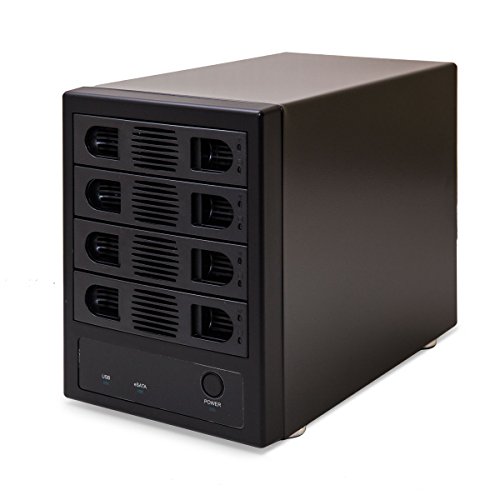
Looking for a reliable storage solution that accommodates multiple drives without RAID complexity? The Syba 4 Bay SATA III HDD Non-RAID Enclosure is a great choice. It supports up to four HDDs, each with a capacity of 24TB, and connects via dual eSATA or USB 3.0 for fast transfer speeds. Its tool-less design makes installation a breeze, and the adjustable cooling fan guarantees drives stay cool. Plus, you can manage power individually for each drive. Though some users note minor software issues on Mac, overall, this enclosure offers excellent performance and build quality, making it a solid investment for your storage needs.
Best For: Users seeking a dependable storage solution for multiple hard drives without the complexity of RAID setups.
Pros:
- Tool-less design allows for easy installation of up to four HDDs.
- Adjustable cooling fan ensures optimal temperature management for drives.
- Dual eSATA and USB 3.0 connections provide fast data transfer speeds.
Cons:
- Some users report software compatibility issues on Mac systems.
- The USB cable length is considered short, necessitating the purchase of longer cables.
- Durability concerns regarding plastic tabs used in drive trays.
MAIWO USB-C 4 Bay HDD RAID Enclosure

The MAIWO USB-C 4 Bay HDD RAID Enclosure stands out as an excellent choice for users seeking robust data storage solutions, especially those who require extensive storage capacity. Supporting both 2.5 and 3.5 SATA drives, you can manage up to 96TB. With seven RAID modes, it offers flexibility for your storage needs. The USB A/C 3.1 interface delivers data transfer speeds up to 5Gbps. A dual fan cooling system guarantees efficient heat dissipation, enhancing stability. While it has some installation challenges and compatibility concerns, many users appreciate its plug-and-play functionality for data management and backup tasks.
Best For: Users seeking a high-capacity, flexible RAID storage solution for data management and backup.
Pros:
- Supports a wide range of storage capacity up to 96TB with multiple RAID configurations.
- Fast data transfer speeds of up to 5Gbps via USB A/C 3.1 interface.
- Dual fan cooling system ensures stable operation and prolongs the lifespan of drives.
Cons:
- Installation can be fiddly due to the use of multiple screws, particularly for 3.5 drives.
- Older design may lead to limitations in transfer speeds due to the JMicron JMB393 controller.
- Beeping errors may indicate potential drive issues or power failures, causing concern for users.
Factors to Consider When Choosing Multi Bay RAID Systems for PC
When choosing a multi-bay RAID system for your PC, you’ll want to contemplate several key factors. Think about your storage capacity needs, the RAID modes available, and the types of connectivity that fit your setup. Also, pay attention to the cooling system’s efficiency and how easy it is to install the system.
Storage Capacity Requirements
How do you determine the right storage capacity for your multi-bay RAID system? Start by considering the maximum storage capacity per drive, which typically ranges from 24TB to 30TB for 3.5-inch drives. Evaluate the total combined capacity; some systems can support 160TB or more with multiple high-capacity drives. Reflect on your specific needs: for instance, a setup with four 20TB drives offers up to 80TB in a RAID 0 configuration. Additionally, think about the RAID modes the system supports, as they affect redundancy and available storage. Finally, verify compatibility with your existing drives, since some systems may not accept certain brands or sizes, limiting your expansion options.
RAID Mode Options
Choosing the right RAID mode for your multi-bay RAID system can greatly impact both performance and data security. For speed, you might consider RAID 0, which uses striping but offers no redundancy. If data protection is your priority, RAID 1 mirrors data across multiple drives. RAID 5 strikes a balance, using parity for fault tolerance while maintaining decent performance. For peak speed and redundancy, RAID 10 combines the benefits of RAID 0 and RAID 1. Advanced configurations like RAID 50 enhance performance and fault tolerance by combining multiple RAID 5 arrays. Remember, switching between modes often requires a data backup, so plan carefully to avoid potential data loss. Choose wisely based on your specific needs!
Connectivity Types Available
As you explore multi-bay RAID systems for your PC, the connectivity types available can greatly influence your data transfer speeds and overall compatibility with your devices. Look for options like USB 3.0, USB 3.1 (Type-C), eSATA, and USB 3.2. USB 3.0 offers speeds up to 5Gbps, but if you need faster performance, USB 3.2 can reach 10Gbps. eSATA connections provide direct access to SATA drives, which can be especially advantageous for large data transfers. Additionally, some systems support daisy chaining, allowing you to connect multiple devices through one port, enhancing your workflow. Don’t forget to verify compatibility with your operating system—Windows, macOS, or Linux—to achieve seamless integration with your existing setup.
Cooling System Efficiency
An efficient cooling system plays an essential role in the performance and longevity of multi-bay RAID systems for your PC. High temperatures can lead to drive failures and data loss, so it’s vital to choose a system with robust cooling solutions. Look for models with smart fan functions and thermal sensors that automatically adjust fan speed based on internal temperatures. This feature helps in effective heat dissipation while keeping noise levels down. Enclosures made from aluminum alloy can further enhance heat dissipation, reducing the need for active cooling. If you expect heavy workloads, prioritize systems with multiple fans or high airflow designs, but be mindful of noise levels, especially if you’re in a noise-sensitive environment.
Installation Ease
A well-designed multi-bay RAID system not only keeps your drives cool but also simplifies installation and management. Look for enclosures with tool-less drive installation features; these let you set up quickly without screws or extra tools. Hot-swappable capabilities are another plus, allowing you to replace or add drives without powering down your system. Evaluate the setup instructions—clear, detailed guides make the process smoother, while vague documentation can lead to frustration. Choose designs that provide easy access to drives, so you can manage or swap them out effortlessly. Finally, check user experiences regarding initial setup and configuration; some systems may require patience or technical know-how to navigate RAID settings effectively. Prioritize ease to enhance your storage experience.
Performance Speed Metrics
When selecting a multi-bay RAID system, understanding performance speed metrics is crucial for maximizing your storage capabilities. Look for data transfer rates; USB 3.0 supports speeds up to 5Gbps, while USB 3.2 can reach 10Gbps. RAID configurations like RAID 0 can enhance speed by striping data across multiple drives, achieving impressive speeds of 521MB/s under ideal conditions. Utilizing UASP (USB Attached SCSI Protocol) can further improve performance by allowing simultaneous command processing. Don’t forget that the type of drives matters—SSDs offer faster read/write speeds than HDDs, especially in RAID 0 setups. Finally, verify effective cooling and monitor drive health, as these factors can greatly impact your system’s performance during heavy data transfers.
Compatibility With Operating Systems
Choosing a multi-bay RAID system that works seamlessly with your operating system is essential for a smooth user experience. First, confirm compatibility; many enclosures support Windows, macOS, and Linux, but this varies by model. Check if specific drivers are needed for your OS, as this can impact setup and functionality. Look for plug-and-play options that allow easy integration without extra software. Additionally, consider the supported RAID modes—some may have limitations based on your operating system. Finally, verify that the enclosure supports your OS’s file systems, like NTFS for Windows or HFS+ for macOS, to confirm proper data access and management. This attention to compatibility will maximize your RAID system’s effectiveness.
Build Quality and Durability
Since build quality plays an important role in the performance and longevity of multi-bay RAID systems, you’ll want to prioritize materials and design features. Look for enclosures made from aluminum, as they offer better durability and heat dissipation compared to plastic options. Tool-less drive installation can also enhance your experience, making maintenance and upgrades a breeze. Don’t overlook cooling features; dedicated fans and smart airflow designs are crucial for preventing overheating, which can extend the lifespan of your drives. Pay attention to weight and dimensions—heavier models often indicate more robust materials. Finally, read user feedback; complaints about drive recognition or disconnections may reveal potential weaknesses in less durable systems. Choose wisely to guarantee long-term reliability.