If you’re in the market for reliable USB-C RAID storage solutions for your PC, you’ve got plenty of options that promise speed and durability. Whether you’re a creative professional or just someone who values data security, selecting the right model can make all the difference. From versatile enclosures with multiple RAID configurations to those designed for high-speed transfers, each choice has unique benefits. But which ones truly stand out in performance and design? Let’s explore the top contenders.
TERRAMASTER D2-320 2Bay USB 3.2 Gen 2 RAID Storage

If you’re a creative professional or a tech-savvy user in need of reliable and high-speed storage, the TERRAMASTER D2-320 2-Bay USB 3.2 Gen 2 RAID Storage is an excellent choice. With data transfer rates up to 10Gbps, it supports various RAID modes like RAID 0 and RAID 1, guaranteeing flexibility and security. You can achieve impressive read/write speeds, especially with SSDs. Its tool-free design makes drive installation a breeze, while the intelligent fan guarantees peak cooling. Weighing just 4.5 pounds, it’s both portable and efficient, making it perfect for video editing, backups, or simple storage needs.
Best For: Creative professionals and tech-savvy users seeking reliable, high-speed storage solutions for video editing, backups, or general storage needs.
Pros:
- High data transfer rates of up to 10Gbps, enabling rapid file access and transfer.
- Tool-free design allows for easy installation and removal of hard drives without additional tools.
- Multiple RAID modes provide flexibility for data security and performance based on user needs.
Cons:
- Some users reported initial USB connection issues, which may affect reliability.
- Packaging inconsistencies noted, with occasional missing protective sleeves for drives.
- Limited to 2-bay configuration, which may not meet the needs of users requiring larger storage solutions.
TERRAMASTER D4-320 External Hard Drive Enclosure (4-Bay USB 3.2 Gen2)

The TERRAMASTER D4-320 External Hard Drive Enclosure is an excellent choice for professionals and enthusiasts who need robust storage solutions. With four bays and USB 3.2 Gen2 support, it delivers impressive speeds up to 10Gbps, allowing for rapid data transfer. You can easily use HDDs or SSDs with a total capacity of up to 120TB. The tool-free design simplifies drive installation, while hot-swappable capabilities let you replace disks without downtime. Plus, its intelligent fan keeps things cool and quiet. Although some users reported power supply issues under peak loads, the overall performance and usability remain highly praised.
Best For: Professionals and enthusiasts seeking a high-capacity, fast, and flexible external storage solution.
Pros:
- High-speed performance with USB 3.2 Gen2, achieving data transfer rates up to 10Gbps.
- Tool-free design allows for easy installation and removal of drives, enhancing user convenience.
- Hot-swappable capability enables drive replacement without shutting down the enclosure, minimizing downtime.
Cons:
- Some users have reported power supply issues during peak loads, impacting performance.
- Durability concerns exist, with a few reports of unit failure among users.
- The peak power draw can reach nearly 150W, requiring a suitable power supply for optimal operation.
Mediasonic 4 Bay SATA Hard Drive Enclosure (HFR7-SU31CH)
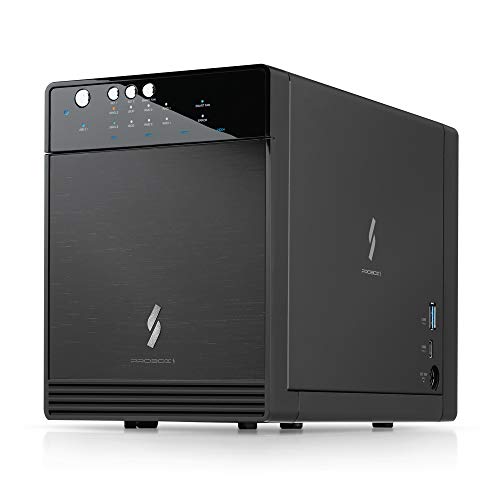
For users seeking a reliable and versatile storage solution, the Mediasonic 4 Bay SATA Hard Drive Enclosure (HFR7-SU31CH) stands out with its impressive support for up to 30TB per 3.5” SATA HDD. You’ll enjoy fast transfer rates of up to 10Gbps via USB 3.2 Gen 2, making data transfers quick and efficient. Its tool-free installation simplifies setup, while the built-in USB hub offers extra connectivity options. Though some users reported issues with drive recognition, its performance and low power consumption are generally praised. It’s an excellent choice for media workflows and extensive backups, offering good value for the price.
Best For: Users needing additional storage options for extensive backups and media workflows, especially those using older SATA drives.
Pros:
- Supports up to 30TB per 3.5” SATA HDD with fast transfer rates of up to 10Gbps via USB 3.2 Gen 2.
- Tool-free installation for easy setup and built-in USB hub for extra connectivity.
- Low power consumption and quiet operation during idle.
Cons:
- Some users have reported issues with drive recognition, particularly with faulty drives.
- Does not support hardware RAID; only software RAID is possible on compatible systems.
- Long-term reliability varies, with mixed user experiences regarding durability after extended use.
4 Bay Hard Drive Enclosure with Cooling Fan for SATA HDD/SSD

Whether you’re a professional content creator or a data enthusiast, the 4 Bay Hard Drive Enclosure with Cooling Fan offers an excellent solution for managing large storage needs. Supporting up to 80TB across four 2.5/3.5 inch SATA drives, it makes installation a breeze with its tool-free, hot-swappable design. Enjoy lightning-fast data transfers at 5Gbps, transferring a 1GB movie in just 3-5 seconds. The aluminum-alloy build guarantees durability, while the cooling fan helps prevent overheating during use. Although the fan operates at 40-50 decibels, many users find it acceptable. With plug-and-play functionality, setting it up is quick and easy!
Best For: Professionals and data enthusiasts looking for a reliable solution to manage large storage needs with easy installation and fast data transfer.
Pros:
- Tool-free installation allows for quick setup and easy drive swaps without the need for additional tools.
- High data transfer rate of up to 5Gbps enables rapid file transfers, making it efficient for large files.
- Durable aluminum-alloy construction combined with an effective cooling fan helps maintain performance and prevent overheating.
Cons:
- Fan noise levels of approximately 40-50 decibels may be disruptive in noise-sensitive environments.
- No RAID or NAS support, which may limit some users looking for advanced storage configurations.
- Weight of 1.37 kg (3.01 lbs) may make it less portable compared to lighter alternatives.
OWC 16TB Mercury Elite Pro Dual USB-C/Thunderbolt 3 External Raid Storage Enclosure

Designed for content creators and professionals who demand high-speed data access, the OWC 16TB Mercury Elite Pro Dual USB-C/Thunderbolt 3 External RAID Storage Enclosure stands out with its impressive capacity and swift performance. With speeds up to 1026MB/s and versatile RAID options, you can easily customize your storage for any project. The enclosure supports two 2.5-inch or 3.5-inch drives and features a whisper-quiet cooling fan, keeping your workspace serene. Although users report some fan noise, adding thermal pads can help. Overall, this reliable solution is perfect for enhancing your workflow in production studios or home offices.
Best For: Content creators and professionals seeking high-speed data access and customizable storage solutions.
Pros:
- Fast performance with speeds up to 1026MB/s, enhancing productivity.
- Versatile RAID options (RAID 0, 1, Span, JBOD) for tailored storage configurations.
- Easy installation of drives and quiet operation with a cooling fan.
Cons:
- Some users report loud fan noise during operation.
- There can be a delay when drives spin up, affecting initial access times.
- Power management issues noted by some Mac users.
Dual Bay Raid SSD Enclosure with Clone Mode & 20Gbps Compatibility

The Dual Bay RAID SSD Enclosure stands out for those who need a versatile storage solution that combines speed and data protection. Supporting M.2 2280 SSDs, it offers RAID 0 for speed, RAID 1 for redundancy, and a convenient Clone mode for easy disk duplication. With tool-free installation, you can switch SSDs effortlessly. Its durable aluminum casing guarantees heat dissipation while maintaining portability. Enjoy data transfer speeds up to 20Gbps, though actual performance may vary. While users appreciate its compact design, some report confusion during setup and potential heat management issues. Overall, it’s a solid choice for reliable storage.
Best For: Those seeking a versatile and high-speed storage solution with options for data redundancy and easy disk duplication.
Pros:
- Tool-free installation allows for quick and easy SSD switching.
- Supports multiple RAID configurations, including RAID 0 for speed and RAID 1 for data protection.
- Durable aluminum casing enhances portability and aids in heat dissipation.
Cons:
- Some users experience confusion during setup, especially with thermal tape application.
- Reports of performance speeds falling short of the advertised 20Gbps under certain conditions.
- Potential heat management issues due to lack of airflow, which could affect performance.
Aluminum Dual Bay Hard Drive Enclosure with Cooling Fan for SATA HDD/SSD

For those seeking efficient and expandable storage solutions, the Aluminum Dual Bay Hard Drive Enclosure with Cooling Fan stands out as a perfect choice. This enclosure supports both 2.5” and 3.5” SATA HDDs/SSDs, allowing up to 20TB per drive and a total of 120TB when daisy-chained. With USB A/C 3.0, you’ll experience data transfer speeds up to 5Gbps, making file transfers quick and seamless. Its aluminum build and integrated cooling fan maintain ideal temperatures during extended use, while the tool-free installation simplifies drive swaps. Enjoy reliable performance with minimal fan noise, making it a smart addition to your setup.
Best For: Users looking for a reliable and expandable storage solution with high data transfer rates and easy installation.
Pros:
- Tool-free installation allows for quick and easy drive swaps without the need for additional tools.
- High data transfer speeds of up to 5Gbps enable efficient file transfers, reducing wait times.
- Effective cooling system with a built-in fan helps maintain optimal temperatures for extended use.
Cons:
- Fan noise may be noticeable to some users, although many find it acceptable.
- Installation issues can arise if drives are not properly seated in their trays, leading to functionality problems.
- Limited compatibility with older operating systems, requiring Windows 7 or above, Mac 9.1 or above, and Linux.
OWC 12TB Mercury Elite Pro Dual USB-C/Thunderbolt 3 External Raid Storage Enclosure
Looking for a reliable storage solution that meets the demands of high-performance workflows? The OWC 12TB Mercury Elite Pro Dual USB-C/Thunderbolt 3 External RAID Storage Enclosure delivers pro-grade speeds up to 974MB/s, making it perfect for your audio/video projects. It supports multiple RAID settings—RAID 0, 1, Span, or JBOD—giving you flexibility based on your needs. With a sturdy aluminum build and a whisper-quiet cooling fan, it guarantees durability and efficient operation. Plus, its compatibility with USB-C and Thunderbolt 3 devices makes connecting to various tools a breeze. This enclosure is ideal for production studios and home offices alike.
Best For: Professionals in audio/video production and home office users who require fast and reliable external storage solutions.
Pros:
- High-speed performance with real-world tested speeds up to 974MB/s, ideal for demanding workflows.
- Versatile RAID configurations (RAID 0, 1, Span, or JBOD) allow for customization based on data redundancy and performance needs.
- Durable aluminum construction and a whisper-quiet cooling fan ensure long-lasting efficiency and minimal noise during operation.
Cons:
- Higher price point compared to standard external drives, which may be a consideration for budget-conscious users.
- Limited to SATA SSD or HDD drives for storage, potentially restricting options for users wanting to use other drive types.
- Size and weight may be less portable than smaller external storage solutions, making it less convenient for on-the-go use.
ORICO USB C 4-Bay RAID Enclosure for SATA SSD and HDD
Designed with video editors in mind, the ORICO USB C 4-Bay RAID Enclosure offers a robust solution for managing large amounts of data efficiently. Supporting up to four 2.5-inch SATA SSDs or HDDs with a total capacity of 32TB, it adapts to your storage needs. You’ll appreciate the seven RAID modes, allowing you to protect important footage and streamline your workflow. Plus, its solid-state structure reduces noise and enhances shock resistance, making it perfect for transport. With an all-aluminum chassis and effective cooling vents, this enclosure guarantees long-lasting performance and a quiet workspace, letting you focus on your projects.
Best For: Video editors and content creators needing a reliable and spacious storage solution for managing large data files.
Pros:
- Versatile RAID options: Supports seven RAID modes for tailored data protection and workflow efficiency.
- Compact and portable design: Over 50% smaller than traditional enclosures, making it easy to transport.
- Quiet operation: Solid-state drives and low fan noise create a peaceful working environment.
Cons:
- Limited to 2.5-inch drives: May not accommodate larger 3.5-inch drives, reducing flexibility for some users.
- Requires additional enclosures for maximum capacity: To reach the full 32TB, users need to purchase four separate enclosures.
- Cooling may be insufficient in high-demand environments: While designed for effective heat dissipation, heavy usage could strain thermal management.
ORICO All-Flash 5-Bay USB-C Docking Station for HDDs and SSDs

The ORICO All-Flash 5-Bay USB-C Docking Station is an excellent choice for professionals who need high-capacity storage solutions, especially in video editing or data-intensive workflows. Supporting up to 40TB across five 2.5-inch bays, it guarantees smooth data management with speeds up to 10Gbps. You can easily configure RAID settings via DIP switches or the ORICO HW RAID Manager, offering flexibility for your needs. Its compact design and durable aluminum casing make it portable, while built-in cooling keeps it running efficiently. With multiple connectivity options, this docking station is ideal for anyone looking to expand their storage capabilities.
Best For: Professionals in video editing and data-intensive workflows seeking high-capacity storage solutions.
Pros:
- Supports up to 40TB across five 2.5-inch bays, ideal for large file management.
- Offers flexible RAID configurations via DIP switches or ORICO HW RAID Manager.
- Compact and portable design with durable aluminum casing and built-in cooling system.
Cons:
- Average customer rating of 3.8 out of 5 suggests mixed user satisfaction.
- Some users reported discrepancies in advertised speed capabilities.
- Potential issues with RAID recovery processes may concern some users.
Factors to Consider When Choosing USB-C RAID Storage for PC
When you’re choosing USB-C RAID storage for your PC, you’ll want to evaluate several key factors. Think about your storage capacity needs, the RAID configuration that suits your workflow, and the data transfer speeds you require. Don’t forget to check compatibility with your devices and the efficiency of the cooling mechanisms to guarantee peak performance.
Storage Capacity Requirements
Choosing the right storage capacity for your USB-C RAID setup is essential to meet your specific needs. Consider the maximum supported capacity—dual-bay systems can offer up to 44TB, while four-bay configurations reach up to 120TB. Think about the types and sizes of files you work with; larger video files require more extensive storage to manage high-capacity drives effectively. Your chosen RAID configuration also impacts capacity—RAID 0 maximizes speed and storage, while RAID 1 prioritizes redundancy. Make sure the enclosure supports the necessary drive types, as compatibility can affect your storage strategy. Finally, anticipate future needs by selecting systems that allow for expansion, ensuring your setup can grow with you.
RAID Configuration Options
After determining your storage capacity needs, it’s time to explore the various RAID configuration options available for your USB-C setup. You’ve got several choices: RAID 0 maximizes speed through data striping, while RAID 1 offers a mirror backup for redundancy, ideal if you’re worried about data loss. If you need a balance, consider RAID 5 or RAID 10, which provide both performance and protection. You might also look into JBOD for independent drive usage. Plus, some configurations support hot swapping, allowing you to replace or add drives without shutting down your system. Keep in mind that your maximum storage capacity and performance will depend on the number of drives and their individual capacities. Choose wisely!
Data Transfer Speeds
Understanding data transfer speeds is essential for optimizing your USB-C RAID storage setup. With USB 3.2 Gen 2 technology, you can reach speeds up to 10Gbps, drastically cutting down file transfer times. If you choose RAID 0 with SSDs, you might enjoy read speeds exceeding 1000MB/s, perfect for demanding tasks like video editing. While typical write speeds hover around 156MB/s for HDDs, SSDs generally perform better. Additionally, multi-bay devices can enhance performance by combining multiple drives, allowing for even faster read/write speeds over 1,000MB/s. Keep in mind that RAID 1 offers data redundancy, ensuring safety, although it may slightly reduce performance compared to RAID 0. Make sure to select a configuration that fits your speed needs!
Compatibility With Devices
When selecting USB-C RAID storage for your PC, compatibility with your devices is essential. First, make sure the device supports your operating system—whether it’s Windows, macOS, or Linux—to guarantee full functionality. Next, check for USB-C compatibility, as some RAID enclosures may only feature USB Type-A ports, limiting your performance. Consider the maximum storage capacity the RAID enclosure supports; models can handle individual drives up to 30TB. Additionally, look for RAID configurations that align with your needs, like RAID 0 for speed or RAID 1 for redundancy. Finally, verify the data transfer rates; models using USB 3.2 Gen 2 can achieve speeds up to 10Gbps, enhancing your data access and transfer for intensive tasks.
Cooling Mechanism Efficiency
Selecting the right USB-C RAID storage for your PC goes beyond compatibility; cooling mechanism efficiency plays a pivotal role in maintaining peak performance. Excessive heat can lead to drive failures and data loss, so look for enclosures with intelligent, temperature-controlled fans. Some designs operate quietly at just 30dB, ensuring minimal disruption. Additionally, materials like aluminum alloy enhance heat conduction, further improving cooling efficiency. A well-designed cooling system not only prevents overheating during intense data transfers but can also greatly extend the lifespan of your hard drives. Consider RAID solutions with built-in cooling vents to promote airflow, helping to maintain stable operating temperatures and ensuring your data remains safe and accessible.
Build Quality and Durability
While you might be tempted to focus solely on capacity and speed, build quality and durability are essential factors when choosing USB-C RAID storage for your PC. Look for enclosures made from durable materials like aluminum alloy, which improve heat dissipation and enhance longevity. Heavier models often indicate a more robust build, providing better stability during operation. Features like tool-free installation and hot-swappable capabilities also signal a design prioritizing user convenience and durability. Check for cooling mechanisms, such as intelligent temperature-controlled fans, that prevent overheating and increase drive lifespan. Ultimately, reviewing customer feedback on long-term reliability can offer valuable insights into how well the enclosure performs over time. Prioritizing these factors guarantees a reliable storage solution.
Ease of Installation
Choosing USB-C RAID storage for your PC becomes much simpler if you prioritize ease of installation. Look for enclosures designed for tool-free installation, allowing you to set up drives quickly and without extra tools. Hot-swappable capabilities are also essential, letting you replace or add drives without powering down your system, minimizing downtime. Clear installation instructions or intuitive design features can greatly reduce your learning curve, making the setup process smoother. Opt for products with a solid reputation for straightforward installations, as user feedback often emphasizes this aspect. Additionally, make sure the enclosure secures drives with features like push-lock mechanisms for a hassle-free and secure installation experience. This attention to ease will enhance your overall satisfaction with the RAID storage solution.
Noise Level Considerations
When considering USB-C RAID storage for your PC, noise level is an essential factor that can greatly impact your experience, especially in quiet environments. Noise levels can vary considerably; some enclosures operate around 30 dB, making them ideal for silence, while others can reach 50 dB during heavy use. The type of drives you choose matters too—SSDs are generally quieter since they lack moving parts, while HDDs may produce noticeable sounds. Look for effective cooling systems, like temperature-controlled fans, to help manage noise. Aluminum enclosures can dissipate heat better, requiring less aggressive cooling. Finally, consider models that offer quieter RAID configurations to minimize power draw and heat, leading to reduced noise levels overall.