When you’re looking to boost your PC’s data security and performance, choosing the right RAID storage solution can make all the difference. With options like the WD 16TB My Book Duo and the LaCie Rugged Raid Shuttle, there’s a variety that suits different needs. Each solution offers unique features to enhance your system’s efficiency. But how do you decide which one is best for you? Let’s explore the top contenders and what they bring to the table.
WD 16TB My Book Duo Desktop RAID External Hard Drive

If you’re a data-intensive user looking to safeguard your large collection of photos, videos, and documents, the WD 16TB My Book Duo Desktop RAID External Hard Drive is an excellent choice. With its massive capacity and USB 3.1 interface, you can enjoy sequential read speeds up to 360MB/s. This drive features 256-bit AES hardware encryption and password protection, ensuring your data’s safety. Plus, it comes RAID-0 ready out of the box, making it perfect for enhancing performance. Weighing just 6.9 pounds and equipped with USB Type-C and two Type-A hub ports, it’s user-friendly and versatile for your data management needs.
Best For: Data-intensive users looking for a reliable and high-capacity external storage solution to safeguard their large collections of files.
Pros:
- Massive 16TB capacity allows for extensive storage of photos, videos, and documents.
- High-speed performance with sequential read speeds up to 360MB/s for efficient data access.
- Advanced security features including 256-bit AES hardware encryption and password protection.
Cons:
- Weight of 6.9 pounds may be less portable for users needing a lighter solution.
- Requires reformatting for non-Windows OS, limiting compatibility for some users.
- RAID-0 configuration could present a risk of data loss if one drive fails, as it splits data across two disks.
TERRAMASTER D2-320 2Bay USB 3.2 Gen 2 RAID Storage

The TERRAMASTER D2-320 2Bay USB 3.2 Gen 2 RAID Storage is an excellent choice for creative professionals and tech enthusiasts seeking reliable and high-speed data solutions. With a data transfer rate of up to 10Gbps, this device supports RAID 0, RAID 1, JBOD, and single drive configurations, accommodating up to 44TB of storage. Its tool-free design makes installation a breeze, while the intelligent fan guarantees peak cooling. Users appreciate its quiet operation and ease of setup, making it perfect for video editing or backup storage. Plus, it’s compatible with various operating systems, enhancing its versatility in any setup.
Best For: Creative professionals and tech enthusiasts seeking a reliable, high-speed, and versatile data storage solution.
Pros:
- Tool-free design allows for easy installation and removal of drives.
- High data transfer rates of up to 10Gbps, ideal for video editing and backup.
- Compatible with various operating systems, enhancing versatility.
Cons:
- Some users reported initial USB connection issues.
- Mixed reviews on packaging consistency, with some noting missing protective sleeves.
- Fan noise may vary based on installed drives, potentially affecting quiet operation.
LaCie Rugged Raid Shuttle 8TB External Hard Drive
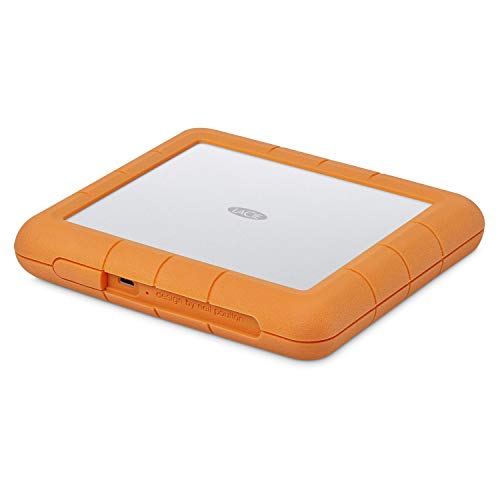
For creative professionals constantly on the move, the LaCie Rugged Raid Shuttle 8TB External Hard Drive offers an unbeatable combination of portability and massive storage capacity. Its flat design fits perfectly in your gear bag or shipping envelope, making it a breeze to transport. With 8TB of space, you can store extensive projects without worrying about running out of room. The easy-to-use RAID 0/1 configuration wizard lets you optimize for speed or redundancy effortlessly. Plus, its self-encrypting password system guarantees your work stays secure. Enjoy a complimentary month of Adobe Creative Cloud to elevate your editing game!
Best For: Creative professionals who need a portable and high-capacity storage solution for extensive projects.
Pros:
- Massive 8TB storage capacity allows for extensive content storage without worrying about space.
- Easy RAID 0/1 configuration wizard optimizes performance or redundancy based on user needs.
- Self-encrypting password system ensures projects are protected from unauthorized access.
Cons:
- Higher price point compared to standard external hard drives with less storage.
- Limited compatibility with older devices that may not support USB-C or USB 3.0.
- One-month Adobe Creative Cloud membership may not be beneficial for users who don’t utilize those apps regularly.
QNAP TR-004 4 Bay USB Type-C Direct Attached Storage (DAS)

Looking to expand your storage options without the hassle of complex setups? The QNAP TR-004 4 Bay USB Type-C Direct Attached Storage (DAS) is perfect for you. With hardware RAID support for configurations like RAID 0, 1, and 5, you can tailor your storage to your needs. Its diskless design features four 3.5-inch SATA bays, making it easy to add your drives. This DAS connects directly via USB Type-C to Windows, macOS, and Linux systems. Keep your data secure with lockable drive bays, and remember, it’s primarily for NAS backup expansion, not for running NAS applications.
Best For: Users seeking to expand their storage solutions easily without complicated setups.
Pros:
- Hardware RAID support allows for flexibility in storage configurations such as RAID 0, 1, and 5.
- Lockable drive bays enhance security for your data.
- Direct-attached USB Type-C connectivity is compatible with Windows, macOS, and Linux systems.
Cons:
- Not compatible with certain older NAS models and requires specific QTS versions.
- Cannot run NAS applications, limiting its functionality as a standalone device.
- Drives must be migrated between TR-004 units, which may complicate data management.
QNAP TR-002-A-US 2 Bay USB Type-C Direct Attached Storage (DAS)
Compact and versatile, the QNAP TR-002-A-US 2 Bay USB Type-C Direct Attached Storage (DAS) is ideal for users seeking reliable external storage solutions with RAID capabilities. Supporting up to two 2.5/3.5 SATA drives, this unit offers USB 3.2 Gen 2 connectivity for fast data access. You can easily configure RAID modes like 0, 1, JBOD, or use individual disks, providing flexibility based on your needs. With a straightforward setup process, you’ll have your drives installed and running in under 30 minutes. Despite minor issues with the plastic caddies, user feedback highlights its good performance and ease of use.
Best For: Users seeking a reliable external storage solution with RAID capabilities for backup and expansion purposes.
Pros:
- Easy to use RAID Manager software for quick configuration.
- Good read/write performance with USB 3.2 Gen 2 connectivity.
- Straightforward setup process, allowing drives to be installed and operational in under 30 minutes.
Cons:
- Plastic drive caddies may feel flimsy and less durable.
- Online manual may be challenging for non-technical users.
- Limited to two drives, which may not meet the needs of users requiring more storage capacity.
BUFFALO LinkStation 720 8TB Home Office Private Cloud Data Storage

The BUFFALO LinkStation 720 8TB is an ideal choice for home office users needing reliable private cloud data storage. With 8TB capacity and two drive bays, it supports RAID 1 for data security or RAID 0 for maximum storage. You’ll appreciate the subscription-free personal cloud for managing your media files, while SSL encryption guarantees secure transfers. Installation is straightforward, although some network knowledge helps. Plus, you’ll benefit from 24/7 US-based customer support. While performance can be variable, its ease of use and robust features make it a strong contender for your data storage needs.
Best For: Home office users seeking reliable and secure private cloud data storage solutions.
Pros:
- Subscription-free personal cloud for easy management of media files.
- Supports RAID 1 for data security or RAID 0 for maximizing storage capacity.
- 24/7 US-based customer support ensures assistance whenever needed.
Cons:
- Performance can be variable, with some users reporting slow transfer speeds.
- Mixed reviews on setup ease, with some users experiencing difficulties with instructions.
- Reliability concerns have been raised regarding potential drive failures and outdated technology.
ORICO RAID 5 Bay HDD Enclosure (9858RU3)

For professionals managing large-scale projects or high-resolution video storage, the ORICO RAID 5 Bay HDD Enclosure (9858RU3) stands out with its impressive support for up to 110TB of storage. This enclosure features eight RAID configurations, including RAID 5, ensuring data redundancy and performance. With a USB 3.0 interface, you can achieve data transfer speeds up to 235MB/s. Its aluminum construction provides durability and effective heat dissipation, while the silent cooling fan maintains ideal temperatures. Setup is straightforward, and with independent locking mechanisms, you can manage your drives securely, making it a reliable choice for your storage needs.
Best For: Professionals managing large-scale projects or high-resolution video storage who require reliable and high-capacity data solutions.
Pros:
- Supports up to 110TB of storage with multiple RAID configurations for data redundancy and performance.
- USB 3.0 interface allows for fast data transfer speeds of up to 235MB/s.
- Durable aluminum construction with effective cooling system ensures optimal performance and heat dissipation.
Cons:
- Some users reported temporary disconnections and data visibility issues when adding or removing drives.
- Cages may feel flimsy, leading to concerns about long-term reliability.
- RAID configuration setup can take time, particularly for more complex setups like RAID 5.
BUFFALO LinkStation 720 16TB 2-Bay NAS Storage
Ideal for home office users seeking reliable data storage, the BUFFALO LinkStation 720 offers a robust 16TB capacity across two bays. It features enhanced cloud capabilities, providing subscription-free personal cloud storage for your videos, music, and photos. You can choose between RAID 1 for automatic backup (8TB usable) or RAID 0 for full capacity. The setup is straightforward, supported by 24/7 US-based assistance. While some users report slower data transfer rates, the ease of use and secure file sharing options make it a solid choice for managing multiple devices. Overall, it stands out in a competitive NAS market.
Best For: Home office users looking for reliable and secure data storage solutions with cloud capabilities.
Pros:
- Subscription-free personal cloud for easy access and management of videos, music, and photos.
- Flexible RAID options (RAID 1 for backup or RAID 0 for full capacity) to suit different storage needs.
- Easy setup with 24/7 US-based support and intuitive user interface for managing multiple devices.
Cons:
- Reported slow data transfer speeds, which may affect performance for heavy users.
- Mixed customer feedback regarding product reliability and customer service experiences.
- Outdated technology compared to newer models in the market, leading to potential performance limitations.
8 Bay Hard Drive RAID Enclosure with Cooling Fan

Offering an impressive capacity of up to 160TB, the CENMATE 8 Bay Hard Drive RAID Enclosure with Cooling Fan is perfect for users needing robust data storage solutions. It supports both 2.5 and 3.5-inch SATA HDDs/SSDs, providing versatility for your setup. With multiple RAID modes, you can customize your data redundancy and performance needs. The built-in cooling system, featuring two quiet fans, keeps your drives running smoothly. Installation is tool-less for 3.5-inch drives, while 2.5-inch drives require adapters. Just plug it in, and you’re ready to enjoy fast data transfer speeds up to 5Gbps.
Best For: Users needing a high-capacity, versatile RAID storage solution for personal or enterprise applications.
Pros:
- Tool-less installation for 3.5-inch drives simplifies setup.
- Multiple RAID modes provide flexibility for data redundancy and performance.
- Built-in cooling system with quiet fans ensures optimal drive temperature.
Cons:
- Compatibility issues with WD 20TB drives may limit options for some users.
- Some initial setup challenges reported, requiring firmware updates for resolution.
- Mixed reliability feedback on RAID recognition could impact user experience.
OWC 12TB Mercury Elite Pro Dual USB-C/Thunderbolt 3 External Raid Storage Enclosure

The OWC 12TB Mercury Elite Pro Dual USB-C/Thunderbolt 3 External RAID Storage Enclosure stands out for creative professionals and content creators who demand high-speed performance and versatile connectivity. With real-world speeds up to 974MB/s, it supports selectable hardware RAID settings, including RAID 0, 1, Span, or JBOD. This enclosure connects seamlessly with USB-C and Thunderbolt 3 devices, offering a 3-port hub for added convenience. Its aluminum design and 30dB cooling fan guarantee whisper-quiet operation, making it perfect for production studios or home offices. Plus, it accommodates two 2.5-inch or 3.5-inch SATA drives, meeting your storage needs effortlessly.
Best For: Creative professionals and content creators who need high-speed, versatile storage solutions.
Pros:
- Pro-grade storage speed with real-world tested performance up to 974MB/s.
- Selectable hardware RAID settings provide flexibility in data management (RAID 0, 1, Span, or JBOD).
- Whisper-quiet operation due to aluminum construction and a 30dB cooling fan, ideal for studio environments.
Cons:
- Higher price point compared to basic external storage options.
- Requires compatible devices (USB-C or Thunderbolt 3) for optimal performance.
- Limited to two drive bays, which may not suffice for users with larger storage needs.
Factors to Consider When Choosing Raid Storage for PC
When choosing RAID storage for your PC, you need to take into account several key factors. Think about your storage capacity requirements, the RAID configuration options that suit your needs, and the data transfer speeds you expect. Also, verify compatibility with your system and check for features that manage heat dissipation effectively.
Storage Capacity Requirements
As you consider RAID storage for your PC, it is crucial to assess both your current and future storage needs. Start by determining the total amount of data you plan to store, including photos, videos, and documents, while factoring in expected growth over time. Next, consider the maximum storage capacity of your RAID configuration; for instance, RAID 0 offers the combined capacity of all drives, while RAID 1 provides redundancy with half that capacity. Evaluate how many drives you’ll use, as configurations like RAID 5 require at least three drives for peak efficiency and redundancy. Finally, keep in mind the type of drives you’ll use, since different RAID systems support varying capacities and types, impacting performance and total usable storage.
RAID Configuration Options
Evaluating your storage capacity needs naturally leads to exploring the various RAID configuration options available for your PC. Common choices include RAID 0, RAID 1, RAID 5, and RAID 10. If you’re after maximum performance, RAID 0 stripes data across multiple drives, but remember, it offers no redundancy—losing any single drive means losing all your data. On the other hand, RAID 1 mirrors data between two drives, providing redundancy at the cost of usable storage capacity. RAID 5 strikes a balance, using three or more drives with distributed parity for protection against a single drive failure. Ultimately, RAID 10 combines the benefits of RAID 0 and RAID 1, offering high performance and redundancy but requiring a minimum of four drives. Choose wisely!
Data Transfer Speeds
Data transfer speeds are essential in determining the right RAID storage solution for your PC. Different RAID configurations offer varying performance, with RAID 0 typically delivering the highest speeds by striping data across multiple drives, achieving read speeds of up to 1,075MB/s with SSDs. In contrast, RAID 1 mirrors data for redundancy, resulting in slower write speeds since each piece must be duplicated. The interface also plays a role; USB 3.2 Gen 2 can support speeds up to 10Gbps, while USB 3.0 maxes out at 5Gbps. Additionally, choose SSDs over HDDs for faster read/write capabilities. Overall, average transfer speeds can vary, with some setups reporting write speeds of 156MB/s and read speeds of 221MB/s based on configuration and hardware.
Compatibility With Systems
When choosing a RAID storage solution for your PC, it’s crucial to guarantee compatibility with your system to avoid potential issues. First, verify the RAID device works with your operating system, as some may need reformatting for non-Windows platforms. Next, check for specific connectivity options like USB Type-C, USB 3.1, or Thunderbolt 3 to facilitate seamless integration. You should also consider the maximum supported drive sizes and types, whether SATA HDDs or SSDs, to accommodate your existing drives. Additionally, confirm that the RAID storage supports the necessary configurations, such as RAID 0, RAID 1, or JBOD, that fit your performance and redundancy needs. Finally, look for compatibility notes regarding network setups or specific NAS limitations.
Heat Dissipation Features
To guarantee your RAID storage system performs at its best and lasts longer, you can’t overlook the importance of effective heat dissipation features. Look for enclosures made of aluminum, as they dissipate heat more efficiently. A well-designed cooling system with temperature-controlled fans is vital; it prevents overheating during demanding tasks like video editing and data backups while ensuring quiet operation. Additionally, pay attention to the placement of vents and airflow design, as these factors greatly influence cooling efficiency. Opt for models that optimize air circulation to keep your drives cool. Regularly monitoring temperature levels is essential, since sustained high temperatures can degrade performance and reliability over time. Prioritize these features to protect your data and hardware.
Security and Encryption
Choosing the right RAID storage solution involves considering several key security and encryption features that can protect your valuable information. First, look for devices offering 256-bit AES hardware encryption, which provides robust protection against unauthorized access. Additionally, consider RAID systems with password protection, ensuring that only authenticated users can access your data. Evaluate RAID mode configurations, like RAID 1, that offer redundancy to safeguard against data loss due to drive failure. Check the system’s compatibility with various operating systems, ensuring that encryption features work seamlessly on Windows, macOS, and Linux. Finally, opt for RAID solutions that include built-in security protocols, such as SSL encryption, for secure file transfers, helping to protect sensitive information during transmission.
Ease of Setup
Selecting a RAID storage solution can be intimidating, especially if you’re not particularly tech-savvy. To simplify the setup process, look for systems with tool-free hard drive trays that allow for easy installation and removal. Opt for devices with straightforward software setups and user-friendly interfaces, minimizing configuration time. Detailed setup guides or online resources can be invaluable, especially for complex configurations. Additionally, check customer feedback to verify the product is praised for its ease of setup and performance, enhancing your experience right from the start. Finally, choose RAID options that support multiple modes and provide clear instructions for switching configurations, giving you flexibility as your storage needs evolve.
Cost-Effectiveness and Value
After guaranteeing a smooth setup, the next step is evaluating the cost-effectiveness and value of a RAID storage solution. Consider the total cost of ownership, including the initial purchase price, future upgrades, and maintenance expenses. Data redundancy in RAID can save you money on data recovery services, especially for critical information. When investing, think about capacity and scalability; higher-capacity units might prevent additional purchases as your data needs expand. Also, faster read/write speeds can boost productivity and justify a higher upfront cost. Finally, don’t overlook warranty and customer support options, as reliable assistance can reduce downtime costs and guarantee smoother operations, ultimately enhancing the value of your RAID investment.