A RAID 5 enclosure can give your PC a large pool of direct-attached storage that remains accessible if one drive fails. The right choice depends on more than capacity: bay count, host connection, drive compatibility, and rebuild behavior all matter.
These 10 enclosures span four- and five-bay designs, so check each model’s supported RAID modes before buying. RAID 5 protects against a single drive failure, but it does not replace a separate backup.
Best 10 Raid 5 Enclosure for PC Picks for 2026
Best for Mixed Drive Sizes
Yottamaster PS500RC3 5-Bay RAID Enclosure

- Five bays support 2.5-inch and 3.5-inch SATA drives
- RAID 5 plus six other listed modes
- 5Gbps USB; 78W combined-drive power limit
Best For: Mixed-size SATA arrays on a PC
Best for Tool-Free Drive Changes
ORICO 9858RU3 5-Bay RAID Enclosure

- Five 3.5-inch SATA bays with safety locks
- RAID 5 among eight listed modes
- Built-in 150W supply; up to 235MB/s stated
Best For: Desktop arrays needing bracket-free drive installation
Best for Faster USB Connections
ORICO 9958RC3-PRO 5-Bay RAID Enclosure

- 20Gbps USB 3.2 Gen 2x2 interface
- Five bays; up to 130TB raw drive capacity
- Supports RAID 5 and hot-swapping
Best For: Large-file workflows with a compatible USB port
Best Four-Bay Option

- Four 3.5-inch SATA bays; up to 96TB raw
- RAID 5 and other configuration options
- 5Gbps USB-C; two switch-controlled fans
Best For: Four-drive PC backup or media storage
Flexible RAID Modes
ORICO 5-Bay Hardware RAID Enclosure

- Five bays for 2.5- or 3.5-inch SATA drives
- RAID 5 plus multiple other hardware modes
- Built-in 150W power supply and active cooling
Best For: Five-drive desktop backups with flexible RAID settings
Backup-Focused Pick
TERRAMASTER D5-310 5-Bay RAID Enclosure

- Five diskless bays; up to 120TB stated capacity
- Hardware RAID 5 with hot-spare support
- Includes scheduled Windows backup software
Best For: Five-drive Windows backups with a hot-spare option
Four-Bay Connectivity Pick
CENMATE USB and eSATA RAID Enclosure

- Four bays with up to 80TB stated capacity
- Eight modes, including RAID 5
- USB and eSATA cables included
Best For: Four-drive PC storage with USB and optional eSATA
Best with Extra Features

- Four 3.5-inch bays; up to 88TB
- RAID 5 plus seven other modes
- Trayless, lockable bays
Best For: PC users with four 3.5-inch SATA drives
Best Dual-Interface Option
Syba SY-ENC50122 Five-Bay RAID Enclosure
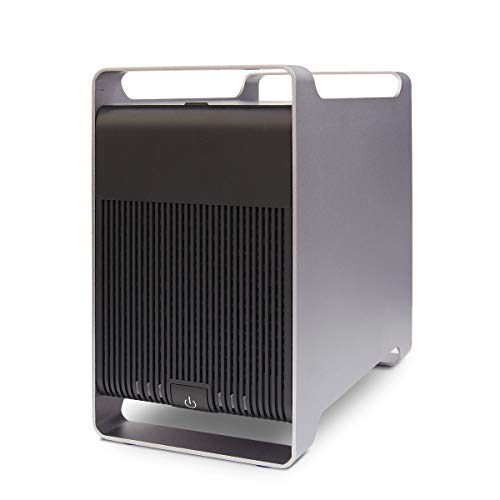
- USB 3.0 and eSATA connections
- Five bays for 2.5- or 3.5-inch SATA drives
- eSATA multi-drive access needs compatible PC hardware
Best For: PC users needing USB and eSATA connection options
Best Mixed-Drive Pick
Yottamaster FS5RU3 Five-Bay RAID Enclosure

- Five bays; stated capacity up to 120TB
- Accepts 2.5-inch SATA SSDs and 3.5-inch HDDs
- RAID 5 and adjustable auto-sleep
Best For: PC users mixing SATA SSDs and hard drives
Best for Mixed Drive Sizes – Yottamaster PS500RC3 5-Bay RAID Enclosure
If you need a raid 5 enclosure for pc storage and want to mix 2.5-inch SSDs with 3.5-inch hard drives, the Yottamaster PS500RC3 offers five SATA bays and up to 110TB of supported raw drive capacity.
Best For: PC users building a flexible, high-capacity array with both 2.5-inch and 3.5-inch SATA drives.
Pros:
- Supports RAID 0, 1, 3, 5, 10, JBOD, and clone modes.
- Five removable, screw-secured trays accommodate HDDs and SSDs.
- Aluminum housing and a temperature-controlled 80mm fan aid cooling.
Cons:
- USB 3.1 connection is rated at 5Gbps, not 10Gbps or higher.
- Combined drive power consumption must stay within 78W for normal operation.
Its drive-size flexibility is the main draw. Check the power requirements of your chosen disks before filling all five bays, and remember that usable RAID 5 capacity will be lower than the stated 110TB raw maximum.
Best for Tool-Free Drive Changes – ORICO 9858RU3 5-Bay RAID Enclosure
For a raid 5 enclosure for pc backups built around 3.5-inch hard drives, the ORICO 9858RU3 provides five bays, a bracket-free mounting design, and a built-in 150W power supply.
Best For: Users who want easier 3.5-inch drive installation and a power supply housed inside the enclosure.
Pros:
- Offers RAID 0, 1, 3, 5, 10, JBOD, clone, and clear modes.
- Bracket-free mounting and individual safety locks help manage drive access.
- Aluminum housing, an 80mm fan, and front-to-rear vents support cooling.
Cons:
- Specified for 3.5-inch SATA disks, not 2.5-inch drives.
- USB 3.0 is limited to a 5Gbps interface; the stated transfer speed is up to 235MB/s.
The integrated power supply and locking bays make this a practical desktop choice. The supplied specifications give a 110TB maximum based on five 22TB disks; usable RAID 5 capacity will be less.
Best for Faster USB Connections – ORICO 9958RC3-PRO 5-Bay RAID Enclosure
If transfer bandwidth matters, this raid 5 enclosure for pc use pairs five SATA bays with a USB 3.2 Gen 2×2 connection rated up to 20Gbps and support for up to 130TB of raw drive capacity.
Best For: Users with a compatible high-bandwidth USB port who regularly move large files.
Pros:
- Supports RAID 0, 1, 5, 10, JBOD, and Normal modes.
- Accepts 2.5-inch and 3.5-inch SATA drives and supports hot-swapping.
- Built-in 150W power supply and fan-assisted cooling suit a populated five-bay setup.
Cons:
- Thunderbolt connections are described as limited to around 10Gbps rather than the full 20Gbps interface rate.
- Configuring or changing RAID mode erases drive contents, so existing data needs backing up first.
Choose this model for its faster host interface, not a guaranteed file-transfer speed: port compatibility, disks, and RAID setup all matter. Its 130TB figure assumes five 26TB drives before RAID 5 redundancy.
Best Four-Bay Option – MAIWO K35284D RAID Enclosure
For buyers who only need four disks, the MAIWO K35284D is a raid 5 enclosure for pc backups that supports 3.5-inch SATA hard drives, up to 96TB of raw capacity, and a USB-C connection rated at 5Gbps.
Best For: Four-drive desktop backup or media storage setups using 3.5-inch SATA hard drives.
Pros:
- Includes RAID 5 alongside Normal, RAID 0, RAID 3, RAID 1/10, clone, and Large/JBOD options.
- Supports up to four 24TB drives and has disk-status LEDs.
- Two built-in fans have an on/off switch; USB-A–to–USB-C and USB-C–to–USB-C cables are included.
Cons:
- Four bays offer less expansion room than the five-bay models here.
- Specified for 3.5-inch SATA hard drives, and the fans use manual on/off control.
This is a straightforward choice when four bays are enough. Allow for RAID 5 redundancy when planning usable space: the advertised 96TB is the combined maximum of four 24TB drives, not the available RAID 5 volume.
Flexible RAID Modes – ORICO 5-Bay Hardware RAID Enclosure
The ORICO is a raid 5 enclosure for pc buyers who want five drive bays and several hardware-selectable storage modes. It supports 2.5- and 3.5-inch SATA HDDs and SSDs, with up to 22TB per drive according to the supplied specifications.
Best For: Desktop backups and media libraries that benefit from five bays and flexible RAID settings.
Pros:
- Supports RAID 0, 1, 3, 5, and 10, plus JBOD, Clone, and Clear modes.
- Built-in 150W power supply avoids an external power brick.
- Aluminum-alloy housing, 80mm fan, and airflow vents provide active cooling.
Cons:
- USB 3.0 connection is rated for transfers up to 230MB/s.
- The supplied title says 130TB, but the detailed specifications list a 110TB maximum.
Choose this model if mode selection and built-in power matter more than a faster host connection. Plan capacity around the stated 22TB-per-drive specification unless you confirm support for larger drives.
The TERRAMASTER D5-310 is a raid 5 enclosure for pc users who want hardware RAID and included Windows backup software. Its five diskless bays accept 2.5- and 3.5-inch SATA drives, with a stated maximum of 120TB across five 24TB drives.
Best For: Windows backup workflows that need five bays, RAID 5, and a hot-spare option.
Pros:
- Rear knob selects RAID 5, 0, 1, 10, or individual-disk mode.
- Hot-spare feature supports RAID 1, 5, and 10 configurations.
- Includes Windows software for scheduled, incremental, and differential backups.
- Tool-free bays and temperature-controlled fans simplify day-to-day use.
Cons:
- Ships diskless, so drives are a separate purchase.
- The included backup software is specified for Windows, not macOS or Linux.
This is the strongest fit of the three if a hot spare and scheduled Windows backups are priorities. Its USB 3.1 Gen 1 connection is rated at up to 5Gbps, while the supplied notes cite roughly 220MB/s actual read/write speeds.
The CENMATE is a raid 5 enclosure for pc setups that need four bays rather than five and offer USB or eSATA connectivity. It accepts 2.5- and 3.5-inch SATA HDDs and SSDs, with a stated 80TB maximum using four 20TB drives.
Best For: Four-drive desktop storage where USB connectivity and multiple RAID modes are useful.
Pros:
- Supports RAID 0, 1, 3, 5, and 10, plus Clone, Large, and Normal modes.
- Includes USB A/C and eSATA cables.
- Aluminum enclosure and built-in fan provide active cooling.
Cons:
- Fan noise is specified at about 40–50 dB, which may bother noise-sensitive users.
- Hot-swapping is not supported.
- Accessing multiple bays over eSATA requires a compatible computer eSATA port with RAID support; a SATA-to-eSATA adapter is not supported.
USB is the more straightforward connection if your PC lacks the required eSATA support. Follow the supplied mode-switching procedure carefully: changing RAID configurations may cause data loss.
Best with Extra Features – ORICO 9848RU3 RAID Enclosure
The ORICO 9848RU3 is a practical raid 5 enclosure for pc users who want four 3.5-inch SATA drive bays and hardware-configurable storage without moving to a five-bay unit. It supports up to 88TB across four 22TB drives.
Best For: Desktop users with 3.5-inch drives who want RAID 5 alongside several other configuration options.
Pros:
- Supports RAID 0, 1, 3, 5, and 10, plus JBOD, CLONE, and CLEAR modes.
- Trayless bays with safety locks make drive changes straightforward.
- Aluminum housing, an 80mm fan, and a built-in 150W power supply suit a multi-drive setup.
Cons:
- Supports 3.5-inch SATA drives, not the 2.5-inch drives supported by some alternatives here.
- USB 3.0 connection is rated for 5Gbps, with a stated transfer rate of up to 235MB/s.
Choose this model when four bays and easy drive access matter more than accommodating 2.5-inch drives. Its RAID 5 option gives PC users a configurable alternative to a basic multi-drive enclosure.
Best Dual-Interface Option – Syba SY-ENC50122 Five-Bay RAID Enclosure
The Syba SY-ENC50122 is a raid 5 enclosure for pc setups that need five bays and a choice of USB 3.0 or eSATA connectivity. Its listed drive support includes both 2.5-inch and 3.5-inch SATA disks, with up to 24TB per drive.
Best For: PC users who want five SATA drive bays and may need eSATA as well as USB 3.0.
Pros:
- Supports RAID 0, 1, 3, 5, and 10, plus SPAN and JBOD.
- Five bays accommodate both 2.5-inch and 3.5-inch SATA drives.
- Trayless handles simplify drive insertion and removal.
Cons:
- Accessing multiple drives simultaneously over eSATA requires a computer port multiplier with FIS-based switching.
- The supplied specifications conflict on maximum capacity: the bullets state 120TB, while the details list 16TB.
The eSATA option sets this model apart, but check your PC’s eSATA capabilities before buying for that connection. Confirm the supported capacity if you plan to fill all five bays with high-capacity drives.
Best Mixed-Drive Pick – Yottamaster FS5RU3 Five-Bay RAID Enclosure
The Yottamaster FS5RU3 is a raid 5 enclosure for pc users combining 2.5-inch SATA HDDs or SSDs with 3.5-inch SATA hard drives. Its five bays support a stated total capacity of up to 120TB using five 24TB drives.
Best For: Windows or Linux PC users who want five bays, RAID 5, and support for both SATA SSDs and larger hard drives.
Pros:
- Supports RAID 0, 1, 5, and 10, plus JBOD, CLONE, and Normal modes.
- Removable aluminum trays secure drives with the provided screws.
- Aluminum housing, an 80mm fan, and a 150W power supply support a five-drive setup.
- Adjustable or cancelable 10-minute auto-sleep setting offers power-management flexibility.
Cons:
- Uses USB 3.0 Type-B with a stated maximum interface speed of 5Gbps.
- Drive installation involves trays and screws rather than a trayless mechanism.
This is a strong fit when drive-format flexibility matters: it accepts SATA SSDs as well as 3.5-inch HDDs. Consider whether its tray-based installation and USB 3.0 connection suit your workflow.
How We Picked the Best Raid 5 Enclosure for PC
We focused on practical differences across the 10 selected models: four versus five bays, stated drive compatibility and capacity, available PC connections, and whether RAID 5 is listed among the supported modes. We also considered cooling and how easy it is to understand each enclosure’s setup requirements. A product name that says “RAID” is not, by itself, confirmation of RAID 5 support; verify the exact model’s specifications and manual before ordering.
Quick Comparison: Which Type Fits Your PC?
Five-bay enclosures are a useful starting point if you want RAID 5 with room for more drives or capacity growth. The selected Yottamaster, ORICO, TerraMaster, and Syba models offer five-bay choices, but differ in interfaces, stated capacity limits, and supported modes. Four-bay enclosures can suit a smaller desk or a four-drive plan; check the specific MAIWO, CENMATE, or ORICO configuration for RAID 5 before purchase. For connectivity, the list ranges from USB 3.0 and eSATA options to an ORICO model labeled USB 3.2 Gen 2×2. Faster ports are most useful when your PC supports the same connection and your drives can take advantage of it.
Key Buying Factors for a Raid 5 Enclosure for PC
RAID Modes and Usable Capacity
RAID 5 needs at least three drives and reserves roughly one drive’s worth of space for parity when equal-capacity drives are used. Mixing sizes can waste capacity, so plan on matching drives. Treat an advertised maximum capacity as a compatibility claim, not guaranteed usable RAID 5 space. Also check whether the enclosure creates and manages the array itself or requires software configuration on your PC.
Connections, Drives, and Cooling
Match the enclosure’s USB or eSATA interface to your PC; a newer connector does not make mechanical hard drives inherently faster. Confirm support for your intended 2.5-inch or 3.5-inch SATA drives, individual drive capacities, and any power requirements. Multi-drive arrays produce heat and vibration, making fan design, airflow clearance, and accessible drive bays worth considering. Check the manual for rebuild procedures and how drive failures are signaled before the array holds important files.
Backup and Recovery
RAID 5 keeps an array running through one drive failure; it cannot protect against accidental deletion, malware, enclosure failure, or a second drive failing during rebuild. Keep another copy of irreplaceable data, ideally separate from the enclosure. If you need access to files from multiple devices over a network, consider a NAS instead: these are direct-attached enclosures for a PC.
Who Should Buy Which Raid 5 Enclosure for PC?
Choose a five-bay model if expansion flexibility is a priority, subject to its confirmed RAID 5 support. Choose a four-bay model if four drives meet your capacity target and you prefer a smaller setup. Prioritize the USB 3.2 Gen 2×2 option only if your PC has a compatible port and your workload warrants it; otherwise, focus on reliable compatibility and cooling. For an older PC with eSATA, compare the CENMATE and Syba connection options. In every case, confirm the exact RAID modes and keep a separate backup.