When you’re looking to enhance your storage solutions, choosing the right RAID enclosure can make all the difference. With a variety of options out there, it’s essential to evaluate performance, capacity, and features that fit your specific needs. Whether you’re a gamer, a content creator, or someone needing reliable data management, the right enclosure can elevate your setup considerably. Let’s explore the top RAID enclosures that can transform how you store and access your data.
TERRAMASTER D4-320 External Hard Drive Enclosure (4bay USB 3.2 Gen2)

If you’re looking for a versatile storage solution, the TERRAMASTER D4-320 External Hard Drive Enclosure is an excellent choice for anyone needing to manage large amounts of data efficiently. This 4-bay enclosure supports single HDDs up to 30TB, allowing a total capacity of 120TB. With USB 3.2 Gen2, you’ll enjoy data transmission speeds up to 10Gbps. Its plug-and-play feature makes setup a breeze, while the tool-free design simplifies drive installation. Plus, the intelligent fan keeps things cool and quiet. Users appreciate its performance, though some have noted power supply issues under peak loads. Overall, it’s a solid investment for your storage needs.
Best For: Users seeking a high-capacity, efficient storage solution for managing large datasets across multiple drives.
Pros:
- Plug-and-Play: Easy setup with no drivers needed for compatibility with MAC, Windows, and Linux.
- Hot Swappable: Allows for drive replacement without powering off the device, enhancing usability.
- High Performance: Achieves impressive data transfer speeds up to 1,016 MB/s with multiple drives.
Cons:
- Power Supply Issues: Some users have reported problems with the power supply during peak loads.
- Durability Concerns: A few instances of unit failure have been noted, raising concerns about long-term reliability.
- Weight: At 3.1 pounds, it may be less portable compared to lighter alternatives.
TERRAMASTER D2-320 2-Bay USB 3.2 RAID Storage

The TERRAMASTER D2-320 2-Bay USB 3.2 RAID Storage is an excellent choice for creative professionals who demand high-speed data transfer and reliable backup solutions. With data transfer rates up to 10Gbps, it supports RAID 0, RAID 1, JBOD, and SINGLE modes, allowing for a maximum capacity of 44TB. Its tool-free design simplifies drive installation, and the intelligent fan guarantees peak temperature control. Users appreciate its quiet operation and ease of setup, although some have reported initial USB connection issues. Overall, this enclosure is perfect for video/audio editing, backup storage, and seamless integration with various setups, including Linux and NAS systems.
Best For: Creative professionals and users seeking reliable and high-speed data storage solutions for video/audio editing and backup.
Pros:
- Tool-free design for easy installation and removal of drives.
- High data transfer rates up to 10Gbps, ensuring fast performance for demanding tasks.
- Quiet operation with an intelligent fan that manages heat efficiently.
Cons:
- Some users experienced initial USB connection issues that may require troubleshooting.
- Mixed reviews on packaging consistency, with reports of missing protective sleeves.
- Plastic material may not be as durable as metal enclosures.
Aluminum Dual Bay Hard Drive Enclosure with Cooling Fan for 2.5“/3.5” SATA HDD/SSD
For users seeking a reliable and efficient storage solution, the Aluminum Dual Bay Hard Drive Enclosure with Cooling Fan stands out with its impressive compatibility for both 2.5” and 3.5” SATA HDDs and SSDs. You can expand your storage up to 120TB by daisy chaining three devices. With USB A/C 3.0, enjoy data transfer rates of up to 5Gbps, transferring 1GB files in just 3-5 seconds. The tool-free installation allows for easy drive swaps, while the built-in cooling fan keeps temperatures in check. Users appreciate its compact design and solid build, making it a smart addition to your setup.
Best For: Users looking for a versatile and efficient storage solution for both 2.5” and 3.5” SATA HDDs and SSDs with high data transfer rates.
Pros:
- Tool-free installation makes it easy to swap drives without additional tools.
- Compact design and solid aluminum build ensure durability and effective cooling.
- High data transfer rate of up to 5Gbps allows for quick file transfers.
Cons:
- Some users may find the fan noise (40-50 decibels) to be bothersome.
- Proper installation is crucial, as improper seating of drives can lead to functionality issues.
- Limited to compatibility with operating systems starting from Windows 7 and Mac 9.1.
Mediasonic Raid 4 Bay SATA Hard Drive Enclosure (HFR7-SU31CH)
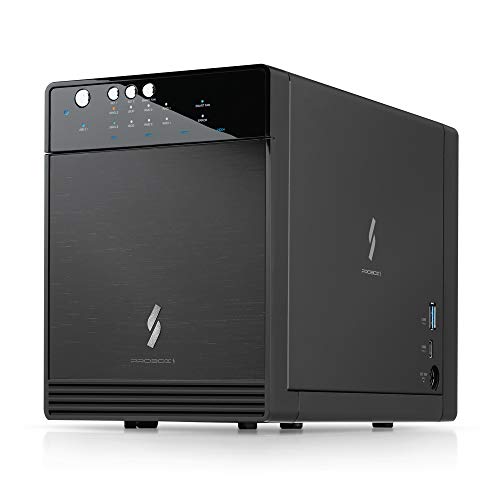
Designed for users who require substantial storage solutions, the Mediasonic Raid 4 Bay SATA Hard Drive Enclosure (HFR7-SU31CH) stands out with its ability to support up to 30TB per 3.5” SATA drive. This Direct Attached Storage (DAS) device features USB 3.2 Gen 2 connectivity, offering impressive transfer speeds of up to 10Gbps. Its built-in RAID controller supports Single Drive Mode and RAID 0/1, while the tool-free installation makes it easy to set up. With compatibility across Windows, Mac OS, and Linux, this enclosure is perfect for media workflows and high-capacity backups, enhancing your storage solutions efficiently.
Best For: Users needing extensive storage capacity and versatility for various SATA drives, ideal for media workflows and high-capacity backups.
Pros:
- Tool-free installation for easy setup and convenience.
- Supports high transfer speeds of up to 10Gbps via USB 3.2 Gen 2.
- Compatible with multiple operating systems including Windows, Mac OS, and Linux.
Cons:
- Some users may experience drive recognition issues, particularly with faulty drives.
- Does not support hardware RAID; software RAID is only possible on compatible systems.
- Long-term reliability is variable, with mixed user experiences over extended use.
OWC Express 4M2 Four-Slot USB4 External Storage Enclosure for NVMe M.2 SSDs

If you’re looking for a powerful storage solution that supports high-speed data transfer and robust RAID configurations, the OWC Express 4M2 is a top contender. This four-slot USB4 enclosure handles NVMe M.2 SSDs, delivering real-world performance up to 3200MB/s. Weighing just 3.9 pounds and built from durable aircraft-grade aluminum, it features smart fans for quiet operation. The DIY installation is user-friendly, and it’s compatible with various operating systems, including Windows and Linux. Ideal for video editing or gaming, this enclosure offers flexibility for upgrades, ensuring you stay future-proof as your storage needs grow.
Best For: Professionals and enthusiasts in video editing, gaming, and bulk storage who require high-speed data transfer and flexible upgrade options.
Pros:
- High-speed performance with real-world transfer rates up to 3200MB/s, ideal for demanding applications.
- Durable construction from aircraft-grade aluminum, providing effective heat dissipation and ruggedness for transport.
- User-friendly installation with included tools and compatibility with various operating systems, ensuring easy setup.
Cons:
- DIY installation may not be suitable for users unfamiliar with assembling hardware components.
- Weight of 3.9 pounds might be considered bulky for portable use compared to lighter alternatives.
- Requires additional SSDs for full functionality, which may increase overall costs for users needing multiple drives.
Aluminum Dual Bay Hard Drive RAID Enclosure with Cooling Fan

The Aluminum Dual Bay Hard Drive RAID Enclosure with Cooling Fan is an excellent choice for tech enthusiasts who need reliable storage solutions without sacrificing performance. It supports both 2.5” and 3.5” SATA HDDs or SSDs, allowing for a massive 40TB capacity. With USB A/C 3.0 connectivity, you’ll enjoy fast data transfers up to 5Gbps. The tool-free installation makes setup a breeze, while the built-in cooling fan guarantees peak performance, despite some noise. Offering four RAID modes, it’s versatile but requires careful configuration to avoid data loss. Overall, it’s a solid investment at around £52 for those serious about storage.
Best For: Tech enthusiasts and professionals seeking a reliable and high-capacity storage solution with versatile RAID configurations.
Pros:
- Tool-free installation allows for easy mounting of drives.
- Supports a massive total capacity of up to 40TB with fast data transfer rates.
- Built-in cooling fan helps maintain performance during continuous use.
Cons:
- Some users may find the fan noise levels unsuitable for noise-sensitive environments.
- Incorrect RAID configurations can lead to data loss, requiring careful setup.
- Limited compatibility with Mac OS, especially with Time Machine and lack of sleep mode for drives.
Syba 5 Bay SATA HDD External USB 3.0/eSATA RAID Hard Drive Enclosure
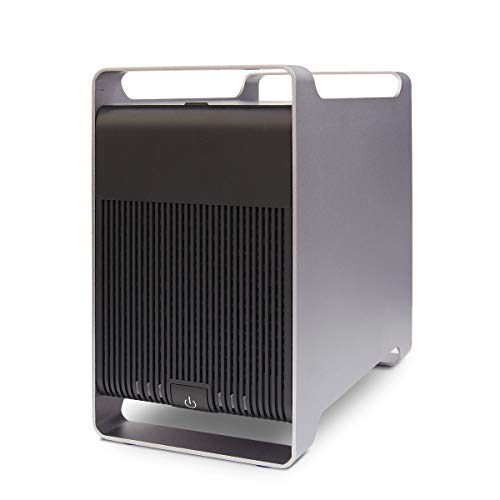
For users seeking a reliable and high-capacity storage solution, the Syba 5 Bay SATA HDD External USB 3.0/eSATA RAID Hard Drive Enclosure stands out with its support for up to 120TB across five drives. This enclosure is compatible with all 2.5 and 3.5 SATA I/II/III hard disk drives, allowing you to configure RAID 0, RAID 1, RAID 5, and more for enhanced data management. With USB 3.0 speeds reaching up to 5 Gb/s and a tray-less design for easy drive swapping, this enclosure offers both convenience and efficiency, making it an excellent choice for your storage needs.
Best For: Users in need of a high-capacity, versatile storage solution for managing large amounts of data across multiple drives.
Pros:
- Supports up to 120TB of storage with five drives, accommodating large data needs.
- Compatible with various RAID configurations for enhanced data management and redundancy.
- USB 3.0 interface provides fast data transfer speeds up to 5 Gb/s, ensuring efficient performance.
Cons:
- eSATA interface requires additional hardware (Port Multiplier) for optimal use with multiple HDDs.
- Limited to SATA drives, which may not suit users with other interfaces.
- Some users may find the tray-less design less secure compared to traditional drive bays.
Aluminum 4 Bay 10Gbps Hard Drive Enclosure with Cooling Fan
With a robust capacity of up to 80TB, the Aluminum 4 Bay 10Gbps Hard Drive Enclosure is perfect for professionals and enthusiasts who need reliable and high-speed storage solutions. Compatible with 2.5″/3.5″ SATA HDDs and SSDs, it supports USB A/C 3.2 Gen 2 for blazing-fast data transfers up to 10Gbps. The tool-free installation makes adding or swapping drives a breeze. Plus, the built-in cooling fan helps maintain ideal temperatures, although some users report it can be a bit noisy. Overall, this enclosure combines performance, efficiency, and ease of use, making it a solid choice for your storage needs.
Best For: Professionals and enthusiasts seeking high-capacity, high-speed storage solutions for their data-intensive tasks.
Pros:
- High Capacity: Supports up to 80TB across four drives, accommodating large data storage needs.
- Fast Data Transfer: Features USB A/C 3.2 Gen 2 interface, achieving data transfer rates up to 10Gbps.
- Tool-Free Installation: Easy to add or swap drives without the need for additional tools.
Cons:
- Fan Noise: Some users find the built-in cooling fan to be noisy, especially in quiet environments.
- Plastic Quality: A few reviews mention concerns regarding the quality of the plastic trays.
- Weight: At 1.37 kg (3.01 lbs), it may be considered heavier than some other enclosures on the market.
QNAP TR-004 4 Bay USB Type-C Direct Attached Storage (DAS)

Designed for users seeking reliable and expandable storage solutions, the QNAP TR-004 4 Bay USB Type-C Direct Attached Storage (DAS) offers hardware RAID support for various configurations like RAID 0, 1, and 5. With its diskless design, you can easily install four 3.5-inch SATA drives. The USB Type-C connectivity guarantees compatibility with Windows, macOS, and Linux, making it a versatile choice. You’ll appreciate the lockable drive bays for added security, but keep in mind it’s not compatible with certain NAS models. Overall, it’s an excellent option for those looking to expand their storage without combining pools on the NAS.
Best For: Users seeking reliable and expandable external storage solutions for NAS backups without the need to combine storage pools.
Pros:
- Hardware RAID support for various configurations including RAID 0, 1, and 5 enhances data protection and performance.
- Lockable drive bays provide added security for the installed drives.
- USB Type-C connectivity ensures compatibility with multiple operating systems like Windows, macOS, and Linux.
Cons:
- Not compatible with certain NAS models and requires QTS 4.3.6 or later for proper functionality.
- Can only be used as an individual storage pool or volume on the NAS, limiting integration with NAS applications.
- Drives can only be migrated between TR-004 units, which may complicate data management when moving data to/from other devices.
GODO 3.5 inch Dual Bay Hard Drive Enclosure

The GODO 3.5 inch Dual Bay Hard Drive Enclosure stands out for its impressive capacity, supporting up to 40TB across two bays, making it an ideal choice for data-intensive users like gamers, content creators, and professionals who need reliable storage solutions. It’s compatible with all 3.5 SATA I, II, and III HDDs and SSDs, ensuring versatility. The aluminum construction aids in heat dissipation, while its compact size makes it easy to fit into your setup. With a data transfer rate of 5Gbps via USB 3.0 Type-C, you’ll enjoy fast access to your files, enhancing your overall productivity.
Best For: Data-intensive users like gamers, content creators, and professionals who need reliable storage solutions.
Pros:
- Solid aluminum construction improves heat dissipation and durability.
- High data transfer rate of 5Gbps via USB 3.0 Type-C for quick file access.
- Supports multiple RAID configurations for flexible storage management.
Cons:
- Concerns regarding fan performance and heat dissipation in certain conditions.
- Power-saving mode may lead to frequent powering down of the drives.
- RAID setup can be challenging on some operating systems.
Factors to Consider When Choosing Raid Enclosures for PC
When you’re picking a RAID enclosure for your PC, you’ll want to think about several key factors. Consider your storage capacity needs, the RAID configurations that suit your setup, and how fast you need data transfers to be. Don’t forget to check compatibility with your drives and keep an eye on cooling and noise levels, too.
Storage Capacity Requirements
Choosing the right RAID enclosure for your PC involves carefully evaluating your storage capacity requirements. First, consider the maximum supported capacity per drive, which can range from 20TB to over 30TB. Depending on the enclosure model, you could achieve up to 120TB of combined storage with multiple drives. Keep in mind that RAID configurations impact usable capacity; for instance, RAID 1 mirrors data, halving the total available space. Assess both your current and future needs, as some enclosures allow daisy chaining for easier capacity expansion. Finally, look for enclosures that accommodate both 2.5-inch and 3.5-inch drives, giving you the flexibility to optimize your storage solutions effectively.
RAID Configuration Options
After evaluating your storage capacity requirements, it’s important to explore the various RAID configuration options available for your PC. RAID configurations enhance data management and redundancy, with common types being RAID 0, RAID 1, and RAID 5. RAID 0 focuses on performance through striping, while RAID 1 offers data redundancy through mirroring. If you want a balance of both, RAID 5 uses striping with parity. Many enclosures support multiple RAID modes, allowing you to switch configurations based on your needs. For individual drive access, JBOD (Just a Bunch of Disks) might be suitable. Understanding these configurations is essential, as incorrect setups can lead to data loss and complications during recovery. Choose wisely to protect your data effectively.
Data Transfer Speeds
Data transfer speeds play an essential role in selecting RAID enclosures for your PC, impacting overall performance and efficiency. The interface you choose greatly affects these speeds; for instance, USB 3.2 Gen2 can reach up to 10Gbps, while USB 3.0 maxes out at 5Gbps. If you opt for RAID 0 configurations, you can achieve combined speeds exceeding 1,000 MB/s with multiple drives. SSDs in RAID can deliver impressive read speeds over 1,000 MB/s, perfect for demanding tasks like video editing. Keep in mind that the number of drives, drive types (HDD vs. SSD), and support for advanced protocols like UASP can also impact transfer speeds, making it vital to take these factors into account when making your choice.
Compatibility With Drives
When selecting a RAID enclosure for your PC, compatibility with the drives you plan to use is essential. First, make sure the enclosure supports the specific drive types, like 2.5-inch or 3.5-inch SATA HDDs and SSDs, since compatibility varies widely. Check the maximum storage capacity per bay and the total capacity; many enclosures support individual drives up to 20TB or 30TB. Confirm the RAID modes offered, as configurations like RAID 0, RAID 1, and JBOD impact performance and redundancy. Also, verify that the enclosure’s interface, whether USB 3.0, USB 3.2, or eSATA, matches your drives’ data transfer speeds. Finally, consider if it supports tool-free installation and hot-swapping for easier drive management and upgrades.
Cooling and Noise Levels
Choosing the right RAID enclosure isn’t just about compatibility with your drives; cooling and noise levels are key factors that can greatly influence your experience. Effective cooling is essential to prevent overheating, which can lead to drive failure. Look for enclosures with intelligent temperature-controlled fans to manage heat. Noise levels also vary, with some models operating at around 40-50 decibels, while others are notably quieter. Enclosures made from aluminum alloy typically offer better heat dissipation than plastic, enhancing cooling efficiency. Additionally, consider designs with smart fans that activate only under heavy load, minimizing noise during idle periods. Properly seating your drives is vital, as improper installation can increase vibrations and noise, affecting performance and your overall experience.
Ease of Installation
A seamless installation process can make all the difference in your experience with RAID enclosures. Look for enclosures that feature tool-free designs, allowing you to easily mount or swap hard drives without any extra tools. Hot-swappable functionality is another must-have, letting you replace drives without powering down your device. Check for clear installation instructions and intuitive features like push-lock mechanisms or slide-in trays that simplify securing drives. Good customer feedback on ease of setup is also essential, as positive experiences often indicate straightforward installation. Finally, choose products that include all necessary cables and accessories to minimize setup complexity, ensuring you can start using your RAID enclosure right away without hassle.
Build Quality and Material
Build quality and material play an essential role in the performance and longevity of RAID enclosures. Choosing aluminum over plastic is significant, as aluminum offers superior heat dissipation, which helps maintain ideal temperatures. A robust build quality is important, especially under heavy loads; flimsy models often fail prematurely. Look for enclosures with built-in cooling systems, like fans, to further reduce overheating risks. Typically, heavier enclosures indicate better construction and stability, enhancing overall performance. Additionally, tool-free installation designs not only simplify setup but also reflect thoughtful build quality, making drive management easier. By prioritizing these factors, you’ll guarantee your RAID enclosure stands the test of time while effectively protecting your data.
Power Management Features
When it comes to RAID enclosures, effective power management features can greatly impact both energy consumption and overall performance. Look for enclosures that synchronize power on/off with your computer, which boosts energy efficiency and reduces wear on your drives. Many units draw around 15W with two drives but can spike to 150W when all drives are active, so understanding these requirements is essential. Intelligent power management features, like low power modes and smart fan control, can keep noise levels down while maintaining ideal temperatures. Also, be aware that some enclosures may not support auto power-on after a power failure, affecting data accessibility. Choose wisely to guarantee compatibility with your available power supply for seamless operation.