If you’re looking to upgrade your storage game, hot-swappable RAID enclosures might be just what you need. These enclosures offer the flexibility to manage your drives without the hassle of downtime, making them ideal for both personal and professional setups. With various options available, choosing the right one can feel overwhelming. But don’t worry—let’s explore the top contenders that can enhance your storage efficiency and performance.
TERRAMASTER D4-320 External Hard Drive Enclosure (4bay USB 3.2 Gen2)

If you’re looking for a reliable and efficient way to manage multiple hard drives, the TERRAMASTER D4-320 External Hard Drive Enclosure is an ideal choice. This 4-bay enclosure supports both 3.5-inch and 2.5-inch SATA hard drives and SSDs, offering a total capacity of up to 120TB. With USB 3.2 Gen2 speeds reaching 10Gbps, you’ll enjoy rapid data transfers. Its hot-swappable feature lets you replace drives without downtime, while the tool-free design simplifies installation. Plus, the intelligent fan keeps things cool and quiet. Users appreciate its ease of use, making it a top choice for expanding storage flexibility.
Best For: Users seeking a versatile and high-capacity external storage solution for both personal and professional use.
Pros:
- Supports multiple drive types: Compatible with 3.5-inch and 2.5-inch SATA hard drives and SSDs.
- High-speed data transfer: Achieves up to 10Gbps speeds with USB 3.2 Gen2.
- Convenient design: Hot-swappable feature and tool-free installation make it user-friendly.
Cons:
- Power supply concerns: Some users report issues with power supply under peak loads.
- Durability issues: Occasional reports of unit failure despite overall positive performance feedback.
- Weight: At 3.1 pounds, it may be considered slightly heavy for portable use.
Aluminum Dual Bay Hard Drive Enclosure with Cooling Fan for SATA HDD/SSD

The Aluminum Dual Bay Hard Drive Enclosure with Cooling Fan is an excellent choice for tech enthusiasts and professionals who need efficient storage solutions. This enclosure supports both 2.5” and 3.5” SATA HDDs and SSDs, accommodating up to 20TB per drive and a total of 120TB through daisy chaining. With USB A/C 3.0 connectivity, you’ll enjoy data transfer rates up to 5Gbps. Its tool-free installation makes swapping drives a breeze, while the built-in cooling fan maintains ideal temperatures during extended use. Despite some fan noise, user ratings remain high, praising its compact design and solid build quality.
Best For: Tech enthusiasts and professionals seeking efficient and expandable storage solutions for their HDDs and SSDs.
Pros:
- Compact design allows for easy placement in any workspace.
- Tool-free installation simplifies the process of adding or removing drives.
- Daisy chaining capability enables expansion of storage up to 120TB.
Cons:
- Fan noise can be noticeable for some users, though often considered acceptable.
- Some users may experience issues related to improper installation of drives.
- Limited compatibility with operating systems prior to Windows 7 and Mac 9.1.
Aluminum Dual Bay 10Gbps Hard Drive Enclosure with Cooling Fan for SATA HDD/SSD

For professionals and tech enthusiasts who need seamless data management, the Aluminum Dual Bay 10Gbps Hard Drive Enclosure stands out with its hot-swappable capability. This enclosure supports both 2.5″ and 3.5″ SATA HDDs/SSDs, boasting a maximum capacity of 20TB per drive. With USB A/C 3.2 Gen 2, you’ll experience lightning-fast data transfers up to 10Gbps. The built-in cooling fan keeps your drives cool, although some users mention it can be a bit noisy. Enjoy tool-free installation and daisy chain expansion for up to 120TB of storage. Cenmate’s customer support is ready to assist you, ensuring a smooth experience.
Best For: Professionals and tech enthusiasts who require high-capacity, fast external storage solutions for data management.
Pros:
- Hot-swappable design allows for easy drive replacements without powering down.
- Tool-free installation simplifies the setup process, making it user-friendly.
- Daisy chain expansion supports up to 120TB of total storage across multiple devices.
Cons:
- Fan noise can be noticeable, particularly in quieter environments.
- Some users report durability concerns with the tool-less drive trays during hot swapping.
- Power supply compatibility issues have been noted, especially with Australian outlets.
Mediasonic 4 Bay SATA Hard Drive Enclosure (HFR7-SU31CH)
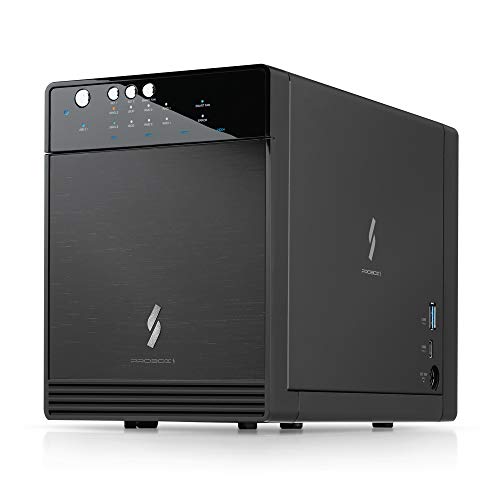
Mediasonic’s 4 Bay SATA Hard Drive Enclosure (HFR7-SU31CH) stands out with its built-in hardware RAID controller, making it an excellent choice for users who need flexible storage solutions. With support for up to 30TB per drive and compatibility across Windows, Mac OS, and Linux, it fits various setups. The USB 3.2 Gen 2 Type C connectivity guarantees fast transfer rates of up to 10Gbps, while the tool-free installation simplifies adding drives. Users enjoy its quiet operation and efficient power management, though some have faced drive recognition issues. Overall, it’s a solid option for expanding your storage capacity effectively.
Best For: Users needing reliable and expansive storage solutions for media workflows and high-capacity backups.
Pros:
- Excellent transfer speeds of up to 10Gbps via USB 3.2 Gen 2.
- Tool-free installation for easy setup of drives.
- Quiet operation and efficient power management features.
Cons:
- Some users have reported issues with drive recognition, especially with faulty drives.
- Misunderstanding exists regarding RAID capabilities; it does not support hardware RAID.
- Long-term durability is uncertain, with mixed feedback on reliability after extended use.
TERRAMASTER D6-320 External Hard Drive Enclosure

If you’re looking for a reliable solution that offers seamless data transfer and extensive storage options, the TERRAMASTER D6-320 External Hard Drive Enclosure stands out. With USB 3.2 Gen2, it delivers data transmission speeds up to 10Gbps. You can install up to six SATA HDDs or SSDs, totaling a massive 132TB capacity. Plus, its plug-and-play design makes it compatible with various operating systems. Enjoy the convenience of hot swapping, allowing for quick drive replacements without downtime. The intelligent cooling system guarantees peak performance, keeping your drives cool and quiet during operation. This enclosure is a game-changer for your storage needs.
Best For: Users who require high-capacity and fast data transfer solutions for professional storage needs.
Pros:
- High-speed data transmission with USB 3.2 Gen2, achieving speeds up to 10Gbps.
- Supports a large storage capacity of up to 132TB with six drives.
- Hot swappable feature allows for easy drive replacement without powering off the device.
Cons:
- Limited to SATA HDDs and SSDs, which may not suit users needing support for other drive types.
- Requires external power, adding to the complexity of setup compared to purely portable solutions.
- Cooling fan may generate noise, which could be a concern in quiet environments.
Syba 5 Bay Tool Less Hot Swappable HDD Enclosure (SY-ENC50118)

The Syba 5 Bay Tool Less Hot Swappable HDD Enclosure (SY-ENC50118) stands out as an ideal choice for users who need versatile storage solutions, especially those managing large data sets. Supporting both 2.5″ and 3.5″ SATA drives up to 24TB each, it provides a massive 120TB capacity. With a user-friendly tool-less design, you can easily swap drives, while LED indicators keep you informed of their status. Expect impressive transfer speeds of up to 200MB/s in various RAID configurations. Though minor issues exist, like short USB cables, overall, users appreciate its build quality and straightforward installation.
Best For: Users who require a high-capacity, versatile storage solution for managing large datasets with ease of drive swapping.
Pros:
- Tool-less design allows for quick and easy installation and removal of hard drives.
- Supports a wide range of RAID configurations for enhanced data security and performance.
- Impressive build quality and efficient cooling system ensure optimal drive performance and longevity.
Cons:
- Short USB cable length may limit placement options for the enclosure.
- Some users report issues with plastic tabs on trays and minor quality control problems.
- Software compatibility issues noted by Mac users can hinder setup and functionality.
GODO 3.5 inch Dual Bay Hard Drive Enclosure

For those seeking a versatile and efficient solution for data management, the GODO 3.5 inch Dual Bay Hard Drive Enclosure shines with its impressive support for both RAID 0 and RAID 1 configurations. Capable of accommodating up to 40TB of storage, it supports all 3.5 SATA I, II, and III HDDs and SSDs. This aluminum enclosure not only enhances heat dissipation but also guarantees solid construction. With data transfer rates of 5Gbps via USB 3.0, you’ll enjoy fast performance. Users appreciate its easy installation, though be mindful of potential RAID setup issues on certain operating systems.
Best For: Users looking for a reliable and high-capacity storage solution with RAID functionality for data management.
Pros:
- Supports up to 40TB of storage with compatibility for various 3.5 SATA HDDs and SSDs.
- Fast data transfer rates of 5Gbps via USB 3.0 Type-C protocol.
- Solid aluminum construction enhances heat dissipation and durability.
Cons:
- Potential RAID setup difficulties on certain operating systems.
- Concerns regarding fan performance and heat dissipation.
- Power-saving mode may lead to frequent powering down of the drives.
Dual Bay RAID SSD Enclosure with Clone Mode & 20Gbps Compatibility

Looking for a versatile storage solution that combines speed and redundancy? The Dual Bay RAID SSD Enclosure offers just that, supporting M.2 2280 hard drives with RAID 0 for speed, RAID 1 for redundancy, and even Clone mode for easy duplication. Its tool-free installation makes switching SSDs a breeze, while the durable aluminum casing guarantees portability and effective heat dissipation. With compatibility for up to 16TB across two drives and data transfer speeds reaching 20Gbps, it’s a solid choice. Just be cautious during setup to avoid potential data loss and verify your drives are compatible for peak performance.
Best For: Users seeking a high-performance storage solution that offers both speed and data redundancy for M.2 2280 SSDs.
Pros:
- Tool-free installation allows for easy SSD swapping and setup.
- Supports multiple RAID configurations, including RAID 0, RAID 1, and Clone mode.
- Durable aluminum casing enhances portability and heat dissipation.
Cons:
- Some users experienced data transfer speeds lower than the advertised 20Gbps.
- Limited airflow may lead to heat management concerns during extended use.
- Setup instructions can be confusing, particularly regarding thermal tape application.
4 Bay Hard Drive RAID Enclosure with Cooling Fan

Designed for users seeking robust storage solutions, the 4 Bay Hard Drive RAID Enclosure with Cooling Fan excels in versatility and performance. It supports both 2.5 and 3.5-inch HDDs and SSDs, accommodating up to 80TB of data. With eight RAID modes to choose from, you can tailor your storage to fit your needs. The built-in cooling fans guarantee peak performance while maintaining a noise level of 40-50 decibels. Though initial setup may require some patience, tool-less drive installation simplifies the process. This enclosure is perfect for those needing substantial storage without network connectivity, offering excellent reliability for personal or enterprise use.
Best For: Users needing substantial storage capacity without the complexity of network connectivity, ideal for personal or enterprise use.
Pros:
- Tool-less drive installation allows for quick setup and ease of use.
- Supports multiple RAID modes catering to various data protection and performance needs.
- Built-in cooling fans effectively maintain drive performance during heavy usage.
Cons:
- Initial setup instructions can be vague, requiring patience for configuration.
- Fan noise levels may not be suitable for noise-sensitive environments.
- RAID mode switching can lead to data loss if not managed carefully.
ORICO RAID 5 Bay HDD Enclosure (9858RU3)

The ORICO RAID 5 Bay HDD Enclosure (9858RU3) is perfect for professionals and enthusiasts needing robust data storage solutions. Supporting up to 110TB with 3.5-inch SATA disks, it offers eight RAID configurations, including RAID 5 for redundancy. The USB 3.0 interface enables fast data transfer rates of up to 235MB/s. Built from durable aluminum with an effective cooling system, it guarantees peak performance. Tool-less installation makes swapping drives easy, though some users report concerns with the cages’ sturdiness. Overall, it’s a reliable choice for high-resolution video storage and centralized data management, enhancing your storage flexibility considerably.
Best For: Professionals and enthusiasts looking for a high-capacity and versatile RAID storage solution.
Pros:
- Supports up to 110TB storage capacity with multiple RAID configurations for data redundancy and performance.
- USB 3.0 interface allows fast data transfer rates of up to 235MB/s, enhancing productivity.
- Durable aluminum construction and efficient cooling system ensure optimal performance and longevity.
Cons:
- Some users report concerns with the sturdiness of the tool-less drive cages.
- Occasional issues with temporary disconnections and data visibility when drives are added or removed.
- RAID configuration setup may require significant time, particularly for RAID 5.
Factors to Consider When Choosing Hot Swappable Raid Enclosures for PC
When choosing a hot swappable RAID enclosure for your PC, you’ll want to contemplate several key factors. Think about storage capacity options, RAID configuration types, and data transfer speed to guarantee it meets your needs. Also, don’t overlook the efficiency of the cooling system and the build quality material for durability.
Storage Capacity Options
Choosing the right storage capacity for your hot swappable RAID enclosure is essential for maximizing your data management needs. Most enclosures support individual hard drives ranging from 20TB to 30TB, allowing a total combined storage of up to 120TB or more, depending on the number of bays. You can opt for both 2.5-inch and 3.5-inch SATA HDDs and SSDs, giving you flexibility in your setup. If you need even more space, look for enclosures with daisy chaining capabilities to connect multiple units seamlessly. Remember, the maximum capacity per drive varies by model, with some supporting up to 22TB each. Carefully consider your storage needs, as your RAID mode will influence the usable capacity while ensuring data protection.
RAID Configuration Types
Understanding RAID configuration types is essential for optimizing your hot swappable RAID enclosure. RAID 0 boosts performance by splitting data across multiple drives but lacks redundancy, risking total data loss if one drive fails. RAID 1, on the other hand, mirrors data across two drives, ensuring that if one fails, the other keeps your data safe. RAID 5 combines striping with parity, needing at least three drives and allowing for one drive failure without losing data. RAID 10 merges the benefits of RAID 0 and RAID 1, requiring four drives for enhanced performance and redundancy. Finally, JBOD (Just a Bunch of Disks) lets you combine multiple drives into a single volume without redundancy, maximizing capacity but offering no performance benefits.
Data Transfer Speed
Data transfer speed is a critical factor in enhancing your experience with hot swappable RAID enclosures. When choosing one, look for units that offer speeds up to 10Gbps, especially those utilizing USB 3.2 Gen2 technology. Keep in mind that the type of drives you use matters; SSDs typically provide faster read/write speeds than traditional HDDs, with some reaching up to 510MB/s. Additionally, higher RAID configurations can optimize data transfer rates, like RAID 0, which stripes data across multiple drives for increased speed. Remember that the interface type also impacts performance; USB 3.0 supports up to 5Gbps, while advanced interfaces can double that. Real-world speeds may vary based on drive health and workload, so consider these factors carefully.
Cooling System Efficiency
When you’re selecting a hot swappable RAID enclosure, the efficiency of its cooling system can greatly impact performance and longevity. Look for enclosures with intelligent temperature-controlled fans that adjust speeds based on drive temperatures. This feature maximizes heat dissipation and prolongs drive life. Aluminum materials enhance heat dissipation compared to plastic, helping to maintain ideal temperatures during heavy data transfers. Pay attention to noise levels; some fans operate at 40-50 decibels, which might not suit noise-sensitive environments. Inadequate cooling can lead to thermal throttling, reducing data transfer speeds. Consider enclosures with dual cooling fans and multiple airflow vents for better thermal management, especially when multiple drives are in use simultaneously.
Build Quality Material
Choosing the right material for your hot swappable RAID enclosure is essential for performance and durability. Aluminum is a top choice due to its excellent thermal conductivity, helping to dissipate heat effectively during operation. Enclosures made from aluminum alloy often come with integrated cooling systems, ensuring ideal temperatures even during extended use. A robust build quality not only enhances longevity but also protects against physical damage, providing stability when swapping drives. Additionally, consider the noise levels; enclosures with plastic components can produce more vibrations and noise compared to all-metal designs. Finally, the weight of the enclosure matters—lighter materials are more portable, making it easier for you to move your system when needed. Choose wisely for better performance!
Tool-Free Installation Design
A solid build quality lays the groundwork for a reliable hot swappable RAID enclosure, but the installation design plays a significant role in user experience. Tool-free installation designs let you easily install or replace hard drives without needing extra tools, enhancing convenience and saving time. Many enclosures feature sliding mechanisms or trays for quick drive insertion or removal, perfect for users who frequently upgrade their storage. The absence of screws reduces the risk of damaging drives during installation, ensuring a safer experience. Plus, these user-friendly designs make it easy for anyone, even those with minimal technical knowledge, to manage their storage solutions effectively. This feature is especially valuable in environments requiring rapid drive changes, like data recovery scenarios.
Compatibility With Systems
Ensuring compatibility with your system is essential for making the most of a hot swappable RAID enclosure. First, check that the enclosure supports your operating systems, like Windows, Mac OS, and Linux, for smooth operation. Next, confirm the enclosure’s interface—USB 3.0, USB 3.2 Gen 2, etc.—matches your PC’s available ports to achieve ideal data transfer speeds. Make sure it accommodates the specific drive types you plan to use, such as 2.5-inch and 3.5-inch SATA HDDs or SSDs. Opt for enclosures with plug-and-play functionality to streamline the setup process across different systems. Finally, verify that the available RAID modes align with your data management strategy for effective utilization.
Power Supply Requirements
When selecting a hot swappable RAID enclosure, power supply requirements play a critical role in guaranteeing peak performance. You need a power supply that can handle the total load of all active drives, especially when using high-capacity HDDs or SSDs, which can draw significant power during peak operations. Be sure to check the power draw, as it can range from 15W to over 150W depending on your setup. Some enclosures sync power on/off with your computer, while others require manual management, so consider this for convenience. Also, remember that certain enclosures might not auto power-on after a failure, requiring your intervention. A reliable power supply is essential to prevent data loss and guarantee consistent performance.