When setting up your network, a reliable 4-port PoE injector can make a significant difference in efficiency and organization. It simplifies power and data delivery to devices like IP cameras and access points, all through a single cable. With various models available, understanding which one fits your needs is essential. Let’s explore the top options and what you should consider to guarantee you choose the best injector for your setup.
TRENDnet 65W 4-Port Gigabit PoE+ Injector (TPE-147GI)
If you’re looking to power multiple devices like access points and cameras without breaking the bank, the TRENDnet 65W 4-Port Gigabit PoE+ Injector (TPE-147GI) is an excellent choice. This injector supplies up to 30W of power to four PoE or PoE+ devices, ensuring your equipment runs smoothly. With a fanless design, it operates quietly while reducing energy consumption. You’ll appreciate its easy installation—no configuration needed—and the strong magnetic mounting plate keeps things tidy. Plus, it’s NDAA and TAA compliant, making it suitable for government use. Overall, it’s a cost-effective solution for your PoE needs.
Best For: Users looking for an affordable and efficient solution to power multiple PoE devices like access points and cameras.
Pros:
- Supplies up to 30W of power to four PoE/PoE+ devices, ensuring reliable operation.
- Fanless design allows for silent operation and reduced energy consumption.
- Easy installation with no configuration required and a strong magnetic mounting plate for tidy setups.
Cons:
- Limited to four PoE ports, which may not suffice for larger installations.
- Power output is capped at 30W per port, which may not meet the needs of high-demand devices.
- Not suitable for environments requiring extensive networking capabilities beyond basic PoE support.
TP-Link 5 Port Gigabit PoE Switch (TL-SG1005P)

The TP-Link 5 Port Gigabit PoE Switch (TL-SG1005P) is perfect for small office or home networks that require efficient power delivery to multiple devices. With four PoE+ ports, each supporting up to 30W, you can easily power IP cameras and access points. Its plug-and-play setup means you won’t need any software, making installation a breeze. The durable metal casing guarantees reliable performance, while the fanless design keeps things quiet. Users love its solid build and consistent performance, making it a great value for reliable PoE solutions. Just remember to check device compatibility with the 802.3af/at standards for seamless integration.
Best For: Small offices or home networks needing efficient power delivery to multiple devices.
Pros:
- Plug and Play: Easy installation without the need for software.
- Solid Build Quality: Durable metal casing ensures reliability and longevity.
- Fanless Design: Operates quietly, enhancing user experience in any environment.
Cons:
- Not Omada Controlled: May limit integration with certain network management systems.
- Higher Price Point: Slightly pricier than some alternatives, but justified by quality.
- Compatibility Check Required: Users must ensure devices meet 802.3af/at standards for optimal performance.
PoE Texas 4 Port PoE Injector for VoiP Phones and IP Cameras
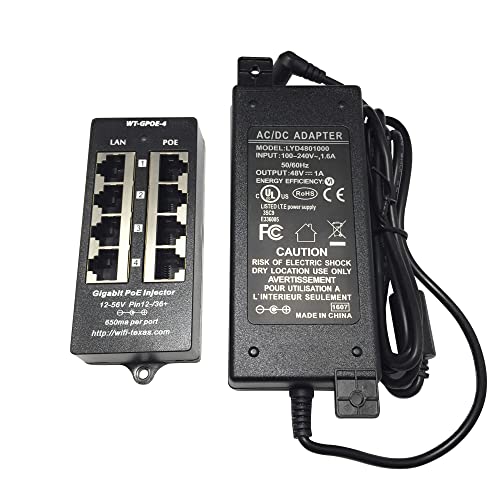
Designed to seamlessly power multiple devices, the PoE Texas 4 Port PoE Injector is ideal for businesses relying on VoIP phones and IP cameras. This gigabit passive PoE injector supports 802.3af and 802.3at standards, supplying a reliable 48V, 48W power supply. With four Data In ports and four Data + Power Out ports, it simplifies installations for up to four devices. Enjoy fast wired speeds up to 10/100/1000 Mbps without any signal loss. Plus, you’ve got a one-year replacement warranty and a 30-day return policy, ensuring peace of mind with your purchase. Don’t forget to verify compatibility with your devices!
Best For: Businesses and organizations that require reliable power for multiple VoIP phones and IP cameras.
Pros:
- Supports both 802.3af and 802.3at standards, providing versatility for various devices.
- Easy installation with four Data In and four PoE Out ports, allowing for a streamlined setup.
- Fast data transfer speeds of up to 10/100/1000 Mbps without signal loss, ensuring efficient operation.
Cons:
- Only supports passive PoE, which may not be suitable for all devices that require active PoE.
- Limited to powering four devices, which may not meet the needs of larger installations.
- Compatibility verification is necessary, requiring additional time and effort before purchase.
TP-Link TL-SF1005P 5 Port Fast Ethernet PoE Switch

For those seeking a reliable and efficient power solution for their network devices, the TP-Link TL-SF1005P 5 Port Fast Ethernet PoE Switch stands out with its four PoE+ ports, each delivering up to 30W of power. With a total PoE power budget of 67W, you can easily power multiple devices simultaneously. Its Plug and Play setup guarantees you won’t need any complicated software. The fanless design keeps operations quiet, while the sturdy metal casing assures durability. Plus, the 3-year warranty and dedicated technical support provide peace of mind for your investment in network stability.
Best For: Users looking for a cost-effective PoE switch to power multiple network devices such as IP cameras and VoIP phones.
Pros:
- Easy Setup: Plug and Play design requires no software installation, making it user-friendly.
- High PoE Power Budget: Offers a total PoE power budget of 67W, allowing multiple devices to be powered simultaneously.
- Durable Construction: Sturdy metal casing ensures long-lasting use, and the fanless design operates quietly.
Cons:
- Limited Port Count: Only 5 ports may not be sufficient for larger networks.
- Speed Downgrade in Extend Mode: Data transmission speed reduces to 10 Mbps when using the Extend Mode for longer distances.
- No Managed Features: Lacks advanced management features found in higher-end switches, which may limit customization for network professionals.
PoE Texas 4 Port PoE Injector with 48V Power Supply
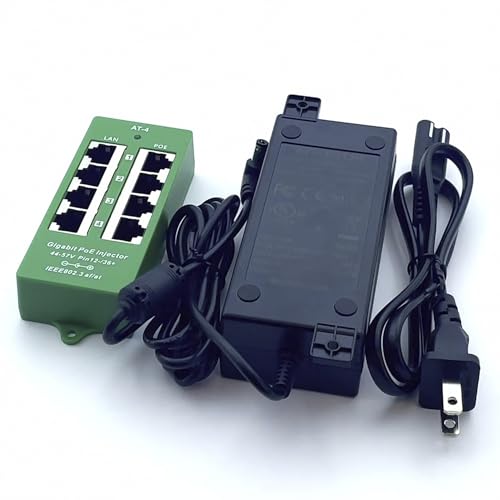
If you’re looking to expand your network seamlessly, the PoE Texas 4 Port PoE Injector with a 48V power supply is an excellent choice. This active mode injector delivers up to 30W per port, making it perfect for WiFi access points, IP cameras, and VoIP phones. It’s compatible with 802.3at/af standards, ensuring intelligent power negotiation and device protection. With a compact design, you can easily wall-mount it for convenient integration. Plus, the robust safety features, including self-resetting fuses and overload protection, offer peace of mind. Enjoy reliable performance with shielded Gigabit RJ45 ports supporting data throughput up to 1000Mbps.
Best For: Businesses and home users looking to power multiple PoE devices like WiFi access points, IP cameras, and VoIP phones efficiently.
Pros:
- Cost-effective solution for adding Power over Ethernet capability to non-PoE switches.
- Smart power management with intelligent device protection to prevent damage to non-PoE equipment.
- High data throughput with shielded Gigabit RJ45 ports supporting speeds up to 1000Mbps.
Cons:
- Limited to 4 ports, which may not be sufficient for larger setups.
- Requires a 48V power supply, which may not be compatible with all existing infrastructure.
- Wall-mountable design may not be ideal for all installation environments.
PoE Texas 4 Port PoE Injector for VoIP Phones, WiFi Access Points, IP Cameras

The PoE Texas 4 Port PoE Injector stands out as an ideal solution for those looking to power multiple devices like VoIP phones, WiFi access points, and IP cameras simultaneously. It offers Gigabit Passive Power Over Ethernet and supports IEEE 802.3af and 802.3at devices. With four Data In and four Data + Power Out ports, you can easily connect your devices. The installation is straightforward, thanks to its multi-port design and wall-mounting tabs. Although it lacks a power supply, it provides reliable performance, earning an average rating of 3.8 stars. Plus, it comes with a 1-Year warranty and customer support.
Best For: Users needing to power multiple VoIP phones, WiFi access points, or IP cameras in a single network setup.
Pros:
- Supports IEEE 802.3af and 802.3at devices, ensuring compatibility with a wide range of equipment.
- Simple installation with a multi-port design and wall-mounting tabs for easy setup.
- 1-Year warranty and customer support provide peace of mind for users.
Cons:
- No power supply included, which may require additional purchases.
- Specific compatibility required for devices, necessitating checks against manufacturer specifications.
- Average rating of 3.8 stars indicates some mixed customer feedback regarding performance.
PoE Texas 4 Port PoE Injector with 56V Power Supply

With its ability to support up to four PoE devices simultaneously, the PoE Texas 4 Port PoE Injector with a 56V Power Supply is an ideal choice for small to medium-sized businesses looking to streamline their network setups. This injector delivers up to 60 watts, ensuring reliable power for IP cameras, desktops, and WiFi access points. Its plug-and-play design simplifies installation, while gigabit data transfer rates maintain signal quality over 328 feet. Plus, with a 1-Year warranty and responsive customer support, you can feel confident in your purchase. Users rave about its performance and reliability, making it a solid investment for your network.
Best For: Small to medium-sized businesses looking to efficiently power and connect multiple PoE devices like IP cameras and WiFi access points.
Pros:
- Supports up to four PoE devices simultaneously with reliable 60 watts of power delivery.
- Plug-and-play design simplifies installation and is wall mountable for convenience.
- High data transfer rates of 1000 Mbps maintain signal quality over long distances (up to 328 feet).
Cons:
- Limited to four ports, which may not be sufficient for larger setups requiring more devices.
- Plastic casing may not be as durable as metal alternatives for heavy usage environments.
- Specific to PoE devices, meaning additional non-PoE devices would require separate power solutions.
PoE Texas 4 Port PoE/PoE+ Injector

Ideal for powering multiple devices, the PoE Texas 4 Port PoE/PoE+ Injector delivers a robust 120 watts of power, making it perfect for IP cameras, desktop phones, and WiFi access points. It supports up to four PoE devices, negotiating power delivery to protect lower-powered equipment. With gigabit data rates and a maximum distance of 328 feet, you won’t sacrifice performance. Its plug-and-play design simplifies installation, while the wall-mountable feature enhances versatility. Rated 4.4 out of 5 stars, this injector comes with a 1-year replacement warranty and dedicated customer support, ensuring you stay connected without hassle.
Best For: Those looking to power multiple IP cameras, desktop phones, or WiFi access points with a reliable and efficient PoE solution.
Pros:
- Supports up to 4 PoE devices with the ability to negotiate power delivery, protecting lower-powered devices.
- Gigabit data rates and a maximum distance of 328 feet ensure high performance and signal quality.
- Wall-mountable design and plug-and-play functionality simplify installation and enhance versatility.
Cons:
- Limited to 4 ports, which may not be sufficient for larger setups requiring more devices.
- Heavier weight (1.9 pounds) compared to some other PoE injectors, potentially affecting installation options.
- Higher power output (120W) may not be necessary for all users, resulting in potential overkill for smaller setups.
StarTech.com 4 Port Gigabit PoE+ Injector

For professionals needing a reliable power source for multiple devices, the StarTech.com 4 Port Gigabit PoE+ Injector stands out as a top choice. This compact, wall-mountable injector delivers up to 30.8 watts per port, ensuring your devices stay powered efficiently. With plug-and-play installation, it automatically detects powered devices, simplifying setup. The four PoE and Ethernet ports support a maximum cable length of 328 feet, enabling versatile connections. Plus, its durable metal housing and LED indicators keep you informed about power status. Whether you’re powering cameras or access points, this injector is designed for high performance and reliability.
Best For: Professionals needing a reliable power source for multiple devices in a compact and efficient design.
Pros:
- Compact and wall-mountable design for easy installation and space-saving.
- Delivers up to 30.8 watts per port, making it suitable for high PoE needs like cameras and access points.
- Plug-and-play setup with automatic device detection simplifies the installation process.
Cons:
- Misunderstanding of functionality as it is not a switch, which may lead to confusion for some users.
- Concerns about power connection instructions, particularly regarding power outages.
- Lack of Ethernet link indicators may leave users uncertain about connectivity status.
4-Ports PoE Injector Midspan for IP Cameras and VOIP Phones

The 4-Port PoE Injector Midspan is a perfect solution for those looking to power multiple IP cameras and VOIP phones seamlessly. With a 48V 65W power supply, it supports up to four devices over Ethernet wiring, extending up to 328 ft. This injector is compatible with IEEE802.3af devices, ensuring efficient operation for your network. It features four LAN input and output ports, distributing power equally across all connections. The resettable fuse protection and LED indicators enhance safety and usability. Simply connect your devices using CAT-5/6/7 cables, and you’re ready to go. Experience hassle-free connectivity today!
Best For: Those seeking a reliable and efficient solution to power multiple IP cameras and VOIP phones over Ethernet.
Pros:
- Compact and lightweight design makes it easy to install and manage.
- Supports up to four devices simultaneously, providing flexibility for network expansion.
- Equipped with resettable fuse protection and LED indicators for enhanced safety and monitoring.
Cons:
- Some users have reported issues with mounting and the reliability of the power cable.
- Compatibility problems may arise with specific devices not rated for 48V.
- Limited to 10/100Mbps operation, which may not meet the needs of high-speed network users.
Factors to Consider When Choosing 4 Port PoE Injectors for PC
When you’re choosing a 4-port PoE injector for your PC, there are several key factors to keep in mind. You’ll want to take into account the power output capacity, compatibility with your devices, and how easy it is to install and set up. Don’t forget to check the design, build quality, and warranty support to guarantee you make a smart choice.
Power Output Capacity
Power output capacity is a critical factor to evaluate in choosing 4-port PoE injectors for your PC setup. Standard models typically supply up to 30W per port for PoE+ (IEEE 802.3at) devices, making them suitable for various powered devices like IP cameras and access points. A typical injector can deliver a combined power budget ranging from 65W to 120W, allowing you to power multiple devices simultaneously without issues. It’s important to guarantee the injector supports both PoE (802.3af) and PoE+ (802.3at) standards for adequate power delivery. Higher wattage ratings, like 60W or 120W, provide the flexibility to support high-demand devices or several lower-demand ones, enhancing your network’s versatility while matching the voltage output of 48V to connected devices.
Compatibility With Devices
Selecting a 4-port PoE injector means ensuring compatibility with your devices. Start by checking the power standards; for most, you’ll want an injector that supports IEEE 802.3af for standard PoE or IEEE 802.3at for PoE+. Make sure it supplies the correct voltage, typically 48V, to prevent any damage or operational issues. Next, evaluate the total power budget—aim for around 65W for all four ports to power devices simultaneously without hiccups. Don’t overlook the data transfer rate; choose one that supports Gigabit speeds (10/100/1000 Mbps) to match your device requirements. Finally, confirm that the maximum cable length of up to 100 meters (328 feet) works for your installation needs, especially for distant devices.
Installation and Setup
Installing a 4-port PoE injector is typically straightforward, thanks to its plug-and-play design that requires no complex setup. Just verify compatibility with your network devices by checking if they adhere to standards like IEEE 802.3af or 802.3at, guaranteeing proper power delivery. When setting it up, connect the injector’s data input ports to a suitable non-PoE switch or router using CAT-5/6/7 cables for peak performance. Many injectors come with wall-mountable designs, offering flexible placement and reducing clutter. Also, look for built-in indicators on the injector that show power status and PoE activity; these can be invaluable for troubleshooting during installation. Following these steps will help you get your devices powered efficiently.
Design and Build Quality
When choosing a 4-port PoE injector for your PC, design and build quality play essential roles in ensuring peak performance and longevity. Look for a compact and lightweight design that makes installation straightforward and keeps your workspace clutter-free. A sturdy metal casing is critical, as it protects internal components from environmental factors and enhances durability. Opting for a fanless design can also reduce operational noise and energy consumption, creating a quieter environment. Consider wall-mountable options for flexible installation, allowing you to optimize your space while maintaining easy access to power and data connections. Finally, LED indicators for power and port status provide real-time feedback on operational status, helping you monitor your devices effectively.
Warranty and Support
Ensuring you have solid warranty and support options is essential for your peace of mind when purchasing a 4-port PoE injector for your PC. Look for a manufacturer that offers a warranty period of 1 to 3 years, as this indicates their confidence in the product’s durability. Make sure the warranty covers replacement or repair for defects, which can save you from unexpected costs. Accessible customer support, like phone assistance, is vital for troubleshooting issues during installation or operation. Check customer feedback regarding the responsiveness of the technical support team, as prompt help can enhance your experience. Finally, confirm the availability of a return policy, typically lasting 30 days or longer, to protect your investment.
Cost-Effectiveness and Value
While you might be tempted to invest in multiple PoE switches, opting for a 4-port PoE injector can save you both money and hassle. These injectors considerably cut installation costs, especially if you only need a few PoE ports. Many models provide up to 30W of power per port, allowing efficient power delivery without extra sources. Typically priced between $50 and $100, they offer an affordable solution for small to medium networks. Plus, features like fanless operation and compact designs minimize maintenance costs and conserve space. By centralizing power delivery through existing Ethernet cables, you’ll reduce wiring clutter and lower overall expenses, making the 4-port PoE injector a smart investment for your setup.