ACEMAGIC K1 Mini PC review: this compact AMD system is built for everyday productivity, multi-monitor desks, and small always-on setups.
If you want a tiny Windows PC that still offers useful expansion and modern connectivity, it is a sensible candidate.
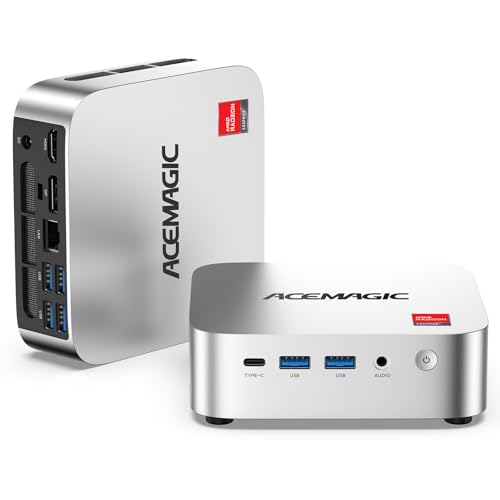
ACEMAGIC K1 Mini PC Review Summary
The ACEMAGIC K1 Mini PC makes the most sense for buyers who want a small desktop for office work, web browsing, online learning, media playback, and light multitasking without moving into a bulky tower.
Its AMD Ryzen R2544 processor, Radeon graphics, triple 4K display support, and practical port selection give it a clear productivity angle rather than a pure budget-toy feel.
Verdict: this is a good fit for a compact work machine, a media hub, or a light home server where size, connectivity, and upgradability matter more than raw workstation power.
Review Scorecard
| Category | Score | Why it matters |
|---|---|---|
| Everyday productivity | 8/10 | The Ryzen R2544 is positioned for office apps, browsing, and general multitasking. |
| Display flexibility | 9/10 | Triple 4K output across HDMI, DisplayPort, and USB-C is a strong desk setup feature. |
| Connectivity | 8/10 | USB-C 10Gbps, six USB 3.2 ports, Gigabit Ethernet, WiFi 5, and Bluetooth 4.2 cover most needs. |
| Expandability | 8/10 | Dual DDR4 SO-DIMM slots and M.2 SSD expansion give it room to grow. |
| Home server potential | 8/10 | Auto power on, RTC wake, and Wake-on-LAN are genuinely useful for always-on roles. |
| Cooling and stability | 7/10 | The upgraded cooling system is a good sign for sustained daily workloads. |
| Value for practical buyers | 8/10 | The feature mix is focused on usefulness instead of unnecessary extras. |
Key Features and Specifications of ACEMAGIC K1 Mini PC
The headline feature is the AMD Ryzen R2544, a 4-core, 8-thread chip with a 3.35GHz base clock and boost up to 3.7GHz.
That places the K1 squarely in the everyday productivity class: enough for office software, tab-heavy browsing, streaming, and light creation work, but not a machine that should be bought for heavy rendering or demanding gaming.
The integrated Radeon graphics are part of the pitch.
ACEMAGIC positions them as a step up from entry-level N-series systems, and the listing emphasizes smoother visuals for office tasks, emulators, and media playback.
In buyer terms, that means the K1 is trying to deliver a more comfortable experience than the absolute cheapest mini PCs while still staying compact and efficient.
Memory and storage are modest out of the box but sensible for the category: 8GB DDR4 RAM and a 256GB M.2 SSD.
The important detail is expansion.
Dual DDR4 SO-DIMM slots support up to 32GB of RAM, and storage can be expanded up to 4TB.
That makes the K1 easier to live with long term than fixed-config mini PCs that quickly hit their limits.
Port selection is one of the strongest parts of the design.
ACEMAGIC lists six USB 3.2 ports, including a USB-C Gen 2 port rated up to 10Gbps.
The USB-C port also supports DP 1.4 video output and PD power delivery, which helps simplify a desk setup and keeps the machine flexible for modern peripherals and external storage.
Display support is another clear selling point.
The K1 can drive up to three 4K monitors through HDMI 2.0, DisplayPort 1.4, and USB-C 3.2.
For a compact PC, that is a practical productivity feature.
It is especially relevant if you work with spreadsheets, monitoring dashboards, remote desktops, or a media/control station setup.
Networking and always-on features point to use beyond the standard desktop role.
You get Gigabit Ethernet, WiFi 5, and Bluetooth 4.2, plus Auto Power On, RTC Wake, and Wake-on-LAN.
Those features make the K1 more attractive for NAS-style use, home server tasks, firewall roles, or digital signage where unattended startup and remote wake behavior matter.
The cooling design also deserves mention.
ACEMAGIC describes an upgraded system with a fan running above 2000 RPM, an aluminum thermal profile, and dual air outlets.
That does not guarantee silent operation, but it does suggest the machine is designed to stay stable during extended use rather than peak and throttle in a cramped case.
Pros and Cons of ACEMAGIC K1 Mini PC
Pros
- Strong compact-office focus. The Ryzen R2544 and Radeon graphics are aimed at practical daily workloads.
- Excellent monitor support for the size. Triple 4K display output is a meaningful advantage for productivity users.
- Useful expansion path. Dual RAM slots and expandable storage make it less disposable than fixed-entry mini PCs.
- Modern desk connectivity. USB-C 10Gbps, six USB 3.2 ports, Ethernet, WiFi, and Bluetooth cover real-world setups.
- Always-on features add flexibility. Wake-on-LAN and RTC wake are useful for home-server-style roles.
Cons
- Not a performance monster. The specs point to office and light-use strength, not heavy creation or gaming.
- Base memory is limited. 8GB is workable, but many buyers will want to upgrade sooner rather than later.
- WiFi 5 and Bluetooth 4.2 are serviceable, not cutting-edge. They are fine, but not the latest standards.
- The listing leans on feature density. Buyers should still judge it by the actual workload, not the bullet list alone.
Who Should Buy ACEMAGIC K1 Mini PC?
The K1 is a smart buy for office users who want a small desktop that can disappear behind a monitor or sit neatly on a desk while handling normal work with a little headroom.
It also suits students, remote workers, and general home users who need a compact Windows 11 Pro machine for browsing, documents, video calls, and media.
It is also a credible option for people building a multi-monitor workstation.
The triple 4K output support gives it a real advantage for dashboards, finance work, admin tasks, support stations, and any setup where screen space is more valuable than raw GPU power.
Buyers who may also appreciate it include hobbyists setting up a light home server, NAS-adjacent box, or automation node.
The always-on features are not decorative; they are the kinds of details that make a mini PC easier to integrate into a networked role.
Who should skip it?
Anyone expecting strong gaming performance, demanding creative workloads, or workstation-grade throughput should look higher up the stack.
Likewise, if you want the latest wireless standards or a machine that arrives with generous memory headroom, this base configuration may feel conservative.
ACEMAGIC K1 Mini PC Performance and Use Cases
Everyday Productivity
For office suites, browser tabs, cloud tools, and video streaming, the K1 is built around the right priorities.
The 4-core, 8-thread CPU architecture is not flashy, but it is aligned with the actual use case the listing describes: responsive day-to-day computing with enough room for routine multitasking.
Multi-Monitor Workstations
The triple 4K support is the feature that makes the K1 stand out in practical terms.
A mini PC that can drive three displays cleanly gives you more flexibility than many entry-level desktops, and that matters if your workflow depends on side-by-side windows, dashboards, or communication tools.
Home Server and Network Roles
Wake-on-LAN, RTC wake, and Auto Power On make the K1 more than just a small office box.
Those functions are especially useful if you want the machine to reboot cleanly after power events or stay reachable in a setup that needs remote management.
Expansion and Longevity
Dual DDR4 slots and expandable M.2 storage are the kind of details that extend the useful life of a mini PC.
Even if the shipped configuration feels basic, the platform gives you a path to improve responsiveness and storage capacity later without replacing the whole system.
Alternatives to ACEMAGIC K1 Mini PC
If you want a comparable mini PC from a more established mini-PC line, look at Beelink mini PC options.
Beelink is often considered when buyers want a compact Windows desktop with strong everyday performance and a broad model range.
If you prefer another common mini-PC brand with a similar compact-office focus, check MINISFORUM mini PCs.
That line is worth comparing if your priority is a small footprint with configurable hardware choices.
If you want a more mainstream desktop alternative rather than a mini PC, Lenovo ThinkCentre small form factor PCs are a reasonable comparison point for buyers who value business-oriented reliability and serviceable office performance.
Is ACEMAGIC K1 Mini PC Worth It?
Yes, if your priority is a compact Windows machine for productivity, display flexibility, and light always-on duties.
The ACEMAGIC K1 Mini PC looks well thought out for desk work, home office use, and small server-style roles, and its triple 4K support plus expansion options make it more interesting than a basic entry mini PC.
It is not the right choice for buyers who want serious gaming power or heavy creator performance, but that is not the point of the design.
For the audience it targets, the K1 is worth considering because it focuses on the features that actually make a mini PC useful every day.