If you’re serious about 3D modeling, investing in the right tools can make all the difference. The 3Dconnexion SpaceMouse series offers a range of options designed to enhance your workflow and boost productivity. With features like 6-Degrees-of-Freedom navigation and customizable buttons, each model caters to different needs and preferences. So, which SpaceMouse is the best fit for you? Let’s explore the top 10 options and find out.
3Dconnexion SpaceMouse Wireless Bluetooth Edition

The 3Dconnexion SpaceMouse Wireless Bluetooth Edition is an excellent choice for professionals and enthusiasts in 3D applications, like engineers and architects. Its symmetrical design suits both left and right-handed users, making it versatile for anyone. With a patented 6-Degrees-of-Freedom sensor, you can easily pan, zoom, and rotate 3D models with one hand. The Bluetooth connectivity is energy-efficient, offering up to a month of battery life on a single charge. Plus, you can customize it with two programmable buttons and 3DxWare®10 software, enhancing your workflow. Lightweight and portable, it also comes with a durable carry case for easy transport.
Best For: Professionals and enthusiasts in 3D applications, such as engineers and architects, who require precise navigation and control.
Pros:
- Patented 6-Degrees-of-Freedom sensor allows for intuitive manipulation of 3D models.
- Bluetooth connectivity provides energy-efficient data transfer with up to a month of battery life.
- Customizable features with programmable buttons and 3DxWare®10 software enhance user experience.
Cons:
- May take time to get accustomed to for users new to 3D navigation tools.
- Limited to specific software compatibility for full customization features.
- The symmetrical design may not be comfortable for all users over extended periods.
3Dconnexion SpaceMouse Pro Wireless BT

Engineers, architects, and 3D artists will find the 3Dconnexion SpaceMouse Pro Wireless BT an indispensable tool for enhancing their workflow. With its six-degrees-of-freedom sensor, you can navigate your 3D models effortlessly. The rechargeable 1100 mAh battery offers wireless and USB-C connectivity, ensuring you stay untethered while working. Its ergonomic design provides comfort during long hours of use, and customizable buttons let you tailor shortcuts to your needs. While some users mention a learning curve, the overall satisfaction with its functionality in CAD software like Fusion 360 and SolidWorks is evident. Experience improved productivity with this powerful tool.
Best For: Engineers, architects, and 3D artists seeking to enhance their productivity and efficiency in 3D modeling.
Pros:
- Ergonomic design provides comfort during extended use.
- Customizable buttons allow for tailored shortcuts in CAD software.
- Six-degrees-of-freedom sensor enables effortless navigation of 3D models.
Cons:
- Some users experience a learning curve with the device.
- Reports of connectivity issues, particularly with Apple silicon Macs.
- Customer service responsiveness has been criticized by users.
3Dconnexion SpaceMouse Wireless Kit 2 with Bluetooth

If you’re a designer, engineer, or 3D artist seeking enhanced control and precision in your workflow, the 3Dconnexion SpaceMouse Wireless Kit 2 with Bluetooth is a game-changer. Weighing just 1.5 pounds, its compact design fits easily in your bag, complemented by a durable multilayer carrying case. With Bluetooth and USB-C connectivity, you can enjoy seamless interaction without the hassle of wires. The built-in scrolling wheel lets you navigate effortlessly through browser tabs. Backed by a perfect 5.0 customer rating, this device promises reliability and performance. Plus, Amazon offers a 30-day return policy for your peace of mind.
Best For: Designers, engineers, and 3D artists seeking enhanced control and precision in their workflow.
Pros:
- Compact and portable design with a multilayer carrying case for durability.
- Seamless connectivity through Bluetooth and USB-C, eliminating the hassle of wires.
- High customer satisfaction with a perfect 5.0 rating, indicating reliability and performance.
Cons:
- Limited color options available for personal customization.
- Weight may be slightly heavy for some users who prefer ultra-light devices.
- Battery life not specified, which may concern users looking for long-term usage without recharging.
3Dconnexion Space Mouse Enterprise (3DX-700056)
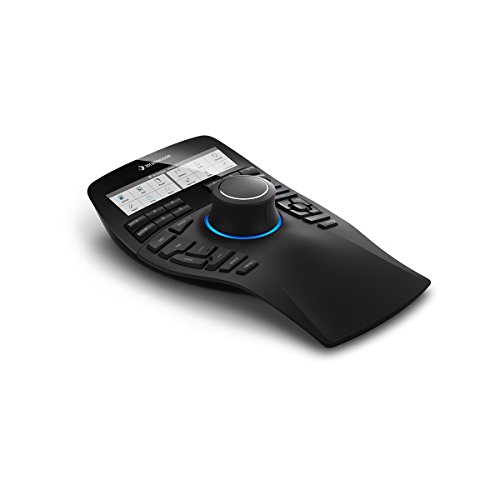
For professionals immersed in 3D modeling and design, the 3Dconnexion Space Mouse Enterprise (3DX-700056) stands out with its six-degrees-of-freedom (6DoF) sensor, providing intuitive and precise navigation. You’ll appreciate the 31 programmable keys, including 12 Intelligent Function Keys that adapt to your software, enhancing your workflow. The color LCD displays icons from application toolbars, making tasks seamless. Weighing 2.8 pounds and ergonomically designed, it remains stable on your desk. With a three-year warranty and compatibility with various 3D applications, this device is a worthy investment for elevating your design experience and boosting productivity.
Best For: Professionals in 3D modeling and design seeking enhanced navigation and productivity with customizable tools.
Pros:
- Ergonomically designed for stability and comfort during extended use.
- Features 31 programmable keys, including Intelligent Function Keys for tailored functionality based on the application.
- Seamless compatibility with a variety of 3D applications, improving workflow efficiency.
Cons:
- Some users report issues with specific software compatibility.
- A few instances of device malfunctions, such as continuous zooming, have been noted.
- The price may be considered high by some users, although many acknowledge its value for professional use.
3Dconnexion SpaceMouse Enterprise Kit 2

Designed for professionals seeking precision and ease, the 3Dconnexion SpaceMouse Enterprise Kit 2 is the ideal choice for architects, designers, and engineers who demand high-quality performance in their 3D modeling tasks. Weighing 3.95 lbs and featuring a sleek black design, it’s both stylish and functional. With a wireless Bluetooth/RF connection, you’ll enjoy seamless navigation across Windows and macOS platforms. Its seven customizable buttons and scroll wheel enhance your workflow, ensuring quick access to essential functions. Backed by excellent customer satisfaction and a reliable warranty, this kit is a fantastic investment for elevating your 3D modeling experience.
Best For: Professionals such as architects, designers, and engineers seeking high-quality performance in 3D modeling tasks.
Pros:
- Excellent build quality with high-grade materials ensuring durability.
- Customizable buttons and scroll wheel enhance workflow efficiency.
- Wireless Bluetooth/RF connection provides seamless navigation across multiple operating systems.
Cons:
- Weight of 3.95 lbs may be cumbersome for some users.
- Limited to Windows and macOS, excluding other operating systems.
- Higher restocking fees may apply for customer misuse or tampering.
3Dconnexion 3DX-700040 SpaceMouse Pro 3D Mouse
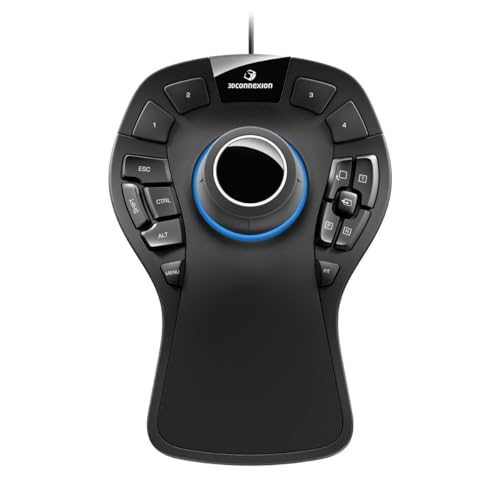
The 3Dconnexion 3DX-700040 SpaceMouse Pro 3D Mouse is an excellent choice for CAD professionals seeking to enhance their 3D modeling efficiency. Weighing 1.47 pounds and measuring 204 x 142 x 58mm, its ergonomic design helps reduce shoulder strain. The 6Dof sensor allows you to pan, orbit, and zoom simultaneously, while 15 programmable keys can be customized for your favorite CAD applications. Users report completing tasks 2-3 times faster. It’s compatible with Windows, macOS, and Linux, making it a versatile tool for any setup. Just remember to check software compatibility before purchasing for the best experience.
Best For: CAD professionals looking to enhance their 3D modeling efficiency and reduce physical strain during prolonged use.
Pros:
- Ergonomic design helps reduce shoulder strain and finger pain during extended use.
- Customizable buttons improve workflow by allowing quick access to frequently used commands in various CAD applications.
- 6Dof sensor enables simultaneous panning, orbiting, and zooming for a more intuitive modeling experience.
Cons:
- Some users report issues with specific software compatibility, which may limit functionality with certain programs.
- Learning curve may be steep for new users, requiring an adaptation period before achieving full efficiency.
- No power switch means it may draw power when not in use, potentially leading to battery drain.
3Dconnexion SpaceMouse Office RF Wireless Mouse

Engineers, architects, and 3D creators will find the 3Dconnexion SpaceMouse Office RF Wireless Mouse an invaluable tool for maneuvering complex designs and models. This compact, lightweight mouse offers seamless navigation in 3D applications, allowing you to sculpt, design, and refine your projects with ease. With its wireless capability—including Bluetooth and USB Type-A connectivity—you can enjoy freedom of movement without the clutter of wires. Users appreciate the intuitive design, leading to improved efficiency in their workflows. With an impressive average rating of 4.6 stars from 82 reviews, this mouse is a reliable choice for anyone looking to elevate their 3D modeling experience.
Best For: Professionals and enthusiasts like engineers, architects, and 3D creators who need an efficient tool for navigating and designing in 3D applications.
Pros:
- Intuitive design enhances user experience and workflow efficiency.
- Wireless connectivity (Bluetooth and USB Type-A) provides freedom of movement without the clutter of wires.
- Compact and lightweight design makes it easy to use and transport.
Cons:
- Battery life may require regular monitoring and charging, depending on usage.
- Limited compatibility with some older software or applications.
- Price point may be higher compared to standard mice, which could be a consideration for budget-conscious users.
3Dconnexion CadMouse Pro Wireless Mouse

For CAD professionals seeking precision and comfort, the 3Dconnexion CadMouse Pro Wireless Mouse stands out with its ergonomic design and advanced features. You’ll appreciate the full-size, right-handed shape that fits naturally in your hand, reducing strain during long design sessions. With a 7200 dpi optical sensor and seven customizable buttons, it offers exceptional control for all your CAD projects. The Smart Mouse Wheel 2 enhances scrolling, while the USB-C charging guarantees you stay connected. Weighing 8.8 ounces, it’s stable and reliable. Plus, with an average battery life of two months, you can focus on your work without interruption.
Best For: CAD professionals who need a comfortable and precise mouse for extensive design sessions.
Pros:
- Ergonomic design reduces strain during long use.
- High precision with a 7200 dpi optical sensor and customizable buttons.
- Long battery life averaging two months allows for uninterrupted workflow.
Cons:
- Some users may have difficulty adjusting to the extra buttons.
- Reports of software driver installation problems for certain users.
- Memory issues noted by a few customers impacting performance.
3Dconnexion CadMouse Compact Wireless

Engineers and designers looking for a compact and efficient tool will find the 3Dconnexion CadMouse Compact Wireless to be an ideal choice. Its ergonomic design fits your hand naturally, reducing strain during long hours of CAD work. With Bluetooth connectivity, you can enjoy a clutter-free workspace, and the 7 buttons—5 of which are programmable—allow for customized shortcuts. While its optical movement detection provides precise control, some users may find the scroll wheel less effective for CAD applications. Overall, this mouse delivers solid performance and reliability, making it a great portable option for CAD professionals.
Best For: Engineers and CAD professionals seeking a compact, ergonomic mouse for extended design sessions.
Pros:
- Ergonomic design reduces wrist strain during long hours of use.
- Bluetooth connectivity eliminates wire clutter for a cleaner workspace.
- Customizable buttons enhance workflow efficiency with personalized shortcuts.
Cons:
- Compact size may not be comfortable for all users, especially those with larger hands.
- Scroll wheel functionality is criticized as ineffective for CAD applications.
- Some users report discomfort after extended use despite ergonomic design.
3Dconnexion SpacePilot Pro 3D Mouse 3DX-700036

The 3Dconnexion SpacePilot Pro 3D Mouse 3DX-700036 stands out with its 6-Degrees-of-Freedom (6DoF) sensor, making it an ideal choice for professionals immersed in 3D modeling and design. Its ergonomic design guarantees comfort during extended sessions, while customizable buttons and intelligent function keys streamline your workflow. You’ll appreciate the Dual-Function QuickView Keys for easy access to various model views, enhancing your error detection. Although it requires a traditional mouse for editing, its compatibility with programs like AutoCAD and Blender makes it a valuable addition to your setup. Just be ready for a slight learning curve!
Best For: Professionals who regularly work with 3D modeling software and require enhanced navigation and workflow efficiency.
Pros:
- Ergonomic design provides superior comfort for extended use.
- Customizable buttons and intelligent function keys improve workflow by recognizing active applications.
- Dual-Function QuickView Keys facilitate easy access to different model views for better error detection.
Cons:
- Some users report inconsistent driver support, particularly with certain applications like Zbrush.
- It is not a replacement for a traditional mouse, as it primarily aids in viewport navigation.
- Initial learning curve may deter casual users from fully utilizing its features.
Factors to Consider When Choosing the 3dconnexion Spacemouse for PC
When you’re choosing a 3Dconnexion SpaceMouse for your PC, consider factors like ergonomics and comfort to guarantee long hours of use are pleasant. You’ll also want to look at connectivity options, programmable buttons, and sensor precision to match your workflow. Finally, don’t forget to check software compatibility for seamless integration with your favorite applications.
Ergonomics and Comfort
Choosing the right 3Dconnexion SpaceMouse hinges on its ergonomic design, as this can greatly reduce strain during long modeling sessions. Look for models featuring contours that align with your natural hand position for ideal comfort. A soft-coated hand rest can further enhance your experience, minimizing wrist fatigue during extended use. The mouse’s weight and stability also matter; a well-balanced device prevents unnecessary movement, providing a solid base for your work. If you have larger or smaller hands, an adjustable design is essential for accommodating different sizes. Finally, customizable buttons allow you to set personalized shortcuts, reducing repetitive strain by cutting down on awkward hand movements or unnecessary keyboard reaching. Prioritize these factors to maximize your comfort and productivity.
Connectivity Options
Several connectivity options are available for 3Dconnexion SpaceMouse models, making it easy to find one that fits your needs. Many models feature Bluetooth technology, offering a wireless experience that reduces cable clutter while ensuring a reliable connection. If you prefer a wired option, certain models provide uninterrupted power and quick charging via a USB cable. Additionally, some SpaceMouse models allow you to use a standard mouse simultaneously, enhancing your workflow flexibility. However, it’s essential to check compatibility with your operating system and software, as some models may have connectivity limitations with specific platforms or applications. By considering these factors, you can choose a SpaceMouse that perfectly complements your 3D modeling experience.
Programmable Buttons
Programmable buttons on the 3Dconnexion SpaceMouse can greatly enhance your workflow, allowing you to customize functions and shortcuts that cater specifically to your software needs. Depending on the model you choose, you’ll find a range of programmable buttons—like 2 on the SpaceMouse Wireless and up to 31 on the SpaceMouse Enterprise. This flexibility means you can map application commands, create radial menus, and assign macros, making your 3D modeling tasks more efficient. Users often report that these buttons cut down the time spent maneuvering through menus, boosting productivity and streamlining the design process. Additionally, some models feature intelligent function keys that recognize software automatically, ensuring the buttons adapt seamlessly to your current application for an even smoother experience.
Sensor Precision
When selecting the right 3Dconnexion SpaceMouse for your needs, sensor precision should be a top consideration. The patented 6-Degrees-of-Freedom (6DoF) sensor allows you to manipulate digital content and camera positions with impressive accuracy. This feature enables you to pan, zoom, and rotate 3D models easily, enhancing your workflow considerably. You’ll appreciate how the sensor supports simultaneous movement in multiple directions, which is essential for detailed CAD tasks. Users often report completing projects 2-3 times faster than with traditional input methods, thanks to the high precision. Plus, you can customize the sensor’s sensitivity to match your preferences and software requirements, ensuring an efficient and tailored experience every time you work.
Software Compatibility
Selecting the right 3Dconnexion SpaceMouse hinges considerably on software compatibility. You’ll want to verify it’s tailored for the specific CAD or 3D modeling software you plan to use, like SolidWorks, AutoCAD, or Blender, as different models support various applications. Many SpaceMouse devices include customization software, allowing you to set button functions suited to your workflow, which can boost efficiency. Also, check for intelligent function keys that adapt to the active application, providing context-specific commands. Don’t forget to take into account operating system compatibility, as some models may not fully support Windows, macOS, or Linux. Finally, reading user feedback can help you identify any issues or limitations with particular 3D applications when using the SpaceMouse.
Size and Weight
Understanding software compatibility is just one part of choosing the right 3Dconnexion SpaceMouse; size and weight are equally important factors. The dimensions of these devices can vary greatly. For instance, the SpaceMouse Wireless Bluetooth Edition is compact at 78 x 78 x 0.1 inches, making it great for portability. Weight also plays an essential role; the SpaceMouse Pro Wireless BT weighs 2.25 pounds, which might affect your comfort during long sessions. If you prefer something lighter, the SpaceMouse Wireless Kit 2 at 1.5 pounds offers functionality without the bulk. Consider how the size and weight fit into your workspace, especially if you’re frequently on the move or working in tight areas. Stability and ergonomics should also influence your choice.
Battery Life
While considering a 3Dconnexion SpaceMouse, battery life is an essential factor that can greatly affect your workflow. Different models offer varying battery life, with some lasting up to 1 month on a single charge and others providing around 2 months. Most use rechargeable lithium-ion batteries, allowing for extended use without frequent replacements. Wireless connectivity via Bluetooth is designed to be energy-efficient, further enhancing battery longevity. Look for models that allow simultaneous charging while in use, so you won’t face interruptions during demanding tasks. However, keep in mind that the more features, like customizable buttons, you add, the more it might impact overall battery performance. Balance your needs to find the perfect SpaceMouse for your 3D modeling.