In 2025, finding the right Huion tablet can elevate your digital artistry to new heights. With options ranging from the versatile Inspiroy series to the advanced Kamvas Pro, there’s something for every artist. Each model boasts features like pressure sensitivity and customizable shortcuts that can enhance your workflow. Curious about which tablets stand out this year? Let’s explore the top contenders that might just transform your creative process.
HUION Inspiroy H1060P Graphics Drawing Tablet

The HUION Inspiroy H1060P Graphics Drawing Tablet stands out as an ideal choice for both professional artists and beginners alike, thanks to its impressive 8192 levels of pressure sensitivity. With a working area of 10 x 6.25 inches, you can create detailed artwork comfortably. Weighing only 1.69 pounds, it’s portable and easy to set up. The battery-free stylus offers ±60° tilt support, enhancing your drawing experience. Plus, with 12 programmable press keys and 16 soft keys, you can customize shortcuts for efficiency. It’s compatible with various operating systems and design software, making it a versatile tool for your creative projects.
Best For: The HUION Inspiroy H1060P Graphics Drawing Tablet is best for professional artists, beginners, and hobbyists who seek a versatile and efficient drawing tool.
Pros:
- Excellent pressure sensitivity with 8192 levels for precise control.
- Portable and lightweight design, making it easy to carry and set up.
- Customizable shortcut keys enhance workflow and efficiency.
Cons:
- Requires a USB adapter for Mac connections, which may be an inconvenience.
- Not compatible with iPhone/iPad, limiting mobile use options.
- Cursor issues reported with SAMSUNG Galaxy S series devices.
HUION Inspiroy H950P Drawing Tablet (8×5 inch, Battery-Free Stylus)

For aspiring artists and digital creators seeking a reliable drawing tablet, the HUION Inspiroy H950P stands out with its battery-free stylus and impressive 8192 levels of pressure sensitivity. This 8×5 inch tablet offers a lightweight design, making it easy to control and transport. The PW100 stylus provides a natural drawing experience, while side buttons allow quick switching between pen and eraser. With 8 customizable hotkeys, you can streamline your workflow across various applications. It’s compatible with Mac, Windows, Linux, and Android, making it a versatile tool for everything from digital art to online education.
Best For: Aspiring artists and digital creators looking for a portable and versatile drawing tablet to enhance their creative workflow.
Pros:
- 8192 levels of pressure sensitivity for precise and natural drawing control.
- Lightweight and compact design makes it easy to transport and use in various settings.
- 8 customizable hotkeys allow for efficient workflow optimization across multiple applications.
Cons:
- Limited to an 8×5 inch drawing area, which may feel restrictive for some users.
- Requires installation of drivers for full functionality, which might be inconvenient for beginners.
- Compatibility issues may arise with some specific software applications or older devices.
HUION Drawing Tablet HS610 with Battery-Free Stylus

With its battery-free stylus and impressive 8192 levels of pressure sensitivity, the HUION Drawing Tablet HS610 is an excellent choice for digital artists and creators seeking a responsive and versatile tool. Weighing just 600g and measuring 10 x 6.25 inches, it’s portable and easy to use on the go. The tablet features a tilt function for a natural drawing experience and customizable keys that enhance productivity. Compatible with various operating systems and software, it effortlessly connects to Android devices. Users rave about its build quality, excellent pressure control, and the seamless drawing experience provided by the stylus.
Best For: Digital artists and creators looking for a responsive, portable drawing tablet with customizable features.
Pros:
- Lightweight and portable design makes it easy to carry for on-the-go use.
- Battery-free stylus eliminates the need for replacements and provides a seamless drawing experience.
- High pressure sensitivity (8192 levels) and tilt function support natural and precise drawing.
Cons:
- Some users report minor issues with software shortcuts and configuration.
- Limited compatibility with certain Linux distributions may require custom drivers.
- Users may need to adapt to the customizable keys for optimal productivity.
HUION Kamvas 13 Drawing Tablet (Gen 3)

Artists seeking a versatile and reliable drawing tablet will find the HUION Kamvas 13 Drawing Tablet (Gen 3) to be an ideal choice, especially thanks to its impressive color accuracy and advanced pen technology. The 13.3-inch fully laminated screen minimizes glare while providing 99% sRGB coverage, ensuring vibrant colors. With PenTech 4.0, you’ll enjoy 16,384 levels of pressure sensitivity for a natural drawing experience. The tablet simplifies your workflow with USB-C connectivity, five programmable shortcut keys, and dual dial buttons. Plus, it’s compatible with various operating systems and includes an adjustable stand for comfortable working angles. Release your creativity!
Best For: Artists and creators seeking a high-quality drawing tablet with exceptional color accuracy and advanced pen technology for a fluid drawing experience.
Pros:
- Enhanced color accuracy with 99% sRGB coverage and a factory calibration report.
- Advanced PenTech 4.0 technology offering 16,384 levels of pressure sensitivity for natural drawing.
- User-friendly features such as USB-C connectivity, programmable shortcut keys, and dual dial buttons for optimized workflow.
Cons:
- Limited screen size of 13.3 inches may not be ideal for those who prefer larger displays.
- Compatibility may vary with some older operating systems or devices.
- The adjustable stand is an additional accessory that may not be included in the basic package.
HUION KAMVAS Pro 16 Drawing Tablet

The HUION KAMVAS Pro 16 Drawing Tablet stands out as an excellent choice for creative professionals seeking a reliable and versatile pen display. With its 15.6-inch full-laminated screen and anti-glare glass, you’ll enjoy vibrant colors, boasting a 120% sRGB color gamut. The tablet features six customizable shortcut keys and a touch bar, streamlining your workflow for efficiency. Plus, the adjustable stand allows you to find the perfect angle, reducing strain during long sessions. Compatible with Windows, Mac, and Linux, it’s a powerful tool for artists using popular software like Adobe Photoshop and Clip Studio Paint. Get ready to elevate your creativity!
Best For: Creative professionals and artists looking for a reliable pen display that enhances their digital art experience.
Pros:
- Customizable shortcut keys and touch bar streamline workflow and improve efficiency.
- High color accuracy with a 120% sRGB color gamut, ideal for vibrant and detailed artwork.
- Adjustable stand provides ergonomic comfort, reducing strain during long working sessions.
Cons:
- Requires connection to a computer or laptop, not a standalone device.
- Some users may find the weight (2.98 pounds) less portable for on-the-go use.
- Limited software compatibility compared to other drawing tablets, potentially restricting user options.
HUION H420X Graphic Drawing Tablet
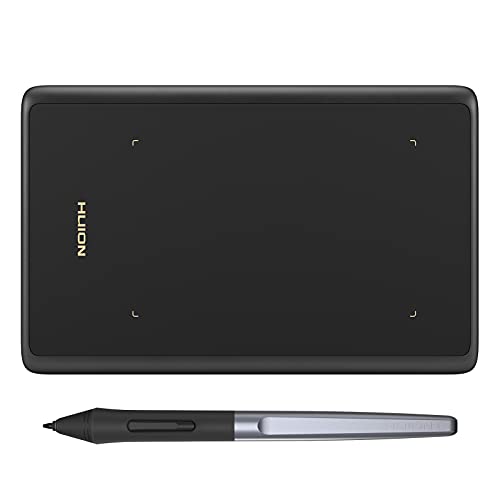
If you’re looking for a reliable tablet for gaming or digital note-taking, the HUION H420X Graphic Drawing Tablet stands out with its ultra-portable design and impressive 8192 levels of pressure sensitivity. Weighing just 3.7 ounces and measuring only 7mm thick, it’s perfect for on-the-go creativity. The battery-free stylus features customizable buttons, enhancing your workflow for tasks like online teaching or signing documents. Plus, it’s compatible with various operating systems and popular software, making it versatile for all your projects. With its plug-and-play functionality, you can immerse yourself in your work without any hassle. Experience creativity set free with the H420X!
Best For: The HUION H420X Graphic Drawing Tablet is best for gamers, digital artists, and educators seeking a portable and versatile drawing solution.
Pros:
- Ultra-portable design allows for easy travel and on-the-go use.
- High pressure sensitivity (8192 levels) provides precise control for detailed artwork.
- Plug-and-play functionality enables quick setup without the need for driver installation.
Cons:
- Limited active area may feel restrictive for larger projects.
- Not compatible with iOS, which limits use for Apple device users.
- Customizable buttons may have a learning curve for some users to optimize their workflow.
HUION Inspiroy 2 Medium Drawing Tablet (9x5inch)

Looking for a versatile drawing tablet that combines portability with advanced features? The HUION Inspiroy 2 Medium Drawing Tablet offers a sleek 9×5 inch design, perfect for on-the-go creativity. With its advanced PenTech 3.0 technology, you’ll experience precise control and minimal lag, making your strokes feel natural. The battery-free PW110 stylus, featuring a comfortable grip and side buttons, enhances your drawing experience. Plus, enjoy the convenience of a scroll wheel and 8 customizable keys for tailored workflows. Compatible with multiple operating systems, this tablet is ready to inspire your artistic journey, whether at home or on the move.
Best For: Artists and designers seeking a portable drawing tablet with advanced features for a smooth and natural drawing experience.
Pros:
- Compact Design: The 9×5 inch size makes it easy to carry and perfect for on-the-go creativity.
- Precision Control: Advanced PenTech 3.0 technology reduces lag and wobble, enhancing the drawing experience.
- Customizable Workflow: The scroll wheel and 8 programmable keys allow for personalized shortcuts, improving efficiency.
Cons:
- Limited Battery Life: As a battery-free stylus, it may require more frequent use of the tablet for long sessions.
- Compatibility Issues: Some users may encounter difficulties with specific applications or older operating systems.
- Size Limitation: The medium size may not be suitable for users who prefer larger drawing surfaces.
HUION 420 OSU Drawing Tablet for Digital Art

For beginner artists and kids keen to explore digital art, the Huion 420 OSU Drawing Tablet stands out as an excellent choice. Its 4 x 2.23-inch responsive stylus makes drawing and sketching easy, while its slim design guarantees portability. This tablet replaces your mouse and keyboard, streamlining online education and remote work. You can even play OSU, sign documents, and take notes with it. Plus, it’s compatible with popular software like Adobe Photoshop and works seamlessly with Windows and Mac OS. With plug-and-play functionality, you won’t need to fuss with driver installations—just connect and create!
Best For: Beginner artists and kids interested in exploring digital art and enhancing their online learning experience.
Pros:
- Affordable option for entry-level digital artists and students.
- Lightweight and portable design, making it easy to carry and use in various settings.
- Plug-and-play functionality allows for quick setup without the need for driver installation.
Cons:
- Limited drawing area of 4 x 2.23 inches may not suit more advanced users.
- Not compatible with iOS and Android devices, restricting use to Windows and Mac.
- Fewer advanced features compared to higher-end graphics tablets, which might limit creative possibilities.
HUION Inspiroy H430P Drawing Tablet

The HUION Inspiroy H430P Drawing Tablet stands out as an excellent choice for beginners and casual artists, thanks to its compact design and user-friendly features. Measuring 4.8×3 inches and weighing just 135g, it easily fits into limited desktop spaces. The battery-free digital pen offers 4096 levels of pressure sensitivity, ensuring a responsive drawing experience. With compatibility across various operating systems and software, you can effortlessly create across platforms. The four programmable express keys streamline your workflow, and setup is a breeze. Overall, this tablet provides great value, making it a solid option for those looking to explore their creative potential.
Best For: Beginners and casual artists looking for an affordable and portable drawing tablet to enhance their creative skills.
Pros:
- Compact and lightweight design makes it easy to store and travel with.
- Battery-free stylus with 4096 levels of pressure sensitivity for a smooth drawing experience.
- Four programmable express keys for efficient workflow and easy access to shortcuts.
Cons:
- Small active area may be limiting for advanced artists.
- Occasional driver installation issues reported by some users.
- Light pen weight can affect comfort during extended use.
HUION Inspiroy Q11K Wireless Graphic Drawing Tablet

If you’re an artist or professional who values precision and comfort during long drawing sessions, the HUION Inspiroy Q11K Wireless Graphic Drawing Tablet is a standout choice. With an active area of 11 x 6.87 inches and 8192 levels of pressure sensitivity, it delivers exceptional detail. The new PF150 pen is rechargeable and fits naturally in your hand. You’ll appreciate the wireless connectivity for a clutter-free workspace and the 2500mAh battery that lasts over 40 hours. Plus, the ergonomic design helps reduce fatigue, making it ideal for online teaching or creative projects. Elevate your artistry with this versatile tool!
Best For: Artists and professionals seeking a precise and comfortable drawing experience for long sessions.
Pros:
- 8192 levels of pressure sensitivity for detailed and accurate drawings.
- Wireless connectivity allows for a tidy workspace without tangled cables.
- Ergonomic design reduces fatigue, making it suitable for extended use.
Cons:
- May require charging for the pen, which could interrupt workflow.
- Active area size might be limiting for some artists who prefer larger surfaces.
- Initial setup may take time for users unfamiliar with graphic tablets.
Factors to Consider When Choosing Huion Tablets for PC
When choosing a Huion tablet for your PC, think about factors like size and portability, as they can affect your comfort and workspace. You’ll also want to take into account pressure sensitivity levels and compatibility with your preferred software to guarantee a smooth experience. Finally, look into customization options and stylus features to find a tablet that truly fits your creative needs.
Size and Portability
Choosing the right size and portability for your Huion tablet can make all the difference in your creative process. Smaller models, like the 4.8×3 inch H430P, are perfect for limited spaces, while larger options, such as the 10×6.25 inch designs, cater to those who prefer more active drawing area. If you’re on the go, consider lightweight tablets like the HS610 at 1.32 pounds or the ultra-thin H950P at just 0.3 inches thick, which fit easily into bags. The H420X, weighing only 3.7 ounces, offers extreme portability for artists who want to create anywhere. Ultimately, choose a size that matches your drawing style and workspace, ensuring maximum comfort and creativity in your artistic journey.
Pressure Sensitivity Levels
Understanding pressure sensitivity levels is essential for your experience with Huion tablets, as they directly impact how your stylus responds to your touch. These levels typically range from 4096 to 8192, giving you finer control over line thickness and opacity. When you choose a tablet with higher sensitivity, like 8192, you’ll enjoy a more natural drawing experience that closely mimics traditional tools. This advanced technology allows your tablet to recognize subtle pressure variations, enabling you to create detailed gradients and nuanced strokes. Plus, the ability to customize pressure sensitivity settings means you can adjust responsiveness to suit your personal drawing style. This customization enhances your overall user experience, making your digital artwork more precise and fluid.
Compatibility With Software
Ensuring your Huion tablet works seamlessly with your software is essential for an efficient workflow. Most Huion tablets support major operating systems like Windows 7 or later, macOS 10.12 or later, and Linux (Ubuntu), so compatibility with a wide range of PCs is usually not an issue. They also integrate well with popular creative software, including Adobe Photoshop, Corel Draw, and Clip Studio Paint. Before purchasing, confirm that your chosen tablet is compatible with your preferred design software and operating system to avoid any functionality problems. Plus, be aware that some models may need specific USB adapters for Mac connections or have limitations with certain Android devices. Checking these details can save you from potential headaches.
Customization Options Available
Customization options play an essential role in enhancing your experience with Huion tablets. Many models come with customizable hotkeys, allowing you to assign specific functions or shortcuts to streamline your workflow, with options ranging from 4 to 12 keys. You’ll also find features like a scroll wheel or touch ring, making it easy to zoom or adjust brush sizes for a more intuitive drawing experience. Some tablets support tilt functionality, giving you greater precision based on the stylus angle. Plus, you can customize settings through the Huion driver software, adjusting pen pressure sensitivity and shortcut keys for different applications. With battery-free styluses, you won’t have to worry about charging, allowing for a natural and uninterrupted creative process.
Stylus Features and Design
When selecting a Huion tablet for PC, the stylus features and design are essential factors that can greatly impact your drawing experience. Many Huion tablets include a battery-free stylus, so you won’t have to worry about frequent battery replacements. These styluses typically boast high pressure sensitivity, often reaching up to 8192 levels, giving you precise control over line thickness. Advanced tilt functionality, supporting angles of up to ±60°, allows you to mimic natural pencil strokes effectively. Plus, ergonomic designs with soft grips and accessible side buttons enhance comfort during long sessions. Most styluses also come with replacement nibs, ensuring longevity and letting you customize your drawing experience to match your personal preferences. Choose wisely!
Price and Warranty Options
Choosing the right Huion tablet for your PC involves more than just stylus features; price and warranty options are significant factors too. Huion tablets come at various price points, so it’s essential to align your budget with the features you want, ranging from affordable models like the Huion H420 to the more advanced Kamvas Pro 16. Generally, higher prices correspond to better pressure sensitivity, larger active areas, and extra functionalities like wireless connectivity. Many tablets also offer warranties that assure product durability and reliable support, which you can usually find on the manufacturer’s website. Don’t forget to check customer reviews; they can help you gauge the product’s value and the effectiveness of warranty support, ensuring you make an informed choice.