Finding an affordable scanner for oversized documents can be difficult when you need more than a standard letter-size model. The best budget large-format scanners balance generous scan areas, useful resolution, dependable software, and manageable operating costs.
Our selection includes A3 flatbed scanners, book and document capture systems, portable duplex models, and compact office scanners. Use the guide below to match scan size, speed, image quality, and workflow features to your needs.
Best 10 Budget Large Format Scanners Picks for 2026
Best Value A3 Scanner

- Scans documents up to 11.7 by 17 inches
- Approximately 9-second A3 scans
- Includes OCR and document-management software
Best For: Schools, libraries, and small offices
Fastest A3 Scanning

- 4-second A3 color scans at 200 dpi
- Up to 2400 dpi optical resolution
- Frameless glass with auto-scan function
Best For: Fast office, CAD, and blueprint scanning
Best Office Workflow

- Scans documents up to 12 inches wide
- Handles mixed-size office and technical papers
- Automatic detection and customizable job button
Best For: High-volume offices with varied document sizes
Best for Art and Books

- Scans materials up to approximately 11.98 by 16.8 inches
- 8-second A3 color scans at 200 dpi
- Frameless design with 1200 dpi and 48-bit color
Best For: Libraries, schools, and flat artwork or book scanning
Best Office Workhorse

- 50-sheet ADF for batch scanning
- Duplex scanning and OCR support
- Cloud sharing and automatic image adjustments
Best For: Home offices and small businesses processing multi-page documents
Best True Large-Format Choice

- A2 capture area for oversized materials
- 26MP imaging with book-flattening software
- OCR and automatic facing-page separation
Best For: Books, maps, manuscripts, newspapers, and bound documents
Best Compact Photo Option

- 4800 × 4800 dpi photo scanning
- Single USB Type-C cable for power and data
- Slim design with auto-scan and PDF buttons
Best For: Home photo scanning and occasional letter-size documents
Best Budget A3 Scanner
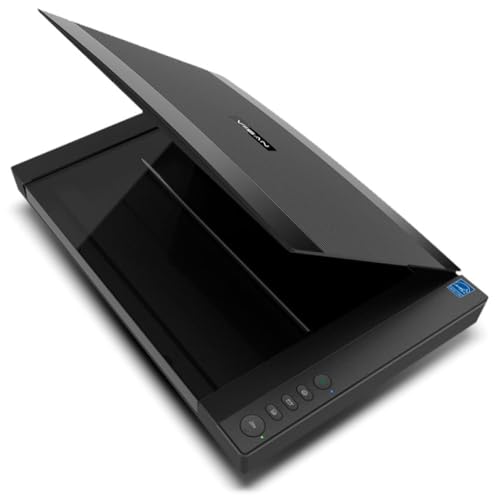
- A3 flatbed scanning for documents, books, and artwork
- 2400 DPI optical resolution with 48-bit color
- Fast scans and Windows/macOS support
Best For: Budget-conscious buyers needing genuine A3 flatbed scanning
Best Compact Wireless Scanner

- Compact design for space-constrained desks
- Up to 30 ppm duplex scanning
- USB and Wi-Fi connectivity for computers and mobile devices
Best For: Everyday documents, receipts, cards, and photos in small workspaces
Best Value A3 Scanner – Plustek OS1180
For shoppers comparing budget large format scanners, the Plustek OS1180 is a practical A3 flatbed built for graphics, documents, schools, libraries, and small offices. It scans up to 11.7 by 17 inches, uses an energy-saving LED light source, and includes shortcut buttons for common tasks.
Best For: Schools, libraries, small offices, and users digitizing A3 artwork or documents.
Pros:
- Supports A3 and tabloid-size documents up to 11.7 by 17 inches.
- Scans A3 documents in approximately 9 seconds, according to the supplied specifications.
- Includes ABBYY FineReader 12, PageManager, and DocAction software.
- Offers 48-bit color and 16-bit grayscale scanning with 1200 dpi resolution.
Cons:
- Uses a USB 2.0 connection and is designed for PC use.
- Its large 23.18-inch width may require substantial desk space.
The OS1180 combines broad A3 coverage, one-touch controls, and useful OCR software at a comparatively practical level for small organizations. It is a strong fit when straightforward flatbed scanning matters more than advanced automation.
Fastest A3 Scanning – VIISAN VF3240
The VIISAN VF3240 stands out among budget large format scanners for speed and high-resolution output. It can scan an A3 color document in 4 seconds at 200 dpi under the stated conditions, while its frameless glass and auto-scan feature support continuous work with drawings, documents, and artwork.
Best For: Offices, CAD users, schools, and anyone prioritizing fast A3 document scanning.
Pros:
- Rated for 4-second A3 color scans at 200 dpi under specified conditions.
- Provides up to 2400 dpi optical resolution and 48-bit color depth.
- Frameless glass supports edge-to-edge scanning of large materials.
- Works with Windows and macOS and includes scan, email, print, and PDF buttons.
Cons:
- Actual scanning speed varies with resolution, document size, and settings.
- Windows users receive up to 1200 dpi for A3 through ViiScan, while WIA is limited to 600 dpi.
- The CIS sensor is intended for flat materials rather than 3D objects or sleeves.
With unusually fast stated A3 performance and strong resolution, the VF3240 is appealing for high-volume workflows. Buyers should verify their operating system and software needs, especially if full-resolution A3 scanning is important.
Best Office Workflow – Plustek S30
The Plustek S30 is a sensible choice among budget large format scanners when an office needs to handle both everyday paperwork and occasional wide documents. Its 12-inch scanning width accommodates tabloid, ledger, A3, blueprints, and engineering drawings without requiring a separate wide-format scanner.
Best For: High-volume offices scanning mixed-size paperwork and occasional wide-format documents.
Pros:
- Handles documents up to 12 inches wide.
- Supports standard office sheets alongside blueprints, plans, and thin papers.
- Automatic paper detection can identify sizes, remove blank pages, and optimize images.
- Job buttons enable one-touch access to frequently used scanning tasks.
Cons:
- Its 600 dpi resolution is lower than the other listed models.
- Windows 7 or newer is listed as the minimum system requirement.
- Although relatively compact for its capacity, it still measures about 16 inches wide.
The S30 focuses on reducing workflow friction rather than maximizing optical resolution. Automatic detection, job buttons, and support for varied paper types make it especially useful for offices that regularly switch between standard and wide documents.
Best for Art and Books – VIISAN VF3120
The VIISAN VF3120 is a practical option among budget large format scanners for digitizing artwork, books, photos, magazines, and oversized documents. Its frameless design accommodates materials up to approximately 11.98 by 16.8 inches, while auto-scan and dedicated function buttons simplify repeated scanning.
Best For: Libraries, schools, graphic designers, and home or small-office users scanning flat artwork and books.
Pros:
- Supports large materials up to approximately 11.98 by 16.8 inches.
- Scans A3 color documents in 8 seconds at 200 dpi under the stated conditions.
- Offers 1200 dpi resolution, 48-bit color, and a frameless scanning area.
- Compatible with Windows and macOS and includes scan, email, print, and PDF buttons.
Cons:
- The CIS sensor is designed for flat materials and is not recommended for 3D objects.
- Windows WIA scanning is limited to 600 dpi; higher-resolution work requires supplied software.
- The large 24.8-inch width may be challenging in smaller workspaces.
The VF3120 balances A3 coverage, color capability, and convenient controls for creative and archival projects. It is a good match for users who need to scan books, albums, and artwork, provided the materials can lie flat.
Best Office Workhorse – Epson WorkForce ES-400 II
For shoppers comparing budget large format scanners for everyday office paperwork, the Epson WorkForce ES-400 II is a practical desktop document scanner. Its 50-sheet automatic document feeder, duplex scanning, OCR, and cloud-sharing tools are designed for processing stacks efficiently.
Best For: Home offices and small businesses scanning multi-page documents, receipts, and forms.
Pros:
- 50-sheet ADF supports faster batch scanning.
- Duplex scanning captures both sides of a page.
- OCR can create searchable PDFs and editable Word or Excel files.
- Supports direct sharing to services including Dropbox, Evernote, Google Drive, and OneDrive.
Cons:
- Its 300 dpi resolution is geared toward documents rather than high-detail photo scanning.
- USB is the listed connection type, with no wireless connectivity noted.
The ES-400 II is a strong value when productivity matters more than oversized media support. Double-feed detection, dynamic skew correction, and automatic image adjustments add useful safeguards for routine office workflows.
Best True Large-Format Choice – VIISAN S21 A2 Book Scanner
If you need budget large format scanners for books, maps, newspapers, or oversized documents, the VIISAN S21 is the most purpose-built option in this group. Its overhead A2 capture area, adjustable A2/A3 design, and book-focused software make it suited to materials that do not fit a conventional flatbed.
Best For: Scanning large books, manuscripts, maps, newspapers, and other oversized or bound materials.
Pros:
- Captures A2-size documents up to 594 × 420 mm.
- 26MP still resolution with software-enhanced output up to 600 dpi.
- Software can flatten curved pages, remove fingers, and split facing pages.
- Built-in OCR supports PDF, Word, Excel, EPUB, and text output.
Cons:
- Bundled OfficeCam software does not support ARM-based devices such as the Surface Pro X.
- Glare-prone papers are not recommended, and the built-in LEDs are not intended for bright-light use.
- USB 2.0 is the listed hardware interface.
The S21 is a specialized overhead scanner rather than a typical sheet-fed office model. Its foldable hinge, video capability, and book-correction features provide flexibility, but buyers should confirm computer compatibility before purchasing.
Best Compact Photo Option – Canon CanoScan LiDE 400
Canon CanoScan LiDE 400 Slim Scanner, 7.7" x 14.5" x 0.4", Document & Photo Scanner, Black
Check Price On AmazonFor buyers seeking budget large format scanners that stay compact while handling letter-size documents and photos, the Canon CanoScan LiDE 400 offers a straightforward flatbed design. It combines 4800 × 4800 dpi resolution with USB Type-C data and power through one cable.
Best For: Home users scanning photos, single-page documents, and letter-size materials.
Pros:
- 4800 × 4800 dpi resolution is suitable for detailed photo scans.
- USB Type-C cable provides both data and power.
- Auto Scan mode detects the material being scanned.
- Built-in PDF buttons support multi-page searchable PDFs.
Cons:
- Its standard sheet capacity is one page, so it is not designed for batch scanning.
- Listed paper sizes are letter and related standard formats rather than A2 or other oversized media.
- Windows 7 is the stated minimum system requirement.
The LiDE 400 is a better fit for photo quality and occasional document work than high-volume office scanning. Its slim profile and vertical stand help conserve space, while image enhancements can restore color and remove dust.
Best Budget A3 Scanner – VIISAN VF3240
For shoppers comparing budget large format scanners, the factory-refurbished VIISAN VF3240 stands out as an affordable way to scan A3 documents, photos, books, artwork, and other oversized materials. It combines a 2400 DPI optical resolution with fast A3 scanning and one-touch controls, though buyers should account for its refurbished condition.
Best For: Offices, schools, libraries, design studios, and home users who need A3 flatbed scanning on a budget.
Pros:
- Scans materials up to A3 size, including books, magazines, artwork, and CAD drawings.
- Provides up to 2400 x 2400 DPI optical resolution and 48-bit color depth.
- Can scan an A3 color document at 200 DPI in as fast as 4 seconds.
- Works with Windows and macOS and includes auto-scan and one-touch workflow features.
Cons:
- Factory-refurbished units may have minor cosmetic signs of previous use.
- Requires downloading drivers from the VIISAN website.
- Its flatbed design is less suited to high-volume multipage document feeding than an automatic document scanner.
The VF3240 is the clearest fit here for large-format work: it offers genuine A3 coverage, strong resolution, and quick scanning at a typically lower refurbished price. Choose it when oversized originals matter more than compactness or automatic sheet feeding.
Best Compact Wireless Scanner – ScanSnap iX1300
The ScanSnap iX1300 is a compact document scanner for buyers who value convenience and desk space over large-format capability. While it is not an A3 scanner, it offers wireless or USB connectivity, duplex scanning at up to 30 pages per minute, and software designed to simplify everyday document organization.
Best For: Home offices, small workspaces, and users scanning receipts, cards, photos, and standard documents from computers or mobile devices.
Pros:
- Compact design helps conserve desk space.
- Scans both sides of documents at up to 30 pages per minute.
- Supports USB and Wi-Fi connections, including mobile and cloud workflows.
- Handles documents, photos, thick items, and plastic cards with automatic image adjustments.
Cons:
- Its 600 DPI resolution and document-focused design do not provide A3 flatbed scanning.
- The 20-sheet capacity is more appropriate for light or moderate batches than large jobs.
- Requires supported operating systems and mobile-platform versions for the listed connectivity features.
The iX1300 is a practical alternative for shoppers whose “large format” needs are limited to organizing varied everyday paperwork rather than scanning oversized originals. Its small footprint, duplex speed, and wireless options make it especially convenient for flexible home-office use.
Best Portable Budget Scanner – Canon imageFORMULA R10
The Canon imageFORMULA R10 is a portable, USB-powered document scanner for buyers seeking an inexpensive setup for mobile or remote work. It is not a large-format flatbed, but its duplex feeder, compact build, and built-in software make it useful for digitizing standard documents, receipts, cards, and reports wherever a laptop is available.
Best For: Mobile users, classrooms, home offices, and remote workplaces that need portable duplex document scanning.
Pros:
- Lightweight USB-powered design is easy to carry between locations.
- Scans both sides at once at up to 12 pages per minute.
- 20-sheet automatic feeder handles receipts, business cards, reports, legal documents, and cards.
- Works with Windows and Mac devices and includes built-in scanning software.
Cons:
- Does not scan A3 or other large-format originals.
- Limited to USB connectivity rather than wireless operation.
- Canon states that it is not intended for photographs on photo paper or photographic media.
The R10 makes sense when portability and simple document capture are more important than oversized media support. It is a useful budget companion for standard paperwork, but shoppers specifically seeking large-format scanning should choose a true A3 flatbed instead.
How We Picked the Best Budget Large Format Scanners
We evaluated these scanners against the needs of home offices, schools, libraries, designers, archivists, and small businesses. Our main criteria were maximum document size, optical resolution, scan speed, feeding and duplex capabilities, software convenience, connectivity, and overall value. Because “large format” can mean different things, the list includes true A3 and A2-capable machines as well as compact document scanners that may suit buyers whose priority is speed or portability rather than oversized media.
We also considered practical ownership factors, including whether a scanner is flatbed or sheet-fed, how well it handles books and photos, and whether its design supports repeated daily use.
Quick Comparison
| Scanner type | Best suited to | Main advantage |
|---|---|---|
| A3 flatbed | Drawings, photos, books, and documents | Flexible oversized scanning with a full glass bed |
| A2/A3 book scanner | Bound books and fragile originals | Large capture area and contact-free workflow |
| Duplex document scanner | Receipts, forms, and office files | Fast two-sided batch scanning |
| Portable scanner | Travel and occasional digitization | Small footprint and simple USB operation |
Key Buying Factors for Budget Large-Format Scanners
Scan Size and Design
Confirm the maximum scan area before buying. A3 supports documents up to 11.7 by 16.5 inches, while A2 models provide more room for large plans and open books. Flatbeds are usually the safest choice for delicate originals, artwork, and bound material. Sheet-fed scanners are better for loose pages and high-volume work.
Resolution and Image Quality
Optical resolution matters more than an inflated interpolated-DPI figure. Around 600 dpi is generally sufficient for documents and most photos; higher optical resolution is useful for detailed artwork, small originals, and cropping. Check color depth and software correction features if accurate photo or graphics reproduction matters.
Speed, Feeding, and Connectivity
Look for stated scan times at the resolution and color mode you expect to use. An automatic document feeder and duplex scanning can save substantial time for office batches, while frameless designs may make it easier to position oversized originals. USB is common, but wireless connectivity can simplify shared home-office workflows.
Software and Space
Bundled OCR, searchable PDF creation, automatic cropping, deskewing, and document enhancement can be more valuable than headline resolution. Measure your desk carefully, allowing room for lids, paper paths, cables, and ventilation. Large-format flatbeds often need significantly more permanent workspace than portable or desktop sheet-fed models.
Who Should Buy Which Budget Large Format Scanners?
For Schools, Libraries, and Small Offices
Choose an A3 flatbed with straightforward controls and broad media support. It offers the best balance for occasional maps, artwork, books, and documents.
For CAD Drawings and Oversized Graphics
Prioritize a true A3 model with strong optical resolution, accurate color handling, and a rigid glass bed. A factory-refurbished option can reduce cost if it includes a reliable warranty.
For Books and Fragile Originals
An A2/A3 overhead or book-scanning system is preferable to forcing bound material onto a conventional lid. Automatic flattening and finger-removal features can improve results and reduce editing.
For High-Volume Office Paperwork
Select a duplex sheet-fed scanner with an automatic document feeder. Compact models are often faster and more convenient than large flatbeds when nearly every original is a loose page.
For Occasional or Mobile Use
A USB-powered portable scanner makes sense when storage space and travel convenience matter more than oversized scan capacity. It is best paired with a larger flatbed if you also digitize A3 documents or photos.