Commercial-grade book scanners make it easier to digitize bound volumes, loose documents, photos, and oversized materials without relying on slow, manual workflows. The right model can improve capture quality, reduce page-handling time, and simplify OCR and file management.
This roundup compares 10 strong options, from overhead A3 scanners to high-speed duplex document scanners, so you can match features such as auto-flattening, wireless connectivity, OCR, resolution, and scan volume to your operation.
Best 10 Commercial-Grade Book Scanners Picks for 2026
Best Overhead Scanner for Bound Books

- Scans bound books without cutting or damaging pages
- Automatically corrects curves and captured fingers
- Detects page turns for more efficient scanning
Best For: Libraries, offices, and users digitizing bound or fragile materials
Best Compact Duplex Document Scanner

- 50-sheet feeder handles stacks of loose documents
- Duplex scanning captures both sides in one pass
- OCR creates searchable and editable files
Best For: Offices digitizing loose paperwork and business records
Best Large-Format Commercial Scanner
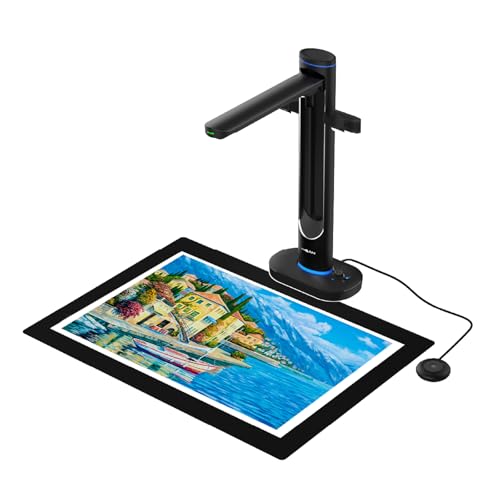
- Scans bound and oversized materials up to A2 size
- Dual 48MP cameras capture detail at up to 600 dpi
- Includes AI correction, OCR, and text-to-speech
Best For: Libraries, archives, schools, and large-format book scanning
Best Wireless High-Capacity Scanner

- 100-sheet feeder handles larger document batches
- Wireless scanning works with devices, USB, email, and cloud services
- Duplex capture and OCR streamline document management
Best For: Offices needing high-volume wireless scanning of loose pages
Best Large-Format Choice

- A2 capture area for maps, newspapers, and manuscripts
- 26MP camera with software-enhanced scanning up to 600 DPI
- Auto-flattening, finger removal, page splitting, and OCR
Best For: Oversized books and documents in libraries, archives, and offices
Best Portable Option
CZUR Shine Ultra Smart Book Scanner

- Scans A3 and smaller pages in about one second
- Foldable, lightweight design with foot-pedal operation
- OCR for 180+ languages plus document-camera functionality
Best For: Portable scanning, classrooms, and thinner books
Best Flatbed Value
VIISAN 3120 Refurbished A3 Scanner

- 1200 DPI optical resolution with 48-bit color
- A3 scanning in as fast as eight seconds at 200 DPI
- Frameless flatbed design for books, artwork, and photos
Best For: Large-format flatbed scanning in libraries, schools, offices, and studios
Best with Extra Features

- About two seconds per page
- Laser-based curved-page flattening
- 180+ language OCR and auto page detection
Best For: Fast book scanning with hands-free workflow features
Best A3 Overhead Value

- A3 overhead scanning for large materials
- 16MP camera with 300 DPI capture
- Anti-glare LED lighting
Best For: Libraries, offices, and home archiving projects
Best Multi-Format Workflow

- Scans A3 and A4 materials
- Two-second-per-page scanning
- Searchable PDF and multi-format output
Best For: Fast book and document digitization with flexible file output
Best Overhead Scanner for Bound Books – ScanSnap SV600
The ScanSnap SV600 is a practical choice among commercial-grade book scanners when you need to digitize books, newspapers, magazines, or documents without cutting or damaging them. Its overhead design, automatic page correction, and page-turn detection support efficient hands-free scanning.
Best For: Libraries, offices, and home users scanning bound books, fragile pages, photos, and mixed documents.
Pros:
- Scans books and bound materials without flattening or cutting them.
- Automatically corrects curved pages and removes captured fingers with Point Retouch.
- Multi Document Detection can crop and rotate several smaller items in one scan.
- Page Turning Detection and Time Mode support more efficient batch scanning.
Cons:
- Its standard sheet capacity is limited to one page at a time.
- USB connectivity requires a connected computer.
- Book scanning features may require more manual setup than a conventional sheet-fed scanner.
The SV600 stands out for non-destructive book scanning and useful correction tools. Choose it when preserving bindings and pages matters more than feeding large stacks of loose documents.
Best Compact Duplex Document Scanner – Epson ES-400 II
The Epson WorkForce ES-400 II is a strong fit for commercial-grade book scanners buyers who primarily process loose pages rather than bound volumes. Its 50-sheet feeder, duplex scanning, OCR, and double-feed detection make it well suited to routine office digitization.
Best For: Offices and workgroups scanning stacks of loose documents into searchable, shareable files.
Pros:
- 50-sheet Auto Document Feeder helps process document stacks efficiently.
- Duplex scanning captures both sides of a page in one pass.
- OCR creates searchable PDFs and editable Word or Excel files.
- TWAIN support and cloud destinations help integrate scans into business workflows.
Cons:
- The sheet-fed design is not intended for scanning bound books without removing pages.
- USB is the listed connection type, with no wireless connectivity noted.
- Resolution is listed at 300 dpi.
For high-volume loose-paper work, the ES-400 II offers a practical mix of feeder capacity, duplex capture, document correction, and file management. It is less suitable when preserving intact bindings is a priority.
Best Large-Format Commercial Scanner – VIISAN S48 Duo
The VIISAN S48 Duo is a large-format option among commercial-grade book scanners, combining an overhead design with dual 48MP cameras and support for materials up to A2 size. Its book-focused processing tools are designed to preserve oversized, bound, or fragile content without pressing it flat.
Best For: Libraries, schools, archives, and professional users scanning large books, maps, manuscripts, and teaching materials.
Pros:
- Captures A2-size books and documents without flattening or damaging bindings.
- Dual 48MP cameras provide detailed scans at up to 600 dpi.
- AI tools help flatten curves, remove fingers, correct edge distortion, and clean backgrounds.
- OCR, text-to-speech, and UVC camera functionality support accessibility and live teaching.
Cons:
- USB connectivity requires a computer for the listed scanning workflow.
- The recommended system configuration includes 16GB of RAM and at least 20GB of storage.
- Its large-format overhead design may be more equipment than needed for ordinary loose documents.
The S48 Duo is the most capable choice here for oversized and delicate materials. Its combination of high-resolution dual cameras, AI correction, OCR, and presentation features makes it especially versatile for archival and educational environments.
Best Wireless High-Capacity Scanner – Epson ES-580W
The Epson WorkForce ES-580W is a convenient option for commercial-grade book scanners buyers who need to process loose pages and distribute files wirelessly. A 100-sheet feeder, duplex scanning, touchscreen controls, OCR, and direct-to-cloud workflows support busy office environments.
Best For: Offices and teams that need high-capacity, wireless scanning with minimal computer dependence.
Pros:
- 100-sheet Auto Document Feeder supports larger scanning batches.
- Wireless scanning can send files to devices, email, USB, and supported cloud services.
- Duplex scanning and Single-Step Technology capture both sides efficiently.
- OCR creates searchable PDFs and editable Word or Excel documents.
Cons:
- The sheet-fed design is not intended for intact bound books.
- Listed resolution is 300 dpi.
- Wireless features depend on compatibility with the supported operating systems and services.
The ES-580W is a strong productivity choice for loose-document workflows, especially where wireless sharing and a large feeder matter. Select an overhead model instead if you need to preserve books or other bound materials.
Best Large-Format Choice – VIISAN S21 A2/A3 Book Scanner
For buyers comparing commercial-grade book scanners for oversized materials, the VIISAN S21 stands out with A2 capture capacity, a 26MP camera, and software designed to process bound pages. Its overhead design is suited to manuscripts, newspapers, maps, and other items that may not fit a conventional flatbed.
Best For: Libraries, archives, educators, and offices scanning large books, maps, newspapers, and manuscripts.
Pros:
- Captures materials up to A2 size and adjusts for A2 or A3 scanning.
- 26MP resolution with software-enhanced output up to 600 DPI.
- Automatically flattens curved pages, removes fingers, repairs edges, and splits facing pages.
- Built-in OCR exports scans to PDF, Word, Excel, EPUB, or text formats.
Cons:
- Bundled OfficeCam software does not support ARM-based Windows devices.
- Glare-prone paper is not recommended, and the built-in LEDs are not intended for bright environments.
The S21 is a strong fit when oversized capture and automated book processing matter more than a traditional flatbed workflow. Confirm your computer uses a supported x64 or x86 architecture before purchasing.
Best Portable Option – CZUR Shine Ultra Smart Book Scanner
The CZUR Shine Ultra is a practical choice among commercial-grade book scanners when portability and quick page capture are priorities. It scans A3 and smaller materials at roughly one second per page, while its software adds page flattening, cropping, paging, and OCR functions.
Best For: Portable office, classroom, remote-teaching, and general document-scanning workflows involving thinner books.
Pros:
- Captures A3 and smaller documents at about one second per page.
- 13MP CMOS camera with adjustable height and a foldable, lightweight design.
- OCR supports more than 180 languages, with multiple color modes and smart cropping.
- Works as both a document scanner and USB document camera.
Cons:
- Curved-page flattening is intended for thinner books; CZUR recommends the ET series for thicker books.
- Not compatible with Android or iOS devices.
- Thai, Hebrew, and Arabic are not supported by the listed OCR functionality.
Choose the Shine Ultra if you need a foldable scanner that can move between scanning and camera duties. Its limitations are most relevant to users handling thick bindings or requiring the excluded OCR languages.
Best Flatbed Value – VIISAN 3120 Refurbished A3 Scanner
For buyers who prefer a conventional flatbed workflow, the professionally refurbished VIISAN 3120 offers A3 scanning, 1200 DPI optical resolution, and 48-bit color. It is designed for books, photos, artwork, magazines, newspapers, and other large materials used in library, school, office, and publishing settings.
Best For: Libraries, schools, graphic-design work, SOHO offices, and users scanning large photos, artwork, books, or documents.
Pros:
- Scans materials up to approximately 11.98 by 16.8 inches.
- Provides 1200 x 1200 DPI optical resolution and 48-bit color depth.
- Scans an A3 color document at 200 DPI in as fast as eight seconds.
- Frameless design, auto-scan operation, and one-touch controls support book and album scanning.
Cons:
- This is a professionally refurbished unit and may have minor cosmetic signs of prior use.
- Achieving 1200 DPI requires the supplied VIISAN scanning software.
- Windows and macOS versions are not specified in the supplied details.
The 3120 makes sense for users who value flatbed image quality and large-format versatility over an overhead camera design. Its refurbished status may offer value, but buyers should be comfortable with possible cosmetic wear.
Best with Extra Features – CZUR Aura Pro A3 Book Scanner
The CZUR Aura Pro is a practical option for shoppers comparing commercial-grade book scanners for fast desktop digitization. Its laser-based page flattening, automatic page-turn detection, A3 capture area, and OCR support make it suited to bound books, loose sheets, and larger materials.
Best For: Users who want fast book scanning with automatic workflow features, curved-page correction, and a built-in multifunction lamp.
Pros:
- Scans single sheets and double-page books in about two seconds per page.
- Three laser lines help flatten and reproduce curved book pages accurately.
- OCR supports more than 180 languages, with automatic page-turn detection and foot-pedal scanning.
- Includes supplemental side lights and a four-mode, six-level brightness desk lamp.
Cons:
- Thai, Hebrew, and Arabic are not currently supported by the OCR.
- Sound control can be affected by background noise and distance.
- Requires USB connection and compatible Windows or macOS software.
Choose the Aura Pro when speed and hands-free scanning matter most. It combines book flattening and intelligent software with useful lighting, though buyers should verify operating-system and OCR-language compatibility first.
Best A3 Overhead Value – VIISAN DL16 Book Scanner
The VIISAN DL16 is a capable choice among commercial-grade book scanners for bound books, oversized documents, artwork, and sheet music. Its overhead design avoids the constraints of a standard flatbed, while a 16MP camera, 300 DPI capture, and anti-glare lighting support clear document digitization.
Best For: Libraries, offices, educators, and home archivists scanning A3 books, artwork, large documents, and printed collections.
Pros:
- A3 overhead format accommodates books and large materials that may not fit a standard scanner.
- 16MP camera captures document details at up to 300 DPI.
- Anti-glare LED lighting helps reduce reflections and uneven shadows.
- Compatible with both Windows and Mac computers.
Cons:
- The supplied specifications do not list automatic page-turn detection or a foot pedal.
- USB connection is required.
- Its 300 DPI resolution may be less suited to buyers seeking higher-resolution photographic reproduction.
The DL16 is a sensible fit when A3 overhead capture is more important than advanced automation. Its camera and lighting setup should appeal to organizations digitizing varied large-format materials on Windows or Mac.
Best Multi-Format Workflow – CZUR Aura Pro A3/A4 Scanner
The CZUR Aura Pro is designed for shoppers seeking commercial-grade book scanners that handle both books and documents in a compact desktop format. It combines A3 and A4 capture, two-second-per-page scanning, curved-page flattening, searchable output, and built-in lighting for reading or digitization.
Best For: Users digitizing books and mixed document formats who want fast output to JPG, Word, PDF, and searchable PDF.
Pros:
- Supports A3 and A4 materials with scanning speeds of about two seconds per page.
- Three laser lines help correct curved book pages for clearer captures.
- Outputs JPG, Word, PDF, and searchable PDF files.
- Offers OCR for more than 180 languages and includes 32 LEDs plus supplemental side lighting.
Cons:
- Thai, Hebrew, and Arabic are not supported by the listed OCR function.
- Uses a USB connection rather than wireless connectivity.
- Sound-control performance may vary with environmental noise and distance.
This Aura Pro is a strong all-purpose pick for mixed-format scanning and searchable document creation. Its lighting and page-flattening features add flexibility, while the required USB connection and OCR exclusions are worth checking before purchase.
How We Picked These Commercial-Grade Book Scanners
We focused on scanners suited to demanding office, education, library, archive, and digitization work. Key considerations included capture format, optical resolution, scanning speed, duplex capability, page-flattening technology, OCR support, lighting, connectivity, portability, and overall workflow efficiency.
The selection includes overhead book scanners for bound materials, flatbed designs for photographs and fragile originals, and desktop document scanners for fast batches of loose pages. Because “commercial-grade” can mean different things depending on the workplace, we compared practical capabilities rather than assuming one scanner fits every use case.
Quick Comparison
| Best For | Look For | Strongest Match |
|---|---|---|
| Bound books and archives | Overhead capture, page flattening, and glare control | ScanSnap SV600 or a VIISAN overhead model |
| High-volume loose documents | Automatic document feeding and duplex scanning | Epson ES-400 II or ES-580W |
| Oversized pages | A3 or A2 capture area | VIISAN S48 Duo or large-format VIISAN models |
| Portable scanning | Compact design, USB operation, and fast setup | CZUR Shine Ultra or Aura Pro |
| Photos and delicate originals | Flatbed glass, high resolution, and stable lighting | VIISAN 3120 A3 |
Key Buying Factors for Commercial-Grade Book Scanners
Capture Size and Scanner Type
Start with the largest material you expect to scan. A4 scanners are suitable for standard office paperwork, while A3 and A2 models provide more room for books, maps, newspapers, artwork, and oversized records. Overhead scanners are generally more convenient for bound books; flatbeds provide controlled positioning for photos and fragile pages; sheet-fed scanners are usually fastest for loose documents.
Speed and Workflow
Check whether the quoted speed applies to single-sided or duplex scanning, and whether it assumes a particular page size or resolution. An automatic document feeder can make a major difference for multipage batches, while overhead models may save time by capturing two facing pages without separating a binding.
Image Quality and OCR
Higher resolution is valuable for small print, photographs, and archival work, but it can increase file sizes and processing time. OCR is essential when searchable or editable text matters. Auto-flattening, finger removal, page detection, and anti-glare lighting can also improve usable results with books.
Connectivity and Software
USB is dependable for dedicated workstations, while Wi-Fi can simplify shared office workflows. Review included software, supported operating systems, export formats, OCR languages, and compatibility with your document-management platform before buying.
Who Should Buy Which Commercial-Grade Book Scanners?
Choose an overhead ScanSnap or VIISAN model if your priority is digitizing bound books, oversized pages, or archival material. Choose an Epson WorkForce desktop scanner when you mainly process stacks of loose paperwork and need dependable duplex throughput. A CZUR portable scanner is better for mobile work, classrooms, field projects, or users who need quick setup and compact storage.
For the best overall fit, prioritize your normal page type and daily volume first. A scanner with more resolution or a larger format is not automatically better if it slows routine jobs, takes up valuable space, or lacks the software integration your workflow requires.