The best high-performance book scanners make it easier to preserve books, convert paper archives, and create searchable digital files without sacrificing speed or image quality.
Our 2026 roundup covers overhead book scanners, flatbed models, duplex document scanners, and portable options so you can match the scanner to your workspace, materials, and workflow.
Best 10 High-Performance Book Scanners Picks for 2026
Best Flatbed-Feeder Hybrid
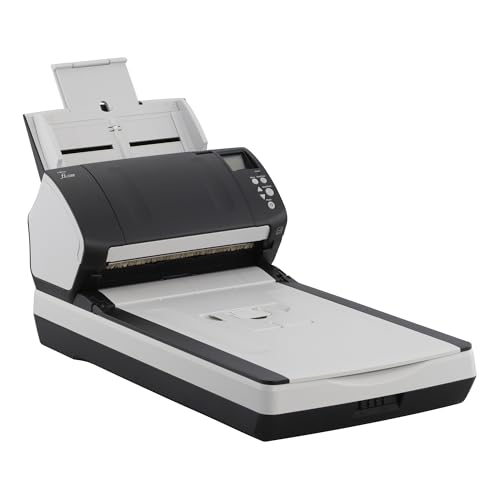
- 80 ppm letter-size scanning
- 80-sheet duplex feeder
- Built-in flatbed for books and fragile pages
Best For: High-volume offices and archives needing both feeder speed and flatbed versatility
Best Overhead Book Scanner
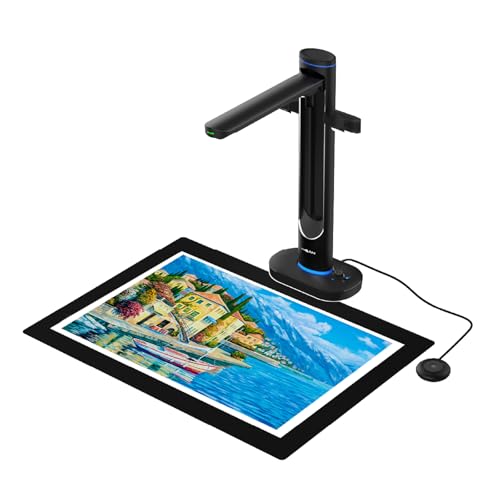
- A2 overhead book capture
- Dual 48MP cameras with up to 600 DPI
- AI correction, OCR, and text-to-speech
Best For: Libraries, schools, and archives scanning large or fragile bound materials
Best Wireless Document Scanner

- 45 ppm double-sided scanning
- 100-sheet feeder with Wi-Fi 6
- Touchscreen profiles and cloud support
Best For: Connected home offices and teams digitizing everyday paperwork
Best Large-Format Flatbed

- Fast A3 color scans at 200 dpi
- 2400 dpi optical resolution
- Frameless edge-to-edge scanning
Best For: Engineers, designers, schools, and offices digitizing oversized flat materials
Best Overhead Scanner

- Scans bound materials without cutting
- Corrects curved-page distortion
- Supports page-turn and multi-item scanning
Best For: Books, newspapers, magazines, and delicate documents
Best for Office Stacks

- 50-sheet automatic document feeder
- Duplex scanning for two-sided pages
- OCR and cloud-sharing workflow support
Best For: Loose document stacks in home and office settings
Best High-Resolution Book Scanner

- 16MP camera with fast page capture
- Flattens curved book pages
- OCR supports over 180 languages
Best For: Rapid book digitization and varied materials
Best Compact Choice

- Up to 30 ppm duplex scanning
- USB and Wi-Fi connectivity
- Compact design with broad media support
Best For: Small desks and mixed document workloads
Best Portable Book Scanner

- About one-second-per-page scanning
- Curved-page flattening for thinner books
- Works as a document camera
Best For: Portable book scanning and remote teaching
Best High-Resolution Portable Scanner

- 24MP camera with high-resolution capture
- Exports searchable and editable formats
- Foldable design weighs 2 pounds
Best For: Portable, high-resolution book digitization
Best Flatbed-Feeder Hybrid – Fujitsu fi-7280
The Fujitsu fi-7280 combines high-performance book scanners versatility with an 80-sheet automatic document feeder and a built-in flatbed. It is a practical choice when you need fast duplex scanning for letter-size paperwork but also need to digitize thick books, bound periodicals, fragile pages, receipts, or labels.
Best For: Offices and archives that need high-volume document scanning plus flatbed support for bound or delicate materials.
Pros:
- Scans letter-size documents at up to 80 pages per minute.
- 80-sheet feeder supports efficient batch scanning.
- Built-in flatbed handles thick documents, books, and fragile pages.
- Skew reduction and paper protection help reduce feeding problems and paper damage.
Cons:
- USB connectivity is less flexible than wireless models.
- At 19.4 pounds, it is relatively heavy for a compact scanner.
- Supplied minimum system requirements list Windows 7, with no macOS support specified.
The fi-7280 stands out for combining production-style feeder speed with flatbed flexibility. Choose it when workflow efficiency matters, but your scanning tasks also include materials that cannot safely pass through a feeder.
Best Overhead Book Scanner – VIISAN S48 Duo
The VIISAN S48 Duo is one of the more specialized high-performance book scanners, using an overhead design to capture bound books, maps, and oversized documents without flattening them. Its dual 48MP cameras, AI processing, OCR, and text-to-speech features make it suited to archiving, education, and accessibility-focused workflows.
Best For: Libraries, schools, archives, and professionals digitizing large or fragile bound materials.
Pros:
- Overhead capture supports books and documents up to A2 size without pressing on bindings.
- Dual 48MP cameras capture detailed images at up to 600 DPI.
- AI tools can flatten curved pages, remove finger marks, and correct edge distortion.
- OCR, text-to-speech, and UVC camera functionality expand its accessibility and presentation uses.
Cons:
- USB connection requires a computer for standard scanning workflows.
- Its 2.8 kg weight and overhead format require dedicated workspace.
- Processing depends on a computer meeting the listed memory and storage requirements.
The S48 Duo is a strong fit when protecting bindings and capturing oversized pages are more important than traditional feeder speed. Its software features also make it particularly useful for searchable archives, teaching, and assisted reading.
Best Wireless Document Scanner – ScanSnap iX2500
The ScanSnap iX2500 is a streamlined choice among high-performance book scanners alternatives for users whose main priority is fast, organized document digitization. It offers 45-page-per-minute double-sided scanning, a 100-sheet feeder, Wi-Fi 6, USB-C, touchscreen profiles, and cloud connectivity for flexible everyday workflows.
Best For: Homes, offices, and small teams scanning paperwork, receipts, photos, and business cards to computers, mobile devices, or cloud services.
Pros:
- 45 ppm double-sided scanning supports quick document processing.
- 100-sheet feeder is useful for larger batches.
- Wi-Fi 6 and USB-C provide flexible connection options.
- Touchscreen profiles and automatic file organization simplify repeat workflows.
Cons:
- It is a feeder-based document scanner rather than a flatbed or overhead book scanner.
- Its listed 600 dpi resolution may be less suited to highly detailed archival work.
- Compatibility requires relatively recent operating systems and mobile platforms.
The iX2500 is best for users who want speed, connectivity, and automation in a compact document-focused design. It is less appropriate for bound books, but highly practical for paper-heavy workflows involving multiple destinations.
Best Large-Format Flatbed – VIISAN VF3240 A3 Scanner
The VIISAN VF3240 is a large-format flatbed option for buyers comparing high-performance book scanners for A3 materials. It supports fast 200 dpi color scans, high-resolution output, frameless edge-to-edge capture, and automatic scanning when the lid closes, making it useful for blueprints, CAD drawings, newspapers, textbooks, and oversized documents.
Best For: Designers, engineers, schools, and offices scanning flat A3 documents, artwork, blueprints, and large-format records.
Pros:
- Scans A3 color documents in as little as four seconds at 200 dpi under specified conditions.
- 2400 dpi optical resolution and 48-bit color support detailed image capture.
- Frameless glass enables edge-to-edge scanning of large materials.
- Auto-Scan and four-button controls support straightforward repeated scanning.
Cons:
- Designed for flat materials and is not recommended for 3D objects or bulky items.
- Full A3 scanning at 2400 dpi requires macOS with native ICA driver support; Windows A3 output is listed at up to 1200 dpi through ViiScan.
- USB connectivity does not provide wireless operation.
The VF3240 is a compelling pick when document size and image detail matter more than feeder-based automation. Its A3 bed and fast low-resolution scanning are especially useful for offices handling drawings, posters, and other oversized flat originals.
Best Overhead Scanner – ScanSnap SV600
For shoppers comparing high-performance book scanners, the ScanSnap SV600 is a practical overhead option for digitizing bound books, newspapers, magazines, and other materials without cutting or damaging them. Its page-turn detection, automatic book correction, and multi-document detection support efficient, hands-off scanning.
Best For: Bound books, newspapers, magazines, and delicate documents.
Pros:
- Scans books and documents without cutting or damaging them.
- Automatically flattens curved pages and corrects distortion.
- Page Turning Detection can begin scanning when a page is turned.
- Multi Document Detection automatically crops and rotates multiple items.
Cons:
- Requires a USB connection and compatible Windows or macOS system.
- Its overhead design occupies more horizontal space than a compact sheet scanner.
- Point Retouch is needed to remove captured fingers from scans.
The SV600 is a strong fit when preserving bound materials matters more than feeding stacks of loose pages. Its correction and automation features make it especially useful for book-focused scanning projects.
Best for Office Stacks – Epson ES-400 II
Among high-performance book scanners, the Epson WorkForce ES-400 II is best suited to offices handling stacks of loose documents rather than bound books. Its 50-sheet automatic document feeder, duplex scanning, OCR, and cloud-sharing features are designed for productive everyday workflows.
Best For: Home and office scanning of loose, two-sided document stacks.
Pros:
- 50-sheet Auto Document Feeder helps process stacks efficiently.
- Duplex scanning captures both sides of a document.
- OCR creates searchable PDFs and editable Word or Excel files.
- Supports scanning to email and services including Dropbox, Evernote, Google Drive, and OneDrive.
Cons:
- Designed as a document scanner rather than an overhead bound-book scanner.
- USB connectivity may be less convenient for users seeking wireless operation.
- The supplied resolution is 300 dpi.
The ES-400 II is a sensible choice for fast, organized document intake. Double-feed detection, skew correction, and automatic image adjustments add useful safeguards for routine office scanning.
Best High-Resolution Book Scanner – CZUR ET16 Plus
The CZUR ET16 Plus is a compelling choice among high-performance book scanners for users who want fast, high-resolution capture of bound books and varied materials. Its 16MP camera, curved-page flattening technology, and OCR support are aimed at large digitization projects.
Best For: Fast book digitization, binders, business cards, and multilingual OCR projects.
Pros:
- 16MP camera captures high-resolution scans at approximately 1.5 seconds per page.
- Patented technology flattens curved book pages after pixel transformation.
- Can scan books, binders, business cards, vouchers, and physical objects.
- OCR supports more than 180 languages.
Cons:
- Very glare-prone paper is not recommended.
- Thai and Hebrew OCR are not currently supported.
- Arabic OCR support is limited by operating system and Windows requirements.
With its high-resolution camera and rapid scanning pace, the ET16 Plus is well matched to substantial book projects. Buyers should review the operating-system and OCR-language limitations before choosing it for specialized work.
Best Compact Choice – ScanSnap iX1300
For shoppers comparing high-performance book scanners that can also handle everyday documents, the ScanSnap iX1300 is a compact, flexible option. It scans up to 30 pages per minute duplex, connects by USB or Wi-Fi, and includes automatic de-skew, color optimization, and blank-page removal.
Best For: Small desks, mixed document workloads, and users who want wireless scanning with minimal setup.
Pros:
- Compact 4.5-by-11.7-by-3.3-inch design fits small workspaces.
- Scans documents, photos, receipts, business cards, and plastic cards.
- Duplex scanning reaches up to 30 ppm with automatic image enhancements.
- Works with computers, mobile devices, cloud services, and Chromebook via the mobile app.
Cons:
- Its 20-sheet capacity is more suited to moderate batches than large archives.
- It is primarily a document scanner rather than a dedicated bound-book scanner.
The iX1300 stands out when convenience and desk space matter as much as speed. Its ScanSnap Home software and computer-free scanning support make it a practical choice for organized home offices and small businesses.
Best Portable Book Scanner – CZUR Shine Ultra
The CZUR Shine Ultra is one of the more book-focused high-performance book scanners in this lineup, using a camera-based design to capture pages at about one second per page. Its software can flatten curved pages, crop images automatically, and convert scans with OCR in more than 180 languages.
Best For: Portable book and document scanning, remote teaching, and digitizing thinner books up to A3 size.
Pros:
- Scans A3 and A4 documents and smaller objects at roughly one second per page.
- Patented technology helps flatten curved surfaces on thinner book pages.
- Functions as both a document scanner and USB document camera for video meetings.
- Foldable, height-adjustable design weighs about 4 pounds and includes a foot pedal.
Cons:
- Not recommended for thicker books; the notes point to the ET series for those projects.
- Does not support Android or iOS.
- OCR does not currently support Thai, Hebrew, or Arabic.
Choose the Shine Ultra when portability and book-page handling are priorities. Its camera-based workflow is especially useful for classroom demonstrations and thinner bound materials, while the desktop-only compatibility may limit mobile users.
Best High-Resolution Portable Scanner – CZUR Shine Ultra Pro
For buyers seeking high-performance book scanners with a portable camera design, the CZUR Shine Ultra Pro combines a 24MP sensor with software for flattening curved book pages. It can save digitized material as JPG, PDF, searchable PDF, Word, or Excel files and folds for transport.
Best For: Users who need high-resolution captures, portable book scanning, and editable document output.
Pros:
- 24MP CMOS camera provides high-resolution 5696-by-4272 captures.
- Curved-page flattening supports digitizing book pages.
- Exports to JPG, PDF, searchable PDF, Word, and Excel formats.
- Foldable, height-adjustable design weighs only 2 pounds.
Cons:
- Uses a USB connection rather than wireless connectivity.
- Requires a compatible Windows or macOS computer.
- Its camera-based design may require more positioning than a conventional sheet-fed scanner.
The Shine Ultra Pro is a strong fit for mobile digitization projects where resolution and editable output are important. Its two-pound form factor is notably travel-friendly, though shoppers should plan to use it with a computer and USB connection.
How We Picked the Best High-Performance Book Scanners
We focused on scanners that offer a meaningful combination of speed, resolution, book-friendly handling, reliable software, and useful file-conversion features. The selection includes overhead scanners for bound books, flatbed designs for delicate or varied originals, and automatic document feeders for large batches of loose pages.
We also considered practical differences such as A3 or A2 capture areas, duplex scanning, optical character recognition (OCR), portability, wireless connectivity, and compatibility with common document formats. A scanner’s advertised resolution or page-per-minute rating is useful, but real-world productivity also depends on software, page positioning, lighting, and post-processing.
Quick Comparison
| Scanner type | Best suited for | Features to prioritize |
|---|---|---|
| Overhead book scanner | Bound books and fragile originals | Page flattening, lighting, OCR, foot-pedal or automatic capture |
| Flatbed scanner | Photos, artwork, books, and mixed originals | Optical resolution, color accuracy, adjustable lid |
| Document-feed scanner | Large stacks of loose pages | Duplex scanning, feeder capacity, paper handling, software |
| Portable scanner | Travel, classrooms, and compact workspaces | Setup time, USB power, foldability, document camera functions |
Key Buying Factors for High-Performance Book Scanners
Book Handling and Capture Area
For bound books, an overhead scanner prevents pages from passing through a feeder and can reduce handling of fragile spines. Check the maximum page size before buying; A3 and A2-capable models are better for oversized books, newspapers, maps, and technical drawings.
Speed and Workflow
Look beyond the headline scan time. Automatic page detection, batch capture, page-turn recognition, and one-touch software can matter more than peak resolution when digitizing hundreds of pages. For loose documents, duplex feeders are usually faster than photographing pages individually.
Resolution, Color, and OCR
Higher optical resolution helps preserve small type, line art, and illustrations, while accurate color matters for photographs and archival material. OCR turns scans into searchable or editable files, but results vary with paper quality, typography, curvature, and language support.
Connectivity and Software
USB is dependable for desktop workflows, while Wi-Fi can simplify placement and sharing. Review included software, operating-system support, export formats, and whether OCR or automatic correction tools require additional applications.
Who Should Buy Which High-Performance Book Scanners?
Choose an overhead model such as the VIISAN S48 Duo, ScanSnap SV600, or a CZUR Shine or ET16 Plus when your priority is scanning bound books, textbooks, or delicate originals. Consider the VIISAN VF3240 or Fujitsu fi-7280 for larger formats and more demanding office or production workflows.
For high-volume stacks of loose paperwork, the ScanSnap iX2500, Epson WorkForce ES-400 II, or ScanSnap iX1300 offers a more efficient feeder-based workflow. The iX1300 is especially practical where desk space is limited. Portable CZUR models are a good fit for mobile work, teaching, quick reference capture, or occasional book scanning.
Before ordering, confirm the scanner’s maximum original size, required computer connection, OCR needs, and expected daily volume. Matching those details to your workflow will produce better results than choosing solely by resolution or advertised scan speed.