The best commercial-grade electronic writing tablets make handwriting, sketching, document signing, and digital note-taking more efficient without forcing every user into the same workflow.
We compared professional pen input, writing feel, portability, connectivity, display technology, software support, and durability across dedicated e-notebooks, drawing tablets, signature pads, and full Android devices.
Best 10 Commercial-Grade Electronic Writing Tablets Picks for 2026
Color Note-Taking Powerhouse

- 10.95-inch anti-glare color LCD with three display modes
- Battery-free pencil with 16,384 pressure levels
- Android 14, PDF tools, OCR, recording, and AI notes
Best For: Color note-taking, meetings, study, and Android productivity
Professional Drawing Essential

- Battery-free EMR pen with 4,096 pressure levels
- Four ExpressKeys and a compact 6-by-3.7-inch active area
- Works with Windows, Mac, Android, and Chromebook
Best For: Computer-based drawing, teaching, photo editing, and design
Focused E Ink Work Companion

- 10.3-inch third-generation black-and-white E Ink display
- 21 ms digital ink response for responsive writing
- Templates, organization tools, and document integrations
Best For: Distraction-free notes, meetings, reading, and PDF markup
AI-Ready Paper Tablet

- 10.3-inch 300 ppi E Ink display with 8,192 pressure levels
- Android 14, 128GB storage, split-screen, and third-party apps
- Voice-to-text, handwriting OCR, summaries, and bundled folio
Best For: E Ink reading, PDF work, meetings, and AI-assisted note organization
Color E Ink Productivity

- 11.8-inch color E Ink display with reading light
- Marker Plus pen with built-in eraser
- PDF markup and handwriting-to-text tools
Best For: Paper-free note-taking, reading, and organized professional workflows
Portable Pen Input

- 6-by-4-inch active drawing area
- Battery-free stylus with 8,192 pressure levels
- Compatible with Windows, Mac, and Chromebook
Best For: Computer-based drawing, e-signatures, teaching, and remote work
Dedicated Signature Capture
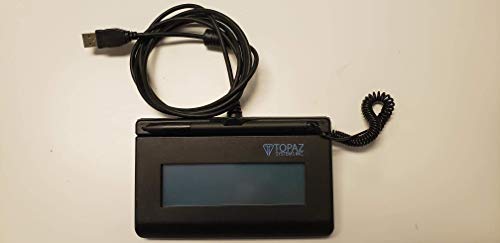
- Backlit LCD signing surface
- USB-connected compact signature pad
- Biometric and forensic capture capabilities
Best For: Business electronic-signature and signature-capture stations
Best Large-Screen Pick

- 14.3-inch 2.4K paper-like display
- 4096-level stylus and 256GB storage
- 10,000mAh battery with multitasking support
Best For: Large-screen writing, drawing, reading, and productivity
Best Paper-Based Notebook

- Writes on real A5 paper with instant phone sync
- 8192-level pressure sensitivity
- Offline writing with Android and iOS support
Best For: Handwritten notes and sketches with digital backup
Best Dedicated Signature Pad

- Purpose-built for electronic signatures
- USB connection for Windows, macOS, and Linux
- Includes stylus, software, and two-year warranty
Best For: Office and business signature-capture workflows
Color Note-Taking Powerhouse – XPPen Magic Note Pad
For buyers seeking commercial-grade electronic writing tablets with broad productivity features, the XPPen Magic Note Pad combines a full Android 14 tablet with a pressure-sensitive, battery-free pencil. Its 10.95-inch AG nano-etched LCD offers adjustable monochrome and color modes, though it is not an E Ink device.
Best For: Professionals, students, and meeting users who want handwritten notes, PDF tools, Android apps, and color viewing in one device.
Pros:
- 16,384 pressure levels, a soft X3 Pro Pencil 2 nib, and magnetic attachment support expressive writing.
- 90Hz refresh rate, 16.7 million colors, and AG nano-etched anti-glare glass support comfortable reading and writing.
- XPPen Notes includes handwriting-to-text conversion, audio recording, PDF editing, cloud uploads, and AI-assisted functions after updates.
- 6GB RAM and 128GB storage are paired with Android 14 for access to a broader tablet ecosystem.
Cons:
- The LCD display does not provide the appearance or characteristics of an E Ink screen.
- Some MyScript and AI features require a system upgrade to version 1PAE.
- Its larger feature set may be more than needed for users seeking a distraction-free writing-only tablet.
The XPPen stands out when color, Android compatibility, and advanced note conversion matter as much as handwriting. Choose it over an E Ink model if you prefer a conventional tablet display with paper-oriented surface treatment.
Professional Drawing Essential – Wacom Intuos Small
The Wacom Intuos Small is a compact choice among commercial-grade electronic writing tablets for computer-based drawing, design, photo editing, and document markup. It connects by USB-A and uses a battery-free EMR pen for a familiar pen-on-paper feel.
Best For: Teachers, students, designers, and creators who work on Windows, Mac, or Chromebook software rather than needing a standalone display.
Pros:
- Battery-free Wacom pen technology provides precise control without charging the stylus.
- Four ExpressKeys offer convenient shortcut access during creative work.
- Works with Windows, macOS, Android, and Chromebook, with broad software compatibility.
- Includes creative software access and online training after registration.
Cons:
- The 6-by-3.7-inch active area is smaller than the writing surface on larger tablets.
- It has no built-in screen, so users must look at a connected computer display.
- USB-A connectivity may require an adapter with newer devices.
Unlike standalone digital notebooks, the Intuos Small is designed as a reliable computer peripheral. Its compact footprint, shortcut keys, and established pen technology make it a practical fit for classrooms and desktop creative workflows.
Focused E Ink Work Companion – reMarkable Paper Pure
The reMarkable Paper Pure is a focused option among commercial-grade electronic writing tablets for handwriting, reading, document review, and meetings. Its 10.3-inch black-and-white E Ink display emphasizes a paper-like workspace, minimal distractions, and quick digital ink response.
Best For: Professionals and students who want a dedicated E Ink notebook for handwritten notes, PDF markup, and organized document workflows.
Pros:
- The third-generation 10.3-inch E Ink display offers improved whiteness and contrast.
- Digital ink appears in 21 ms for responsive handwriting and sketching.
- Templates, folders, tags, handwriting-to-text conversion, and document editing support organized work.
- Apps and plugins connect with Google Drive, Dropbox, Microsoft Word, Slack, Miro, and email workflows.
Cons:
- The black-and-white E Ink display is not intended for color content.
- Some expanded cloud and editing capabilities require a Connect subscription.
- Its reMarkable OS is more specialized than a general Android tablet platform.
The Paper Pure prioritizes concentration over app variety. It is a strong match for paper replacement, meeting notes, and PDF review, especially when a glare-conscious black-and-white display is more important than color or broad third-party app support.
AI-Ready Paper Tablet – Penstar eNote 2
The Penstar eNote 2 brings a high-resolution E Ink display and Android 14 to the commercial-grade electronic writing tablets category. It is built for paper-like writing, document reading, voice capture, and AI-assisted organization, with 128GB of storage and a bundled folio.
Best For: Users who need a large digital notebook for PDFs, books, meetings, voice-to-text, and organized document storage.
Pros:
- The 10.3-inch 2480-by-1860 display delivers 300 ppi resolution with clearer black-and-white E Ink viewing.
- The included battery-free stylus provides 8,192 pressure levels and supports writing on books and PDFs.
- Android 14, 4GB RAM, 128GB storage, and support for third-party apps offer flexible workflows.
- AI voice-to-text, handwriting conversion, note summaries, folders, tags, split-screen reading, and nine customizable buttons support productivity.
Cons:
- It is heavier than some paper tablets at approximately 0.97 kg.
- The supplied specifications list battery life as up to four weeks in one section and an average of two weeks in another.
- Its many controls and Android features may feel less minimalist than a dedicated writing-only device.
The eNote 2 is a versatile choice for buyers who want E Ink comfort without giving up Android apps, storage, audio features, and AI tools. Its bundled pen, spare nibs, and folio also make it ready for use out of the box.
Color E Ink Productivity – reMarkable Paper Pro
For buyers seeking commercial-grade electronic writing tablets for reading, planning, and focused note-taking, the reMarkable Paper Pro combines an 11.8-inch color E Ink display with a paper-like writing surface. Its included Marker Plus adds a built-in eraser, while folders, tags, PDF markup, and handwriting conversion support organized workflows.
Best For: Professionals, educators, and remote workers who want a large, low-glare digital notebook for writing, reading, PDF annotation, and sketching.
Pros:
- Large 11.8-inch color E Ink display with adjustable reading light.
- Marker Plus provides precise writing and includes a built-in eraser.
- Folders, tags, PDF markup, and handwriting-to-text conversion help organize work.
- Low-glare screen is designed for comfortable indoor and outdoor reading.
Cons:
- It is substantially larger and heavier than compact graphics tablets.
- Its Linux-based operating system and reMarkable-focused workflow may not suit users seeking a general-purpose tablet.
The Paper Pro is the most complete option here for paper replacement and distraction-free work. Choose it when an integrated screen, color support, reading comfort, and document organization matter more than a compact desktop drawing pad.
Portable Pen Input – XP-Pen StarG640
The XP-Pen StarG640 is a compact choice among commercial-grade electronic writing tablets for digital drawing, signatures, online teaching, and remote work. Its 6-by-4-inch active area uses a battery-free stylus with 8,192 pressure levels and connects by USB to compatible Windows, Mac, and Chromebook devices.
Best For: Students, teachers, remote workers, and creators who need an affordable, portable pen-input tablet for computers.
Pros:
- Battery-free stylus supports uninterrupted use without charging.
- 8,192 pressure levels provide detailed control for drawing and writing.
- Works with Windows, macOS, and Chrome OS devices listed in the specifications.
- Very slim 2 mm design is convenient for travel and mobile work.
Cons:
- The 6-by-4-inch active area is less spacious than a full-size writing tablet.
- It requires a connected computer and does not provide an integrated display for viewing work.
The StarG640 is a practical computer accessory rather than a standalone digital notebook. It is a strong fit for precise mouse replacement, signatures, classroom collaboration, and entry-level creative work where portability and a battery-free pen are priorities.
Dedicated Signature Capture – Topaz SigLite T-LBK460
Topaz SigLite T-LBK460-HSB-R 1x5 LCD Signature Capture Pad USB Connection (Backlit)
Check Price On AmazonThe Topaz SigLite T-LBK460-HSB-R is a specialized option for commercial-grade electronic writing tablets, built around USB-connected signature capture rather than general note-taking or drawing. It features a backlit LCD signing surface, a compact footprint, and biometric and forensic capture capabilities for supported business workflows.
Best For: Businesses that need a dedicated, portable USB signature pad for electronic signing and identity-related capture workflows.
Pros:
- Backlit LCD display allows a customizable signing interface.
- Compact size and 1.1-pound weight support portability.
- Third-generation touchscreen signing surface is designed for cost-efficient capture.
- Supports high-quality biometric and forensic signature capture.
Cons:
- Its specialized signature-pad design is not intended for broad drawing or note-taking.
- USB connectivity requires a compatible connected computer or system.
- The supplied specifications do not identify a standalone operating system or general-purpose tablet functions.
The SigLite makes the most sense when electronic signatures are the primary requirement. For creative work or handwritten notes, choose a graphics tablet or paper tablet instead; for dedicated signing stations, its LCD surface and biometric capture focus are more relevant.
Best Large-Screen Pick – TCL NXTPAPER 14
For shoppers comparing commercial-grade electronic writing tablets, the TCL NXTPAPER 14 is a versatile Android option that combines a large 14.3-inch 2.4K paper-like display with a 4096-level T-PEN stylus. It supports drawing, note-taking, reading, sheet music, multitasking, and media use in one device.
Best For: Students, artists, musicians, and creators who want a large tablet for writing, drawing, and everyday productivity.
Pros:
- Paper-like NXTPAPER 3.0 display reduces glare and filters blue light.
- Three display modes support standard viewing, digital art, and ink-style reading.
- Includes a 4096-level stylus, flip case, 256GB storage, and 10,000mAh battery.
- Supports split-screen, floating windows, screen mirroring, and extended display.
Cons:
- MicroSD expansion is not supported.
- Charger is not included.
- Its 14.3-inch size may be less convenient than a smaller tablet for travel.
The TCL NXTPAPER 14 stands out when screen comfort and workspace size matter most. Its combination of stylus support, multiple viewing modes, long battery capacity, and productivity features makes it a strong all-purpose choice.
Best Paper-Based Notebook – XPPen Note Plus
The XPPen Note Plus takes a different approach to commercial-grade electronic writing tablets: it uses real A5 paper and a dedicated ink pen, then syncs handwriting to a phone through Bluetooth 5.3. It is designed for notes, sketches, meetings, and offline writing rather than on-screen tablet use.
Best For: Students, teachers, professionals, and anyone who prefers handwriting on paper while keeping a digital copy.
Pros:
- Captures handwriting and sketches on real A5 paper without scanning.
- 8192 levels of pressure sensitivity support detailed digital sketches.
- Works offline and syncs automatically after reconnecting.
- Compatible with Android 10 or later and iOS 14 or later, with PNG/PDF sharing.
Cons:
- It has no electronic screen; writing requires the included matching ink pen.
- Phone syncing is required for viewing and managing digitized notes.
- The supplied pen refill is specific to the notebook’s writing system.
Choose the Note Plus if the feel of paper is more important than writing directly on glass. Its replaceable A5 core, offline storage, long battery life, and cross-platform syncing make it particularly practical for meetings and handwritten study notes.
Best Dedicated Signature Pad – Topaz SigLite LCD 1×5
For business workflows that need commercial-grade electronic writing tablets for signatures, the Topaz SigLite LCD 1×5 is a focused USB signature pad rather than a general drawing or note-taking device. It connects to a computer and includes software for electronic-signature use.
Best For: Organizations and offices that need a compact wired pad for capturing electronic signatures on Windows, macOS, or Linux computers.
Pros:
- Purpose-built for electronic signatures.
- USB connectivity works with Windows, macOS, and Linux.
- LCD display provides a dedicated signing surface.
- Includes a stylus and a stated two-year factory warranty.
Cons:
- The 1×5 LCD and 5.72-square-inch active area are limited for general writing or drawing.
- It is designed for computer-based signature capture rather than standalone use.
- USB wiring is less flexible than a wireless writing device.
The Topaz is the most specialized option in this roundup. Its compact signing surface and broad computer operating-system support make it a sensible choice for counter, reception, or document-approval workflows, but not for creative tablet work.
How We Picked the Best Commercial-Grade Electronic Writing Tablets
We evaluated these tablets by matching their hardware and software to real workplace tasks. Pressure sensitivity, pen responsiveness, display quality, battery or power requirements, operating-system support, file handling, and included accessories all influenced the selection. We also considered whether each model is best suited to creative work, handwritten productivity, mobile document workflows, or high-volume electronic signatures.
“Commercial-grade” does not mean every tablet has the same capabilities. A signature pad may be ideal for a reception desk but unsuitable for drawing, while a full Android tablet offers broader software support but may not provide the distraction-free writing experience of an E Ink notebook.
Quick Comparison
| Best For | Recommended Type | What to Prioritize |
|---|---|---|
| Digital signing | Topaz SigLite models | USB compatibility, capture software, authentication, and warranty |
| Handwritten notes | reMarkable, Penstar, or XPPen notebooks | Writing feel, conversion, synchronization, and battery life |
| Digital art | Wacom Intuos or XPPen StarG640 | Pressure levels, driver support, active area, and shortcut controls |
| Large-screen productivity | TCL NXTPAPER 14 | App compatibility, storage, screen comfort, and portability |
Key Buying Factors for Commercial-Grade Electronic Writing Tablets
Pen Technology and Writing Accuracy
Look for low-latency input, reliable palm rejection, and a pen that feels natural during extended sessions. Artists should check pressure sensitivity and tilt support, while business users should prioritize consistent strokes and accurate signature capture.
Display and Paper Feel
E Ink is usually easier on the eyes and closer to paper, but it can refresh more slowly and may not support rich color. LCD and paper-like matte displays are more versatile for apps, video, and color content. Consider lighting, glare, and whether the device will be used indoors or on the move.
Software, Connectivity, and File Workflows
Confirm compatibility with Windows, macOS, Android, or the organization’s document systems before buying. Cloud synchronization, PDF annotation, handwriting conversion, Bluetooth, and USB support can matter more than raw screen resolution. For signature pads, verify that the included or supported software integrates with your existing forms and applications.
Power, Size, and Durability
Battery-free styluses reduce charging interruptions, while rechargeable tablets are more portable than wired pads. A larger writing surface improves comfort but adds weight. For shared commercial environments, examine construction quality, replacement pen availability, warranty coverage, and long-term driver support.
Who Should Buy Which Commercial-Grade Electronic Writing Tablets?
Choose a Topaz device for dedicated electronic signatures and structured front-desk or office workflows. Choose a Wacom or XPPen drawing tablet for computer-based illustration, design, retouching, or classroom instruction. Choose a reMarkable or Penstar notebook if distraction-free handwriting, organization, and paper reduction are the main goals. Select the TCL tablet when you need Android apps, a large display, and broader multimedia capability alongside writing. XPPen’s digital notebooks are a practical middle ground for users who want handwritten notes with digital storage and phone synchronization.