Remote work often means switching between video calls, handwritten notes, PDFs, and digital task lists. The right electronic writing tablet can reduce that friction while keeping your workflow organized.
This roundup compares 10 options across digital notebooks, E Ink tablets, reusable note systems, LCD annotation pads, and graphic tablets so you can choose based on how you actually work.
Best 10 Electronic Writing Tablets for Remote Work Picks for 2026
Best Android Note-Taking Tablet

- Color Android tablet with three display modes
- Battery-free 16K-pressure pencil included
- Handwriting, PDF, audio, and cloud-note tools
Best For: Remote workers wanting a versatile Android note-taking tablet
Best Premium E-Ink Tablet

- 11.8-inch color e-ink display
- Paper-like writing with Marker Plus eraser
- Folders, PDF markup, and handwriting conversion
Best For: Focused remote work, reading, and handwritten document review
Best Feature-Rich E-Ink Notebook

- 10.3-inch 300-ppi e-ink display
- Android 14 with 128GB storage
- Voice-to-text, OCR, split-screen, and broad file support
Best For: File-heavy remote work and meeting transcription
Best Budget Drawing Pad

- Large 10 x 6.25-inch active area
- Battery-free 16K-pressure stylus
- Eight shortcut keys and broad OS compatibility
Best For: Computer-connected handwriting, whiteboarding, and design
Smart Sync Notebook

- Real-time handwriting sync to iOS and Android
- OCR export to editable text and Word files
- Audio-linked notes and offline storage
Best For: Paper-first remote workers managing searchable meeting notes
AI E-Ink Work Tablet

- Paper-like, low-latency E Ink writing experience
- 18-language meeting transcription support
- Slim design with stylus and folio case
Best For: Remote meetings, reading, and Wi-Fi-connected note organization
Paper-to-Phone Notebook

- Writes on replaceable A5 paper and syncs by Bluetooth 5.3
- Offline capture with Android and iOS compatibility
- Search, edit, back up, and export notes digitally
Best For: Paper-oriented remote workers sharing organized digital notes
Best for Live Annotation
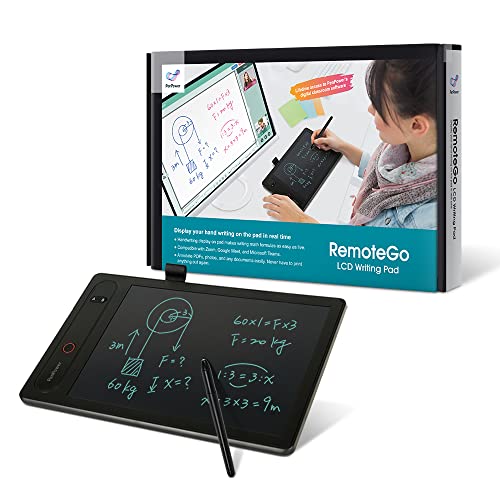
- Live annotation for meetings and documents
- Works with Zoom, Teams, Meet, and Webex
- Math formula recognition and DocuINK access
Best For: Remote teaching and visual collaboration
Best Budget Pen Tablet

- Battery-free stylus needs no charging
- Compatible with Windows, Mac, and Chrome OS
- Compact 6-by-4-inch writing area
Best For: Signatures, online teaching, and everyday handwritten input
Best for AI Meeting Notes
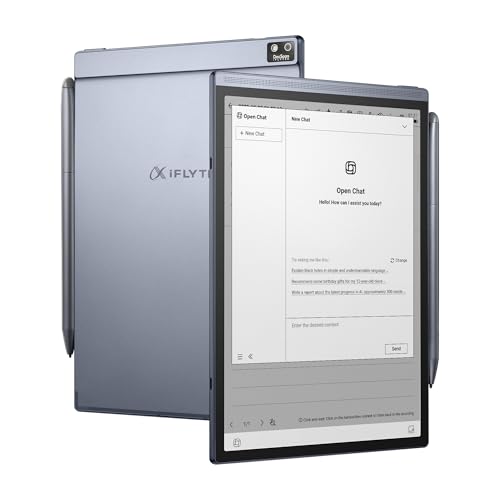
- Transcribes meetings and creates AI summaries
- Supports multilingual transcription and handwriting
- Paper-like E-Ink display with weeklong battery claim
Best For: Meetings, multilingual notes, and task organization
Best Android Note-Taking Tablet – XPPen Magic Note Pad
For shoppers comparing electronic writing tablets for remote work, the XPPen Magic Note Pad is a versatile Android option rather than an e-ink reader. Its 10.95-inch display, color modes, included folio, and note-focused software make it suitable for meetings, reading, and document markup.
Best For: Remote workers who want an Android tablet for handwritten notes, PDFs, voice recording, and cloud-connected productivity.
Pros:
- Three display modes, including monochrome, light color, and natural color.
- 90Hz, 400-nit display with AG nano-etched glass and reduced glare.
- Battery-free X3 Pro Pencil 2 offers 16,384 pressure levels and a soft nib.
- XPPen Notes supports handwriting-to-text, audio recording, PDF editing, and cloud uploads.
Cons:
- It is a standard Android tablet, not an e-ink device.
- The listed AI Notes and MyScript features require a system update.
The Magic Note Pad is the most flexible choice here for users who need app support and color, but buyers specifically seeking an e-ink reading experience should consider another model.
Best Premium E-Ink Tablet – reMarkable Paper Pro
The reMarkable Paper Pro is a premium pick among electronic writing tablets for remote work, combining an 11.8-inch color e-ink display with a paper-like writing surface. Its low-glare screen, adjustable reading light, and organized document system are designed for focused reading and note-taking.
Best For: Professionals who prioritize distraction-free writing, PDF annotation, comfortable reading, and a refined paper-like experience.
Pros:
- 11.8-inch color e-ink Canvas display with adjustable reading light.
- Marker Plus includes a built-in eraser and six spare tips.
- Supports folders, tags, PDF markup, and handwriting conversion.
- Ultra-slim design and low-glare display support portable day or night use.
Cons:
- Runs Linux rather than a general-purpose Android tablet platform.
- Only one USB-C port is listed.
Choose the Paper Pro when writing feel and comfortable reading matter more than broad app flexibility. It is a focused digital notebook for work documents rather than a conventional multitasking tablet.
Best Feature-Rich E-Ink Notebook – Penstar eNote 2
The Penstar eNote 2 is a strong choice for electronic writing tablets for remote work when document compatibility and smart input tools are priorities. Its 10.3-inch 300-ppi e-ink display, Android 14 system, large storage, and voice-to-text features support meetings and paper-heavy workflows.
Best For: Remote workers who need extensive file-format support, split-screen reading and note-taking, voice transcription, and third-party Android apps.
Pros:
- 10.3-inch, 300-ppi e-ink screen designed for clear reading.
- Supports handwriting-to-text, voice-to-text, note summaries, folders, and tags.
- 128GB storage, 4GB RAM, Android 14, and support for third-party apps.
- Includes a pressure-sensitive stylus, spare nibs, folio, speakers, and microphone array.
Cons:
- Battery-life specifications vary between the supplied claims of two and four weeks.
- At 0.97 kg, it is heavier than some slim digital notebooks.
The eNote 2 is the practical all-rounder for users handling varied office files and recorded meetings. Its broader feature set is appealing, though it may be more hardware than users seeking a minimalist writing pad need.
Best Budget Drawing Pad – XPPen Deco 01 V3
The XPPen Deco 01 V3 takes a different approach to electronic writing tablets for remote work: it is a pen tablet that connects to a computer or compatible Android device, not a standalone screen tablet. Its large active area and shortcut keys make it useful for handwriting input, digital whiteboarding, and creative software.
Best For: Remote workers who already use a Windows, Mac, ChromeOS, Linux, or compatible Android device and want an affordable stylus input pad.
Pros:
- 10 x 6.25-inch drawing area provides room for notes and annotations.
- Battery-free stylus offers 16,384 pressure levels and up to 60 degrees of tilt.
- Eight customizable shortcut keys support efficient workflows.
- Includes spare nibs, stand, glove, protective film, and connection adapters.
Cons:
- Requires a connected computer or compatible Android device.
- It does not provide its own display or standalone note-taking software.
The Deco 01 V3 is a cost-effective choice for computer-based remote work, especially whiteboarding, annotation, and design. It is less suitable if you want a self-contained digital notebook you can use without another screen.
Smart Sync Notebook – OPHAYA Smart Pen Notebook
For shoppers comparing electronic writing tablets for remote work, the OPHAYA system offers a familiar paper-writing setup with digital capture. It syncs handwriting to the Ophaya Pro+ app, supports offline storage, and can convert notes into editable text for easier filing and sharing.
Best For: Remote workers who prefer writing on paper but want searchable, shareable digital meeting notes.
Pros:
- Captures handwriting in real time and syncs with compatible iOS and Android phones.
- OCR can convert handwritten notes into editable text and Word files.
- Audio recording can sync with corresponding written notes.
- Offline storage automatically uploads notes after reconnection.
Cons:
- Requires the Ophaya Pro+ app and a compatible phone for syncing.
- Its paper-based workflow may be less convenient than a standalone screen tablet.
- Handwriting recognition and conversion may vary with writing quality.
This is a practical choice when your remote-work routine involves handwritten brainstorming, interviews, or meetings. The combination of offline capture, audio support, and searchable exports makes it more useful than a conventional notebook, provided you are comfortable using the companion app.
AI E-Ink Work Tablet – iflytek AINOTE 2
The iflytek AINOTE 2 is a screen-based option for electronic writing tablets for remote work, combining a paper-like E Ink display with handwriting tools and AI-assisted note organization. Its transcription and summary features can support meetings, though several smart functions require Wi-Fi.
Best For: Remote professionals who want a lightweight digital notebook for writing, reading, and meeting transcription.
Pros:
- Frontlight-free E Ink display and low-latency handwriting are designed to feel paper-like.
- AI tools can assist with selected text, summaries, and organization when connected to Wi-Fi.
- Supports transcription in 18 languages for meetings, lectures, and interviews.
- Includes a stylus and protective folio case, with up to 14 days of stated usage under specified conditions.
Cons:
- No frontlight means external lighting is needed in dark or low-light rooms.
- AI assistance and transcription require an active internet connection.
- Transcription accuracy depends on audio quality, accents, and the surrounding environment.
AINOTE 2 is the more self-contained choice of these options, especially for users who want to write directly on a display rather than on paper. Its E Ink format should suit extended note-taking, but confirm that your work environment provides adequate lighting and that cloud-based features fit your meeting privacy needs.
Paper-to-Phone Notebook – XPPen Note Plus
The XPPen Note Plus suits shoppers seeking electronic writing tablets for remote work without giving up real paper. It records handwriting through Bluetooth 5.3, stores notes offline, and provides phone-based tools for editing, tagging, searching, and exporting work notes.
Best For: Remote workers who want real A5 paper, cross-platform syncing, and flexible digital note management.
Pros:
- Syncs handwritten notes to Android 10 or later and iOS 14 or later devices.
- Works with replaceable A5 paper cores up to 8 mm thick.
- Offers tagging, quick search, editing tools, Google Cloud backup, and PNG/PDF sharing.
- Supports offline writing, 14 hours of continuous use, and 50 days of standby according to the supplied specifications.
Cons:
- Uses real paper and a dedicated matching ink pen rather than an electronic screen.
- Notes must be synced through a compatible phone for digital access and editing.
- Its feature set is oriented toward handwriting capture rather than direct on-device reading or editing.
Note Plus is a strong middle ground for people who think best on paper but need digital copies for remote collaboration. Its replaceable A5 core and offline mode are useful for daily work, while Bluetooth syncing and export tools make notes easier to organize after a meeting.
Best for Live Annotation – RemoteGo LCD Writing Pad
For remote workers who need to explain ideas visually, this is one of the more specialized electronic writing tablets for remote work. The RemoteGo combines a 10-inch LCD writing surface with PC and Mac integration for live annotations, screen recording, PDF comments, and video meetings.
Best For: Remote teaching, collaborative presentations, PDF annotation, and handwriting-based math instruction.
Pros:
- Integrates with Zoom, Google Meet, Microsoft Teams, and Webex on Windows and Mac.
- Supports live annotation across websites, documents, applications, and videos.
- Can record annotations or capture screenshots, while math formulas can be exported as LaTeX, MathML, or images.
- Includes one year of access to the DocuINK collaboration platform.
Cons:
- USB connectivity means it is designed for use with a computer or compatible device rather than standalone note-taking.
- The feature-rich DocuINK workflow may be more than casual note-takers need.
Choose the RemoteGo if your remote-work routine centers on explaining, marking up, or teaching on screen. Its annotation and conferencing features make it a stronger collaboration tool than a basic drawing tablet.
Best Budget Pen Tablet – XPPen StarG640
The XPPen StarG640 is a straightforward option among electronic writing tablets for remote work. Its 6-by-4-inch active area and battery-free stylus let you write signatures, mark up documents, draw diagrams, and control compatible applications without charging the pen.
Best For: E-signatures, online teaching, handwritten notes, diagrams, and replacing a mouse during remote work.
Pros:
- The battery-free stylus supports uninterrupted writing and drawing.
- Works with Windows, Mac, and Chrome OS, including Microsoft Office, Zoom, Google Jamboard, Google Keep, and Google Canvas.
- Thin, lightweight design is easy to carry between home, office, or classroom locations.
- Offers 8192 levels of pressure sensitivity for more controlled lines.
Cons:
- The 6-by-4-inch active area is smaller than the RemoteGo’s 10-inch LCD surface.
- It requires a connected computer and does not provide the standalone transcription or storage features of a digital notebook.
The StarG640 is a practical pick when you want a compact, low-maintenance tablet for signatures, teaching, and handwritten input. Its battery-free pen and broad operating-system compatibility keep the setup simple.
Best for AI Meeting Notes – iFLYTEK AINOTE Air 2
The iFLYTEK AINOTE Air 2 takes a different approach to electronic writing tablets for remote work by combining paper-like digital writing with voice transcription and AI organization. It is designed for professionals who want meeting notes, schedules, handwriting recognition, and translations in one portable device.
Best For: Meetings, multilingual teams, handwritten note-taking, transcription, and task organization.
Pros:
- Provides real-time voice-to-text transcription and AI-generated meeting summaries without a subscription, according to the supplied product information.
- Supports transcription in 18 languages, translation across 14 languages, and handwriting recognition in 133 languages.
- Its 8.2-inch E-Ink display, 23ms latency, and included stylus are designed for a paper-like writing experience.
- Offers 32GB local storage, 100GB permanent cloud storage, OneDrive integration, and a battery rated for up to a week of heavy use.
Cons:
- Its listed compatible devices are laptops and desktops, while the tablet itself runs Android.
- The 8.2-inch screen is intended for notes and organization rather than large-format screen annotation.
Pick the AINOTE Air 2 if your remote-work needs go beyond handwriting and include searchable meeting records, multilingual communication, and follow-up tasks. It is the most note-management-focused option in this group.
How We Picked These Electronic Writing Tablets for Remote Work
We selected products that support common remote-work tasks such as capturing meeting notes, marking up documents, sketching ideas, converting handwriting to digital files, or moving notes between a tablet and computer. The list includes standalone digital notebooks, E Ink devices, app-connected writing systems, and pen tablets that rely on a Mac or Windows computer.
We also considered writing feel, stylus technology, portability, screen format, connectivity, software usefulness, and the type of user each device serves best. Since these products differ substantially, the best choice depends more on workflow than on specifications alone.
Quick Comparison
- Best for a paper-like standalone experience: reMarkable Paper Pro with Marker Plus.
- Best for color digital notes: XPPen 3 in 1 Color Digital Notebook.
- Best for AI-assisted note taking: iflytek AINOTE 2 or AINOTE Air 2.
- Best for PDF comments and remote collaboration: RemoteGo LCD Writing Pad.
- Best for computer-based handwriting and drawing: XPPen Deco 01 V3 or StarG640.
- Best for syncing handwritten notes to a phone: XPPen Note Plus or the Smart Pen and Reusable Digital Notebook.
Key Buying Factors for Electronic Writing Tablets for Remote Work
Standalone Tablet or Computer Accessory?
Standalone E Ink and digital notebooks are better when you want to write during meetings without opening a laptop. Graphic tablets are usually more affordable and precise, but they require a connected computer and can take time to master because the writing surface is separate from the display.
Writing Feel and Pen Technology
Pressure sensitivity helps with handwriting, diagrams, and creative work. Battery-free pens reduce charging interruptions, while a textured, low-glare display can feel closer to paper. Check whether the device includes the pen, folio, replacement nibs, or other essentials.
Note Conversion, Syncing, and File Support
For remote work, easy export matters as much as writing comfort. Look for handwriting-to-text conversion, voice transcription, PDF annotation, cloud or phone syncing, and support for formats your team already uses. AI features can save time, but confirm which functions require an app, account, or subscription.
Portability and Battery Life
A slim tablet is easier to carry between home, a coworking space, and meetings. Consider screen size, case protection, charging method, and whether the device can last through a typical workday. Smaller models travel well, while larger screens are more comfortable for documents and detailed diagrams.
Who Should Buy Which Electronic Writing Tablets for Remote Work?
Choose a reMarkable or E Ink model if distraction-free writing and document review are your priorities. Pick an AI note-taking tablet if searchable transcripts and voice-to-text can improve meetings. A color notebook is a stronger fit for visual planning, diagrams, and richer annotations.
Choose an XPPen pen tablet if you already work at a computer and need accurate handwriting, drawing, or screen annotation without paying for a standalone tablet. A reusable notebook or synced digital notebook suits people who prefer a familiar paper workflow but want notes backed up digitally. Finally, consider the RemoteGo option when PDF markup, screen recording, and collaborative explanations are central to your work.