A dock with an SSD enclosure can give your Mac mini more accessible ports and extra storage without adding another box to your desk. The right choice depends on your Mac mini model, the connections you use daily, and how quickly you need to move files.
These 10 options cover compact stands, display-focused hubs, dual-bay enclosures, and higher-bandwidth docks. Before choosing one, check the exact model compatibility and connection requirements rather than relying on the product name alone.
Best 10 Mac Mini Docking Stations with SSD Picks for 2026
Best Compact Fit

- Up to 4TB NVMe storage
- Two 10Gbps USB-A ports; UHS-II SD
- Vented aluminum stand
Best For: Compact setups needing front-facing USB-A and SD access
Best Port Variety
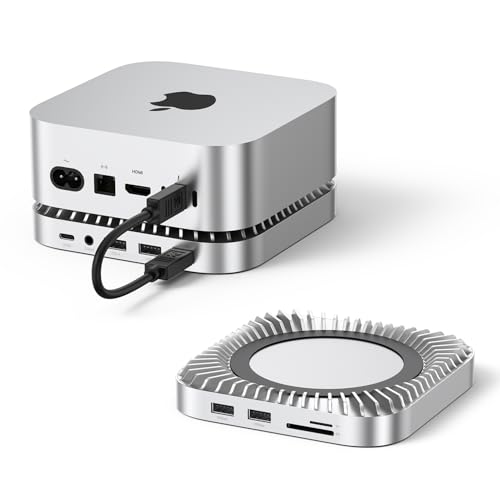
- Up to 8TB NVMe storage
- USB-A, USB-C, SD/TF, and audio
- 10Gbps USB-A and USB-C data ports
Best For: Peripheral-heavy desks needing varied front-facing connections
Best USB Expansion

- Up to 8TB NVMe storage
- Seven listed USB data ports
- Power-button lever and anti-slip pads
Best For: Workstations connecting numerous USB accessories
Best DisplayPort Option

- Up to 8TB NVMe storage
- DisplayPort up to 4K/144Hz on M4
- USB-A/C, SD/TF, and audio
Best For: Mac mini setups needing DisplayPort alongside SSD expansion
High-Capacity Pick
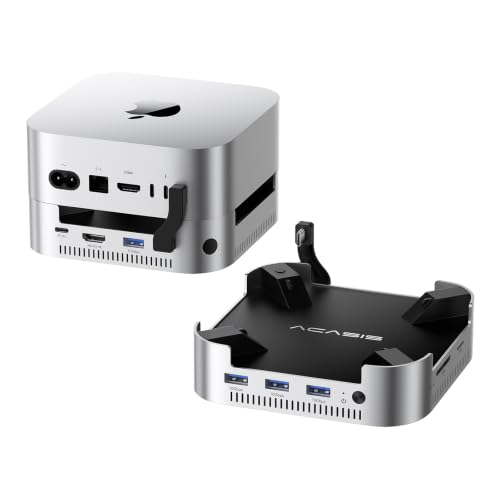
- Two NVMe bays; up to 16TB total
- 4K/60Hz HDMI and three 10Gbps USB-A ports
- Included 65W adapter and dual fans
Best For: Mac mini users needing two SSD bays and display expansion
Display-Focused Pick

- 4K/144Hz DisplayPort plus 4K/60Hz HDMI
- One NVMe slot supports up to 8TB
- SD/microSD, audio, and USB expansion
Best For: Multi-monitor setups that also need local NVMe storage
Peripheral Hub Pick
Yottamaster 9-in-1 Mac mini M4 Dock

- Up to 8TB with a 2280-size M.2 SSD
- Three stated 10Gbps USB data ports
- SD/TF readers, dual audio jacks, and fan
Best For: M4 and M4 Pro users prioritizing USB, cards, and audio
Best for Dual HDMI

- NVMe enclosure supports up to 8TB
- Dual HDMI supports 4K@60Hz
- Active cooling and six USB-A ports
Best For: Dual-display setups needing NVMe storage and USB-A ports
Best Retro Design

- 5-inch built-in HD display
- Thunderbolt 5-ready NVMe enclosure
- SD/microSD readers and 8K DisplayPort
Best For: Retro-style desks needing a small secondary screen
Best for Dual-Drive RAID
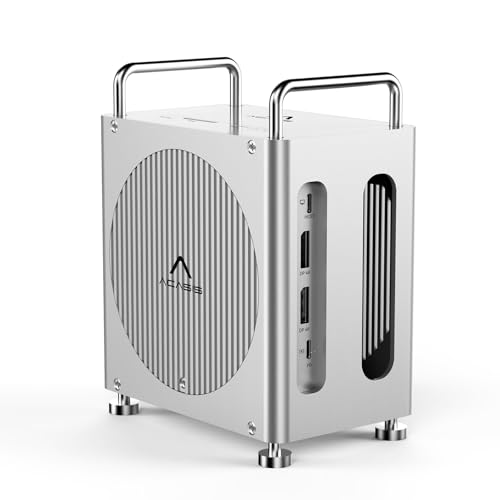
- Two M.2 slots with multiple RAID modes
- Dual DisplayPort supports 4K@60Hz
- SD/TF readers and three 10Gbps USB-A ports
Best For: Mac mini M4 users wanting flexible dual-drive storage
Best Compact Fit – Satechi Mac mini Hub & Stand
Among mac mini docking stations with ssd support, this Satechi stand is a compact choice for adding front-facing ports and an M.2 NVMe enclosure to a compatible Mac mini. It supports up to 4TB of storage, with the SSD sold separately.
Best For: Mac mini users who want a tidy aluminum stand, accessible USB-A and SD connections, and moderate SSD expansion.
Pros:
- Supports 2230, 2242, 2260, and 2280 NVMe drives at up to 10Gbps.
- Includes two 10Gbps USB-A ports and a UHS-II SD reader rated up to 312MB/s.
- Recessed top and bottom vents are designed to preserve airflow; includes a two-year limited warranty.
Cons:
- SSD is not included; heatsink-equipped and double-sided drives are incompatible.
- USB-A ports cannot charge an iPad or support an Apple SuperDrive, and only one bus-powered device should be connected at a time.
Choose this one if the compact, Mac mini-matched design matters more than maximum storage capacity or a broad mix of port types.
Best Port Variety – RayCue Mac mini Dock & Stand
If you are comparing mac mini docking stations with ssd expansion, the RayCue stands out for its mix of USB-A, USB-C, card-reader, and audio connections. Its M.2 NVMe enclosure supports drives up to 8TB at up to 10Gbps; the SSD is not included.
Best For: Users who connect several types of peripherals and want SSD storage in the same Mac mini stand.
Pros:
- Supports 2230, 2242, 2260, and 2280 NVMe SSDs up to 8TB.
- Provides two 10Gbps USB-A data ports, a 10Gbps USB-C data port, SD/TF slots, and a 3.5mm audio jack.
- Bottom vents and a recessed top are designed to aid cooling.
Cons:
- SSD must be purchased separately.
- Listed SD/TF speed is 170MB/s, which may matter if card transfers are a priority.
The RayCue is the versatile pick here if you value audio and USB-C access alongside storage, rather than prioritizing the fastest listed card-reader speed.
Best USB Expansion – UGREEN Mac mini Dock & Stand
For shoppers looking at mac mini docking stations with ssd support, this UGREEN stand pairs an up-to-8TB NVMe enclosure with an especially broad selection of USB data ports. It is a practical fit when several drives and accessories need easy access.
Best For: Mac mini workstations that need multiple high-speed USB connections and substantial SSD capacity.
Pros:
- Accepts 2230, 2242, 2260, and 2280 M.2 NVMe SSDs, with up to 8TB capacity and 10Gbps transfers.
- Lists three 10Gbps USB-A ports, two 5Gbps USB-A ports, two 10Gbps USB-C ports, and an SD/TF reader.
- Includes a power-button lever, anti-slip pads, and a short 4cm cable for a tidy setup.
Cons:
- SSD is not included.
- An external power adapter is recommended when connecting multiple devices.
This is the stronger choice when USB port count drives the purchase; account for supplemental power if you plan to populate the dock heavily.
Best DisplayPort Option – UGREEN Mac mini DP Dock
Most mac mini docking stations with ssd expansion focus on storage and peripherals; this UGREEN dock also adds a DisplayPort connection. Its M.2 NVMe enclosure supports up to 8TB and transfers up to 10Gbps, with the SSD purchased separately.
Best For: Mac mini users who want an NVMe enclosure and a DisplayPort monitor connection in one dock.
Pros:
- Supports 2230, 2242, 2260, and 2280 M.2 NVMe SSDs up to 8TB.
- DisplayPort is rated up to 4K at 144Hz with Mac mini M4 and 4K at 240Hz with M4 Pro.
- Includes 10Gbps USB-A/USB-C data connections, SD/TF slots, audio, and a power-button lever.
Cons:
- SSD is not included.
- Advertised DisplayPort refresh rates depend on the Mac mini model; the supplied notes specify different rates for M4 and M4 Pro.
Pick this model when DisplayPort is a deciding feature, and check the stated refresh-rate support against your particular Mac mini before buying.
High-Capacity Pick – ACASIS Dual-Bay Mac mini Dock
Among mac mini docking stations with ssd expansion, this ACASIS dock stands out for its two NVMe bays. It supports up to 16TB total storage and includes a 65W adapter for self-powered operation.
Best For: Mac mini users who want room for two SSDs alongside extra ports and a 4K display output.
Pros:
- Two NVMe bays support up to 16TB total, with a stated 917MB/s in RAID 0 mode.
- Includes three 10Gbps USB-A ports, SD/TF slots, and 4K/60Hz HDMI.
- Aluminum body, side vents, and two automatic cooling fans.
Cons:
- SSDs must not be installed or removed while the dock is powered on.
- The stated 474MB/s speed in non-RAID-0 modes is lower than its RAID 0 figure.
Choose this model when storage capacity matters more than a fan-free setup; its included power supply and cooling are useful features for a dual-drive dock.
Display-Focused Pick – 4URPC 13-in-1 Mac mini Dock
For shoppers comparing mac mini docking stations with ssd storage and monitor connections, the 4URPC combines an NVMe enclosure with DisplayPort and HDMI. Its single M.2 slot supports up to 8TB, while the dock also adds USB ports, card readers, and audio.
Best For: Mac mini users building a multi-monitor desk setup with local SSD storage.
Pros:
- DisplayPort supports up to 4K/144Hz, and HDMI supports up to 4K/60Hz.
- NVMe enclosure accepts 2230, 2242, 2260, and 2280 drives, with stated speeds up to 10Gbps.
- Includes USB-A and USB-C connections, SD/microSD slots, and a 3.5mm audio jack.
Cons:
- SSD is not included, and SATA SSDs are not supported.
- The USB-C port is specified as USB 2.0, not a 10Gbps data port.
This is the more display-oriented choice of the three, especially if you want both DisplayPort and HDMI on the dock. Check your SSD type before buying.
Peripheral Hub Pick – Yottamaster 9-in-1 Mac mini M4 Dock
The Yottamaster is one of the mac mini docking stations with ssd expansion aimed at keeping everyday peripherals close at hand. It pairs an up-to-8TB M.2 enclosure with USB connections, card readers, two audio jacks, and a bottom cooling fan.
Best For: Mac mini M4 or M4 Pro owners who want SSD expansion and accessible peripheral ports without a dock-based monitor output.
Pros:
- M.2 enclosure supports up to 8TB and accepts 2280-size NVMe or SATA SSDs.
- Provides two 10Gbps USB-A ports and one 10Gbps USB-C port.
- Includes SD/TF readers, two 3.5mm audio jacks, and a bottom cooling fan.
Cons:
- SSD is not included, and the enclosure accepts only 2280-size drives.
- No HDMI or DisplayPort output is listed.
Pick this dock for USB, cards, audio, and a single SSD in a compact Mac mini M4 setup. If you need a display connection on the dock itself, look elsewhere.
Best for Dual HDMI – ANYOYO 40Gbps Mac mini Dock
Among mac mini docking stations with ssd support, the ANYOYO is a practical pick if you want built-in NVMe expansion alongside two HDMI outputs. Its 40Gbps SSD enclosure supports NVMe drives up to 8TB, with advertised read and write speeds up to 2,800MB/s.
Best For: Mac mini users who want dual 4K@60Hz HDMI outputs, NVMe storage, and several USB-A connections in one dock.
Pros:
- Supports 2230, 2242, 2260, and 2280 NVMe SSDs.
- Two HDMI outputs support dual 4K@60Hz displays; a third display can connect through a native Mac mini port.
- Includes four USB-A 3.1 ports, two USB 2.0 ports, and active SSD cooling.
Cons:
- The SSD slot does not support SATA drives.
- Advertised SSD speeds are up to 2,800MB/s, despite the 40Gbps enclosure connection.
Choose this dock for its mix of display outputs and everyday ports, not just its storage speed. Check your SSD protocol before buying.
Best Retro Design – WOKYIS M5 80Gbps Dock
The WOKYIS M5 stands out among mac mini docking stations with ssd support thanks to its Macintosh-inspired housing and built-in 5-inch, 1280×720 display. It pairs an M.2 NVMe enclosure with Thunderbolt 5-ready, 80Gbps theoretical bandwidth and a DisplayPort output supporting up to 8K@60Hz.
Best For: Buyers who want a retro desktop setup with fast NVMe storage, card readers, and a small secondary screen.
Pros:
- Built-in screen can show secondary information, such as notifications or a clock.
- Includes SD/microSD readers, four USB-A ports, two USB-C ports, and a headphone jack.
- NVMe enclosure includes a cooling fan; supplied notes cite theoretical test speeds up to 7,000MB/s.
Cons:
- 80Gbps operation requires a Thunderbolt 5 interface and cable; the dock does not support host protocols below USB4.
- The manufacturer advises connecting the 36W power supply for stable SSD and USB-device operation.
This is the most distinctive choice here if the integrated display will be useful. Verify your host connection and SSD specifications before buying for maximum speed.
Best for Dual-Drive RAID – ACASIS Mac mini M4 Dock
For shoppers comparing mac mini docking stations with ssd expansion, the ACASIS dock offers an unusual advantage: two M.2 slots with RAID 0, RAID 1, JBOD, and default modes. Its 40Gbps host connection also supports two DisplayPort outputs and SD/TF 4.0 card readers.
Best For: Mac mini M4 or M4 Pro users who want dual-drive storage options and external displays from the same dock.
Pros:
- Two M.2 slots support up to 16TB in the stated expansion configuration.
- RAID 0 offers a speed-focused option, while RAID 1 supports mirrored storage.
- Dual DisplayPort outputs support up to 4K@60Hz with two displays, plus three 10Gbps USB-A ports.
Cons:
- Shared bandwidth can reduce RAID 0 read speeds when both DisplayPort outputs are in use, according to the supplied figures.
- USB-A ports provide up to 4.5W each, so they are not suited to fast charging.
Pick the ACASIS if flexible two-drive storage matters more than peak SSD throughput while driving multiple monitors. Its bandwidth trade-off is worth considering for display-heavy workflows.
How We Picked the Best Mac Mini Docking Stations with SSD
We looked for docks that combine accessible connections with a built-in SSD enclosure, then compared their stated storage configurations, host-interface speeds, port layouts, and desk-friendly features. The selection includes everyday hubs, display-oriented options, dual-bay designs, and higher-bandwidth models. Listed specifications are a starting point, not a guarantee of real-world transfer speeds: performance also depends on the SSD, cable, Mac mini port, and what else is connected.
Quick Comparison: Which Type Fits Your Setup?
For a tidy setup with one added drive, start with a single-bay stand-style dock from Satechi, UGREEN, Raycue, or 4URPC. If two separate SSDs would simplify project storage and backups, compare the ACASIS dual-bay models. The UGREEN dock with DisplayPort is worth considering when an external display connection is a priority. ANYOYO and the M5 Retro Dock are aimed at buyers seeking higher stated connection bandwidth; confirm the exact host interface before paying extra. Yottamaster is an option to examine if active cooling matters to you.
Key Buying Factors for Mac Mini Docking Stations with SSD
Mac Compatibility and the Host Connection
Check the dock’s compatibility listing against your exact Mac mini model and ports. Some product names span several model generations, but physical fit and available features may differ. A dock advertised as 40Gbps or 80Gbps needs a compatible Mac port and cable to take advantage of that link; it will not make every connected port or SSD run at the headline speed.
SSD Fit, Capacity, and Installation
“SSD enclosure” usually means you supply the drive separately. Confirm whether the bay accepts NVMe, SATA, or both; check supported M.2 lengths and stated capacity limits before buying a drive. NVMe and SATA M.2 drives may look similar but are not interchangeable in every enclosure. A dual-bay dock can help keep working files and backups on separate drives, although two drives may share the same connection to the Mac.
Ports, Displays, Power, and Heat
Count the ports you will actually use: USB-A for existing accessories, USB-C for newer devices, card readers where needed, and a dedicated display output if that suits your monitor. Verify each port’s data rate and whether a USB-C port carries data, power, or both. Check display resolution and refresh-rate claims against your Mac and monitor. For sustained transfers, consider ventilation, enclosure materials, and whether a fan’s possible noise is acceptable. Also check whether the dock needs its own power supply.
Who Should Buy Which Mac Mini Docking Stations with SSD?
Choose a simple single-bay stand if you mainly want convenient ports and one extra SSD with minimal desk clutter. Pick a dual-bay ACASIS option if managing two drives is more useful than keeping the setup small. Prioritize the display-focused UGREEN model if its output matches your monitor needs. Consider a higher-bandwidth dock for frequent large-file transfers, but compare the full connection path—not just the advertised maximum. If your workload keeps an SSD busy for long stretches, weigh cooling alongside speed and port count. The best of these Mac Mini Docking Stations with SSD is the one that fits your Mac, drive, and everyday connections without making you pay for bandwidth or ports you cannot use.