If you’re tightening up a desk or trying to keep a Mac Mini running cooler, a vertical stand can make a big difference. You’ll free up space, improve airflow, and keep ports accessible without bulky mounts. I’ve picked the top options that fit models from 2010 through the latest M4 Pro, balancing build quality, stability, and heat dissipation — and a few surprises worth considering next.
AFOOYO Mac Mini Vertical Stand (Universal Holder for Mac Mini 2010–2024, Gray)

If you want a simple, secure way to reclaim desk space and keep your Mac Mini cool, the AFOOYO vertical stand is a solid choice—especially for anyone using Mac Minis from 2010 through 2024 (including M1, M2, and M4 Pro). You’ll get a durable ABS holder with a grippy pattern and gravity locking mechanism that stabilizes your Mini and prevents sliding. Pre-installed silicone pads stop scratches, and the hinge supports stacking two to three devices vertically to free desktop real estate. Improved airflow aids heat dissipation, and the universal design even holds phones, tablets, and small laptops.
Best For: users who want to save desk space and securely store Mac Minis (2010–2024, including M1/M2/M4 Pro) while improving airflow and protecting devices from scratches.
Pros:
- Durable ABS construction with non-slip silicone pads prevents scratches and keeps the Mac Mini stable.
- Gravity locking hinge supports stacking 2–3 devices vertically to reclaim desktop real estate.
- Improves airflow for better heat dissipation and can also hold phones, tablets, or small laptops.
Cons:
- Vertical stacking may limit access to ports if multiple devices are tightly arranged.
- Designed primarily for compact devices; may not fit larger or unusually shaped mini PCs.
- ABS plastic construction, while durable, may not have the premium feel of metal stands.
SNANSHI Mac mini M4 Vertical Metal Stand (Heavy-Duty)

For users who prioritize cooling and a rock-solid setup, the SNANSHI Mac mini M4 Vertical Metal Stand delivers: it’s engineered for the 2024 Mac mini M4/M4 Pro with a precision fit that eliminates wobble while exposing the bottom vents to cut thermal throttling by up to 30%, and its solid-metal, weighted build plus silicone padding keeps the unit secure without scratching your desk. You’ll reclaim desk space by shifting the Mini to a vertical stance, improve heat dissipation over plastic stands, and access the side power button without lifting the machine. Anti-slip silicone pads and an interior cushioned groove guarantee stability and scratch protection.
Best For: Users with a 2024 Mac mini M4 or M4 Pro who prioritize improved cooling, stable vertical placement, and a minimalist, space-saving desk setup.
Pros:
- Precision-engineered metal design provides a wobble-free, weighted stand that resists tipping and improves heat dissipation versus plastic alternatives.
- Vertical orientation fully exposes bottom intake vents, reducing thermal throttling by up to 30% and enhancing airflow.
- Anti-slip silicone pads and a cushioned interior groove protect the Mac mini and desk from scratches while keeping the unit secure.
Cons:
- Specifically built for 2024 Mac mini M4/M4 Pro, so it won’t fit other Mac mini generations or different devices.
- Metal construction increases weight and may be less portable than lightweight or foldable stands.
- Vertical placement may limit airflow clearance requirements or placement options in some cramped or enclosed spaces.
Bylitco Desktop Stand for Mac Mini (Vertical Holder)

Gamers and power users who want better cooling and a tidier desk will appreciate the Bylitco Desktop Stand for Mac Mini. You’ll get a vertical holder tailored to Mac Mini models from 2010–2023, including M1 and M2. Its premium metal construction gives sturdy, long-lasting support while the thin padded mat around the groove prevents scratches. The lifted, space-saving design cradles your Mac Mini upright to free desk real estate and boost airflow, which helps reduce thermal throttling and maintain performance. Available in black, this compact stand balances protection, durability, and improved cooling without adding bulk.
Best For: Gamers and power users who need improved cooling and a tidier desk for their Mac Mini (2010–2023, including M1/M2).
Pros:
- Solid premium metal construction provides sturdy, long-lasting support.
- Vertical, space-saving design frees up desk real estate and enhances airflow to reduce thermal throttling.
- Thin padded mat protects the Mac Mini from scratches while cradled upright.
Cons:
- Only available in black, limiting color options for matching setups.
- Vertical orientation may block easy access to ports depending on desk arrangement.
- Adds an external accessory that may not be necessary for users who rarely stress their Mac Mini.
IFCASE Mac mini Vertical Stand (Silver)

Workspace minimalists will appreciate the IFCASE Mac mini Vertical Stand (Silver) for its slim, oxidized-aluminum design that saves desk space while keeping your Mac mini secure. You’ll like its minimalist look that complements modern setups and resists wear. An anti-slip silicone base and internal silicone pads prevent scratches and reduce tipping, giving a snug, stable fit—insert the Mac mini with the logo facing outward to avoid gaps. A large bottom cutout boosts airflow for better heat dissipation, helping prolong device life. Overall, it’s a practical, elegant choice if you want compact vertical storage without sacrificing protection or cooling.
Best For: Minimalists and compact-desk users who want a stylish, secure vertical storage solution to save space and improve airflow for their Mac mini.
Pros:
- Sleek, oxidized-aluminum design complements modern workspaces and resists wear.
- Anti-slip silicone base and internal pads prevent scratches and provide stable, snug fixation.
- Large bottom cutout improves airflow and heat dissipation to help prolong device life.
Cons:
- Only fits when Mac mini is inserted with the logo facing outward for a snug fit, which may be inconvenient for some setups.
- Vertical orientation may restrict access to ports depending on desk placement and cable routing.
- Limited to Mac mini models (2010–2023); not universal for other small-form-factor PCs.
Adjustable Aluminium Vertical Stand for Mac mini and Small Laptops (Universal Slot 10-52mm)

If you need a versatile, heavy-duty stand that fits everything from older Mac minis to thicker mini PCs and small laptops, this adjustable aluminium vertical holder is a smart choice. You’ll set devices into a 10–52mm slot that suits Mac mini models (2005–2023) and many laptops. The 6061 aluminum body is ceramic sandblasted and anodized to match your Mac’s finish, while silicone pads prevent scratches. By elevating the unit, it frees desk space and boosts airflow for better heat dissipation. It’s sturdy, scratch-resistant, and truly universal if you want a neat, cooling-focused vertical mount.
Best For: users who want a sturdy, space-saving vertical mount for Mac mini models (2005–2023), mini PCs, or small laptops up to 52mm thick to improve desk organization and cooling.
Pros:
- Durable 6061 aluminum construction with ceramic sandblasted and anodized finish that complements Mac aesthetics.
- Adjustable 10–52mm slot and silicone padding provide a universal, scratch-free fit for a wide range of devices.
- Elevates device to save desk space and improve airflow for better heat dissipation.
Cons:
- Vertical orientation may block access to ports depending on device layout or cable length.
- May be overkill for very thin laptops that already have sufficient ventilation or low space constraints.
- Heavier or bulkier devices near the 52mm limit might feel less stable than purpose-built clamps or trays.
Metal Desktop Stand for 2024 Mac mini M4/M4 Pro (Black)

For anyone who needs to reclaim desk space without sacrificing access to ports, the Metal Desktop Stand for 2024 Mac mini M4/M4 Pro is a compact, solid-metal solution that holds your Mac mini upright and keeps cables easy to reach. You’ll appreciate its powder-coated finish and soft padding that prevents scratches while the open design guarantees effortless port access and cable routing. It fits both M4 and M4 Pro models, weighs 0.7 pounds, and promotes heat dissipation. With a three-year warranty, 30-day return coverage, and strong 4.7-star feedback, this bylitco DM300 stand balances durability, organization, and cooling.
Best For: Anyone who wants to reclaim desktop space and keep easy access to ports while safely storing a 2024 Mac mini M4 or M4 Pro vertically.
Pros:
- Solid metal construction with powder-coated finish for durability and a premium look.
- Soft padding protects the Mac mini from scratches while the open design allows easy cable access and improved heat dissipation.
- Includes a 3-year warranty, backed by strong customer ratings (4.7/5) and a 30-day return option.
Cons:
- Vertical mounting may not suit users who prefer a horizontal setup or need VESA-style mounting.
- Limited to 2024 Mac mini M4 and M4 Pro models, so not compatible with older or non-Mac mini devices.
- Adds a small footprint and visual element to the desk that may not match all aesthetic preferences.
IFCASE Mac mini Vertical Stand Holder (Aluminum, Non-Slip)

The IFCASE Mac mini Vertical Stand is ideal if you want a compact, stylish way to free up desk space while keeping your Mac mini cool — its large cutout boosts airflow and the silicone-lined aluminum cradle prevents scratches and slipping. You’ll appreciate the minimalist oxidized-aluminum look that complements any setup while the silicone base and wide contact surface keep the stand stable and resistant to accidental knocks. It supports Mac mini models from 2010 through 2023 (including M2 Pro), weighs 0.28 kg, and saves desk room by storing the mini vertically. It comes with a one-year warranty and a 30-day return option.
Best For: Users who want to save desk space and protect their Mac mini with a stylish, stable vertical stand that improves airflow and prevents scratches.
Pros:
- Minimalist oxidized-aluminum design that complements modern setups and adds durability.
- Silicone-lined cradle and anti-slip base protect the Mac mini from scratches and keep the stand stable.
- Large cutout improves air circulation to help prevent overheating while storing the Mac mini vertically.
Cons:
- Designed specifically for Mac mini models (2010–2023), so not suitable for other devices.
- Dimensions not specified, which may require verifying fit for non-standard Mac mini cases or added accessories.
- Limited to a one-year warranty and 30-day return window, which may be short for some users.
Hagibis Vertical Aluminum Stand for Mac mini M4 (Anti-Slip Desktop Holder)
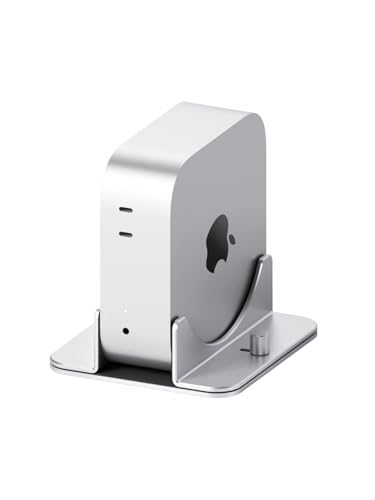
Choose the Hagibis Vertical Aluminum Stand when you want a snug, tool-free fit for a Mac mini M4 or M4 Pro—its die-sunk aluminum frame and knurled knob let you adjust width quickly while the silicone feet keep the unit stable and scratch-free. You’ll appreciate the adjustable 1.73–2.56-inch slot that accommodates different setups, compact 5.67 x 5.08 x 1.89-inch footprint, and lightweight 15.3-ounce build. The anti-slip silicone base improves grip and prevents scratches, while the open design encourages airflow for better heat dissipation. It’s tabletop-friendly, supports Hagibis MC65, includes a one-year warranty, and ships with Amazon’s 30-day return option.
Best For: users with a Mac mini M4 or M4 Pro who want a compact, tool-free vertical stand that provides a snug fit, improved airflow, and anti-slip protection on a tidy desktop.
Pros:
- Specifically die-sunk aluminum design for a precise, sleek fit with Mac mini M4/M4 Pro.
- Tool-free adjustable width (1.73–2.56 inches) via knurled knob for quick installation.
- Silicone base prevents slipping and scratches while the open design aids heat dissipation.
Cons:
- Limited to Mac mini M4/M4 Pro (and compatible Hagibis MC65), so not universal for older Mac minis or other devices.
- Aluminum finish and size options are limited (single silver color and fixed footprint).
- Relies on manual tightening which may require occasional readjustment for very frequent insertions/removals.
JOKItech Aluminum Laptop Vertical Stand Organizer (Spacegrey)
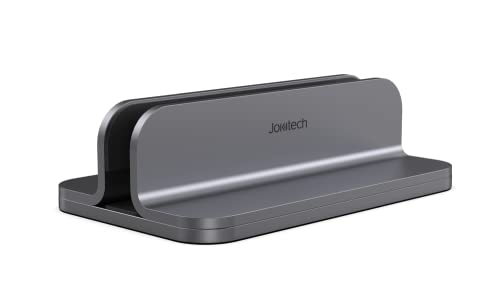
If you want a sturdy, polished stand that keeps a Mac mini or closed-clamshell MacBook cool and neatly stowed, JOKItech’s aluminum vertical organizer is a strong pick. You get a modern aluminum build with polished edges in space gray, black, or silver that fits MacBook Air/Pro (13–16″), Mac mini, and iPad Pro. It holds devices 7–41.8mm thick, supports closed-clamshell setups, and lets you connect external monitors, keyboards, and mice. A heavy base and silicone paddings prevent slips and scratches. The stand improves cooling, tidies cluttered desks, and includes a 24-month warranty for peace of mind.
Best For: users who want a stable, space-saving aluminum stand to neatly store and cool a Mac mini or closed-clamshell MacBook while supporting an external monitor and peripherals.
Pros:
- Sleek, modern aluminum design (space gray, black, or silver) that matches Apple devices and desktop setups.
- Heavy base and silicone padding provide strong stability and scratch-free protection.
- Supports closed-clamshell mode, improves cooling, and organizes cluttered desks.
Cons:
- Limited to devices 7–41.8mm thick, so very thin or unusually thick devices may not fit.
- Vertical orientation may require setup adjustment for cable management on some desks.
- Primarily designed for Apple ecosystem—fit and aesthetics may be less ideal for non-Apple devices.
AFOOYO Mac mini Vertical Stand (Aluminum & Wooden, Universal for 2010–2024 M1/M2/M2 Pro/M4/M4 Pro)

AFOOYO’s Mac mini vertical stand is ideal for users who want a stylish, space-saving mount that also improves cooling; its adjustable aluminum frame and walnut panels fit Mac minis from 2010–2024 (including M1/M2/M4 series) and let you orient the unit vertically for better airflow and desk organization. You’ll get universal compatibility with a max 2.05″ width, premium aluminum alloy construction, and walnut side panels for a minimalist look. Anti-slip silicone pads and scratch-resistant flocked cushions secure and protect your Mac mini. Vertical placement frees desk space, streamlines cables, and improves heat dissipation while maintaining easy power access.
Best For: Users with a Mac mini (2010–2024, including M1/M2/M4 series) who want a stylish, space-saving vertical mount that improves cooling and desk organization.
Pros:
- Universal adjustable design (up to 2.05″) fits a wide range of Mac mini models and offers easy vertical orientation for better airflow.
- Premium aluminum alloy with walnut wood side panels provides a minimalist, durable look that complements desktop setups.
- Anti-slip silicone pads and scratch-resistant flocked cushions protect the Mac mini and keep it securely in place while freeing desk space and organizing cables.
Cons:
- Designed specifically for Mac mini form factors, so it may not suit thicker or non-standard third-party cases or adapters.
- Vertical orientation may limit access to ports depending on desk layout and cable lengths.
- Wood side panels and aluminum finish may show wear or scratches over time with heavy use.
Factors to Consider When Choosing Mac Mini Vertical Stands
When choosing a Mac Mini vertical stand, you’ll want to check fit and compatibility first to make sure your model sits securely. Consider the material and build, cooling and airflow, and how stable the stand is with a good non-slip grip. Also confirm that ports and power access remain unobstructed so you don’t lose functionality.
Fit and Compatibility
Because Mac Mini models vary widely from 2010 to 2024, you’ll want a vertical stand that’s explicitly compatible with your specific generation and configuration. Check product listings for model-year compatibility and confirm port and vent clearances so connectors and airflow aren’t blocked. Prefer stands with adjustable width or inserts if you own multiple Minis or might upgrade—those let you tighten the fit and avoid wobble. A snug, stable hold prevents tipping and vibration that could affect drives or internal components. Make sure the stand promotes airflow around heat-producing models and doesn’t trap heat against vents. Finally, verify protective features like silicone pads or cushioning to guard against scratches when you insert or remove your Mac Mini regularly.
Material and Build
Although you’ll often see plastic stands at lower price points, metal—especially aluminum or solid steel—gives you the durability, stability, and heat dissipation your Mac Mini needs, with anodized aluminum adding scratch resistance and a sleek look. You should favor solid construction to prevent tipping, especially if you frequently connect peripherals or place the Mac Mini in a busy workspace. Aluminum strikes a good balance of weight and thermal transfer; heavier steel can add stability but may feel bulky. Look for anti-slip silicone pads to protect the finish and keep the unit firmly in place. Finally, choose a well-built stand whose geometry supports unobstructed vents and a secure fit so your Mac Mini stays safe, stable, and long-lasting.
Cooling and Airflow
If you want your Mac Mini to run cooler and avoid thermal throttling, choose a vertical stand that elevates the unit, exposes its bottom intake vents, and includes large cutouts for unobstructed airflow. You’ll see improved performance because vertical orientation promotes more efficient heat dissipation than flat placement. Look for stands with generous openings beneath and around the chassis so air moves freely during prolonged, heavy use. Elevation also lets ambient air circulate around the enclosure, helping heat exchange and lowering internal temperatures. Better airflow reduces the likelihood of heat-related damage, so your Mac Mini can maintain sustained workloads and enjoy a longer lifespan. Prioritize stands designed specifically to clear intake areas and encourage passive ventilation.
Stability and Grip
When choosing a vertical stand, prioritize stability and grip so your Mac Mini won’t tip, wobble, or disconnect during use. You want a strong anti-slip base—silicone or rubber pads anchor the stand to your desk and stop sliding when you plug in peripherals or nudge cables. Check weight distribution: heavier stands sit firmer and resist tipping, which matters if you swap models or add accessories. Inspect the internal groove: a snug, well-contoured cradle holds the Mac Mini without shifting and prevents scratches during insertion or removal. Remember stability affects cooling too—any movement can disrupt airflow and raise temperatures. Choose a stand that balances a solid base, appropriate mass, and a precise groove to keep your Mac Mini safe and steady.
Port and Power Access
Because you’ll be plugging in cables and hitting the power button often, pick a vertical stand that gives clear, unobstructed access to all ports and the power switch so you don’t have to remove or tilt the Mac Mini to use it. Choose open designs or precise cutouts that expose USB, HDMI, and power connectors while keeping cables tidy. Favor stands with side-mounted power-button access so you can boot or reset without fuss. Confirm the fit is snug to prevent wobble, which makes plugging in peripherals harder and can stress connectors over time. Balance form and function: a sleek stand is great, but not if it hides ports or complicates cable routing. Prioritize usability so daily access stays convenient.