An external GPU can be a useful upgrade for a compatible Intel Mac mini, but the enclosure is only half the decision. Your Mac’s processor, macOS version, graphics card, and connection all determine whether the setup will work.
These six options span full-size powered enclosures and compact GPU docks. Start with compatibility, then choose the size, power supply, and ports that fit your setup.
Best 6 Mac Mini External GPU Enclosures Picks for 2026
Full-Size GPU Pick
- Fits full-size, three-slot GPUs
- Built-in 650W power supply
- macOS requires a compatible AMD GPU
Best For: Compatible Mac mini setups using a large AMD card
Connectivity Pick

- Four USB-A ports and Gigabit Ethernet
- 750W PSU; 375W continuous GPU power
- Fits GPUs up to 312mm
Best For: Compatible Mac mini workstations needing extra connections
Flexible Power Pick
ANQUORA ANQ-L336 Mini eGPU Dock

- Thunderbolt 3/4 and USB4 support
- Multiple PSU formats; PSU not included
- USB-A and Thunderbolt 4 ports
Best For: Custom eGPU builds with a separately purchased PSU
Flexible DIY Dock

- JHL7440-based Thunderbolt 3/4 and USB4 dock
- Multiple power-supply options; PSU not included
- Downstream Thunderbolt 3 and USB-A ports
Best For: DIY users with a verified compatible host
Integrated Power Pick
TREBLEET 80Gbps eGPU Enclosure

- Thunderbolt 5/USB4 v2 with stated 80Gbps bandwidth
- Built-in 600W PSU; up to 450W for the GPU
- Mac support requires an Intel Mac and supported AMD GPU
Best For: Qualifying Intel Mac or Windows users seeking integrated power
Windows-Focused Dock

- JHL7440 dock for Thunderbolt 3/4 or USB4 hosts
- Supports several external PSU types; PSU not included
- Notes require updated Windows 11; Mac support unlisted
Best For: Windows 11 DIY builds with a verified compatible port
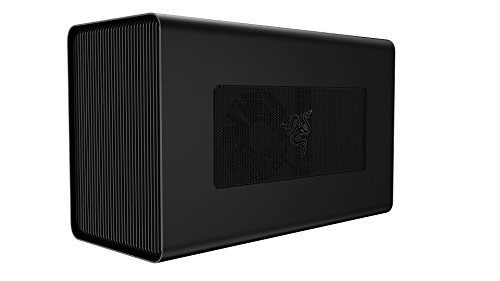
Full-Size GPU Pick – Razer Core X
Among mac mini external gpu enclosures, the Razer Core X is worth considering if your Mac mini has Thunderbolt 3 and supports eGPUs. Its aluminum enclosure fits full-size desktop graphics cards up to three slots wide, and it includes a 650W power supply.
Best For: A compatible Intel-based Mac mini setup needing room for a large AMD graphics card.
Pros:
- Accommodates full-size, up-to-three-slot PCIe graphics cards.
- Includes a 650W ATX power supply.
- Supports compatible AMD graphics cards on macOS High Sierra 10.13.4 or later.
Cons:
- Graphics card is not included.
- NVIDIA graphics cards are not supported on macOS.
The Core X is a straightforward choice when card clearance matters more than extra ports. Confirm your Mac mini’s eGPU compatibility and your chosen AMD card before buying.
If you want mac mini external gpu enclosures with peripheral connections, the Sonnet Breakaway Box 750ex adds four 5Gb/s USB-A ports and Gigabit Ethernet alongside its Thunderbolt 3 eGPU connection. Its 750W power supply supports up to 375W of continuous GPU power.
Best For: A compatible Thunderbolt 3 Mac mini workstation that needs an eGPU enclosure plus USB-A and wired networking.
Pros:
- Includes four USB-A ports and Gigabit Ethernet.
- 750W power supply delivers up to 375W continuous GPU power.
- Supports graphics cards up to 312mm long.
Cons:
- M1 Macs are not compatible with external GPUs.
- GPU choice still needs to match your computer’s operating-system support.
The extra ports distinguish the 750ex from a basic GPU box, particularly for an editing desk. Check your Mac mini model and macOS GPU compatibility before selecting a card.
The ANQUORA ANQ-L336 takes a compact, open-dock approach to mac mini external gpu enclosures. It connects over Thunderbolt 3, Thunderbolt 4, or USB4 and accepts several power-supply formats, but you must provide the PSU separately.
Best For: Buyers building a flexible eGPU dock around a compatible Thunderbolt or USB4 computer and their own power supply.
Pros:
- Supports Thunderbolt 3/4 and USB4 connections.
- Accepts ATX, SFX, FLEX, or DC 12V power supplies.
- Includes a 10Gbps USB-A port and two Thunderbolt 4 ports.
Cons:
- Power supply is not included.
- Its listed macOS compatibility does not establish eGPU support for every Mac mini model.
This dock offers more power-supply flexibility than a self-contained box, at the cost of a less turnkey setup. Verify Mac mini eGPU and graphics-card compatibility before committing to the parts.
Flexible DIY Dock – TREBLEET Mini eGPU Dock
Among mac mini external gpu enclosures, this compact TREBLEET dock calls for a compatibility check first: its listed applications are USB4 and Thunderbolt 3/4 NUCs and laptops, not Mac minis specifically. It uses a JHL7440 controller and leaves the GPU and power supply to the buyer.
Best For: DIY users with a verified Thunderbolt 3/4 or USB4 host who want to choose their own GPU and power supply.
Pros:
- Supports ATX, SFX, FLEX, and compatible DC power supplies.
- Includes a downstream Thunderbolt 3 port and USB-A port for peripherals.
- Includes a Thunderbolt 3/USB4 cable.
Cons:
- Graphics card and power supply are sold separately.
- Requires DIY setup and may involve driver or hardware compatibility settings.
Choose this for power-supply flexibility and a compact, open dock—not as a confirmed Mac mini solution. Verify host support before ordering, and note that DC power is limited to PCIe devices that need no external power.
Integrated Power Pick – TREBLEET 80Gbps eGPU Enclosure
For shoppers comparing mac mini external gpu enclosures, this TREBLEET model stands out for its built-in 600W SFX power supply and stated Thunderbolt 5/USB4 v2 80Gbps connection. Its listed Mac support is specifically for Intel-based Macs running macOS 10.15.3 or later with supported AMD GPUs; Mac mini compatibility should not be assumed beyond those requirements.
Best For: Owners of qualifying Intel-based Macs or Windows PCs who want an enclosure with its power supply already installed.
Pros:
- Integrated 600W SFX PSU provides up to 450W for the GPU through dual 8-pin connectors.
- Fits graphics cards up to 340 × 154 × 57 mm.
- Offers a downstream port, USB-A connectivity, and up to 140W laptop charging.
Cons:
- Mac support excludes NVIDIA GPUs and Boot Camp.
- Its listed macOS support is limited to Intel-based Macs and compatible AMD GPUs.
This is the more self-contained option if its GPU dimensions and host requirements match your setup. Check the exact Mac model, port capabilities, and AMD card before buying.
Windows-Focused Dock – ORARA Mini eGPU Dock
Although it may appear in searches for mac mini external gpu enclosures, the ORARA dock lists Thunderbolt 3/4 and USB4 NUCs, laptops, and game machines as its compatible hosts—not Mac minis. Its notes also specify an updated Windows 11 installation for detection, so Mac buyers should not treat it as a verified option.
Best For: Windows 11 users with a verified Thunderbolt 3/4 or USB4 host who are comfortable supplying a GPU and power source.
Pros:
- JHL7440 controller with stated PCIe 3.0 ×4, 32Gbps transfer support.
- Supports ATX, SFX, FLEX, and DC 12V power supplies.
- Provides USB-A connectivity, a downstream port, and up to 85W PD charging.
Cons:
- Graphics card and power supply are not included.
- Ordinary USB-C and Thunderbolt 1/2 ports are not supported.
- Supplied compatibility notes specify Windows 11, not macOS.
This is a parts-and-setup project rather than a plug-and-play enclosure. Confirm the host port and power requirements, and follow the maker’s PCIe power-cable warning during assembly.
How We Picked the Best Mac Mini External GPU Enclosures
We selected six options covering traditional Thunderbolt 3 enclosures, compact 40Gbps docks, and a newer Thunderbolt 5 model. We focused on the details that affect a purchase: connection type, included power supply, GPU fit, and stated platform compatibility. A product listing that mentions macOS is a starting point, not proof that a particular Mac mini, macOS release, and graphics card will work together.
Quick Comparison
The Razer Core X and Sonnet Breakaway Box 750ex are full-size, powered Thunderbolt 3 enclosures suited to buyers who want a contained desktop setup. The ANQ-L336 and the two other mini eGPU docks emphasize a smaller footprint; check each listing for its power-supply requirements and physical GPU clearance. The TREBLEET model lists a built-in 600W SFX power supply and an 80Gbps Thunderbolt 5/USB4 v2 connection, but its faster interface does not make an unsupported Mac mini compatible.
Key Buying Factors for Mac Mini External GPU Enclosures
Confirm Mac Compatibility First
Apple’s macOS eGPU support applies to Intel-based Macs with Thunderbolt 3; Apple silicon Mac minis do not support external GPUs in macOS. Check Apple’s current compatibility guidance for your exact Mac mini and macOS version before ordering. If you use Windows through Boot Camp, research that configuration separately rather than assuming macOS support carries over.
Choose a Supported Graphics Card
The enclosure holds a GPU; it does not include one unless the seller explicitly says so. For macOS, verify the specific AMD GPU against Apple’s supported eGPU configurations. Do not treat an enclosure’s NVIDIA/AMD hardware compatibility claim as a promise of macOS drivers for both brands.
Check Power, Fit, and Connection
Compare the GPU’s length, thickness, and power connectors with the enclosure’s limits. Match the power supply to the card’s requirements, and confirm whether a mini dock includes a PSU or needs one purchased separately. For an Intel Mac mini, prioritize a compatible Thunderbolt connection over a headline 40Gbps or 80Gbps figure. USB-C connector shape alone does not establish eGPU support, and newer docks may operate at lower speeds with older hosts if they work at all.
Who Should Buy Which Mac Mini External GPU Enclosures?
Choose a full-size powered enclosure such as the Core X or Breakaway Box if you want fewer exposed components and room for a suitable desktop GPU. Consider a compact dock if space matters and you are comfortable checking—or supplying—its power setup. Look at the Thunderbolt 5 model only if its GPU compatibility, host compatibility, and price make sense for your wider setup; it is not a shortcut around macOS eGPU restrictions. For an Apple silicon Mac mini, skip these as macOS GPU upgrades and consider a different way to meet your graphics needs.