If you use a Mac mini for work or travel, choosing the right power-management hub matters — it affects speed, heat, and how many devices you can run. You’ll want something that balances ports, SSD options, and power delivery without adding bulk. Below are ten top hubs that do that well, plus what to weigh before you buy — keep going to find the one that fits your setup.
Satechi Mac mini M4 Hub & Stand with NVMe SSD Enclosure (Silver)

If you want a clean, integrated way to add fast internal storage and extra ports to your Mac mini M4, the Satechi Hub & Stand is made for you — it holds an M.2 NVMe SSD (up to 4TB, 10Gbps) while matching the Mac mini’s aluminum look and providing two high-speed USB-A ports and an SD card reader. You’ll install 2230–2280 drives (SSD not included); avoid heatsinks or double-sided models. It offers two 10Gbps USB-A ports, one USB-A 2.0, and a UHS-II SD slot. The self-cooling design preserves performance. Includes tools, thermal pad, manual, and a two-year warranty.
Best For: Users who want a clean, integrated way to add up to 4TB of fast internal NVMe storage and extra USB/SD connectivity to a Mac mini M4 while maintaining the system’s aesthetic.
Pros:
- Adds internal M.2 NVMe storage (2230–2280) with up to 10Gbps transfer speeds for compact, integrated expansion.
- Provides two high-speed USB-A 3.2 ports and a UHS-II SD card reader for versatile peripheral and media workflows.
- Aluminum design matches the Mac mini M4, with a self-cooling layout and included tools/thermal pad for easy installation.
Cons:
- SSD not included and incompatible with heatsinks or double-sided drives, limiting some drive choices.
- USB-A ports do not support Apple SuperDrive/iPad charging or CD readers, and only one bus-powered device is recommended at a time.
- Limited to USB-A and SD expansion (no additional USB-C/Thunderbolt ports) and physical footprint adds to Mac mini stack.
Atolla 7-Port USB 3.0 Hub with Smart Charging Port and Individual On/Off Switches

For anyone who needs tidy, controllable peripheral management, the Atolla 7-Port USB 3.0 Hub is a smart fit: it expands a single USB 3.0 port to seven high-speed ports, gives each device its own on/off switch, and adds a dedicated smart charging port that delivers up to 2.4A for faster, safer iPhone and iPad charging. You’ll get 5Gbps data syncing for keyboards, mice, printers, and drives, plus full plug-and-play compatibility with Windows, macOS, and Linux. Individual switches let you power only what you need, while the included 5V/4A adapter and 18-month warranty add reliability.
Best For: Anyone who needs to expand a single USB 3.0 port into multiple high-speed connections while keeping peripherals and device charging neatly controlled and individually switchable.
Pros:
- Expands one USB 3.0 port to seven ports with up to 5Gbps data transfer for fast syncing of drives and peripherals.
- Dedicated smart charging port delivers up to 2.4A for faster, safer iPhone and iPad charging (with included 5V/4A adapter).
- Individual on/off switches for each port enable easy power management and hot swapping without unplugging devices.
Cons:
- Requires the included external 5V/4A power adapter for full charging capability, adding cable clutter and need for an outlet.
- Limited to USB 3.0 speeds on the host connection—no USB-C or Thunderbolt support for higher bandwidth.
- Bulkier than unpowered hubs due to built-in switches and power supply, which may take more desktop space.
Rosonway 7-Port USB 3.2/USB-C Hub (RSH-A107C)

The Rosonway 7-Port USB Hub is ideal for users who need to expand a Mac mini’s limited ports while keeping tight control over power to individual devices. You get a 10Gbps USB-A 3.2 port, two USB-C 3.2 ports, and four USB-A 3.0 ports in a premium aluminum housing. The 2‑in‑1 3.3ft USB-A/USB-C cable works with M1 Mac mini, MacBook, iMac, Thunderbolt 3 and many PCs. Each port has an electronic on/off switch with LED for precise power management. A 24W UL‑certified adapter, BC1.2 charging, surge, overvoltage and overcurrent protection keep your gear safe.
Best For: Power users and Mac mini owners who need multiple high-speed USB-A and USB-C ports with per-port power control and reliable surge protection.
Pros:
- Adds a mix of ports including one 10Gbps USB-A 3.2 and two USB-C 3.2 ports for fast data transfer.
- Individual electronic on/off switches with LED indicators let you control power to each device.
- Includes a 24W UL-certified power adapter, BC1.2 charging support, and built-in surge/overvoltage/overcurrent protection.
Cons:
- Total power (24W) may limit simultaneous high-power charging for multiple devices.
- 4 USB-A ports are USB 3.0 (not 3.2), so only the designated ports reach the 10Gbps speed.
- Requires using the included 2‑in‑1 cable—may be less convenient if you need a permanently dedicated USB-C or USB-A connection.
Mac mini M4 Dock 6-Port Hub with Dual 10Gbps USB-C & USB-A, SD/TF Card Reader
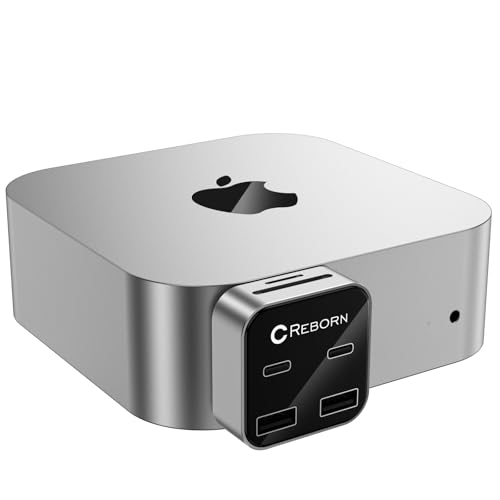
Creators and mobile pros who need a compact, high-speed connection will appreciate the Mac mini M4 Dock’s dual 10Gbps USB-A and USB-C ports paired with an SD/TF 3.0 reader. You get a 6-port Reborn hub designed for Mac mini M4 and M4 Pro that’s 70% smaller than standard models and weighs just 0.04 kg. It delivers simultaneous device support for keyboards, drives, and cameras, speeding workflows for photo, video, and gaming. Plug-and-play via USB-C with an ultra-thin profile avoids blocking adjacent ports. You’ll also have 7×18-hour support, a warranty, and Amazon’s 30-day return option.
Best For: Creators and mobile professionals who need a compact, high-speed hub to expand a Mac mini M4/M4 Pro with fast USB-A/USB-C ports and integrated SD/TF card reading.
Pros:
- Dual 10Gbps USB-C and USB-A ports provide very fast data transfer for external drives and cameras.
- Ultra-compact, ultra-thin design (70% smaller than standard models; 0.04 kg) that won’t block adjacent Mac mini ports.
- Plug-and-play via USB-C with SD/TF 3.0 card reader and reliable after-sales support (7×18-hour service, warranty, Amazon 30-day returns).
Cons:
- Limited to six ports (no Ethernet or HDMI), which may require additional adapters for more complex setups.
- Specifically designed for Mac mini M4/M4 Pro — compatibility with other devices may be limited.
- Small size may mean fewer physical ports and less flexibility compared with larger docking stations.
TobenONE 13-in-1 Mac mini M4 Dock with 8TB SSD Enclosure and Hub Stand (for Mac mini M4/M4 Pro)

Photographers and video editors who need fast local storage will find the TobenONE 13-in-1 Mac mini M4 Dock an ideal match, thanks to its built-in NVMe enclosure that holds up to 8TB at 10Gbps. You get 13 ports—including two 10Gbps USB-A, three more USB (to 10Gbps), HDMI 4K@60Hz, DisplayPort 4K@144Hz, SD/microSD, and a 3.5mm jack—so you can hook up multiple monitors, card readers, and audio gear without adapters. The contoured hub doubles as a stable stand with anti-slip pads and internal baffles. A one-touch power button and two-year warranty round out a compact, efficient solution.
Best For: Photographers, video editors, and power users who need high-speed local NVMe storage and multi-monitor connectivity for 4K/144Hz workflows with a compact Mac mini M4 setup.
Pros:
- Built-in NVMe enclosure supporting up to 8TB at 10Gbps for fast local storage of large RAW/4K files.
- Extensive port selection (13 ports) including 10Gbps USB-A, HDMI 4K@60Hz, DisplayPort 4K@144Hz, and SD/microSD readers for versatile multi-monitor and peripheral support.
- Sleek stand design with anti-slip pads and internal baffles plus a one-touch power button and 2-year warranty for convenience and stability.
Cons:
- NVMe enclosure limited to 10Gbps—faster PCIe Gen4/Gen5 adapter speeds not available for highest-end SSD performance.
- Limited review sample size (22 reviews) may not fully reflect long-term reliability for all users.
- Physical dimensions and added weight might reduce portability compared with a bare Mac mini setup.
Satechi Mac mini Hub & Stand with NVMe/SATA M.2 SSD Enclosure and USB-C Dock for Mac mini/Mac Studio (Silver)

If you need a compact hub that doubles as a cooled SSD enclosure for fast NVMe or SATA storage, Satechi’s Mac mini Hub & Stand is a great fit — especially if you use an M1/M2 Mac mini or Mac Studio. You get a silver aluminum stand (7.8 x 7.8 x 0.9 inches, 403 g) with vents for heat dissipation and an M.2 bay supporting 2242/2260/2280 NVMe or SATA drives up to 10Gbps. The 7-in-1 dock adds USB-C (10Gbps), three USB-A ports (one at 10Gbps), micro/SD readers, and a 3.5mm jack. It includes tools, a thermal pad, support, and a 2-year warranty.
Best For: users of M1/M2 Mac mini or Mac Studio who want a compact, ventilated stand that adds fast NVMe/SATA M.2 storage and multiple high-speed ports in a single silver aluminum accessory.
Pros:
- Combines a cooled M.2 NVMe/SATA (2242/2260/2280) enclosure with a 7-in-1 hub (USB-C 10Gbps, USB-A ports, micro/SD readers, 3.5mm jack) for space-saving convenience.
- Solid aluminum build with vents for improved heat dissipation and a clean desktop aesthetic.
- Includes tools, thermal pad, 2-year limited warranty, and Amazon 30-day return guarantee.
Cons:
- Not compatible with Mac mini M4, CD/DVD SuperDrive, or iPad charging.
- Only supports up to 10Gbps (not full PCIe Gen4 speeds) and recommends connecting one bus-powered device at a time.
- SSD not included and physical size limits compatibility to M.2 2242/2260/2280 drives.
Mac mini M4 Dock with 4TB M.2 SSD Enclosure (SSD Not Included) Hub Stand with HDMI 4K@60Hz and USB-C Accessories

For power users who need fast local storage and tidy desktop routing, the Mac mini M4 Dock with a 4TB M.2 NVMe enclosure is a compact all-in-one solution that mounts your Mac mini while adding a 4K@60Hz HDMI output, a 10Gbps USB‑C host port, SD/MicroSD readers, three interference‑safe USB‑A data ports, and a 3.5mm audio jack—letting you expand up to a 4TB PCIe M.2 SSD (SSD not included) without cluttering your workspace. You’ll get SST/MST dual‑monitor support, NVMe speeds via 2242/2260/2280 drives (format as exFAT or APFS), and stable aluminum construction with anti‑slip pads. USB‑A ports are data‑only.
Best For: power users and Mac mini M4 owners who want a clean, mounted desktop setup with integrated high-speed NVMe storage expansion and multiple I/O ports.
Pros:
- Compact mount-and-dock design adds a 4TB-capable M.2 NVMe enclosure (SSD not included) while saving desk space.
- 4K@60Hz HDMI, 10Gbps USB-C host port, SD/MicroSD readers, and SST/MST dual-monitor support for versatile connectivity.
- Aluminum construction with anti-slip pads and interference-safe USB-A ports for stable placement and reliable wireless performance.
Cons:
- SSD is not included and SATA M.2 drives are not supported—requires purchasing a compatible PCIe NVMe 2242/2260/2280 drive and formatting to exFAT or APFS.
- USB-A ports are USB 2.0 (480Mbps) and data-only, so they do not provide high-speed transfers or charging.
- Limited to Mac mini M4/M4 Pro (2024) compatibility—may not fit or work with other Mac mini models.
Mac mini Hub 8-in-1 Vertical Dock with M.2 NVMe SSD Enclosure and Multiple Ports

The PULWTOP Mac mini Hub is ideal if you want to add fast NVMe storage and extra ports without sacrificing desk space. You get an 8-in-1 vertical dock that fits Mac mini 2018, 2020 M1, and 2023 M2/M2 Pro (not M4 2024). It houses an M.2 PCIe NVMe SSD up to 2TB (2230–2280, B+M/M key) and offers USB-C 3.2 (10Gbps), USB-A 3.2 (10Gbps), two USB-A 2.0, Micro/SD readers, and a 3.5mm jack. It supports horizontal or vertical placement, doubles as device stands with silicone strips, weighs 350g, and includes a one-year warranty.
Best For: users of Mac mini 2018/2020 M1/2023 M2 or M2 Pro who want compact, vertical expansion for NVMe storage and extra USB and card-reader ports without adding clutter.
Pros:
- Adds an internal M.2 PCIe NVMe slot (2230–2280, up to 2TB) for fast local storage expansion.
- Provides a variety of ports (USB-C 3.2 10Gbps, USB-A 3.2 10Gbps, two USB-A 2.0, Micro/SD readers, 3.5mm jack) in a single vertical dock.
- Doubles as a stand (vertical or horizontal) and includes silicone strips that can hold a phone or iPad, helping with desk organization.
Cons:
- Not compatible with Mac mini M4 (2024) and SSD is not included, so you must buy a supported NVMe drive separately.
- USB ports support data only; no video output or charging over the hub’s USB-C/USB-A ports.
- Micro/SD readers and USB-A 2.0 ports are relatively slow compared with the high-speed NVMe and 10Gbps ports.
ORICO Mac mini Expansion Stand with Ports (Type-C, USB 2.0, 3.5mm) for M4/M4 Pro
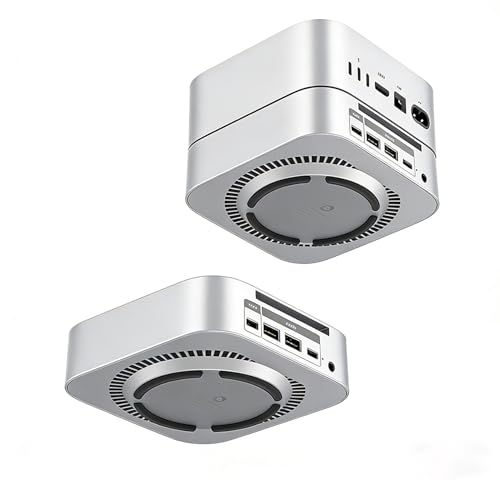
Professionals and power users who juggle multiple peripherals will appreciate the ORICO Mac mini Expansion Stand with Ports (STH03), which adds a front-facing Type-C (5V/3A), two USB 2.0 ports, and a 3.5mm audio jack to your M4/M4 Pro while lifting the Mac mini for better cooling and cable management. You get plug-and-play convenience—no drivers—plus an integrated power switch for quick control. The ABS body with metallic paint looks clean in silver, and the 360° cooling design helps prevent overheating. It’s ideal for students, creatives, and remote workers seeking tidy desks, faster transfers, and seamless peripheral access. Warranty: two years.
Best For: Professionals, students, and creatives who need extra front-facing ports and improved cooling/cable management for their M4/M4 Pro Mac mini.
Pros:
- Adds convenient front-facing Type-C (5V/3A), two USB 2.0 ports, and a 3.5mm audio jack for easy peripheral access.
- Elevated stand with 360° cooling design reduces overheating and declutters the desktop.
- Plug-and-play setup with an integrated power switch and a clean silver ABS finish; includes a 2-year warranty.
Cons:
- USB ports are USB 2.0, which limits transfer speeds compared with USB 3.x alternatives.
- Limited number of ports may not suffice for users with many high-speed peripherals.
- ABS material with metallic paint may not match premium metal stands in durability or aesthetics for some users.
SABRENT 3-Port Aluminum USB 3.0 Mini Hub (Rotatable 90°/180°)
![SABRENT Premium 3 Port Aluminum Mini USB 3.0 Hub [90°/180° Degree Rotatable] (HB-R3MC)](https://m.media-amazon.com/images/I/31ng6tE1XBL._SL500_.jpg)
If you need a compact hub that keeps your Mac Mini’s ports tidy while traveling, the SABRENT 3-Port Aluminum USB 3.0 Mini Hub is a strong choice. You’ll get three USB 3.0 ports in a sleek, Apple-style aluminum body that complements your Mac setup. The USB connector rotates 90° or 180°, so you can angle it to suit tight spaces or different port orientations. It’s plug-and-play, hot-swappable, and works with Windows, Mac, and Linux without drivers. Lightweight and travel-friendly, it’s ideal when you need extra high-speed USB connectivity without adding bulk to your kit.
Best For: Travelers and Mac users needing a compact, high-speed USB expansion that complements Apple-style setups and fits tight port orientations.
Pros:
- Compact, lightweight aluminum design matches Apple aesthetics and is travel-friendly.
- Three USB 3.0 ports provide high-speed connectivity and are hot-swappable.
- Rotatable USB connector (90°/180°) allows flexible positioning in tight or awkward port spaces.
Cons:
- Limited to three ports, which may not be enough for users with many peripherals.
- No external power option, so high-draw devices may not work reliably from all ports.
- Aluminum finish may show scratches or wear over time with frequent travel.
Factors to Consider When Choosing Mac Mini Power Management Hubs
When picking a power management hub for your Mac Mini, check its power delivery capability to make certain it can charge and run your setup reliably. Look for a variety of ports and expandable storage support so you can connect drives, displays, and peripherals without adapters. Also consider thermal management design and build material quality to guarantee long-term stability and safe operation.
Power Delivery Capability
Because power delivery determines whether a hub can charge your Mac Mini peripherals (and even laptops) while handling data, you should check a hub’s wattage ratings and port types before buying. Power delivery capability refers to how many watts a hub can supply while maintaining data throughput. Look for USB-C PD support and note total and per-port wattage—some hubs reach 100W, while others split lower totals across ports. Match the hub’s output to your devices; many laptops need 60W+ for reliable performance. Prefer hubs with smart charging ports that auto-adjust output to device requirements to improve efficiency and safety. Finally, confirm compatibility between the hub’s PD profile and your devices to avoid slow charging or potential damage.
Port Variety
Choose a hub that gives you the right mix of ports—USB-A, USB-C, HDMI, SD card readers, and high-speed data lanes—so your Mac Mini can connect to displays, storage, and peripherals without adapters. You’ll want USB 3.2 or USB 3.0 ports for fast file transfers and smooth external drive performance. Include dedicated charging ports to speed-charge phones and tablets while offloading power management from the Mac Mini. Individual on/off switches for ports let you cut power to cameras, drives, or dongles without unplugging, saving energy and reducing wear. Finally, verify support for current connectivity standards so the hub stays compatible with new devices and minimizes the need to upgrade cables or the hub itself.
Thermal Management Design
If your hub runs hot during heavy use, look for designs that actively channel heat away—built-in air vents, recessed tops that don’t block the Mac Mini’s fan, and bottom vents for self-cooling all keep temperatures in check. You should prioritize hubs that promote unobstructed airflow so the Mac Mini and hub cool efficiently under sustained load. Self-cooling bottom vents let warm air escape without extra noise or power draw, maintaining stable operation when multiple peripherals draw current. Recessed tops avoid impeding the Mac Mini’s intake, preserving internal thermal balance. Good thermal design prevents overheating, reducing throttling and prolonging component life. When evaluating hubs, focus on proven venting arrangements and thermal layouts rather than decorative elements.
Build Material Quality
Materials matter when you pick a Mac Mini power management hub: aluminum-alloy cases give you strength, lighter weight, and better heat handling than cheaper plastics, so your hub stays durable and won’t trap heat or degrade after heavy use. You should favor aluminum-alloy builds because they match your Mac Mini’s aesthetic, shed heat via conduction, and often include vents to prevent thermal buildup during long sessions. Avoid plastic housings that flex, scratch, and wear at ports from repeated plugging. Pick a well-constructed hub to minimize electromagnetic interference and maintain stable data and power delivery. Inspect seams, port mounting, and finish quality—solid assembly indicates longer life and reliable performance for demanding setups.
Expandable Storage Support
When you plan to expand your Mac Mini’s storage, prioritize hubs that handle the SSD sizes and capacities you’ll actually use—many models support M.2 NVMe drives up to 4TB or 8TB and accept common lengths like 2230, 2242, 2260, and 2280. Pick a hub that explicitly lists those size compatibilities so you won’t need adapters or custom mounts. Favor units offering high data transfer rates—up to 10Gbps—so backups and large file transfers don’t bottleneck. Check for multiple port types (USB‑A, USB‑C) to connect peripherals while using the extra SSD. Finally, choose a hub with thermal management—heatsinks or active cooling—to keep NVMe drives performing under sustained loads and avoid throttling during heavy workflows.