If you’re tired of a cluttered desk, mounting your Mac mini can reclaim space and keep cables tidy while improving airflow and access. You’ll find options for under-desk, VESA, and wall mounts that suit different Mac mini models and setups. I’ll walk through the top choices, what makes each unique, and the key factors to weigh so you can pick the right solution for your workspace—starting with mounts built for the latest M4 models.
Under Desk Mount for 2024 Mac mini M4/M4 Pro (VESA Monitor & Wall Mount Accessories)

If you want to reclaim desk space and keep your 2024 Mac mini M4 or M4 Pro out of the way without losing access to ports and the power button, this under-desk VESA mount is the best choice — it clamps or screws securely under your surface (or behind a monitor or on a wall), uses a robust single-piece injection-molded design for long-term strength, and still lets you remove and reinsert the Mac mini quickly. You’ll fit Mac mini M4/M4 Pro to 75×75mm or 100×100mm VESA patterns, install with screws and tape, and hide the unit to protect it from spills, kids, and clutter.
Best For: users of the 2024 Mac mini M4 or M4 Pro who want to reclaim desk space and protect their device while retaining easy access to ports and the power button.
Pros:
- Saves desktop space and reduces clutter by mounting the Mac mini under a desk, behind a monitor, or on a wall.
- Durable single-piece injection-molded design offers greater long-term strength than 3D-printed alternatives.
- Easy installation with screws and double-sided tape while still allowing quick removal and reinsertion of the Mac mini.
Cons:
- Requires a compatible mounting surface and VESA setup (75×75mm or 100×100mm) which may not suit all desks or setups.
- Installation involves drilling/screwing and/or adhesive, which may not be desirable for renters or delicate furniture.
- Hiding the Mac mini can reduce airflow or make accessing ports slightly less convenient for frequent cable swapping.
Monitor Vesa Mount or Under Desk Holder for Mac mini 2018-2023 M1 M2

For anyone looking to reclaim desk space while keeping a 2018–2023 Mac mini (including M1 and M2) protected and out of sight, a VESA monitor mount or under-desk holder is the smart choice because it secures the unit behind a monitor or beneath the work surface without sacrificing airflow or accessibility. You’ll mount on standard VESA holes, attach under the desk, or wall-mount to free desktop real estate and create shelf space. Constructed from 2mm steel plate with foam padding, it prevents scratches and drops while holding the Mac mini firmly. It’s tailored specifically for 2018–2023 Mac mini models for tidy, dust-free organization.
Best For: Anyone who wants to reclaim desk space and keep a 2018–2023 Mac mini (including M1 and M2) protected, dust-free, and out of sight by mounting it behind a monitor, under a desk, or on a wall.
Pros:
- Saves desktop space and creates extra storage or cleaner workspace by using VESA, under-desk, or wall mounting.
- Sturdy 2mm steel construction with foam padding protects the Mac mini from scratches and accidental drops.
- Designed specifically for 2018–2023 Mac mini models (including M1 and M2), ensuring proper fit and maintained airflow and accessibility.
Cons:
- Requires a VESA-compatible monitor or a suitable under-desk/wall surface and some installation effort.
- May limit quick physical access to ports compared with keeping the Mac mini on the desk.
- Fixed mounting reduces portability and may be less convenient for users who frequently move or reconfigure their setup.
TotalMount Wall/Monitor/Desk Mount for Mac mini (with Cooling Airflow Vents)
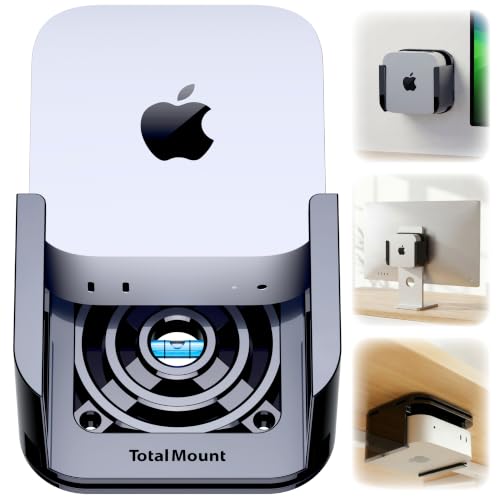
The TotalMount is ideal for users who want secure, airflow-friendly placement of a 2024–2026 Mac mini—whether you’re mounting it to a wall, under a desk, or behind a monitor. You get a U.S.-designed premium mount with wall screws, desk screws, and repositionable straps for monitor mounting; the Mac mini isn’t included. Its metal-free, pro-grade resin avoids blocking Wi‑Fi antennas and uses rubber inserts to prevent scratches. Patented ventilation channels keep airflow steady to reduce thermal throttling, and you can reach the power button without removing the unit. Wall screws work without drills or drywall anchors for easy installation.
Best For: Users with a 2024–2026 Mac mini who want a secure, airflow-friendly mounting solution for wall, monitor, or under-desk placement without compromising Wi‑Fi antenna performance.
Pros:
- Metal-free, pro-grade resin design with rubber inserts protects the Mac mini and avoids blocking Wi‑Fi antennas.
- Patented ventilation channels maintain cooling airflow to reduce thermal throttling while allowing easy access to the power button.
- Flexible installation options (drill-free wall screws, desk screws with bumpers, and repositionable monitor straps) for a variety of setups.
Cons:
- Only compatible with Mac mini models from 2024–2026, not older units purchased before October 2024.
- Mac mini is not included, requiring a separate purchase if you don’t already own the device.
- Glossy piano black finish may show fingerprints and scratches over time despite rubber protection.
HIDEit Mounts for Mac mini (M1/M2) — VESA Under-Desk Mount

Home-office organizers will love the HIDEit VESA under-desk mount because it tucks your Mac mini out of sight while leaving every port and cable fully accessible. You get a US-patented wrap design made from 16-gauge cold-rolled steel with a black powder-coat that resists rust and chips. It secures your Mac mini from spills, kids, and bumps, supporting up to 25 pounds. Installation takes three easy steps with no fancy templates or mandatory stud drilling, and necessary hardware is included. HIDEit is an American company with strong support; reviewers give it about 4.8/5 from 1,694 ratings.
Best For: Home-office organizers and Mac mini owners who want a secure, out-of-sight under-desk mounting solution that keeps all ports and cables accessible.
Pros:
- US-patented wrap design made from 16-gauge cold-rolled steel with black powder-coat for durability and rust/chip resistance.
- Keeps Mac mini secure from spills, kids, and bumps while supporting up to 25 pounds.
- Easy three-step installation with included hardware and no mandatory stud drilling.
Cons:
- Specifically sized for Mac mini (and similar mini PCs), so not suitable for larger or non-compatible devices.
- Under-desk placement may limit airflow if installed in very confined spaces.
- Aesthetic options are limited (single black finish).
Mount for Mac Mini M4/M4 Pro 2024 — Metal VESA/Wall/Under-Desk Mounting Bracket with Remote Holder

If you want a secure, low-profile mounting solution specifically for the 2024 Mac Mini M4/M4 Pro, this metal VESA/wall/under-desk bracket is a great pick. You’ll get a steel build that’s stronger than plastic, with a rust-resistant black coating and anti-scratch, anti-slip strips to protect and stabilize your Mac Mini (must be M4 or M4 Pro, mid‑2024; fits devices up to 12.8cm × 5.2cm). Install behind a monitor, under a desk, or on a wall for fixed, stable placement. It includes a pen/remote holder, all mounting screws, weighs 0.4 kg, and has a 4.8/5 rating.
Best For: Users who own a mid‑2024 Mac Mini M4 or M4 Pro and want a secure, low‑profile steel mounting bracket to attach the unit behind a monitor, under a desk, or on a wall.
Pros:
- Durable steel construction with rust‑resistant black coating and anti‑scratch/anti‑slip strips for protection and stability.
- Versatile mounting options (VESA/wall/under‑desk) with included screws for easy installation.
- Adds functionality with a pen/remote holder and has strong customer ratings (4.8/5).
Cons:
- Only compatible with Mac Mini M4 and M4 Pro (mid‑2024) and devices fitting ≤12.8 cm × 5.2 cm; not for M1/M2 models.
- Fixed movement type — no adjustable positioning or tilt.
- Small added weight (0.4 kg) and occupies mounting space that may be unsuitable for some setups.
HIDEit Mounts Mac mini M4 Under-Desk and VESA Monitor Mount

For anyone who wants a tidy, professional workspace, the HIDEit Mounts Mac mini M4 Under-Desk and VESA Monitor Mount fits the bill — it keeps your Mac mini off your desk or attached behind a monitor while preserving airflow and access. You’ll get a 16-gauge steel bracket with a black powder-coat finish that resists rust and scratches. The offset wrap-around design secures the Mac mini, protects against spills and bumps, and promotes ventilation. It mounts under desks or to 75/100mm VESA patterns, installs in three easy steps with included hardware, and offers optional stud mounting and a clear warranty/return policy.
Best For: Individuals and professionals who want a tidy, clutter-free workspace by mounting their Mac mini M4 or M4 Pro under a desk or behind a VESA-compatible monitor.
Pros:
- Saves desk space and maintains optimal airflow with an offset wrap-around design.
- Durable 16-gauge steel construction with black powder-coat finish resists rust and scratches.
- Easy 3-step installation with included hardware and optional stud mounting for extra security.
Cons:
- Designed specifically for Mac mini M4/M4 Pro, not a universal mount for other devices.
- Under-desk placement may make ports slightly less convenient to access.
- Mounting to thin surfaces may require anchors or stud mounting for maximum security.
Monzlteck Mac mini M4/M4 Pro Under-Desk/Wall Mount Bracket (VESA)

The Monzlteck Mac mini M4/M4 Pro bracket is ideal if you want a heavy-duty, space-saving solution that keeps your Mac Mini secure and out of sight — think of it as a sturdy shelf that frees up up to 70% of your desk. You’ll get industrial-grade steel construction with reinforced joints and a rust-resistant finish, supporting up to 10 lbs. Soft silicone pads prevent scratches and the vibration-dampening design reduces noise. The kit includes screws, anchors, spacers, hex tools and clips for cable management. Adjustable, pre-drilled mounting fits desks, walls or VESA monitor arms (75×75–100x100mm).
Best For: Users who want a durable, space-saving mount to securely hide and organize a Mac mini M4/M4 Pro under a desk, on a wall, or attached to a VESA monitor arm.
Pros:
- Heavy-duty industrial-grade steel with reinforced joints and rust-resistant finish for long-term durability.
- Includes full installation kit (screws, anchors, spacers, hex tools) plus silicone pads and vibration-dampening design to protect the Mac mini.
- Saves up to 70% desk space and provides cable-management clips for a clean, minimalist setup.
Cons:
- Designed exclusively for Mac mini M4/M4 Pro, so it may not fit other small desktop models.
- 10 lb weight capacity could limit use with additional accessories mounted together.
- Installation under desks or on walls may require drilling and measurement, which could be inconvenient for some users.
Foamy Lizard Aluminum Under-Desk/Multi-Mount Bracket for Mac mini M4

Want a compact, secure solution that keeps your Mac mini M4 out of the way but fully accessible? The Foamy Lizard Aluminum Under-Desk/Multi-Mount does exactly that. You get a solid 5mm aluminum bracket with soft-touch, heat-resistant silicone lining to prevent scratches and protect ports. Its 0.25 AeroBracket holds the M4 in any orientation—upright, upside down, or sideways—while leaving the power button reachable. Designed for airflow and minimal signal interference, it preserves cooling and Wi‑Fi/Bluetooth performance. VESA-compatible (50×50, 75×75, 100×100) and just 60mm thick, it includes anchors, M4 screws, and 10+ lb rated VESA bolts.
Best For: Users who want a compact, secure, and low-profile mounting solution to keep a Mac mini M4 out of the way while preserving accessibility and connectivity.
Pros:
- Solid 5mm aluminum construction with soft-touch, heat-resistant silicone interior protects the Mac mini from scratches and heat.
- Universal orientation 0.25 AeroBracket design allows mounting upright, upside down, or sideways while keeping the power button accessible.
- VESA-compatible (50×50, 75×75, 100×100), ultra low-profile (60mm), and includes anchors, M4 screws, and 10+ lb rated VESA bolts.
Cons:
- Designed specifically for the Mac mini M4, so compatibility with older or non-Mac mini devices may be limited.
- Aluminum and silicone materials add rigidity but may still require careful installation to avoid stress on cables or ports.
- Low-profile design could restrict clearance in unusually thick desk or monitor mounting setups.
IFCASE Monitor VESA Under-Desk and Wall Mount for Mac mini (2018–2023, M1/M2)

If you need a space-saving, well-ventilated mount that keeps your Mac mini cool and protected, this IFCASE VESA under-desk and wall bracket is a strong choice. You can mount it under your desk, on a wall, or behind a monitor to reclaim workspace and tidy cables. Its unique heat-dissipation structure promotes airflow to prevent overheating and extend lifespan. Durable aluminum construction resists impacts while a silicone inner pad prevents scratches and slipping. It fits Mac mini models from 2011 through M2 Pro (2023) but isn’t compatible with M4/M4 Pro (2024). Install with the Apple logo facing outward for a snug fit.
Best For: Users who need a space-saving, well-ventilated mounting solution for Mac mini models (2011–2023, including M1/M2) to free desk space and protect the device.
Pros:
- Unique heat-dissipation structure improves airflow to help prevent overheating and extend the Mac mini’s lifespan.
- Versatile mounting options (under-desk, wall, or behind monitor) that tidy cables and reclaim workspace.
- Durable aluminum construction with silicone inner pad protects against scratches, slipping, and impacts.
Cons:
- Not compatible with Mac mini M4 or M4 Pro (2024) models.
- Requires proper installation and orientation (Apple logo must face outward) for a snug fit.
- May not fit non-standard monitor VESA placements or setups without additional adapters.
Adjustable Under Desk Mini PC Mount (Universal)

Ideal for compact-workspace users who need a secure, out-of-the-way spot for a Mac Mini or small PC, the JinLunar Adjustable Under Desk Mini PC Mount gives you six height settings (1.7″–3.3″) and an adjustable-width bracket so you can tuck devices like Mac Mini, Intel NUC, or Xbox under your desk without wobble. Made from sturdy metal with a metallic black finish, it frees desk space, organizes cables, and improves aesthetics. The kit includes all mounting accessories and clear instructions for flexible installation. Rated 3.9 stars with a two-year warranty, it’s a reliable, space-saving choice for small PCs.
Best For: Ideal for compact-workspace users who need a secure, out-of-the-way spot to mount a Mac Mini, Intel NUC, Xbox, or other small PC under their desk.
Pros:
- Sturdy metal construction and metallic black finish provide durable, wobble-free support and a clean look.
- Six height settings (1.7″–3.3″) and adjustable-width bracket offer flexible fit for a variety of small PCs.
- Includes all mounting accessories and clear instructions for easy installation; saves desk space and helps organize cables.
Cons:
- Limited to small-form-factor devices; not suitable for larger desktop towers or heavier systems.
- Height adjustment range may not accommodate unusually tall accessories or add-on components.
- Mixed user reviews (3.9/5) suggest some users may encounter fit or installation issues.
Factors to Consider When Choosing Mac Mini Desk Mounts
When choosing a Mac Mini desk mount, you’ll want to check compatibility with your specific Mac model and think about where you’ll place it—under the desk, on a stand, or behind a monitor. Consider material and build quality for durability, and make sure the mount allows proper heat and airflow to prevent overheating. Finally, pick a design that’s easy to install so you won’t struggle with setup or future adjustments.
Compatibility With Mac Models
Because Mac Mini designs and mounting standards have changed over the years, you’ll want to confirm a mount’s model compatibility before buying. Check whether a mount explicitly supports your Mac Mini generation—some are built for 2018–2023 models (including M1 and M2) while newer options may only fit 2024 M4 and M4 Pro units. Verify any listed cut-off dates; mounts that exclude models purchased before October 2024 won’t fit older Minis. Confirm VESA pattern compatibility (75x75mm or 100x100mm) if you plan to attach the Mini to a monitor or wall bracket. Finally, always compare the mount’s weight capacity to your Mac Mini’s weight so the attachment holds securely and avoids damage or failure.
Mounting Location Options
You’ve got three common mounting locations to weigh—under-desk, behind a monitor, or on a wall—and each affects space, airflow, and accessibility differently. Under-desk mounts reclaim desktop real estate and keep the Mac Mini away from spills and surface dust, but you’ll want to confirm the chosen spot still allows good ventilation and cable access. Behind-monitor mounts, often VESA-compatible (75x75mm or 100x100mm), tuck the Mini into your display setup for a streamlined look while keeping ports reachable if positioned thoughtfully. Wall mounts free up both desk and floor space and can create extra storage zones, though you must plan airflow and routing for power and peripherals. In every case, prioritize a location that balances cleanliness, cooling, and convenient cable management.
Material and Build Quality
Durability matters, so pick a mount made from sturdy materials like cold-rolled steel rather than cheap plastic—steel gives you far better support and longevity. Look for a powder-coat finish to resist rust and scratches so the mount stays looking good and functional over time. Check reinforced joints and robust fasteners; they prevent wobble and prolong service life. Anti-slip strips or rubber pads protect your Mac Mini’s surface and improve stability during use. Confirm the weight capacity meets or exceeds 10–25 pounds so the bracket handles your device and any accessories without strain. Finally, choose materials and a tidy design that aid safe, stable installation and protect your hardware from physical damage.
Heat and Airflow Management
A solid build helps keep your Mac Mini secure, but you also need to manage heat and airflow so performance doesn’t suffer. Choose mounts that keep ventilation ports unobstructed and avoid tight enclosures that trap heat. Look for designs with patented ventilation channels or airflow-optimizing structures; they actively dissipate heat during heavy loads and reduce the risk of thermal throttling. Prefer materials like aluminum or mounts that incorporate heat-dissipating elements to help draw heat away from the chassis. Make sure the mount maintains access to the power button and output jacks while still allowing free airflow around intake and exhaust areas. Proper positioning and vent-friendly design will keep temperatures down and prolong your Mac Mini’s lifespan.
Ease of Installation
Choose a mount that makes setup fast and painless, since easy installation saves time and reduces the chance of mistakes. You’ll want models with simple, few-step processes that don’t require drilling templates or advanced tools. Picks that include all hardware—screws, anchors and clear instructions—cut setup hassle and avoid last-minute trips to the store. Flexible mounting options let you attach the Mac Mini under a desk, to a wall or behind a monitor so you can choose the most accessible spot. Look for user-friendly touches like adjustable brackets and pre-drilled holes to speed alignment and secure the fit. Finally, make sure ports and buttons remain easy to reach so you won’t have to remove the unit for everyday access.
Security and Device Protection
While protecting your Mac Mini, pick a mount that combines firm anchoring with soft protection so your device stays safe from knocks, slips and scratches. Choose wrap-around designs and foam padding to avoid accidental drops and surface damage. Look for heavy-duty steel or injection-molded construction to resist impacts and spills. Anti-slip strips or silicone pads add grip and reduce vibration, keeping ports and connectors steady. Properly mounting your Mac Mini also keeps it out of reach of children and pets, lowering the risk of tampering or knocks. Finally, prioritize mounts with ventilation channels or open designs so heat can dissipate during heavy workloads, preserving performance and preventing heat-related damage over time.
Cable Management Features
Good cable management keeps your Mac Mini setup tidy and functional, and the right mount should give you clips, channels, or sleeves to bundle power, display, and peripheral cords without pinching or kinking them. Look for mounts with built-in channels that hold multiple cables securely, reducing tangles and lowering risk of damage. Some include extra accessories like reusable ties or fabric sleeves to streamline routing and improve aesthetics. Beyond looks, neat routing promotes airflow around the Mac Mini, helping maintain performance and cooling. Organized cables also reduce friction and repeated bending, extending their lifespan. When choosing a mount, prioritize accessible clips that let you add or remove cables easily while keeping connectors protected and paths unobstructed.