A wall-mounted monitor setup looks clean, saves desk space, and works best when the PC disappears into the background. That’s where compact systems and VESA-friendly mounts make a big difference.
This roundup of the best mini PCs for wall mounted monitor setup in 2026 focuses on models and accessories that simplify installation, reduce cable clutter, and still deliver the ports and performance most buyers need.
Best 10 Mini PCs for Wall Mounted Monitor Setup Picks for 2026
Best for Easy VESA Mounting

- VESA mount support for behind-monitor installation
- Dual 4K display output for multi-screen setups
- Compact N95 system for everyday office and streaming use
Best For: People who want a small, easy-to-mount mini PC for a clean wall-mounted monitor setup.
Best for Dell Monitor VESA Conversion
HumanCentric Dell VESA Adapter

- Adds VESA support to select Dell S and SE monitors
- Fits 75x75mm and 100x100mm mounts
- Fast, screwdriver-only installation
Best For: Dell S and SE monitor owners who need a simple VESA adapter for wall or arm mounting.
Best for Triple-Monitor Mounts
KAMRUI Pinova P2 Mini PC 16GB/512GB Ryzen 4300U

- Ryzen 4300U handles everyday multitasking smoothly
- Triple 4K output suits wall-mounted multi-monitor setups
- Compact size makes it easy to hide behind a display
Best For: People building a clean wall-mounted workstation with multiple monitors.
Best for Wall-Mounted HP Monitors

- Adds VESA mounting support to compatible HP monitors
- Helps keep a mini PC wall setup clean and minimal
- Tailored for specific HP M Series and 5 Series models
Best For: HP monitor owners who want a simple VESA adapter for a wall-mounted mini PC setup.
Best for Multi-Monitor Networking
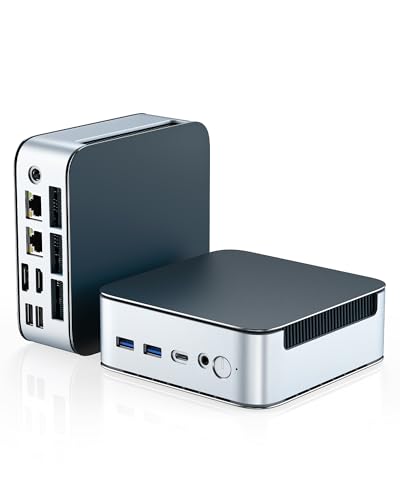
- Ryzen 3 5300U handles daily work and media smoothly.
- Dual 2.5G LAN and WiFi 6 suit connected home office setups.
- Triple-display support helps power a wall-mounted monitor layout.
Best For: A compact multi-monitor mini PC for clean wall-mounted office or media setups.
Best for HP Mini VESA Mounting
HumanCentric HP Mini Mount Bracket

- Fits select HP Desktop Mini and Elite Mini models.
- Supports monitor-back, wall, and under-desk installs.
- Includes cable-friendly straps for the power adapter.
Best For: HP Mini owners who want a tidy VESA, wall, or under-desk mounting solution.
Best for Triple-Monitor Desk Walls
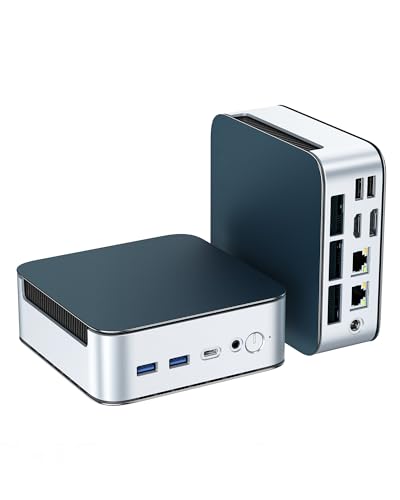
- Triple 4K output for multi-monitor setups
- 16GB RAM and 512GB NVMe for smooth daily use
- Dual 2.5G LAN, WiFi 6, and Bluetooth 5.3
Best For: People building a compact wall-mounted monitor workstation with multiple displays.
Best for Simple Dual-Monitor Setups

- VESA mount included for behind-monitor installation
- Dual HDMI supports two 4K displays
- Compact, quiet design fits clean wall-mounted setups
Best For: Home office users and light multitaskers who want a tidy, behind-monitor mini PC.
Best for Triple-Display Workstations

- Triple 4K display support for multi-monitor setups
- 16GB RAM and 1TB NVMe SSD included
- WiFi 6, Bluetooth 5.3, and Gigabit Ethernet
Best For: Office users and home workers who want a compact, multi-display mini PC for a wall-mounted monitor setup.
Best for Wired Connectivity
C4 Mini PC 11 Pro Ryzen 5 3500U
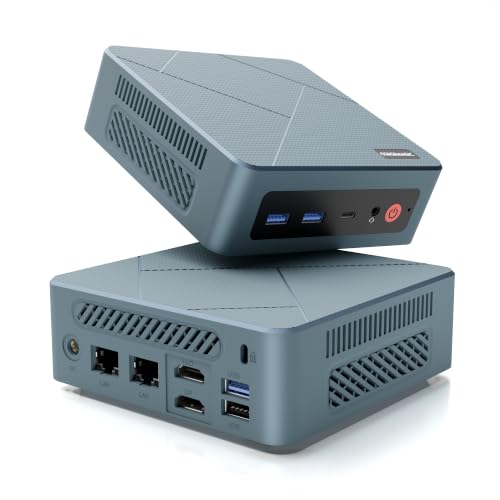
- Ryzen 5 3500U handles everyday work smoothly
- Dual gigabit LAN supports stable wired setups
- Triple-display support suits wall-mounted monitors
Best For: People building a tidy wall-mounted monitor setup that benefits from wired networking and multiple displays.
Best for Easy VESA Mounting – GMKtec G3 S Mini PC N95
If you want a compact, straightforward option for mini pcs for wall mounted monitor setup, the GMKtec G3 S keeps the footprint tiny while still covering everyday office, streaming, and light multitasking needs. Its VESA mount support makes it easy to tuck behind a display for a cleaner wall-mounted desk or kiosk-style installation.
Best For: Buyers who want a simple, budget-friendly mini PC that mounts behind a monitor and handles daily productivity, dual displays, and basic home or office use.
Pros:
- VESA mount-friendly design is ideal for hiding the PC behind a wall-mounted monitor
- Dual HDMI 2.0 outputs support two 4K displays at 60Hz
- 8GB RAM and 256GB SSD are enough for light multitasking and quick boot times
- WiFi 5, Bluetooth 5.0, and Gigabit Ethernet cover flexible connectivity
Cons:
- N95 performance is fine for routine tasks, but not heavy creative workloads
- 8GB RAM and 256GB storage may feel limiting for power users
For mini pcs for wall mounted monitor setup, this model stands out because it combines easy mounting, dual-display support, and low-cost practicality without taking up desk space. It is a sensible pick when you care more about a tidy install than maximum performance.
Best for Dell Monitor VESA Conversion – HumanCentric Dell VESA Adapter
If you’re building mini pcs for wall mounted monitor setup around a compatible Dell S or SE series display, this HumanCentric adapter is a straightforward way to add VESA mounting support without replacing the monitor. It’s designed for a fast install, works with standard 75x75mm and 100x100mm mounts, and keeps the focus on a cleaner, more ergonomic workspace.
Best For: Dell monitor owners who need a simple adapter to mount supported S and SE series screens on a VESA arm or wall mount.
Pros:
- Fits many supported Dell S and SE series monitors
- Converts to standard 75x75mm and 100x100mm VESA patterns
- Quick screwdriver-only installation
- Good for cleaner desks and better monitor ergonomics
Cons:
- Only works with specific Dell model numbers
- Not compatible if the fourth digit in the model is 8 or 9
- Doesn’t help if your monitor already has built-in VESA support
This is a practical pick if your goal is to mount a supported Dell display above a desk and pair it with mini pcs for wall mounted monitor setup. Just verify model compatibility first, because the fit is the main limitation here.
Best for Triple-Monitor Mounts – KAMRUI Pinova P2 Mini PC 16GB/512GB Ryzen 4300U
If you need mini pcs for wall mounted monitor setup, the KAMRUI Pinova P2 is a strong fit thanks to its compact footprint, Ryzen 4300U performance, and triple-display output. It has enough power for everyday office work, streaming, and light multitasking, while the small chassis stays easy to tuck behind or near a mounted screen.
Best For: Buyers who want a compact, capable mini PC for a clean wall-mounted monitor desk, dual- or triple-screen productivity, and light home or business use.
Pros:
- Ryzen 4300U offers solid 4-core/8-thread performance for multitasking
- Triple 4K display support is ideal for multi-monitor wall setups
- 16GB RAM and 512GB SSD provide smooth everyday responsiveness
- USB-C, HDMI, and DisplayPort make monitor connections flexible
Cons:
- Not the best choice for demanding gaming or heavy creative workloads
- Storage expansion is good, but not as simple as a full-size desktop
For mini pcs for wall mounted monitor setup, this model stands out because it balances size, video outputs, and dependable performance better than ultra-low-end options. If your goal is a tidy, cable-light workstation behind a mounted display, it covers the basics well.
Best for Wall-Mounted HP Monitors – HumanCentric HP VESA Adapter
If you’re building mini pcs for wall mounted monitor setup, this HumanCentric VESA adapter is a practical add-on for compatible HP M Series and 5 Series displays. It lets you turn select HP monitors into VESA-ready screens, making it easier to pair a mini PC with a clean wall-mount arrangement without replacing the monitor.
Best For: HP M Series and 5 Series monitor owners who want to mount their display and keep a compact mini PC setup neat and flexible.
Pros:
- Converts supported HP monitors to VESA mounting compatibility
- Helps create a cleaner wall-mounted mini PC workstation
- Designed specifically for a long list of HP M Series and 5 Series models
Cons:
- Only works with compatible HP monitor models
- Does not include a mini PC or display mounting hardware beyond the adapter
- Not useful if your monitor already has native VESA support
For mini pcs for wall mounted monitor setup, this adapter makes the most sense when you already own a supported HP monitor and want a simple way to open up more mounting options. It’s a focused accessory, not a universal solution, but that specificity is exactly what makes it useful for the right build.
Best for Multi-Monitor Networking – Getorli Ryzen 5300U Mini PC
If you want one of the more capable mini pcs for wall mounted monitor setup, the Getorli Mini PC is a strong fit thanks to its Ryzen 5300U chip, triple-display support, and compact footprint. It gives you enough performance for office work, streaming, light gaming, and multitasking without taking up desk space.
Best For: Users who need a compact Windows mini PC for a clean wall-mounted monitor setup with multiple displays and fast wired networking.
Pros:
- Ryzen 3 5300U offers solid everyday responsiveness for productivity and media use.
- Dual 2.5G LAN plus WiFi 6 is great for fast, stable networking.
- Triple display support makes it easy to build a multi-monitor workstation.
- 16GB RAM and a 512GB NVMe SSD provide a good out-of-box balance.
Cons:
- Not intended for demanding AAA gaming or heavy content creation.
- Storage and memory upgrades may be unnecessary for casual users, adding cost.
For mini pcs for wall mounted monitor setup, this model stands out most for connectivity and display flexibility rather than raw power. It is a practical choice if you want a tidy, cable-light setup that can drive multiple screens reliably.
Best for HP Mini VESA Mounting – HumanCentric HP Mini Mount Bracket
If you’re building mini pcs for wall mounted monitor setup and want a clean, monitor-back installation, this HumanCentric bracket is a focused fit for supported HP Desktop Mini models. It gives you a straightforward VESA-based mounting path, plus wall, under-desk, and arm-mount options if your workspace needs more flexibility.
Best For: Owners of compatible HP Mini desktops who want to mount the PC behind a monitor or on a wall with tidy cable management.
Pros:
- Supports a wide range of HP Desktop Mini and Elite Mini models.
- Works with 75 x 75 mm and 100 x 100 mm VESA monitor patterns.
- Includes hardware for wall, under-desk, and pass-through VESA setups.
- Velcro straps help keep the power adapter and cables organized.
Cons:
- Only fits the listed HP Mini models.
- Requires a monitor or arm with a compatible VESA pattern for some setups.
This is a practical mounting solution if your priority is a neat, integrated install rather than a universal PC bracket. For mini pcs for wall mounted monitor setup, it’s most compelling when you already know you’re staying in the HP Mini ecosystem and want a purpose-built fit.
Best for Triple-Monitor Desk Walls – Glorlin Ryzen 5300U Mini PC
If you’re comparing mini pcs for wall mounted monitor setup, this Glorlin model stands out for its triple-4K display outputs, compact footprint, and enough everyday performance to handle office work, streaming, and light multitasking without taking up much desk space.
Best For: Users who want a compact PC for a wall-mounted monitor station, especially for multitasking with multiple displays.
Pros:
- HDMI, DisplayPort, and USB-C support up to three 4K monitors
- Ryzen 3 5300U with 16GB RAM is solid for everyday productivity
- Fast 512GB NVMe SSD with upgrade room to 64GB RAM and 4TB storage
- Dual 2.5G LAN plus WiFi 6 gives flexible wired and wireless networking
Cons:
- Not ideal for heavy gaming or demanding creative workloads
- Small chassis can mean limited internal expandability compared with larger desktops
For mini pcs for wall mounted monitor setup, this is a practical pick if you want a tidy, multi-display workstation with modern ports and easy upgrade potential. It is especially appealing when you need a small computer that can stay out of the way while driving an efficient wall-mounted display layout.
Best for Simple Dual-Monitor Setups – Bmax Mini PC B1 Plus
If you want a compact, affordable option for mini pcs for wall mounted monitor setup, the Bmax Mini PC B1 Plus is built around the basics that matter most: small size, dual HDMI output, and quiet day-to-day operation. It’s a practical fit for browsing, office work, digital signage, or a secondary workstation mounted neatly behind a display.
Best For: Home office users, light multitaskers, and anyone who wants a low-profile mini PC mounted behind a monitor.
Pros:
- Includes a VESA bracket, making behind-monitor mounting straightforward.
- Dual HDMI with 4K output supports two displays for productivity.
- Small footprint and silent cooling suit clutter-free wall-mounted setups.
- Expandable storage adds flexibility beyond the built-in 128GB.
Cons:
- Intel Celeron J3355 is best for light tasks, not heavy workloads.
- 6GB RAM limits more demanding multitasking.
- Wi‑Fi is dual-band, but this is still a budget-class system overall.
For shoppers comparing mini pcs for wall mounted monitor setup, this Bmax model stands out more for easy placement and dual-display convenience than raw speed. It’s a sensible pick when you want a tidy, reliable PC hidden behind the screen rather than a performance-focused desktop.
Best for Triple-Display Workstations – Getorli Ryzen 5 Mini PC
If you need one of the more flexible mini pcs for wall mounted monitor setup, the Getorli Mini PC is built around a Ryzen 5 3550H, 16GB of memory, and a 1TB NVMe SSD for smooth everyday use. Its triple-display support makes it a practical fit for compact desks, behind-screen installs, and productivity-focused workspaces where a full tower would be overkill.
Best For: Office users, students, and home workers who want a compact PC with strong multitasking and multi-monitor support.
Pros:
- Triple 4K display output helps create a clean multi-monitor setup.
- 1TB NVMe SSD and 16GB RAM provide fast, ready-to-use performance.
- WiFi 6, Bluetooth 5.3, and Gigabit Ethernet cover modern connectivity needs.
- Quiet dual-pipe cooling suits desks near living or work areas.
Cons:
- The Ryzen 5 3550H is solid for office work, but not ideal for heavy gaming or creative workloads.
- Only one memory module is installed initially, so dual-channel performance needs an upgrade.
- The compact chassis is convenient, but expansion is more limited than on full-size desktops.
For buyers comparing mini pcs for wall mounted monitor setup, this Getorli model stands out because it balances space-saving hardware with enough ports and display output for a tidy, productive workstation.
Best for Wired Connectivity – C4 Mini PC 11 Pro Ryzen 5 3500U
If you want mini pcs for wall mounted monitor setup that can stay out of sight while still handling everyday work, the C4 Mini PC 11 Pro is a practical pick. Its small footprint, triple-display support, and dual LAN ports make it a strong fit for a clean monitor-mounted workspace, home office, or digital signage-style install.
Best For: Users who want a compact, wired-friendly mini PC for a tidy wall-mounted monitor workspace, office desk, or media setup.
Pros:
- Ryzen 5 3500U offers solid everyday performance for office and streaming tasks
- Dual 1000Mbps LAN ports are great for stable wired networking
- Triple-display output helps expand a wall-mounted monitor setup
- 16GB RAM and 512GB SSD give you a ready-to-use starting point
Cons:
- Wi-Fi 5 is fine, but not as current as Wi-Fi 6 or newer
- USB-C display support is limited to 1080p output
- Not the best choice for demanding gaming or heavy creative work
Overall, this is a solid low-clutter option if you want mini pcs for wall mounted monitor setup with dependable wired networking and enough display flexibility for multitasking. It balances size, ports, and everyday speed better than basic entry-level units.
How We Picked the Best Mini PCs for Wall Mounted Monitor Setup
For Mini PCs for Wall Mounted Monitor Setup, we favored compact hardware that can mount neatly behind or near the display, plus accessories that support clean installation. Priority went to VESA compatibility, strong everyday performance, useful I/O, and options that make cable management easier.
We also looked at display output flexibility, wireless connectivity, storage and RAM headroom, and whether the product is a true mini PC or a mount adapter designed to help complete the setup.
Quick Comparison
Use the fastest category check: low-power mini PCs are best for browsing, kiosks, digital signage, and light office work; Ryzen-based models suit multitasking, multiple displays, and small-business workloads; mount adapters are the right choice when you already have a monitor or compact PC and just need a secure VESA installation.
Key Buying Factors for Mini PCs for Wall Mounted Monitor Setup
Mounting and Space Fit
Confirm the unit can attach to a VESA mount, sit safely behind the monitor, or work with an adapter bracket. Measure depth carefully so ports, cables, and airflow are not blocked once mounted.
Performance Needs
Choose the CPU based on workload. Basic processors are fine for web apps and signage, while Ryzen 5-class chips are better for heavier multitasking, multiple browser tabs, office suites, and dual- or triple-display use.
Ports and Display Support
Check HDMI, DisplayPort, USB-C, and LAN options before buying. For a wall-mounted monitor setup, front-access ports matter less than having the right rear outputs for your display and peripherals. Triple-display support is useful if the mini PC will run dashboards or productivity stations.
Noise, Cooling, and Expansion
A mounted PC should stay quiet and cool because it will often sit in a tighter space than a desktop on a desk. Extra RAM and SSD expandability can extend the useful life of the system, especially in business environments.
Who Should Buy Which Mini PCs for Wall Mounted Monitor Setup?
If you want the simplest low-cost setup, choose an entry-level mini PC with VESA support. If you need smoother multitasking or multiple monitors, a Ryzen 5 model is the safer long-term pick. If your monitor already has the right VESA pattern and you only need a secure mounting solution, a dedicated adapter bracket is the best value. For office, kiosk, and home theater use, match the hardware to the display and workload first, then prioritize the cleanest mounting path.