A small gaming PC can fit neatly beside a 4K TV, but a 4K video output does not guarantee smooth 4K gaming. The graphics hardware, game settings, and your TV’s refresh rate matter much more.
These seven compact PCs span different processors, memory configurations, and expansion options. Use the guide below to find the right fit for your games and living-room setup.
Best 7 Small Form Factor Gaming PCs for 4K TV Picks for 2026
Flexible Upgrade Pick
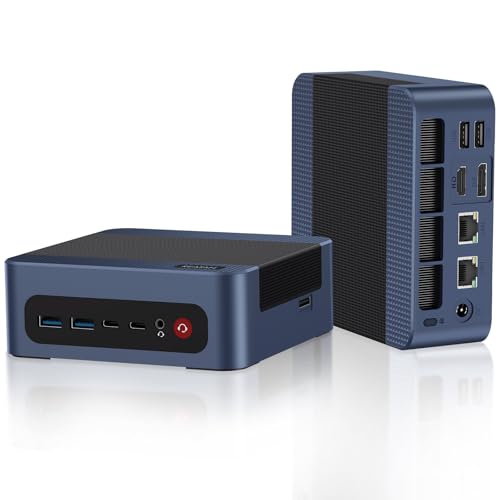
- Ryzen 7 8745HS with Radeon 780M
- 16GB DDR5 and 1TB SSD
- Dual 2.5GbE and expandable storage
Best For: 4K media and lighter gaming with storage headroom
VESA-Friendly Pick

- Ryzen 7 6800H with Radeon 680M
- 24GB memory and 1TB SSD
- VESA mount and three 4K outputs
Best For: A tidy TV-side media and light-gaming setup
Compact Media Pick

- Ryzen 7 7735HS with Radeon 680M
- 24GB memory and 1TB SSD
- Triple-display outputs and VESA mount
Best For: Compact 4K media playback and light gaming
External GPU Path

- 32GB LPDDR5 and 1TB SSD
- OCuLink and USB4 connectivity
- Dual 2.5GbE and three power modes
Best For: A compact TV PC with an external-GPU upgrade path
Dedicated-GPU Pick
MINISFORUM G1 Pro RTX 5060 Mini PC

- 145W RTX 5060 with 8GB GDDR7
- 16-core Ryzen 9 and 32GB DDR5
- 3.8L case with HDMI and DisplayPort
Best For: Demanding TV gaming in a compact desktop
Expandable All-Rounder

- Radeon 780M integrated graphics
- Four-display connectivity
- Three M.2 slots plus USB4 and OCuLink
Best For: TV media, mixed-use computing, and lighter gaming
Compact HTPC Pick
GMKtec M7 Ultra Ryzen 7 PRO Mini PC

- Radeon 680M integrated graphics
- HDMI 2.1 and dual USB4 video outputs
- Three power modes and OCuLink expansion
Best For: TV media and casual gaming in a mini PC
Flexible Upgrade Pick – Reatan A8 Ryzen 7 Mini PC
Among small form factor gaming pcs for 4k tv setups, the Reatan A8 offers a capable compact starting point: a Ryzen 7 8745HS, Radeon 780M integrated graphics, 16GB of DDR5 memory, and a 1TB NVMe SSD. Its HDMI 2.0 output connects to a 4K TV, while DisplayPort and USB-C add options for other screens.
Best For: Buyers who want 4K media playback and lighter PC gaming now, with room to expand storage later.
Pros:
- Radeon 780M graphics and an eight-core Ryzen processor suit a compact gaming and media setup.
- Dual M.2 slots support storage expansion up to 4TB.
- Dual 2.5GbE ports, Wi-Fi 6, and Bluetooth 5.2 offer flexible connectivity.
Cons:
- Integrated graphics are not a substitute for a dedicated GPU when playing demanding games at native 4K.
- Its 16GB memory configuration is smaller than several 24GB and 32GB options in this roundup.
The A8 makes sense if TV connectivity and faster wired networking matter as much as gaming. Treat its 4K output as display capability, not a promise of native-4K performance in every game.
VESA-Friendly Pick – BOSGAME P6 Neo Mini PC
The BOSGAME P6 Neo is a practical choice among small form factor gaming pcs for 4k tv use when you also want to keep the surrounding setup tidy. It pairs a Ryzen 7 6800H and Radeon 680M graphics with 24GB of onboard LPDDR5X memory, a 1TB SSD, and an included VESA mounting bracket.
Best For: A space-saving TV-side PC for 4K streaming, everyday multitasking, and lighter games.
Pros:
- HDMI 2.0, DisplayPort, and full-function USB-C support up to three 4K displays at 60Hz.
- 24GB of memory and two M.2 SSD slots give the system useful multitasking and storage capacity.
- Wi-Fi 6E, Bluetooth 5.3, and a VESA bracket help with flexible placement and peripherals.
Cons:
- Radeon 680M integrated graphics are better suited to lighter gaming than demanding native-4K games.
- The 24GB LPDDR5X memory is onboard, so buyers should not assume it can be upgraded.
The included mount and triple-display connections distinguish the P6 Neo for a compact entertainment area. Its 4K output is useful for a TV, but game resolution and settings should be matched to the integrated GPU.
Compact Media Pick – ACEMAGIC M1 Ryzen 7 Mini PC
For shoppers comparing small form factor gaming pcs for 4k tv setups, the ACEMAGIC M1 emphasizes a compact footprint and straightforward media use. Its Ryzen 7 7735HS, Radeon 680M graphics, 24GB of LPDDR5 memory, and 1TB SSD make it a sensible option for 4K playback and light gaming rather than high-end native-4K play.
Best For: A compact Windows PC for TV streaming, everyday tasks, and occasional lighter games.
Pros:
- HDMI, DisplayPort, and Type-C outputs support a three-display setup.
- 24GB of memory and an additional M.2 NVMe slot leave room for multitasking and more storage.
- The compact chassis includes a VESA mount for placement away from the desk.
Cons:
- Radeon 680M integrated graphics limit expectations for demanding games on a 4K TV.
- The listed 24GB maximum memory offers no stated RAM upgrade path beyond this configuration.
Choose the M1 when size and an included mounting option are priorities. Its 4K display support is most compelling for media, with gaming settings kept realistic for integrated graphics.
External GPU Path – GMKtec NucBox K16
The GMKtec NucBox K16 stands out among small form factor gaming pcs for 4k tv setups because its OCuLink port offers a connection for compatible external PCIe hardware. On its own, it combines a Ryzen 7 7735HS, Radeon 680M integrated graphics, 32GB of LPDDR5 memory, and a 1TB SSD for media, multitasking, and games at settings suited to integrated graphics.
Best For: Buyers who want a compact TV PC today and the option to explore compatible external GPU hardware later.
Pros:
- 32GB of LPDDR5-6400 memory provides a generous fixed configuration.
- OCuLink and USB4 offer expansion and display-connectivity options.
- Two M.2 slots, dual 2.5GbE ports, and selectable power modes add flexibility.
Cons:
- An external GPU setup requires separate compatible hardware; OCuLink is not hot-swappable.
- Onboard memory is not user-replaceable, and the integrated GPU alone is not intended for demanding native-4K gaming.
The K16 is the most expansion-minded choice here, especially if an external graphics setup is part of the plan. Without one, judge it by its Radeon 680M performance rather than its high-resolution video-output specifications.
Dedicated-GPU Pick – MINISFORUM G1 Pro RTX 5060 Mini PC
Among small form factor gaming pcs for 4k tv setups, the MINISFORUM G1 Pro is the option here with a dedicated desktop-grade GPU. Its RTX 5060, Ryzen 9 8945HX, 32GB DDR5 memory, and 1TB SSD make it the strongest fit of these three for demanding games on a large screen.
Best For: TV gamers who want dedicated graphics in a compact desktop and room to expand storage or memory later.
Pros:
- 145W RTX 5060 with 8GB GDDR7 and DLSS 4 support.
- 16-core Ryzen 9 CPU and cooling designed for sustained high-power operation.
- HDMI and DisplayPort connections support multiple 4K displays; Wi-Fi 7 and 5GbE add fast networking options.
Cons:
- Its 3.8L vertical case is larger than a typical palm-size mini PC.
- 8GB of GPU memory may call for graphics-setting compromises in demanding games at 4K.
The dedicated GPU gives this model a clearer route to 4K TV gaming than the integrated-graphics alternatives below, though your frame rate will still depend on the game and settings.
Expandable All-Rounder – GMKtec K12 Ryzen 7 Mini PC
For shoppers comparing small form factor gaming pcs for 4k tv use, the GMKtec K12 makes sense as a media, work, and lighter-gaming machine. Its Ryzen 7 255, Radeon 780M integrated graphics, 32GB DDR5, and 1TB SSD provide a capable starting configuration without a separate graphics card.
Best For: Buyers who split TV time between high-resolution media, everyday computing, and games at settings suited to integrated graphics.
Pros:
- HDMI 2.1, DisplayPort 1.4, and two display-capable USB-C connections support up to four displays.
- Three M.2 slots and two SO-DIMM slots offer substantial upgrade flexibility.
- USB4, OCuLink, and dual 2.5GbE ports provide useful expansion and wired networking options.
Cons:
- Radeon 780M integrated graphics are not a substitute for a dedicated GPU in demanding 4K games.
- OCuLink expansion requires compatible external hardware and cannot be connected or removed while the PC is on.
The K12 can send high-resolution video to a compatible display, but video-output capability should not be mistaken for native 4K gaming performance. Choose it for flexibility and mixed use, not maximum game settings.
Compact HTPC Pick – GMKtec M7 Ultra Ryzen 7 PRO Mini PC
The GMKtec M7 Ultra is a compact choice among small form factor gaming pcs for 4k tv setups when media playback and casual gaming matter more than demanding native-4K games. It pairs a Ryzen 7 PRO 6850U with Radeon 680M integrated graphics, 32GB DDR5 memory, and a 1TB SSD.
Best For: A TV-connected home PC for high-resolution media, everyday tasks, and gaming at settings appropriate for integrated graphics.
Pros:
- HDMI 2.1 provides a direct TV connection and supports up to 8K at 60Hz with compatible equipment.
- Dual USB4 video outputs and four-display support add flexibility beyond the TV.
- Quiet, Balanced, and Performance modes let you adjust the power profile; OCuLink supports compatible external GPU setups.
Cons:
- Radeon 680M integrated graphics will require reduced settings or resolution in demanding games.
- An external GPU setup requires additional compatible hardware not included in the listed configuration.
The M7 Ultra’s TV connection and configurable power modes suit a flexible living-room PC. Its high-resolution output specs describe display support, not a promise of smooth gaming at native 4K.
How We Picked the Best Small Form Factor Gaming PCs for 4K TV
We focused on the listed hardware and the features that matter beside a TV: graphics capability, memory, storage, display connections, and room for upgrades. We also considered whether a system makes more sense for native 4K gaming, upscaled play, or lighter games shown on a 4K screen. Specifications alone cannot establish frame rates, noise levels, or sustained performance, so check independent tests for the exact configuration before buying.
Quick Comparison: Match the PC to the Game
Start with graphics, not the “4K” label. A mini PC with integrated graphics can be useful for streaming, emulation, and less demanding games on a 4K TV. For newer, graphically intensive games at 4K, look for a confirmed dedicated GPU or a compatible external-GPU setup. The Mini PC Gaming A8 lists OCuLink, which may provide an expansion path, but an external GPU adds cost, cables, and space. Verify the MINISFORUM G1 Pro’s exact GPU specification before comparing it with the integrated-graphics models.
Among the listed memory configurations, the A8 has 16GB, the BOSGAME P6 Neo and ACEMAGIC M1 have 24GB, and the GMKtec K16, K12, and M7 Ultra and MINISFORUM G1 Pro list 32GB. All seven list 1TB of storage. Capacity is only one consideration: check whether memory and storage are upgradeable in the particular model you order.
Key Buying Factors for Small Form Factor Gaming PCs for 4K TV
Graphics and Display Output
Confirm that the PC’s specific HDMI, DisplayPort, or USB-C output supports your TV’s desired resolution and refresh rate. A port that outputs 4K at 60Hz may not meet a 4K/120Hz goal. Also check HDR and variable refresh rate support if those features matter to you. Being able to display the desktop at 4K is separate from rendering a game smoothly at that resolution.
Cooling, Placement, and Connectivity
Small cases need unobstructed airflow, especially in an enclosed media cabinet. Look for credible information on fan noise and sustained gaming performance, not just peak processor specifications. Check for enough USB ports for controllers and peripherals, plus reliable Wi-Fi or an Ethernet port for downloads and online play. If you plan to use an external GPU, confirm connector compatibility, available bandwidth, and the enclosure or power supply required.
Total Cost and Setup
Budget for any missing operating system license, controller, cables, or external GPU. Check the seller’s exact configuration and return policy: similarly named mini PCs can ship with different ports, memory layouts, and graphics hardware.
Who Should Buy Which Small Form Factor Gaming PCs for 4K TV?
For lighter games and general TV use, prioritize the ports, connectivity, and price you need; the BOSGAME P6 Neo, ACEMAGIC M1, GMKtec K16, K12, and M7 Ultra are worth comparing on those terms. Consider the A8 if OCuLink expansion is central to your plan. If you want demanding games at high settings on a 4K TV, verify the G1 Pro’s graphics hardware or price out an external-GPU setup before deciding. No compact PC should be assumed to deliver native 4K/120 gaming from its name or video-output specification alone.