Need a compact desktop that can drive modern displays without a full-size tower? The best mini PCs with USB-C display output make it easy to connect one or more monitors while keeping your setup clean and space-saving.
In this roundup, we focus on practical choices for office work, streaming, light content creation, and home lab use, with an eye on ports, performance, and value.
Best 10 Mini PCs with USB C Display Output Picks for 2026
Best for Power Users

- USB4 and USB-C display output support
- Ryzen 5 PRO 6650H with 16GB DDR5
- Dual 2.5GbE LAN and Oculink expansion
Best For: Power users who want a compact, highly connected mini PC for workstations, multi-monitor use, and light gaming.
Best for Triple Displays
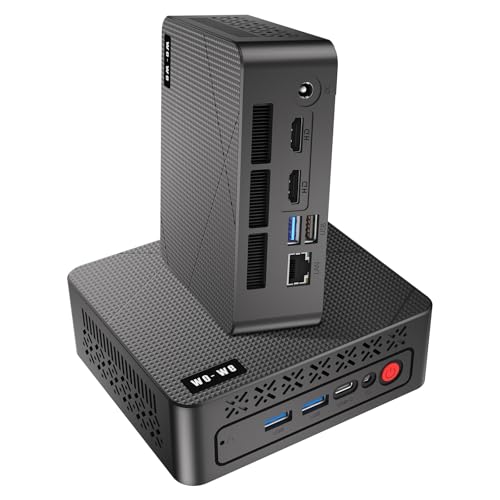
- USB-C plus 2× HDMI 2.0 for triple-monitor output
- Ryzen 5 3500U with Vega 8 suits daily multitasking
- Compact, quiet design works well in tight spaces
Best For: Triple-monitor productivity, home office setups, and compact media desks.
Best for Triple-Display Productivity
GMKtec Ryzen 7 Mini PC M5 Ultra

- USB-C, HDMI, and DP support triple 4K displays
- Ryzen 7 7730U with 32GB RAM and 1TB SSD
- Dual 2.5GbE LAN plus WiFi 6E for fast networking
Best For: People who want a compact, multi-monitor mini PC for office work and light gaming.
Best Triple-Display Value
AS1 Ryzen 5 Mini PC with USB-C

- USB-C, HDMI, and DP for up to 3 displays
- 16GB RAM + 512GB SSD included
- Good fit for office multitasking and light productivity
Best For: Budget-conscious buyers who want USB-C display output and triple-monitor support for work.
Best for Triple-Monitor Workspaces

- USB-C, HDMI 2.0, and DisplayPort for triple 4K@60Hz output
- Ryzen 5300U is well-suited to office and productivity tasks
- Dual LAN and dual M.2 slots add flexibility and upgrade room
Best For: People who want a compact mini PC with USB-C display output and triple-monitor support.
Best for USB-C Triple-Display Workstations
GMKtec G10 Mini PC Ryzen 5 3500U
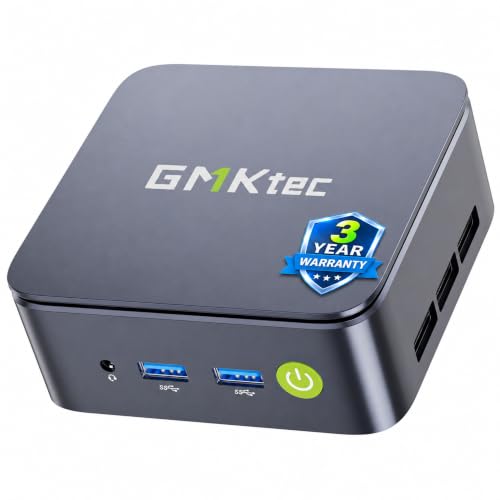
- USB-C, HDMI, and DP support triple 4K@60Hz displays
- Ryzen 5 3500U is stronger than budget N100/N97 mini PCs
- 2.5GbE LAN suits office, media server, and router roles
Best For: People who want a compact USB-C mini PC for multi-monitor productivity and light everyday computing.
Best for Comfort

- USB-C, HDMI, and DisplayPort for 4K triple monitors
- 16GB DDR4 RAM and 512GB PCIe SSD
- Dual RJ45 ports for stable wired networking
Best For: Users who want a compact office mini PC with USB-C display output and triple-monitor support.
Best with Extra Features
GMKtec Ryzen 5 Mini PC with USB-C

- USB-C, HDMI 2.1, and DP for triple 4K output
- Ryzen 5 3500U beats basic N-series mini PCs
- 2.5GbE LAN and upgradeable storage add flexibility
Best For: Compact workstation setups that need USB-C display output, wired speed, and triple-monitor support.
Best Triple-Display Pick

- USB-C plus dual HDMI for three-monitor setups
- Ryzen 5 3550H with 16GB RAM for steady office performance
- 512GB NVMe SSD and Windows 11 Pro included
Best For: People who want a compact Windows mini PC for multi-monitor productivity.
Best Simple Pick

- USB-C plus dual HDMI supports three monitors
- Ryzen 5 3500U is solid for office multitasking
- 512GB NVMe SSD and 16GB RAM help keep it responsive
Best For: Office and home users who want compact triple-monitor productivity with USB-C display output.
Best for Power Users – GMKtec M8 Ryzen 5 PRO Mini PC
If you want a compact workstation that can also handle light gaming and multi-monitor productivity, this GMKtec M8 is a strong fit among mini pcs with usb c display output. The Ryzen 5 PRO 6650H, 16GB DDR5 memory, and USB4/USB-C video support make it a practical choice for desks where space is tight but connectivity matters.
Best For: Buyers who want a fast all-round mini PC with USB-C video out, dual LAN, and expansion options for work or home labs.
Pros:
- USB4 and USB-C display support for flexible monitor setups
- Strong Ryzen 5 PRO 6650H performance for office work, editing, and everyday gaming
- Dual 2.5GbE LAN plus Oculink for advanced networking and eGPU upgrades
- Supports up to three displays for multitasking
Cons:
- Integrated graphics won’t match a discrete GPU for heavy gaming
- Premium features may be more than casual users need
- Short title form makes the model sound simpler than its feature set
This is a versatile pick if you need mini pcs with usb c display output and want more than just basic desktop output. It stands out for connectivity and expansion, making it especially appealing for productivity-focused setups that may grow over time.
Best for Triple Displays – wo-we AMD 3500U Mini PC
If you want one of the more capable mini pcs with usb c display output, the wo-we P6 is worth a look for office multitasking, light creative work, and compact home setups. Its AMD Ryzen 5 3500U, Vega 8 graphics, and USB-C plus dual HDMI layout make it easy to run multiple monitors without taking up desk space.
Best For: Buyers who want a compact mini PC for triple-monitor productivity, home theater use, or a tidy office workstation.
Pros:
- USB-C display output plus 2× HDMI 2.0 supports triple-screen setups
- Ryzen 5 3500U with 4 cores and 8 threads handles everyday multitasking well
- Palm-sized chassis is easy to hide behind a monitor or move between rooms
- Silent cooling design suits shared offices and media spaces
Cons:
- 8GB RAM / 256GB SSD is modest for heavier workloads
- Not aimed at demanding gaming or creator-grade editing
- USB-C is for display output, but expansion options are still fairly basic
Overall, this is a practical pick if you specifically want mini pcs with usb c display output for a clean triple-monitor desk or a simple plug-and-play media setup. It focuses more on efficient everyday performance than on raw power, which makes it easy to recommend for value-conscious multitaskers.
Best for Triple-Display Productivity – GMKtec Ryzen 7 Mini PC M5 Ultra
If you want one of the more capable mini pcs with usb c display output, the GMKtec M5 Ultra stands out with a Ryzen 7 7730U, 32GB of RAM, and triple 4K display support. It’s a practical fit for office work, light gaming, and multitasking setups where USB-C video output and wired networking both matter.
Best For: Users who need a compact mini PC for multi-monitor desks, fast file handling, and dependable everyday performance.
Pros:
- USB-C display output plus HDMI and DP for triple-screen setups
- Ryzen 7 7730U with 32GB RAM and 1TB SSD for strong day-to-day speed
- Dual 2.5GbE LAN and WiFi 6E for flexible, fast networking
- Quiet, compact design that suits office and home workspaces
Cons:
- Not a true discrete-GPU gaming machine
- Preconfigured storage is solid, but serious power users may still want upgrades
- Performance is excellent for its class, but still limited by integrated graphics
Overall, the M5 Ultra is a strong choice if you want mini pcs with usb c display output and also need wired network options, multi-monitor flexibility, and enough CPU headroom for productivity.
Best Triple-Display Value – AS1 Ryzen 5 Mini PC with USB-C
If you want one of the more practical mini pcs with usb c display output, the AS1 is built around Ryzen 5 3550H performance and triple-screen support, making it a solid fit for multitasking, office work, and compact desk setups. It combines a USB-C display output with HDMI and DisplayPort, plus 16GB RAM and a 512GB SSD for everyday speed and usable storage.
Best For: Buyers who want an affordable productivity mini PC with USB-C display output and triple-monitor flexibility.
Pros:
- USB-C, HDMI, and DisplayPort support up to three displays
- 16GB DDR4 RAM and 512GB NVMe SSD included
- Ryzen 5 3550H with Vega 8 graphics handles daily multitasking well
- Dual LAN plus Wi-Fi 5 and Bluetooth 5.0 add flexible connectivity
Cons:
- USB-C display output is limited to 1080p at 60Hz
- Older Ryzen 5 3550H is fine for office work, but not ideal for heavy workloads
- Wi-Fi 5 is less modern than Wi-Fi 6 on newer mini PCs
This is a strong pick if you need mini pcs with usb c display output for a compact workstation, especially when triple-monitor support matters more than cutting-edge specs. It focuses on practical value rather than premium performance.
Best for Triple-Monitor Workspaces – BOSGAME E5 5300U Mini PC
If you want one of the more versatile mini pcs with usb c display output, the BOSGAME E5 is built around a Ryzen 5300U and adds HDMI, DisplayPort, and USB-C video out for a practical three-screen setup. It’s a solid pick for office multitasking, light design work, and everyday use where flexible display connectivity matters more than raw gaming power.
Best For: Users who want a compact desktop with USB-C display output and easy triple-monitor support.
Pros:
- USB-C, HDMI 2.0, and DisplayPort support triple 4K@60Hz displays
- Ryzen 5300U with 8GB RAM handles office, browsing, and productivity smoothly
- Dual LAN plus multiple USB-A ports make it practical for work setups
- Dual M.2 slots offer upgrade room for more storage later
Cons:
- 8GB RAM is fine for basics, but heavier multitasking may want an upgrade
- Wi-Fi 5 is older than current Wi-Fi 6/6E options
- Not aimed at demanding gaming or intensive creative workloads
Overall, the BOSGAME E5 is a strong fit if you need mini pcs with usb c display output for a compact, multi-monitor workstation. Its mix of USB-C video, triple-display support, and dual Ethernet gives it a useful edge for office and home productivity.
Best for USB-C Triple-Display Workstations – GMKtec G10 Mini PC Ryzen 5 3500U
If you want one of the more capable mini pcs with usb c display output for office work, trading dashboards, or a compact home setup, the GMKtec G10 stands out with a Ryzen 5 3500U, 16GB RAM, and support for triple 4K displays. It also adds 2.5GbE networking and a full-function USB-C port, giving you a lot of connectivity for the price.
Best For: Users who need a small desktop for multi-monitor productivity, light gaming, or a home office with wired fast networking.
Pros:
- USB-C display output plus HDMI and DisplayPort for triple 4K@60Hz setups
- Ryzen 5 3500U with Vega 8 graphics is a step up from N100/N97-class mini PCs
- 16GB dual-channel RAM and 512GB SSD come ready for everyday multitasking
- 2.5GbE LAN adds a strong wired-network option for office or server use
Cons:
- Older Ryzen chip is not meant for heavy AAA gaming or demanding creative work
- WiFi 5 is fine, but not as current as WiFi 6/6E models
- Storage and RAM are upgradeable, but the base setup is still modest for power users
For shoppers comparing mini pcs with usb c display output, the G10 is especially appealing if you care more about real-world productivity features than raw benchmark numbers. Its mix of USB-C video, triple-display support, and 2.5GbE makes it a practical compact workstation.
Best for Comfort – BOSGAME E4 Mini PC
The BOSGAME E4 is a practical pick for shoppers comparing mini pcs with usb c display output, especially if you want a compact office machine that can drive multiple monitors without much fuss. With a Ryzen 5 3550H, 16GB of RAM, and a 512GB PCIe SSD, it has enough headroom for everyday multitasking, streaming, and light content work.
Best For: Office users, home setups, and streamers who want USB-C display output plus triple-screen support in a small desktop.
Pros:
- USB-C, HDMI, and DisplayPort support triple 4K displays
- 16GB RAM and 512GB SSD deliver fast everyday responsiveness
- Dual RJ45 ports are useful for stable wired networking
- Compact AMD Ryzen system fits neatly into desk or media setups
Cons:
- Ryzen 5 3550H is solid for daily use, but not a high-end CPU
- Wi-Fi 5 is fine, though newer Wi-Fi standards would be nicer
If your priority is mini pcs with usb c display output for a clean multi-monitor setup, the E4 stands out for its balanced specs and dual-LAN flexibility. It’s a sensible buy for productivity-first users who want more display options than a basic budget mini PC.
Best with Extra Features – GMKtec Ryzen 5 Mini PC with USB-C
If you want one of the more capable mini pcs with usb c display output for office work, home lab use, or a tidy multi-monitor desk, this GMKtec model stands out for its Ryzen 5 3500U chip and triple 4K display support. It also adds 2.5GbE networking, dual-channel 16GB RAM, and a 512GB SSD, so it feels more workstation-ready than entry-level Intel N-series boxes.
Best For: Buyers who want a compact, affordable mini PC for triple-monitor productivity, light gaming, and wired networking.
Pros:
- USB-C, HDMI 2.1, and DisplayPort support triple 4K@60Hz output
- Ryzen 5 3500U delivers a clear step up from N100/N97 class mini PCs
- 2.5GbE LAN is ideal for fast office networks, servers, and router roles
- 16GB RAM and 512GB SSD come ready to use out of the box
Cons:
- Ryzen 5 3500U is older silicon, even if it still performs well for the price
- WiFi 5 lags behind newer WiFi 6/6E-equipped competitors
- Not the best choice for heavy creative workloads or modern AAA gaming
For shoppers comparing mini pcs with usb c display output, this GMKtec unit is a strong practical pick because it combines real multi-display flexibility with solid everyday performance and better-than-basic networking.
Best Triple-Display Pick – BOSGAME E2 Mini PC 11 Pro
If you want one of the more practical mini pcs with usb c display output for a busy desk, the BOSGAME E2 is built around multitasking rather than flashy design. Its Ryzen 5 3550H, 16GB of RAM, and triple-display support make it a solid fit for office work, trading dashboards, and light creative workloads.
Best For: Users who need a compact Windows mini PC with USB-C display output and support for multiple monitors.
Pros:
- USB-C plus dual HDMI output supports up to three displays.
- Ryzen 5 3550H and 16GB RAM handle everyday productivity smoothly.
- 512GB NVMe SSD gives you fast boot times and decent local storage.
- Preinstalled Windows 11 Pro is ready for work right away.
Cons:
- WiFi 5 is older than WiFi 6 found on many newer mini PCs.
- No extra SSD slot, so storage expansion is limited.
- Integrated Vega 8 graphics are fine for light use, not demanding gaming.
Overall, the BOSGAME E2 stands out among mini pcs with usb c display output because it pairs straightforward setup with useful three-screen flexibility. If your priority is desktop productivity over cutting-edge specs, it offers a balanced and affordable workstation-style package.
Best Simple Pick – BOSGAME E2 Mini PC
If you want one of the more practical mini pcs with usb c display output for a budget-friendly office setup, the BOSGAME E2 is worth a look. It pairs a Ryzen 5 3500U with 16GB of RAM, a 512GB NVMe SSD, and triple-display support, making it a solid fit for multitasking without taking up much desk space.
Best For: Office users, traders, and home workers who want a compact PC with USB-C display output for three-monitor productivity.
Pros:
- USB-C plus dual HDMI output supports up to three displays at once
- Ryzen 5 3500U and 16GB RAM handle everyday work, streaming, and light multitasking well
- 512GB NVMe SSD delivers quick boot times and fast app loading
- Compact size, WiFi 5, Bluetooth 5.0, and multiple USB ports keep setups tidy
Cons:
- Ryzen 5 3500U is older and not ideal for heavier creative or gaming workloads
- WiFi 5 is fine for most users, but it lacks newer WiFi 6/6E connectivity
For buyers comparing mini pcs with usb c display output, this BOSGAME model stands out more for value and triple-screen convenience than raw performance. It makes sense if your priority is a small, efficient workstation rather than a machine for demanding apps.
How We Picked the Best Mini PCs with USB C Display Output
We prioritized mini PCs with USB-C display output that offer the best mix of everyday speed, reliable graphics output, and useful connectivity. Key considerations included CPU class, memory and storage capacity, monitor support, networking, thermals, and overall value for typical buyers.
Quick Comparison
For basic productivity and media use, lower-power Ryzen 3/5 systems can be enough, especially if you mostly browse, stream, or run office apps. For heavier multitasking, multiple displays, or more demanding workloads, Ryzen 5 and Ryzen 7 models with larger RAM and SSD configurations are the safer choice.
Key Buying Factors for Mini PCs with USB-C Display Output
Display Connectivity
Check whether the USB-C port supports video output and whether it works alongside HDMI or DisplayPort for multi-monitor setups. If you plan to use two or three screens, confirm the maximum supported resolutions and refresh rates.
Performance Headroom
Look at the processor generation, core count, and sustained power behavior rather than peak boost numbers alone. A stronger CPU can make a big difference when you keep browser tabs, office apps, video calls, and background tasks open at the same time.
Memory and Storage
For most buyers, 16GB RAM is the practical baseline. Choose 32GB if you expect heavier multitasking, virtualization, or long-term use. SSD capacity matters too, since a 512GB or 1TB drive gives you more breathing room for apps, files, and updates.
Ports and Networking
Many mini PCs with USB-C display output also add fast Ethernet, Wi-Fi 6 or 6E, and extra USB ports. Those details matter if you want a desktop replacement, a quiet office machine, or a compact home lab box.
Who Should Buy Which Mini PCs with USB C Display Output?
If you want the simplest everyday setup, pick a budget-friendly model with 16GB RAM, a 512GB SSD, and at least dual-display support. If you need smoother multitasking or plan to run multiple monitors, step up to a Ryzen 5 or Ryzen 7 system with stronger networking and more storage. Power users and tinkerers should favor models with dual LAN, USB4, or Oculink, while home users may value quieter cooling and a smaller footprint more than peak specs.