The best portable ultrawide editing monitors give creators more workspace without forcing them to carry a full desktop display. This roundup covers compact travel screens, high-resolution portable panels, and larger ultrawide options for editing, multitasking, and hybrid work.
We focus on resolution, color coverage, brightness, connectivity, portability, and practical workflow features so you can choose a display that fits your editing setup and travel habits.
Best 10 Portable Ultrawide Editing Monitors Picks for 2026
Best 4K Travel Editor
cocopar 17.3-inch 4K Portable Monitor

- 4K 3840×2160 resolution
- 150% sRGB color coverage
- 1.7-pound travel-ready design
Best For: Mobile photo and video editing
Best Lightweight QHD Editor
ARZOPA 16-inch 2.5K Portable Monitor

- 2560×1600 QHD resolution
- 16:10 productivity-focused format
- Only 1.46 pounds
Best For: Lightweight laptop editing and coding
Best Desktop Ultrawide
LG 34-inch UltraWide WQHD Monitor

- True 21:9 ultrawide workspace
- 3440×1440 curved display
- USB-C with up to 65W delivery
Best For: Desk-based editing and multitasking
Best OLED Touch Editor
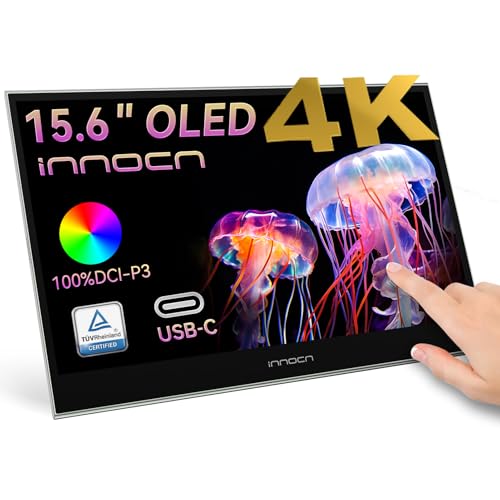
- 4K OLED with 100% DCI-P3 and 10-bit color
- 10-point touch with USB-C and mini HDMI
- 1ms response time and flexible screen modes
Best For: Touch-based photo and video editing on the go
Best Large Dual-Mode Display

- 4K 120Hz or FHD 288Hz dual-mode operation
- 100% sRGB, 500 nits, HDR, and FreeSync
- Large 27-inch panel with stand and VESA support
Best For: Large portable workstations and mixed creative/gaming use
Best Outdoor Editing Screen

- 3840×2400 16:10 display with 1,200-nit brightness
- 145% sRGB gamut and 2,000:1 contrast
- Magnetic cover stand, speakers, and broad cable bundle
Best For: Outdoor photo editing and daylight field work
Best High-Refresh Pick
VisionOwl 16-inch 2.5K Portable Monitor

- 2560×1600 16:10 IPS display
- 110% sRGB and 470-nit brightness
- 144Hz refresh rate with USB-C and HDMI
Best For: Mobile editing and gaming setups needing a bright, smooth second screen
Best Balanced Travel Pick
InnoView 15.6-inch 2K Portable Monitor

- 2560×1440 QHD resolution
- 100% sRGB color coverage
- USB-C, standard HDMI, and protective cover
Best For: Traveling editors and remote workers wanting a compact QHD second screen
Best 4K Travel Editor – cocopar 17.3-inch 4K Portable Monitor
For creators who need portable ultrawide editing monitors, the cocopar offers a large 17.3-inch 4K workspace with 150% sRGB coverage. Its lightweight design, dual USB-C ports, HDMI, and built-in kickstand make it practical as a high-resolution second screen for travel or mobile editing.
Best For: Photo and video editors who prioritize 4K detail and wide color coverage in a portable display.
Pros:
- 3840×2160 resolution with 150% sRGB, 8-bit color, and 16.77 million colors.
- Large 17.3-inch matte screen with brightness up to 600 nits using the included power adapter.
- Lightweight 1.7-pound design with a built-in kickstand, cloth case, and VESA mounting holes.
- Dual USB-C ports and HDMI support plug-and-play connections with compatible devices.
Cons:
- Peak 600-nit brightness requires external power.
- It uses a 16:9 aspect ratio rather than an actual 21:9 ultrawide layout.
- USB-C video requires a compatible Thunderbolt or DisplayPort Alt Mode connection.
The cocopar is a strong choice when resolution and color coverage matter more than a true ultrawide aspect ratio. It is especially appealing for mobile workflows that need a spacious, sharp second screen without a heavy desktop monitor.
Best Lightweight QHD Editor – ARZOPA 16-inch 2.5K Portable Monitor
The ARZOPA 16-inch monitor is a compact option for shoppers comparing portable ultrawide editing monitors for laptops and tablets. Its 2.5K resolution, 16:10 screen, and 123% sRGB coverage provide extra vertical workspace for timelines, spreadsheets, coding, and general editing while keeping weight low.
Best For: Editors and mobile professionals who want a lightweight QHD display with useful vertical workspace.
Pros:
- 2560×1600 QHD resolution with a productivity-friendly 16:10 aspect ratio.
- 123% sRGB coverage, 1200:1 contrast, and 350-nit brightness.
- Lightweight 1.46-pound body measuring about 0.36 inches thick.
- USB-C and HDMI inputs support laptops, consoles, smartphones, tablets, and PCs.
Cons:
- Its 16-inch size is smaller than the 17.3-inch alternatives in this roundup.
- It is limited to a 60Hz refresh rate.
- The listed 26ms response time is less suited to fast-moving content.
Choose the ARZOPA when portability and vertical screen space are more important than maximum brightness or 4K resolution. Its 16:10 format is particularly practical for documents, code, and editing interfaces that benefit from additional height.
Best Desktop Ultrawide – LG 34-inch UltraWide WQHD Monitor
Unlike travel-oriented portable ultrawide editing monitors, the LG 34WR55QK-B is a full-size desktop display built around a genuine 21:9 curved workspace. Its 3440×1440 resolution, 100Hz refresh rate, USB-C connectivity, and window-splitting tools make it a practical choice for editors who work primarily at a desk.
Best For: Desktop editors who need a true ultrawide canvas for multiple windows, timelines, and multitasking.
Pros:
- True 21:9 UltraWide format with 3440×1440 WQHD resolution.
- 34-inch curved VA panel with 3000:1 contrast and up to 99% sRGB coverage.
- 100Hz refresh rate, 5ms response time, HDR10, and FreeSync support.
- USB-C provides up to 65W power delivery, alongside HDMI, DisplayPort, and USB ports.
Cons:
- At 15.2 pounds, it is not designed for regular travel.
- Its 300-nit brightness is lower than the 600-nit portable 4K models listed here.
- The 3440×1440 resolution is not 4K UHD.
The LG is the strongest match for buyers who specifically want an actual ultrawide editing setup rather than a portable second screen. Its broad 21:9 canvas and multitasking features can reduce window switching, while the adjustable stand supports longer desktop sessions.
Best Bright QLED Portable – UPERFECT 17.3-inch 4K QLED Monitor
The UPERFECT 17.3-inch QLED display is a compelling option among portable ultrawide editing monitors for users who want a bright, color-rich 4K screen. Its 150% sRGB coverage, 600-nit brightness, narrow bezels, and flexible connectivity support editing, multimedia work, and dual-screen setups.
Best For: Mobile creators who want a bright 4K display with expanded color volume and flexible mounting.
Pros:
- 3840×2160 4K UHD resolution with QLED technology and 150% sRGB coverage.
- 600-nit brightness, 2000:1 contrast, HDR, and FreeSync support.
- Two full-function USB-C ports and a standard HDMI port support varied devices.
- Built-in 180-degree adjustable stand and VESA compatibility provide flexible positioning.
Cons:
- External power is recommended when connecting the monitor.
- It is a 16:9 display, not a true 21:9 ultrawide monitor.
- At 60Hz, it is aimed more at editing and multimedia than high-refresh gaming.
The UPERFECT stands out for brightness and color volume in a portable form factor. It makes sense for editors who frequently work in bright environments or want a vivid second display, provided they are comfortable carrying an external power supply.
Best OLED Touch Editor – 15.6-inch 4K Touch OLED
The INNOCN PU15 Pre C6 is a strong choice for shoppers seeking portable ultrawide editing monitors alternatives with premium contrast and touch control. Its 15.6-inch 4K OLED panel combines 100% DCI-P3 coverage, 10-bit color, and a 1ms response time in a compact second screen.
Best For: Photo and video editors who want a high-resolution, touch-enabled portable display for laptops, phones, cameras, or consoles.
Pros:
- 4K UHD resolution with OLED contrast and 100% DCI-P3 coverage
- 10-point touch supports tapping, swiping, and pinch-to-zoom
- USB-C and mini HDMI connectivity with plug-and-play setup
- Supports secondary, mirrored, and extended-screen modes
Cons:
- At 15.6 inches, it provides less workspace than larger portable displays
- Glossy finish may reflect more ambient light than a matte screen
- USB-C or mini HDMI devices must support video and audio output
This monitor stands out for editing workflows that benefit from OLED contrast, wide color coverage, and direct touch interaction. It is particularly practical when portability matters more than having an expansive ultrawide canvas.
Best Large Dual-Mode Display – 27-inch 4K/288Hz Monitor
The InnoView 27-inch monitor is a practical pick for buyers comparing portable ultrawide editing monitors while prioritizing a larger workspace. It switches between 4K at 120Hz for editing and FHD at 288Hz for responsive gaming, with 100% sRGB coverage and 500-nit brightness.
Best For: Creators, developers, and gamers who need a large adjustable second display for indoor or fixed-location use.
Pros:
- 27-inch IPS panel with 4K 120Hz and FHD 288Hz modes
- 100% sRGB coverage, 500-nit brightness, HDR, and FreeSync
- Two full-function USB-C ports, HDMI, speakers, and a 3.5mm jack
- Built-in 180-degree stand and 100×100mm VESA compatibility
Cons:
- Its 9.5-pound metal construction is less convenient for frequent travel
- Adapter power is required for operation
- The 16:9 aspect ratio is not an ultrawide format
This is best viewed as a transportable, large-format monitor rather than a lightweight travel screen. Its dual-mode performance and ergonomic mounting options make it compelling for a portable workstation that usually stays in one place.
Best Outdoor Editing Screen – 16-inch 4K Sunlight-Readable
The Yodoit 4K Portable Monitor is designed for editing away from a conventional desk. Among portable ultrawide editing monitors, its 16:10 canvas, 1,200-nit peak brightness, matte coating, and 145% sRGB gamut make it especially suited to outdoor photo work and field presentations.
Best For: Photographers, field inspectors, and mobile editors who need a bright, color-rich screen in daylight.
Pros:
- 3840×2400 resolution on a 16:10 panel with extra vertical workspace
- 1,200-nit peak brightness and matte anti-glare coating for outdoor viewing
- 145% sRGB coverage, 2,000:1 contrast, and 178-degree viewing angles
- Includes magnetic cover/stand, dual speakers, cables, and power adapter
Cons:
- Full-brightness 4K USB-C operation may require added power
- Mini HDMI carries video and audio only, so separate USB-C power is needed
- Its 16:10 design is spacious but not ultrawide
The Yodoit is a particularly capable field monitor when visibility and editing space matter. Its power requirements are worth planning for, but the high brightness and included accessories make it well suited to mobile creative workflows.
Best High-Refresh Pick – VisionOwl 16-inch 2.5K Portable Monitor
For shoppers comparing portable ultrawide editing monitors, the VisionOwl offers a practical balance of workspace, color coverage, and smooth performance. Its 16:10 2.5K IPS display provides 2560×1600 resolution, 110% sRGB coverage, 470 nits of brightness, and a 144Hz refresh rate for editing, multitasking, and gaming.
Best For: Creators and mobile professionals who want a bright, high-refresh second screen that works with laptops, consoles, and desktop setups.
Pros:
- 2.5K 2560×1600 resolution and 16:10 ratio provide extra vertical workspace.
- 8-bit + 2FRC IPS panel, 110% sRGB coverage, and 470-nit brightness support detailed, vivid visuals.
- Includes USB-C, standard HDMI, built-in speakers, a kickstand, and dual VESA holes.
- Lightweight metal design includes a sleeve, power adapter, HDMI cable, and two USB-C cables.
Cons:
- Single-cable video and power requires a compatible Thunderbolt 3/4 or DP Alt Mode device.
- Its 16-inch screen may provide less editing area than larger portable dual-screen designs.
The VisionOwl is a strong choice when portability and fluid motion matter as much as editing detail. Its 16:10 format is particularly useful for laptop work, while VESA compatibility adds flexibility for a more permanent workstation.
Best Large Dual-Screen Setup – InnoView Dual 23.8-inch 4K Monitor
Among portable ultrawide editing monitors, this InnoView stands out for its expansive dual-screen format. Two 23.8-inch 4K displays deliver a large workspace, 100% sRGB coverage, and modes for extending, duplicating, or combining the screens into an ultra-wide canvas.
Best For: Editors and desktop-based creators who prioritize maximum workspace, 4K detail, and side-by-side workflows over lightweight travel.
Pros:
- Dual 23.8-inch 3840×2160 screens provide substantial space for timelines, previews, documents, and code.
- Both displays offer 100% sRGB coverage for photo and video editing workflows.
- Extend, duplicate, and combine modes support flexible multitasking and ultra-wide viewing.
- 315-degree adjustment, built-in speakers, HDMI, USB-C, and DisplayPort add versatility.
Cons:
- The manufacturer does not recommend carrying it out for use because of its size and weight.
- Achieving 4K picture quality requires a device that supports 4K resolution.
- Its 60Hz refresh rate is less suited to high-refresh gaming than the faster alternatives.
This is better viewed as a foldable desktop workstation than a travel-first monitor. If your editing workflow benefits from two large 4K canvases and you usually work from a fixed location, its scale and flexible display modes are compelling.
Best Balanced Travel Pick – InnoView 15.6-inch 2K Portable Monitor
The InnoView 15.6-inch is a straightforward option for portable ultrawide editing monitors when you want sharper-than-Full-HD detail without carrying a large dual-screen unit. Its 2560×1440 QHD panel, 100% sRGB coverage, and compact form suit editing, coding, meetings, and general laptop multitasking.
Best For: Travelers, students, and remote workers seeking a compact QHD second screen with broad device compatibility.
Pros:
- 2560×1440 QHD resolution and 100% sRGB coverage provide clear, colorful images.
- Two USB-C ports and standard HDMI support laptops, MacBooks, phones, tablets, and consoles.
- Protective PU leather cover doubles as a stand for travel and desk use.
- Built-in stereo speakers and duplicate, extend, and second-screen modes add convenience.
Cons:
- Its 250-nit brightness is lower than the brighter VisionOwl option.
- The display is limited to a 60Hz refresh rate.
- Some laptop connections may require two cables for setup.
This InnoView favors practicality and portability over premium speed or brightness. It makes sense for users who need a sharp, color-capable second display on the road and value the included protective cover and wide connection options.
How We Picked These Portable Ultrawide Editing Monitors
We evaluated the selected displays against the needs of photo, video, and design workflows. Resolution and panel technology were key considerations, since sharper images and consistent viewing angles make detailed editing easier. We also looked at stated color-gamut coverage, brightness, refresh rate, connectivity, screen size, and portability.
Because “portable” can mean anything from a slim laptop companion to a larger foldable display, this list includes several form factors. Specifications such as 100% sRGB, 100% DCI-P3, 4K resolution, USB-C, HDMI, HDR, and built-in stands can be useful, but real-world color accuracy and calibration may vary. Professionals should verify independent measurements when color-critical delivery is involved.
Quick Comparison
- Best for maximum detail: Choose a 4K portable monitor such as the cocopar, UPERFECT, INNOCN, or Yodoit models.
- Best for color-focused work: Prioritize the INNOCN OLED or a display with clearly stated sRGB or DCI-P3 coverage.
- Best for a larger workspace: The LG 34-inch ultrawide provides a traditional desktop-style canvas, while the InnoView dual display offers stacked-screen flexibility.
- Best for smooth motion: The InnoView dual-mode monitor and VisionOwl model offer high refresh-rate modes useful for mixed editing and gaming.
- Best for compact travel: The 15.6- to 16-inch options are generally easier to fit beside a laptop and carry in a sleeve.
Key Buying Factors for Portable Ultrawide Editing Monitors
Resolution and Aspect Ratio
4K provides the most workspace and fine detail, but it can require more power and may make interface text smaller. QHD and 2.5K displays offer a useful balance for laptops. A 16:10 panel adds vertical space, while a true 21:9 ultrawide is better for side-by-side timelines, panels, and documents.
Color, Brightness, and Panel Type
Look for stated coverage in sRGB or DCI-P3, but do not confuse gamut size with accuracy. IPS panels are common and provide wide viewing angles; OLED models can deliver deeper blacks and strong contrast. Higher brightness helps in bright rooms and outdoor work, though glossy surfaces may still create reflections.
Connections and Power
USB-C is convenient when it supports both video and power over one cable. Confirm that your laptop’s USB-C port supports DisplayPort video output. HDMI is useful for broader compatibility, while a second USB-C connection or included power adapter may be necessary for high-resolution displays.
Portability and Ergonomics
Check weight, thickness, cover or stand design, VESA support, speaker quality, and cable requirements. A screen that is technically portable but needs several cables and a separate stand may be less convenient for frequent travel.
Who Should Buy Which Portable Ultrawide Editing Monitors?
Traveling photographers and designers should prioritize a lightweight 4K or OLED model with strong color coverage. Video editors may prefer a larger 16:10 or 21:9 display with enough horizontal room for timelines. Remote workers and multitaskers should consider dual-screen or ultrawide designs that reduce window switching. Hybrid creators and gamers can benefit from high-refresh-rate options, provided color performance and resolution still meet their editing needs.