Thermal cameras are no longer just inspection tools. For creators, they can add a striking visual layer to videos, help reveal heat patterns, and support more engaging tech, DIY, and science content.
This roundup of the best thermal imaging cameras for content creators in 2026 focuses on image quality, portability, app workflow, and real-world value so you can choose a model that fits your setup.
Best 10 Thermal Imaging Cameras for Content Creators Picks for 2026
USB-C Compatibility Pick
TOPDON TC002C Duo Thermal Imaging Camera

- USB-C support for iOS, Android, and Windows
- TISR enhances 256×192 to 512×384
- Photo and video recording supported
Best For: USB-C creators who want a compact thermal camera for mobile capture
Smart Scene Analysis Pick
GT16D Dual-Spectrum Thermal Camera

- Dual-spectrum thermal and visible-light imaging
- Scene presets for moisture, insulation, electrics, and solar
- Up to 11 hours of battery life
Best For: Creators who want easy-to-read thermal footage with scene presets
iPhone Lightning Pick

- Works with iOS devices that have Lightning ports
- 1440×1080 visual and 80×60 thermal resolution
- FLIR Ignite Cloud sharing plus rugged construction
Best For: Lightning iPhone creators who want a compact, shareable thermal add-on
Rugged Handheld Pick
FOXWELL RT280 Thermal Imaging Camera

- 2.8-inch LCD with TISR-enhanced thermal clarity
- 8GB storage holds 20,000+ images and videos
- Windows analysis software with 2D/3D tools
Best For: Creators who want a durable handheld camera with PC analysis
Super-Resolution Wi‑Fi Pick
HSFTOOLS P2W WiFi Thermal Camera

- 640x480 super-resolution output
- Wi‑Fi app and PC software support
- Dual IR/visual camera with 5 modes
Best For: Creators who want detailed thermal visuals and easy wireless sharing
Lightweight Everyday Inspector

- Only 240g with a comfortable grip
- Thermal imaging plus thermometer mode
- Up to 14 hours of battery life
Best For: Portable, easy-to-use inspections and quick temperature readings
High-Detail Dual-Lens Creator Tool

- AI upscaled 640x480 thermal imaging
- 2MP visual camera with 5 modes
- Wi‑Fi app control and 4GB storage
Best For: Creators who want detailed dual-lens imaging and organized app-based workflows
Mini Pocket Inspector
TOPDON TC004 Mini Thermal Imaging Camera

- 128x128 thermal image enhanced to 240x240 via TISR
- Pocket-friendly build with 15-hour battery life
- Auto photo capture on alerts; stores up to 8,000 images
Best For: Portable inspections, home checks, and creator-friendly field use
Phone-Ready Thermal Adapter
REVASRI Thermal Camera for iPhone and Android
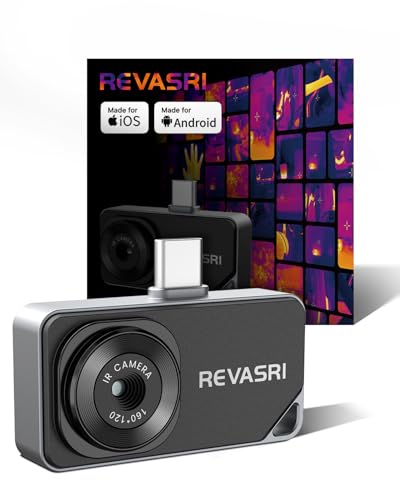
- 320x240 super resolution with 25Hz refresh rate
- USB-C plug-in design works with phones, tablets, and PCs
- No battery required; powered by the connected device
Best For: Mobile-first creators who want a compact thermal add-on for quick checks
USB-C Compatibility Pick – TOPDON TC002C Duo Thermal Imaging Camera
If you want thermal imaging cameras for content creators that work across modern mobile devices, the TOPDON TC002C Duo is built around USB-C compatibility and portable capture. It pairs enhanced 256×192 thermal imaging with TISR up to 512×384, plus 25Hz refresh and 40mK sensitivity for smooth, detailed viewing. The app also supports photo and video recording, which makes it practical for documenting heat patterns on the go.
Best For: Creators using USB-C iPhone, iPad, Android, or Windows devices who need a compact thermal camera with recording support.
Pros:
- Works with USB-C smartphones and tablets across iOS, Android, and Windows
- TISR boosts 256×192 imaging to 512×384 for sharper detail
- 25Hz refresh rate and 40mK sensitivity help track changing heat patterns smoothly
- Supports photo and video recording for content capture
Cons:
- Not compatible with Mac devices
- Not compatible with Android 16 devices temporarily
This is a strong fit if your workflow depends on a small, easy-to-carry thermal imager that can plug into current USB-C devices. It is especially appealing when you want straightforward capture without adding a bulky handheld unit.
Smart Scene Analysis Pick – GT16D Dual-Spectrum Thermal Camera
The GT16D stands out among thermal imaging cameras for content creators who want smarter analysis and clearer context in the same device. It combines thermal and visible-light views, uses UIRA-IR enhancement to raise the native 128×128 detector to 240×240, and runs at 25Hz for real-time viewing. With preset scenes for moisture, insulation, floor heating, electrics, and solar panels, it is built for fast, repeatable inspections.
Best For: Creators who want dual-spectrum imaging and scene presets for quick, explainable thermal content.
Pros:
- Dual-spectrum imaging shows thermal data alongside visible-light context
- Preset scenarios help speed up inspections across moisture, insulation, electrics, and more
- UIRA-IR improves the native 128×128 detector to 240×240
- Up to 11 hours of battery life and 4GB memory for extended use
Cons:
- File transfer is designed for USB-C to USB-A, which may not fit every workflow
- Not much storage compared with some larger handheld units
For creators who need thermal footage that is easier to interpret on camera, the GT16D offers a useful mix of automation and visual context. Its scene presets and dual-mode operation make it especially practical for fast demonstrations and inspection-style content.
IPhone Lightning Pick – FLIR ONE Pro LT
If your setup still uses a Lightning iPhone, the FLIR ONE Pro LT is a straightforward option in thermal imaging cameras for content creators. It connects to iOS devices with a Lightning port and delivers 1440×1080 visual resolution with 80×60 thermal resolution. It is also designed for field use, with a rugged build and Wi‑Fi-based FLIR Ignite Cloud sharing.
Best For: iPhone creators with Lightning devices who want a compact thermal camera for quick capture and sharing.
Pros:
- Direct compatibility with iOS devices that have a Lightning port
- 1440×1080 visual resolution paired with 80×60 thermal resolution
- FLIR Ignite Cloud supports uploading, organizing, and sharing images
- Built to handle jobsite wear and rated for a 1.5-meter drop
Cons:
- Not compatible with iPhone 15 and later USB-C models
- Lower thermal resolution than newer high-resolution options
This model makes the most sense if you already shoot on a Lightning iPhone and want a proven, portable thermal add-on. It is less future-proof than USB-C options, but still useful for simple, mobile thermal documentation.
Rugged Handheld Pick – FOXWELL RT280 Thermal Imaging Camera
The FOXWELL RT280 is a handheld choice for thermal imaging cameras for content creators who want a screen-first workflow and more advanced PC analysis. It features a 2.8-inch 320×240 LCD, TISR enhancement from 120×90 to 240×180, and a 25Hz frame rate for smooth thermal viewing. It also includes 8GB of storage and supports Windows PC analysis with point, line, area, 2D/3D thermal imaging, and report generation.
Best For: Creators who want a rugged handheld thermal camera with onboard storage and PC analysis tools.
Pros:
- 2.8-inch LCD and TISR-enhanced thermal clarity for easier on-device viewing
- 8GB eMMC storage can hold over 20,000 images and videos
- Windows software supports point, line, area, and 2D/3D analysis
- Rugged design with 6.6-foot drop resistance and IP54 protection
Cons:
- PC analysis software is not compatible with Mac
- Bulkier than clip-on smartphone thermal cameras
For creators who prefer a dedicated handheld tool over a phone attachment, the RT280 offers a solid mix of durability, storage, and analysis features. It is especially appealing when your content needs more than a quick snapshot and you want exportable inspection data.
Super-Resolution Wi‑Fi Pick – HSFTOOLS P2W WiFi Thermal Camera
If you want thermal imaging cameras for content creators that can also handle practical inspections, the HSFTOOLS P2W stands out for its 640×480 super-resolution output, dual IR and visual cameras, and easy Wi‑Fi sharing. Its 3.5-inch touchscreen, live recording support, and multiple image modes make it useful for capturing detailed thermal visuals and reviewing them quickly on a phone, tablet, or PC.
Best For: Creators and pros who want high-detail thermal imagery with Wi‑Fi sharing, dual-camera views, and app-based review.
Pros:
- Super-resolution output boosts the base 256×192 detector to 640×480.
- Dual IR and visual cameras with Visual, Thermal, Fusion, PIP, and Blending modes.
- Wi‑Fi app support plus Windows software for sharing, analysis, and reporting.
- Built-in storage, microphone, LED flashlight, and tripod hole add flexibility.
Cons:
- Advanced scene detection features may be more than casual users need.
- Best results depend on using the app or PC software for deeper analysis.
Overall, the P2W is a strong pick if your workflow benefits from sharp thermal detail, multiple viewing modes, and easy transfer to other devices. It feels more like a field-ready imaging tool than a basic thermometer, which makes it a practical option for creator-style documentation and inspection footage.
Lightweight Everyday Inspector – GT14S Thermal Imaging Camera
The GT14S is a practical choice among thermal imaging cameras for content creators who need a lightweight tool that’s easy to carry and quick to operate. At just 240g, it combines thermal imaging with thermometer mode, so you can switch between full-screen thermal views and point-and-shoot temperature readings depending on what you’re documenting.
Best For: Users who want a compact, long-lasting thermal camera for quick inspections and simple temperature checks.
Pros:
- Ultra-light 240g design with a balanced, non-slip grip.
- Dual mode use: thermal imaging plus thermometer mode.
- NETD < 50mK and a -4°F to 1022°F range for broad applications.
- Up to 14 hours of battery life for all-day use.
Cons:
- Lacks Wi‑Fi and app-based sharing features.
- No built-in dual visual/thermal camera system listed.
For creators or technicians who value portability and straightforward operation, the GT14S keeps the focus on fast captures and readable temperature data. Its long battery life and simple controls make it a sensible pick when you want thermal coverage without extra complexity.
High-Detail Dual-Lens Creator Tool – TT27D WiFi Thermal Camera
If you’re comparing thermal imaging cameras for content creators, the TT27D is built for sharp visuals, flexible capture, and easy wireless review. Its dual-lens setup combines a 640×480 AI-upscaled thermal image with a 2MP visual camera, while Wi‑Fi streaming through the AccuHeat app makes it easier to monitor, tag, and organize captures on the go.
Best For: Users who want a compact dual-lens thermal camera with strong app connectivity and report-friendly tools.
Pros:
- AI upscaling to 640×480 with a 2MP visual camera.
- Five imaging modes plus 9 color palettes for flexible viewing.
- Wi‑Fi app support with real-time streaming and remote control.
- 4GB storage and over 5500 file support for organized capture management.
Cons:
- More feature-rich than a basic point-and-shoot thermal camera.
- Advanced scene modes may be unnecessary for simple temperature checks.
The TT27D is the most rounded option here if you want a compact camera that blends detailed thermal capture with app-based workflows. Its measurement tools, storage, and ergonomic design make it well suited to creators who also need practical inspection performance.
Mini Pocket Inspector – TOPDON TC004 Mini Thermal Imaging Camera
If you want thermal imaging cameras for content creators that are easy to carry and quick to use on set, the TOPDON TC004 Mini is a practical pocket-sized option. It combines 128×128 thermal imaging with TISR enhancement to 240×240, plus a 40° x 30° field of view and 25Hz refresh rate for smooth, detailed thermal views during quick checks.
Best For: Creators who need a compact thermal camera for fast home, electrical, or equipment inspections.
Pros:
- Enhances 128×128 thermal data to 240×240 with TISR for clearer detail.
- Pocket-friendly design with 15 hours of runtime and a lightweight build.
- Auto-captures photos on temperature alerts and stores up to 8,000 images.
- Includes 5 color palettes and supports -4°F to 842°F measurements.
Cons:
- Paper manual is not included; setup relies on the electronic manual.
- No charging head is included with the cable.
- Lower base thermal resolution than some higher-end alternatives before enhancement.
This is a strong fit if you want a simple, durable thermal camera that travels well and keeps inspections moving. The IP54 rating, 2-meter drop resistance, and automatic alert photos make it especially convenient for recurring content or field use.
AI Scene Scout – HF96 Thermal Camera with AI Scene Detection
For thermal imaging cameras for content creators who want smarter scanning and more control, the HF96 stands out with AI scene recognition and live super resolution. It boosts thermal images to 240×240 during live viewing and photo capture, while the 50° field of view and 25Hz refresh rate help keep inspections smooth and easy to follow.
Best For: Creators and pros who want AI-assisted thermal detection for leaks, insulation gaps, and electrical hotspots.
Pros:
- AI IntellFault scene recognition helps identify water leaks and insulation gaps.
- Live super resolution improves thermal images to 240×240 at 25Hz.
- 3-in-1 design combines thermometer, thermal camera, and laser pointer.
- Includes 4 GB storage, 11-hour battery life, tripod support, and PC analysis software.
Cons:
- No moisture readings, despite the leak-detection-oriented scene features.
- Firmware update is needed to access the scene detection feature.
- Bulkier than a phone accessory-style thermal camera.
The HF96 is the most feature-rich standalone option here if you want advanced inspection tools and post-capture analysis. Its laser pointer, custom alarms, and Windows software make it especially useful when you need more than just a quick heat read.
Phone-Ready Thermal Adapter – REVASRI Thermal Camera for iPhone and Android
If you want thermal imaging cameras for content creators that plug straight into a phone, the REVASRI is a compact USB-C option with 320×240 super resolution. It works with iOS, Android, and Windows devices, and its 25Hz refresh rate plus 40mK thermal sensitivity are designed to keep thermal views smooth and responsive.
Best For: Creators who want a phone-powered thermal camera for quick, portable inspections.
Pros:
- 320×240 super resolution with 25Hz refresh and 40mK sensitivity.
- Works with iOS, Android, tablets, computers, and Windows via USB-C.
- No battery needed because it draws power directly from the connected device.
- Includes high/low alarms, temperature tracking, 15x zoom, and picture-in-picture.
Cons:
- Requires a compatible USB-C device to use.
- Depends on the connected device for power, so battery drain is a consideration.
- App-based setup adds an extra step before first use.
This is the easiest choice if your workflow already revolves around a phone or tablet. The lightweight, plug-and-play design makes it convenient for quick thermal checks, while IP54 protection and 1-meter drop resistance add some confidence in the field.
How We Picked These Thermal Imaging Cameras for Content Creators
We focused on models that make sense for filming, demonstrating, and sharing thermal visuals, not just for professional diagnostics. The strongest picks balance usable resolution, simple phone or Wi-Fi connectivity, stable app support, and a form factor that is easy to carry on shoots.
We also considered whether a camera works well in common creator scenarios, such as handheld demos, product shots, outdoor footage, and quick social clips. For Thermal Imaging Cameras for Content Creators, convenience matters almost as much as sensor specs.
Quick Comparison
Smartphone-connected models are usually the fastest way to start creating thermal content because they keep your workflow compact and portable. Standalone cameras often offer larger screens, better ergonomics, and more flexible framing when you want to record on location without tying up your phone.
If your priority is polished visuals, look for stronger thermal resolution or super-resolution processing. If your priority is speed and portability, a lighter USB-C or Lightning model may be the better fit.
Key Buying Factors for Thermal Imaging Cameras for Content Creators
Resolution and Image Clarity
Higher thermal resolution generally produces smoother outlines and more readable subject detail, which matters when your audience needs to understand what they are seeing. If you plan to crop footage or film from a distance, higher resolution can help preserve usable detail.
Compatibility and Workflow
Check whether the camera works with iPhone, Android, USB-C, or Lightning, and confirm that the app supports the features you need. A camera that launches quickly and transfers images easily will save time during shoots.
Portability and Power
Creators often work in the field, so size and weight can affect how often you actually use the device. Compact options are easier to pack, while larger models may offer better handling or screens for repeated use.
Field Usability
Look for helpful extras such as laser pointers, adjustable palettes, AI scene features, Wi-Fi connectivity, and thermometer modes. These can make framing, explaining, and filming thermal scenes much easier.
Who Should Buy Which Thermal Imaging Cameras for Content Creators?
If you create phone-based videos and want the simplest setup, choose a smartphone-mounted or USB-C model. If you need the best chance at sharper thermal visuals for more polished content, lean toward higher-resolution or dual-spectrum options.
If your work includes quick field checks, live demonstrations, or social-first content, a lightweight compact unit is often the most practical choice. For creators who want more control and a dedicated viewing experience, a standalone camera can be worth the extra bulk.
In short, the best Thermal Imaging Cameras for Content Creators are the ones that fit your workflow, your editing style, and how often you will actually carry them.