Civil 3D work can feel very different on two PCs with similar-looking specs. Large drawings, surfaces, corridors, and multiple open applications put pressure on memory and storage, while everyday drafting benefits from a responsive CPU.
These 10 desktops span compact systems, configurable towers, and high-memory workstations. Use the picks to narrow your options, then check the exact configuration against the projects and software you run.
Best 10 Workstation PC for Autocad Civil 3d Picks for 2026
Enterprise Tower

- Core Ultra 9 285 vPro and RTX 2000
- 64GB DDR5 and 1TB SSD
- ThinkShield, TPM, and onsite warranty
Best For: Managed CAD teams needing a professional tower
Renewed Storage Pick

- 1TB SSD plus 4TB HDD
- 32GB DDR4 and Quadro K1200 4GB
- Renewed; listed 90-day warranty
Best For: Buyers prioritizing local storage for lighter CAD work
Compact Office Pick

- 64GB DDR4 and 2TB Gen4 NVMe SSD
- RTX A400 with 4GB graphics memory
- Verify CPU: title and notes differ
Best For: Space-conscious offices needing RAM and fast storage
Heavy-Workload Tower
Adamant Ryzen 9 RTX 4000 Blackwell

- 16-core Ryzen 9 9950X
- RTX 4000 Blackwell with 24GB VRAM
- 48GB DDR5 and 1TB NVMe SSD
Best For: Complex 3D modeling and rendering alongside Civil 3D
Best for Expandability

- Eight-core Xeon w3-2435 processor
- 64GB ECC DDR5; expandable to 512GB
- 2TB NVMe SSD and 16GB RTX 2000 Ada
Best For: Teams prioritizing ECC memory and future RAM upgrades
Best Renewed Performance Pick

- 24-core Core i9-13900K
- RTX A4500 with 16GB graphics memory
- 2TB plus 512GB NVMe SSDs
Best For: Buyers seeking strong specifications in a renewed tower
Best Modern Graphics Option
Lenovo ThinkStation P3 Tower Gen 2

- Core Ultra 9 285 vPro processor
- RTX 4000 SFF Ada with 20GB memory
- 32GB DDR5 and 1TB Gen 5 SSD
Best For: Graphics-heavy 3D work with room for memory upgrades
Best Compact Pick
Lenovo ThinkStation P3 Ultra SFF Gen 2
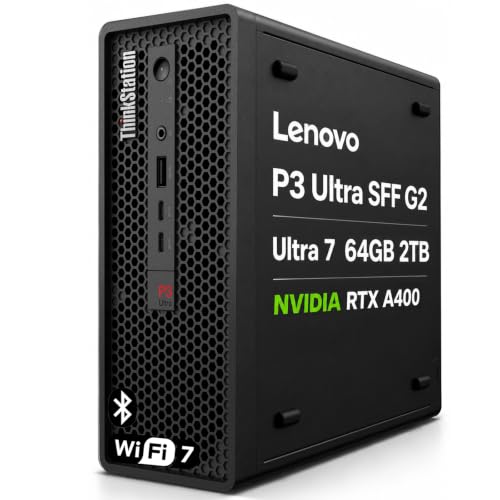
- Compact chassis with AutoCAD ISV certification
- 64GB RAM and 2TB SSD
- RTX A400 supports four display outputs
Best For: Space-conscious Civil 3D workstations
Best Balanced Tower
Lenovo ThinkStation P3 Tower Gen 2, 128GB
- Core Ultra 9 285 vPro and 128GB RAM
- RTX 4000 SFF Ada with 20GB VRAM
- Expandable tower with 2TB Gen 5 SSD
Best For: Engineering teams needing graphics and memory headroom
Best Maximum-Memory Pick
Lenovo ThinkStation P3 Tower Gen 2, 256GB
- 256GB installed RAM at stated maximum
- RTX 4000 SFF Ada with 20GB VRAM
- Dual 2.5Gbps Ethernet and on-site warranty
Best For: Very memory-heavy Civil 3D and engineering workflows
Enterprise Tower – Lenovo ThinkStation P3 Gen 2
If you’re choosing a workstation pc for autocad civil 3d in a managed office, the ThinkStation P3 Tower Gen 2 pairs an Intel Core Ultra 9 285 vPro with NVIDIA RTX 2000 graphics, 64GB of DDR5 memory, and a 1TB SSD.
Best For: CAD teams that want a Lenovo tower with substantial memory, professional graphics, and IT management features.
Pros:
- 64GB DDR5-5600 memory provides room for large files and multitasking.
- Intel vPro, ThinkShield, and a discrete TPM support business security and management.
- Front USB-C and USB-A ports, plus rear HDMI and DisplayPort outputs, offer useful connectivity.
Cons:
- The 1TB SSD may require supplemental storage for extensive project archives.
- The listed USB-C port supports data transfer only.
This is the office-oriented choice of the group: its memory, graphics, and management features are compelling, while storage needs are worth checking against your project library.
Renewed Storage Pick – HP i5 Quadro K1200 Desktop
This renewed HP desktop is a workstation pc for autocad civil 3d shoppers who prioritize storage capacity: it combines a 1TB boot SSD and 4TB hard drive with 32GB DDR4 memory, an 8th-generation six-core Core i5, and Quadro K1200 4GB graphics.
Best For: Buyers seeking a renewed CAD desktop with ample local file storage for less demanding projects.
Pros:
- The 1TB SSD and 4TB HDD separate active work from bulk storage.
- 32GB RAM and dedicated Quadro graphics provide a practical starting configuration for CAD work.
- Includes Windows 11 Pro, Wi-Fi, Bluetooth, and two DisplayPort outputs.
Cons:
- Renewed condition and the listed 90-day warranty warrant a closer look before purchase.
- The 8th-generation CPU and Quadro K1200 are older than the components in the other listed systems.
Its storage layout is the draw, but verify that the older hardware meets the requirements of your Civil 3D version and typical project size.
Compact Office Pick – Envision S12 SFF
For a workstation pc for autocad civil 3d that fits a smaller desk, the Envision S12 SFF offers a listed Core i9-14900K, 64GB DDR4 memory, a 2TB Gen4 NVMe SSD, and RTX A400 4GB graphics. The supplied title instead names an i9-14900KF, so confirm the exact CPU before ordering.
Best For: Space-conscious offices that want substantial RAM and SSD capacity in a small-form-factor system.
Pros:
- 64GB RAM and a 2TB NVMe SSD suit multitasking and sizable local project files.
- Small-form-factor chassis includes a wired keyboard and mouse.
- Windows 11 Pro, TPM 2.0 support, and a listed three-year limited hardware warranty support office deployment.
Cons:
- CPU identification differs between the supplied title and specifications.
- The RTX A400 has 4GB of graphics memory, which may be a constraint for graphics-heavy work.
The S12 is worth considering when desk space and storage matter most; confirm the processor and check whether the graphics configuration fits your Civil 3D workload.
Heavy-Workload Tower – Adamant Ryzen 9 RTX 4000 Blackwell
For demanding modeling alongside Civil 3D work, this workstation pc for autocad civil 3d combines a 16-core Ryzen 9 9950X, RTX 4000 Blackwell graphics with 24GB of video memory, 48GB DDR5 RAM, and a 1TB Samsung 990 PRO NVMe SSD.
Best For: Buyers handling complex 3D modeling or rendering who want a high-core-count CPU and substantial GPU memory.
Pros:
- 16-core Ryzen 9 9950X and RTX 4000 Blackwell 24GB support compute- and graphics-heavy workflows.
- Includes a 360mm liquid cooler and 850W power supply.
- Windows 11 Pro, Wi-Fi 7, and a listed three-year parts-and-labor warranty round out the build.
Cons:
- The 1TB SSD may fill quickly with large project and rendering files.
- 48GB of installed RAM is less than the 64GB supplied with two other systems in this roundup.
This is the strongest fit here for buyers who also do GPU-intensive 3D work; plan extra storage if you keep extensive projects locally.
Best for Expandability – Lenovo ThinkStation P5
If you need a workstation pc for autocad civil 3d with room to grow, the ThinkStation P5 pairs an eight-core Intel Xeon w3-2435 with 64GB of ECC DDR5 memory and a 2TB NVMe SSD. Its NVIDIA RTX 2000 Ada graphics card has 16GB of dedicated memory.
Best For: Civil 3D users who want ECC memory, substantial storage, and a stated path to higher RAM capacity.
Pros:
- 64GB ECC DDR5 RAM is expandable up to 512GB across eight slots.
- 2TB PCIe 4.0 NVMe SSD provides space for projects and supporting files.
- RTX 2000 Ada graphics offers 16GB of dedicated GDDR6 memory.
Cons:
- The 22.25 x 11.75 x 24-inch tower needs considerable desk or floor space.
- The single-processor configuration limits CPU expansion options.
The P5 makes the strongest case when memory capacity and ECC support matter more than a compact footprint. Its included three-year manufacturer warranty is another useful consideration for a work machine.
Best Renewed Performance Pick – Dell Precision 3660
For buyers considering a renewed workstation pc for autocad civil 3d, this Precision 3660 offers a Core i9-13900K, 64GB of RAM, and an NVIDIA RTX A4500 with 16GB of graphics memory. Its two listed NVMe SSDs give you a 2TB drive plus a separate 512GB drive.
Best For: Buyers comfortable with a renewed desktop who want a high-core-count processor and two SSDs.
Pros:
- Core i9-13900K provides 24 cores and a listed boost speed of up to 5.8GHz.
- 64GB RAM supports working across multiple applications.
- Separate 2TB and 512GB NVMe SSDs offer flexible file organization.
Cons:
- This is a renewed unit, so check its condition and seller terms before ordering.
- The supplied warranty details conflict: the bullets mention two years, while the specifications list 90 days.
The CPU, graphics card, and dual-drive setup make this a compelling configuration on paper. Confirm the actual warranty coverage and installed memory specification with the seller, since the supplied details also disagree on the RAM type.
Best Modern Graphics Option – Lenovo ThinkStation P3 Tower Gen 2
If your workstation pc for autocad civil 3d also needs to handle graphics-heavy 3D work, this ThinkStation P3 Tower Gen 2 combines an Intel Core Ultra 9 285 vPro with an NVIDIA RTX 4000 SFF Ada card carrying 20GB of memory. It ships with 32GB DDR5 RAM and a 1TB PCIe Gen 5 SSD.
Best For: Users who want a recent processor, substantial dedicated graphics memory, and an upgradeable tower.
Pros:
- RTX 4000 SFF Ada graphics includes 20GB of dedicated GDDR6 memory.
- 32GB DDR5-5600 RAM is listed as expandable up to 256GB.
- Includes dual 2.5Gbps Ethernet, Wi-Fi 7, and a 1TB Gen 5 SSD.
Cons:
- Its 32GB starting memory is lower than the 64GB configurations in this roundup.
- The factory seal was opened for hardware upgrades; confirm warranty coverage before purchase.
This P3 is a practical fit when graphics capacity and newer connectivity are priorities. The supplied listing says Eluktronics provides one year of whole-system support, with the original manufacturer warranty continuing on remaining components.
Best Compact Pick – Lenovo ThinkStation P3 Ultra SFF Gen 2
If you need a workstation PC for AutoCAD Civil 3D without giving up much desk space, this compact ThinkStation pairs a Core Ultra 7 265 with 64GB of DDR5 memory and a 2TB SSD. Lenovo lists ISV certification for AutoCAD, while the dedicated RTX A400 provides professional graphics in a small chassis.
Best For: Civil 3D users who prioritize a compact workstation, substantial memory, and multiple displays.
Pros:
- AutoCAD ISV certification and MIL-STD-810H testing.
- 64GB RAM and a 2TB SSD accommodate sizable project files and multitasking.
- RTX A400 graphics offer four mini DisplayPort outputs for multi-monitor setups.
Cons:
- RTX A400 has 4GB of graphics memory, less than the tower configurations here.
- The system was resealed for memory and SSD upgrades; those parts carry a separate three-year seller warranty.
Choose this model when footprint and certified AutoCAD support matter more than the stronger graphics and higher memory ceilings of the larger towers. Check the split warranty terms before ordering.
Best Balanced Tower – Lenovo ThinkStation P3 Tower Gen 2, 128GB
For a workstation PC for AutoCAD Civil 3D that leaves room for larger drawings and related 3D workflows, this ThinkStation tower combines a Core Ultra 9 285 vPro, 128GB of DDR5 memory, and an NVIDIA RTX 4000 SFF Ada GPU with 20GB of graphics memory. Its 2TB PCIe Gen 5 SSD adds fast local storage for active projects.
Best For: Engineering teams that want substantial RAM and professional graphics in an expandable tower without moving to the 256GB configuration.
Pros:
- 128GB RAM supports memory-heavy multitasking and project work.
- RTX 4000 SFF Ada provides 20GB of dedicated graphics memory.
- Tool-less expandability, advanced cooling, and a 750W power supply.
Cons:
- The factory seal was opened for hardware upgrades.
- Eluktronics provides one-year support for the complete system; verify how that interacts with the remaining manufacturer coverage.
This is the middle ground of the three: considerably more memory and GPU headroom than the compact model, without the third configuration’s maximum 256GB RAM. The opened-seal and warranty details deserve a look before purchase.
Best Maximum-Memory Pick – Lenovo ThinkStation P3 Tower Gen 2, 256GB
If your workstation PC for AutoCAD Civil 3D also needs to keep unusually large datasets or multiple demanding applications open, this P3 Tower Gen 2 offers 256GB of DDR5 memory—the stated maximum for this configuration. It pairs a Core Ultra 9 285 vPro with RTX 4000 SFF Ada graphics and a 2TB PCIe Gen 5 SSD.
Best For: Civil 3D users whose broader engineering workflows can make use of the maximum installed memory and added tower connectivity.
Pros:
- 256GB of installed RAM provides the most memory of these three systems.
- RTX 4000 SFF Ada includes 20GB of dedicated graphics memory.
- Dual 2.5Gbps Ethernet, enhanced air cooling, and tool-less expandability.
- Factory-sealed listing with a one-year Lenovo on-site warranty.
Cons:
- The listed 256GB already matches the stated maximum RAM capacity.
- Its additional memory may be unnecessary for smaller Civil 3D projects.
Pick this version for demonstrable memory-heavy workloads, not simply because it has the largest specification. Compared with the 128GB tower, its practical differentiators include more installed RAM, faster listed memory, and dual 2.5Gbps Ethernet.
How We Picked the Best Workstation PC for Autocad Civil 3d
We compared the listed CPU, RAM, GPU, storage, and chassis configurations against common Civil 3D workflows: editing drawings, rebuilding surfaces and corridors, coordinating reference files, and switching between CAD and other applications. We also considered whether a system offers room to grow. Listed specifications are not hands-on benchmark results, and a model name alone does not confirm its exact ports, warranty, or upgrade options.
Quick Comparison: Where Each Type Fits
For a compact desk, the ThinkStation P3 Ultra SFF G2 and Envision S12 SFF merit a look, but confirm cooling and expansion before choosing a small chassis. The HP desktop pairs an older Quadro K1200 with 32GB of RAM; check its full CPU specification and software compatibility before treating it as a value option.
For a conventional tower, the P3 with Ultra 9 285 and RTX 2000, Adamant Ryzen 9 build, and Dell Precision 3660 offer different CPU, graphics, and storage combinations. The ThinkStation P5 adds a Xeon platform. The three P3 Tower Gen 2 configurations with RTX 4000 Ada primarily differ in their listed 32GB, 128GB, and 256GB RAM capacities and storage; buy the memory your workload needs rather than assuming more will make every drawing faster.
Key Buying Factors for a Workstation PC for Autocad Civil 3d
CPU Responsiveness
Prioritize strong per-core performance for interactive drafting and many model-editing tasks. Additional cores can help with compatible rendering, analysis, or multitasking, but core count alone is a poor way to rank Civil 3D responsiveness. Compare current CPU benchmarks for the specific processors and workloads you use.
RAM and Storage
For modest projects, 32GB is a practical starting point; 64GB provides more breathing room for larger surfaces, linked files, and simultaneous applications. Consider 128GB or more when your measured usage approaches 64GB or your project requirements justify it. An NVMe SSD helps with opening files and general responsiveness. Check available capacity for local projects, caches, and backups—not just the headline drive speed.
Graphics, Compatibility, and Expansion
A capable dedicated GPU helps with complex viewports and visual workflows, but the most expensive card is not automatically the best Civil 3D purchase. If certified graphics drivers matter to your organization, check Autodesk’s current certification information for the exact software version and GPU. Verify monitor outputs, network connections, available RAM slots, drive bays, power capacity, and warranty terms before ordering.
Who Should Buy Which Workstation PC for Autocad Civil 3d?
Choose an SFF system when desk space is tight and its connectivity meets your needs. Start with a 32GB or 64GB tower for typical professional drafting, favoring CPU responsiveness and a clear upgrade path. Look at the higher-memory P3 configurations when large datasets or heavy multitasking warrant them. If rendering or other GPU-intensive applications share the workload, compare the RTX-equipped towers against those applications’ requirements as well as Civil 3D’s. For any Workstation PC for Autocad Civil 3d, confirm the seller’s exact configuration before purchase.