Choosing a workstation pc for rhino 3d is about more than raw specs. Rhino rewards strong single-core performance for modeling, plenty of RAM for large files, and a capable GPU for smooth viewport work.
Below, we’ve focused on desktop options that can handle demanding design tasks, rendering, and multitasking without turning your workflow into a waiting game.
Best 9 Workstation PC for Rhino 3d Picks for 2026
Best for Heavy Rhino Scenes
Dell Tower Plus EBT2250 Workstation Desktop

- 64GB DDR5 handles big Rhino projects and multitasking
- RTX 5060 supports smoother viewport work and GPU tasks
- 4TB SSD offers fast, roomy storage for active design files
Best For: Designers and architects needing a ready-to-go tower for large Rhino scenes and heavy multitasking.
Best for Heavy 3D Workloads
NOVATECH AI Workstation Desktop PC

- RTX 5080 is built for fast modeling and GPU rendering
- 64GB RAM suits large Rhino files and multitasking
- 2TB NVMe SSD plus liquid cooling support responsive, stable work
Best For: Designers and 3D professionals who want a powerful Rhino workstation with extra GPU and AI headroom.
Best for High-FPS CAD Power
STORMCRAFT Falcon AI Ryzen 7 7800X3D PC

- Ryzen 7 7800X3D and 32GB DDR5 support smooth Rhino multitasking
- RX 9070 XT 16GB adds strong graphics power for rendering and VR
- 1TB NVMe SSD, Wi-Fi 6E, and USB-C keep the setup modern and fast
Best For: Designers who want a fast Rhino-ready desktop that also excels at gaming and creative work.
Best for Enterprise Rhino Work
Dell Pro Tower i7-14700, 32GB, 1TB SSD
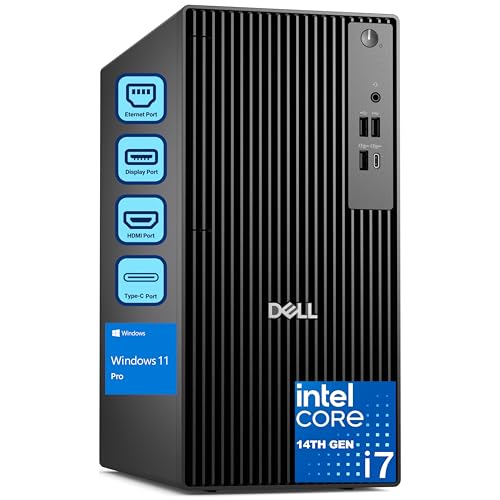
- 20-core i7-14700 handles demanding Rhino and CAD multitasking
- 32GB DDR5 RAM and 1TB PCIe SSD keep projects snappy
- Dual 4K support and Windows 11 Pro suit pro workflows
Best For: Architects, designers, and office teams needing a reliable Rhino-ready tower.
Best for Fast Rhino Workloads
STORMCRAFT Falcon Ryzen 7 7800X3D RTX 5070

- Fast Ryzen 7 7800X3D keeps Rhino modeling responsive
- RTX 5070 adds strong GPU headroom for render previews
- 32GB DDR5 and 1TB Gen4 SSD support smooth multitasking
Best For: Rhino users who want strong modeling speed and extra GPU power for rendering and gaming.
Best Multi-Core Workstation

- 36 cores / 72 threads for heavy multitasking and rendering
- 128GB RAM handles large Rhino files and complex scenes
- 1TB SSD + 4TB HDD balances speed and storage capacity
Best For: Designers and power users who need a thread-heavy workstation for Rhino, rendering, and multitasking.
Best for High-End Rhino Work
Cooler Master TD 5 Pro Gaming PC
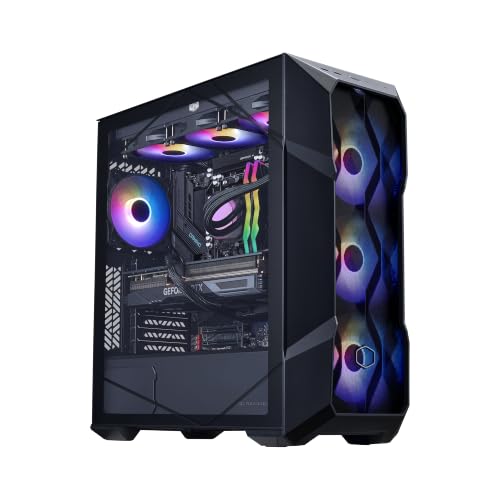
- Ryzen 7 9800X3D + RTX 5070 Ti for demanding 3D tasks
- 32GB DDR5 and 2TB Gen4 SSD for smooth multitasking
- 360mm liquid cooling and 850W Gold PSU for sustained output
Best For: Designers who want a powerful Rhino workstation with strong rendering and multitasking headroom.
Best for Fast Rhino Modeling
STORMCRAFT Phantom RTX 5080 Desktop

- RTX 5080 with 32GB DDR5 for smooth Rhino workflows
- Ryzen 7 9800X3D helps with fast viewport and compute performance
- 2TB Gen4 SSD and 360mm AIO suit heavy project use
Best For: Designers and 3D users who want a powerful prebuilt for Rhino modeling and rendering.
Best for Smooth Rhino Modeling
Skytech O11 Vision Ryzen 7 RTX 5060 Ti

- Ryzen 7 7800X3D for fast, responsive modeling
- RTX 5060 Ti 16GB for strong viewport performance
- 32GB DDR5 RAM and 1TB Gen4 SSD for large projects
Best For: Designers who need a fast Rhino-ready desktop with strong cooling and a gaming-capable GPU.
Best for Heavy Rhino Scenes – Dell Tower Plus EBT2250 Workstation Desktop
If you need a workstation pc for rhino 3d that can handle complex models, multitasking, and fast file loads, this Dell Tower Plus is built around strong core specs. The Intel Ultra 7-265, 64GB of DDR5 memory, and 4TB PCIe SSD make it well suited for demanding design workflows, while the RTX 5060 adds useful GPU support for viewport performance and rendering.
Best For: Designers and architects working in Rhino who want a fast, ready-to-use tower with lots of memory and storage for larger projects.
Pros:
- 64GB DDR5 RAM helps with large Rhino files and smooth multitasking
- RTX 5060 provides solid graphics support for modeling and GPU-accelerated tasks
- 4TB PCIe SSD gives you plenty of fast space for project libraries and assets
- Plenty of ports, including Thunderbolt 4, HDMI, DisplayPort, and Wi-Fi 7
Cons:
- 460W power supply may limit future high-end GPU upgrades
- More expensive than entry-level desktops aimed at basic CAD use
- Large tower footprint is less ideal for tight desks
For buyers prioritizing memory, storage, and a capable RTX card, this is a compelling workstation pc for rhino 3d. It is especially attractive if you want a turnkey desktop that can move beyond basic modeling into heavier scenes and broader creative work.
Best for Heavy 3D Workloads – NOVATECH AI Workstation Desktop PC
If you need a workstation pc for rhino 3d that can also handle AI, rendering, and simulation, this NOVATECH tower brings high-end desktop power to demanding projects. The Core i9-14900K, RTX 5080, 64GB of DDR5 memory, and 2TB NVMe storage make it a strong fit for large files, complex scenes, and smooth multitasking.
Best For: Designers, architects, and 3D artists who want fast Rhino performance plus extra headroom for rendering and GPU-accelerated workflows.
Pros:
- Core i9-14900K and RTX 5080 deliver excellent speed for modeling and GPU rendering
- 64GB DDR5 RAM helps with large Rhino projects, multitasking, and heavy assets
- 2TB NVMe SSD provides fast load times and plenty of workspace for active files
- Liquid cooling and an 850W Gold PSU support stable performance under load
Cons:
- Likely more power than casual Rhino users need
- High-end specs put it well above entry-level workstation budgets
For buyers comparing a workstation pc for rhino 3d, this NOVATECH model stands out when you want serious graphics power, ample memory, and a configuration that can handle both design work and compute-heavy tasks without slowing down.
Best for High-FPS CAD Power – STORMCRAFT Falcon AI Ryzen 7 7800X3D PC
If you want a workstation pc for rhino 3d that can also handle gaming and creative work, the STORMCRAFT Falcon is a strong all-around pick. Its Ryzen 7 7800X3D, 32GB of DDR5 memory, and fast NVMe SSD make model loading, multitasking, and viewport work feel responsive.
Best For: Designers and 3D users who want a fast, versatile desktop for Rhino, rendering, and high-FPS gaming in one system.
Pros:
- Ryzen 7 7800X3D plus 32GB DDR5 gives it plenty of headroom for Rhino multitasking and heavier project files
- 1TB NVMe SSD and Wi-Fi 6E/USB-C support make it easy to work quickly and connect modern peripherals
- RX 9070 XT 16GB adds strong graphics performance for rendering, VR, and gaming
- 360mm AIO cooling and 850W PSU suggest a well-equipped build for sustained use
Cons:
- It is more gaming-focused than a traditional pro workstation
- 1TB storage may feel limited if you keep large Rhino libraries or render assets locally
- RGB styling may not suit a low-profile office setup
This is a good fit if you want a workstation pc for rhino 3d that prioritizes speed, smooth multitasking, and extra graphics muscle without giving up gaming performance. For users who need a stylish desktop that can double as a creative machine, it offers a compelling balance.
Best for Enterprise Rhino Work – Dell Pro Tower i7-14700, 32GB, 1TB SSD
If you need a dependable workstation pc for rhino 3d, this Dell Pro Tower is built around speed, stability, and easy multitasking rather than gaming extras. The Core i7-14700, 32GB of DDR5 memory, and 1TB PCIe SSD give it the headroom for CAD work, modeling, and large project files, while Windows 11 Pro adds the business features many studios and offices want.
Best For: Architects, designers, and business users who want a fast, expandable tower for Rhino, CAD, and other productivity-heavy workflows.
Pros:
- 20-core i7-14700 delivers strong performance for modeling, rendering, and multitasking
- 32GB DDR5 RAM and 1TB PCIe SSD help keep projects responsive and load times short
- Dual 4K display support is useful for complex Rhino layouts and reference-heavy work
- Windows 11 Pro suits professional and managed business environments
Cons:
- No built-in Wi-Fi, so wired Ethernet or an adapter is required
- Not a workstation with a discrete pro GPU, so heavy rendering users may want more graphics horsepower
- Tower design takes up more desk space than a compact desktop
This is a practical workstation pc for rhino 3d if you value CPU strength, memory capacity, and business reliability over flashy extras. It’s a solid fit for studios and professionals who need a stable daily driver for design work and general office use.
Best for Fast Rhino Workloads – STORMCRAFT Falcon Ryzen 7 7800X3D RTX 5070
If you want a workstation pc for rhino 3d that can also handle gaming, this STORMCRAFT Falcon is a strong all-around pick. The Ryzen 7 7800X3D and RTX 5070 pair well for smooth viewport work, fast multitasking, and reliable performance when you’re moving between modeling, rendering, and other creative apps.
Best For: Rhino users who want high-speed modeling performance plus extra GPU power for rendering, VR, and gaming on the side.
Pros:
- Ryzen 7 7800X3D offers fast single-core responsiveness for modeling and navigation
- RTX 5070 12GB gives plenty of graphics headroom for render previews and heavy visual scenes
- 32GB DDR5 6000MHz and 1TB Gen4 SSD keep large files and apps moving quickly
- 360mm AIO, 850W Gold PSU, and Wi-Fi 6E make it a polished, ready-to-use build
Cons:
- More gaming-focused than a purpose-built CAD workstation
- 1TB storage may feel limited if you keep large project libraries locally
- Premium parts mean it is not a budget-friendly option
For buyers seeking a workstation pc for rhino 3d with extra graphics muscle, this tower hits a useful middle ground: fast enough for design work, but overbuilt enough to stay versatile for rendering and play.
Best Multi-Core Workstation – Dual Xeon RTX 5060 Desktop
If you want a workstation pc for rhino 3d that leans more toward heavy multitasking and large project handling than compact form factor, this dual-CPU tower is worth a close look. With 36 cores, 72 threads, 128GB of RAM, and a dedicated RTX 5060, it has the core resources to keep complex modeling sessions responsive while leaving room for rendering and background apps.
Best For: Designers and power users who need lots of CPU threads, ample memory, and a discrete GPU for demanding Rhino work, rendering, and multitasking.
Pros:
- Dual Xeon setup delivers strong multi-threaded performance for rendering and heavy workloads
- 128GB DDR4 RAM is well-suited to large Rhino scenes and multitasking
- RTX 5060 adds modern GPU support for viewport work and acceleration
- Includes a 1TB SSD plus 4TB HDD for fast storage and ample project space
Cons:
- Large tower design is not ideal for tight desks or mobile setups
- Older Xeon platform may not match newer CPU architectures in single-core speed
- Gaming-style configuration may be more machine than some Rhino users need
For buyers comparing a workstation pc for rhino 3d, this model stands out when memory capacity and thread count matter more than portability or the latest CPU platform. It is a practical choice for users who regularly juggle detailed models, render jobs, and other demanding tools at once.
Best for High-End Rhino Work – Cooler Master TD 5 Pro Gaming PC
If you want a fast, well-cooled workstation pc for rhino 3d, the Cooler Master TD 5 Pro brings a strong mix of CPU speed, graphics power, and storage headroom. The Ryzen 7 9800X3D and RTX 5070 Ti should handle demanding modeling, real-time visualization, and multitasking smoothly, while the 32GB DDR5 memory and 2TB Gen4 SSD help keep large files and heavy projects responsive.
Best For: Designers and 3D users who want a high-performance desktop for Rhino modeling, rendering, and GPU-accelerated workflows with plenty of cooling.
Pros:
- Ryzen 7 9800X3D and RTX 5070 Ti offer excellent speed for demanding 3D workloads
- 32GB DDR5 RAM and a 2TB Gen4 SSD provide solid multitasking and file storage
- 360mm liquid cooling and an 850W Gold PSU support sustained performance
- No-bloatware Windows 11 setup with Wi‑Fi and plenty of rear/front connectivity
Cons:
- More power than many casual Rhino users actually need
- Large gaming-style case may not suit compact studios
- Premium specs push it into a higher price range
This is a compelling workstation pc for rhino 3d if you prioritize speed, cooling, and future-ready hardware over a minimalist office build. It looks especially appealing for users who also need strong GPU performance for rendering or other creative apps.
Best for Fast Rhino Modeling – STORMCRAFT Phantom RTX 5080 Desktop
If you want a high-spec workstation pc for rhino 3d that can also handle demanding visualization work, this STORMCRAFT build is worth a look. The Ryzen 7 9800X3D, RTX 5080, 32GB of DDR5 RAM, and 2TB Gen4 SSD give it plenty of headroom for large Rhino files, viewport responsiveness, and quick loading times.
Best For: Designers and 3D users who want a powerful prebuilt for Rhino modeling, rendering, and multitasking without assembling a system themselves.
Pros:
- RTX 5080 graphics and 32GB DDR5 RAM support smooth modeling and GPU-accelerated workflows
- Ryzen 7 9800X3D offers strong single-core and multi-core performance for CAD and creative apps
- 2TB NVMe Gen4 SSD provides fast project loads and room for large asset libraries
- 360mm AIO cooling and 850W Gold PSU add stability for heavy sustained use
Cons:
- More power than many users need if Rhino is your only workload
- Prebuilt gaming styling may not suit every studio or office setup
As a workstation pc for rhino 3d, this machine stands out most for users who value fast previews, strong GPU performance, and easy out-of-box setup. It is a better fit for serious designers than for entry-level buyers, but the specs make it a compelling all-around workstation-style option.
Best for Smooth Rhino Modeling – Skytech O11 Vision Ryzen 7 RTX 5060 Ti
If you want a workstation pc for rhino 3d that feels fast in everyday modeling and light rendering, this Skytech build is a strong fit. The Ryzen 7 7800X3D and 32GB of DDR5 memory give it plenty of headroom for complex scenes, while the RTX 5060 Ti 16GB helps with viewport responsiveness and GPU-accelerated tasks.
Best For: Designers who want a fast, well-cooled desktop for Rhino modeling, visualization, and mixed work/play use.
Pros:
- Ryzen 7 7800X3D delivers excellent single-core speed for responsive modeling workflows
- 16GB RTX 5060 Ti graphics card is a solid match for viewport performance and GPU work
- 32GB DDR5 RAM and 1TB Gen4 SSD handle large files and fast project loading
- 360mm AIO cooling and roomy O11 Vision case help sustain performance under load
Cons:
- 650W power supply leaves less upgrade headroom than larger units
- Gaming-focused styling may be more than some office or studio users want
- 1TB storage can fill up quickly with big asset libraries and renders
Overall, this is a capable workstation pc for rhino 3d if you prioritize smooth drafting, solid GPU support, and strong thermals over a pure pro-workstation platform. It’s a practical all-rounder for designers who also want a machine that can handle gaming after hours.
How We Picked the Best Workstation PC for Rhino 3d
For a Workstation PC for Rhino 3d, we prioritized the parts that matter most in real use: high-clock CPU performance, at least 32GB of RAM for serious projects, fast NVMe storage, and graphics cards that can keep complex viewports responsive. We also looked for practical details like cooling, power headroom, and upgrade potential.
Quick Comparison
The best choices split into a few clear tiers. Mainstream creator towers with modern Intel Core i7 or Ryzen 7/9 CPUs are ideal for most Rhino users. Higher-end systems with RTX 5070 Ti, RTX 5080, or similar GPUs are better if you also render heavily, work with large assemblies, or use other 3D tools alongside Rhino. Budget-leaning older dual-CPU builds trade modern efficiency for lots of cores and memory capacity.
Key Buying Factors for a Workstation PC for Rhino 3d
CPU Performance
Rhino modeling tends to benefit more from fast single-thread speed than from extreme core counts. That makes newer Intel Core i7/i9 and AMD Ryzen 7/9 processors especially attractive. If you render or multitask heavily, extra cores help, but don’t sacrifice responsiveness just to chase core count.
RAM and Storage
32GB is a strong starting point for most users, while 64GB or more is safer for very large models, multiple applications, or dense reference files. A 1TB SSD is workable, but 2TB or higher is more comfortable if you keep project assets, caches, and exports on the same machine.
GPU and Viewport Stability
Rhino does not always need the most extreme gaming GPU, but a modern NVIDIA card can improve viewport smoothness and help with rendering tools. For a Workstation PC for Rhino 3d, look for enough VRAM to keep large scenes fluid and leave room for future projects.
Cooling, Power, and Upgrades
Well-cooled systems are worth paying for, especially if you work long sessions. A stronger PSU also matters if you plan to add storage, more memory, or a faster GPU later. Upgrade-friendly towers usually provide the best long-term value.
Who Should Buy Which Workstation PC for Rhino 3d?
If you mainly model, draft, and handle moderate projects, a balanced tower with a modern i7 or Ryzen 7, 32GB RAM, and a midrange GPU is the sweet spot. If you do heavier rendering, choose a system with 64GB RAM and a stronger RTX 5070 Ti- or RTX 5080-class graphics card. If your priority is maximum multitasking on a tighter budget, a high-memory dual-CPU workstation can still be useful, but it is less efficient and less future-proof than newer platforms.
In short, the best Workstation PC for Rhino 3d is the one that keeps Rhino responsive first, then adds enough memory, storage, and graphics power to match your project size.