If you need a practical way to run two computers through one dual-monitor desk setup, this Hearvo USB 3.0 HDMI KVM Switch review focuses on the features that matter.
It is a straightforward fit for people who want shared displays, shared USB gear, and less cable chaos.
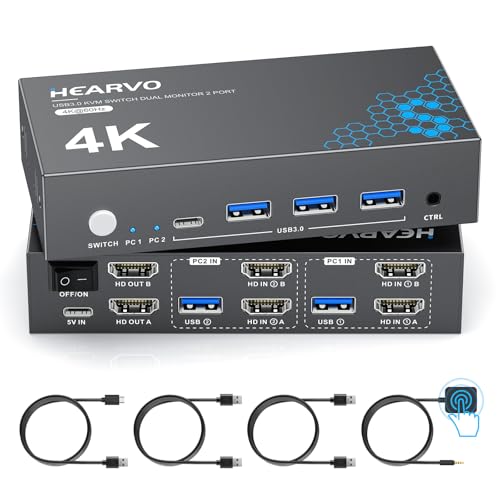
Hearvo USB 3.0 HDMI KVM Switch Review Summary
The Hearvo USB 3.0 HDMI KVM Switch is aimed at buyers who want one control point for two computers and two monitors without turning the desk into a cable lab.
Based on the listing, its strongest appeal is simple productivity: dual-monitor sharing, 4K@60Hz support, four USB 3.0 ports, and a wired remote that makes switching more convenient when the unit sits out of reach.
It makes the most sense for home offices, hybrid workers, programmers, designers, and anyone who regularly moves between two machines while relying on the same keyboard, mouse, printers, or storage devices.
If you value stable, button-based switching over fancy software features, this is a sensible, workflow-first KVM.
Review Scorecard
| Category | Score | Buyer-focused rationale |
|---|---|---|
| Dual-monitor flexibility | 9/10 | Built specifically for 2 computers and 2 monitors, which is the core use case it addresses well. |
| Peripheral sharing | 8/10 | Four USB 3.0 ports make it more useful than a bare-bones switch for desks with multiple accessories. |
| Video capability | 8/10 | 4K@60Hz and HDCP 2.2 support are strong signals for modern office and entertainment compatibility. |
| Switching convenience | 9/10 | Button switching plus a wired remote is practical when the box is tucked under a desk or behind screens. |
| Setup simplicity | 8/10 | Plug-and-play positioning and included cables reduce the friction of getting started. |
| Display stability | 8/10 | Adaptive EDID is a meaningful feature for avoiding resolution and recognition issues during switching. |
| Overall value fit | 8/10 | Strong feature balance for buyers who specifically need a dual-monitor, two-PC desk hub. |
Key Features and Specifications of Hearvo USB 3.0 HDMI KVM Switch
The Hearvo unit is a dual-monitor KVM switch for two computers, designed to let both systems share two displays, one keyboard, and one mouse.
That alone puts it in the right category for people who do not want to rebuild their desk around every device swap.
The listing also emphasizes four USB 3.0 ports arranged as 3 USB-A plus 1 USB-C, with transfer speeds up to 5Gbps.
In practical terms, that should suit common desk accessories such as keyboards, mice, printers, webcams, flash drives, scanners, and external hard drives.
Supported video output reaches 4K at 60Hz, with HDCP 2.2 compatibility and fallback support for 4K@30Hz, 2K, 1080p, and 3D.
That makes it easier to place the switch into a modern mixed-use setup rather than a strictly legacy office environment.
The package includes two USB 3.0 cables and one wired remote controller.
The listing also notes that you should prepare six HDMI 2.0 cables for a complete setup, which is important because a product like this is only as convenient as the cabling behind it.
Key points from the listing:
- Dual-monitor KVM for 2 computers
- Shared use of 2 monitors, 1 keyboard, and 1 mouse
- 4 USB 3.0 ports: 3 USB-A and 1 USB-C
- Up to 5Gbps USB transfer speed
- 4K@60Hz support with HDCP 2.2
- Button switching and wired remote control
- Adaptive EDID for better display recognition
- Plug-and-play operation with no driver or software installation
- Includes 2 USB 3.0 cables and 1 wired remote
- Requires 6 HDMI 2.0 cables for full setup
- Lifetime support is listed by the manufacturer
Pros and Cons of Hearvo USB 3.0 HDMI KVM Switch
Pros
- Good match for dual-monitor, two-PC desks. It is built around the exact workflow many multi-system users need.
- More useful peripheral sharing than minimal KVMs. Four USB 3.0 ports give you room for more than just keyboard and mouse.
- Practical switching options. The wired remote is helpful when the switch is hidden away.
- Modern display support. 4K@60Hz and HDCP 2.2 make it suitable for a wide range of office and media tasks.
- Adaptive EDID is a real quality-of-life feature. It should help reduce handshake and resolution headaches.
Cons
- Cable requirements are substantial. The listing says you need six HDMI 2.0 cables, which can add setup complexity.
- Best for a specific use case. If you only need one monitor or one computer, this is more hardware than necessary.
- No software-based convenience features. That keeps it simple, but also means the appeal is entirely in the physical switching workflow.
Who Should Buy Hearvo USB 3.0 HDMI KVM Switch?
This product is a good fit if you work across two computers every day and want both systems connected to the same desk peripherals.
It also makes sense if your setup depends on two monitors and you care about stable, predictable switching more than remote-management features.
Best buyers include:
- Home office users with a work laptop and a personal or admin PC
- Programmers and developers who move between machines often
- Designers or content workers who need two displays and shared input devices
- Small office users who want to simplify a shared workstation
- People who have printers, storage devices, or webcams they want to reuse across systems
You should probably skip it if:
- You only use one computer
- You do not need dual monitors
- You want a wireless or software-driven switching solution
- You are looking for the smallest possible desk accessory instead of a full KVM hub
How the Hearvo Dual-Monitor KVM Fits Real Workflows
Two-Computer Desk Control
The main strength here is obvious: one keyboard, one mouse, and two monitors can stay connected to two machines without constant replugging.
For anyone balancing a work system and a personal machine, that is a real desk-time saver.
Peripheral Sharing Beyond Input Devices
Four USB 3.0 ports make this more flexible than a switch that only handles input.
The listing specifically calls out printers, webcams, flash drives, scanners, and external hard drives, so the device is positioned as a small desk hub rather than a narrow signal router.
Display Stability and EDID
Adaptive EDID matters because KVMs can sometimes make monitors behave inconsistently during switching.
The listing’s promise is that the switch helps reduce flicker, resolution mismatch, and recognition issues, which is exactly the kind of detail that separates a decent KVM from an annoying one.
Physical Placement and Switching Convenience
The wired remote is a practical choice.
If the switch lives under a desk or behind a monitor, you do not want to reach around every time you change computers.
That remote makes the setup more realistic for everyday use instead of just technically possible.
Alternatives to Hearvo USB 3.0 HDMI KVM Switch
If you want a comparable dual-monitor KVM from a more established switch-focused brand, look at TESmart dual monitor KVM switch.
TESmart is a common Amazon search path for buyers who want a similar category but different feature combinations.
For a broader option set with many HDMI KVM variants, CKL dual monitor KVM switch is worth checking.
It is useful when you want to compare layouts, port counts, and switching styles in the same product family.
If you prefer a more mainstream computer-accessory brand search, UGREEN KVM switch dual monitor is another reasonable place to compare.
That can help if you want to balance brand familiarity with the same two-PC, two-monitor workflow.
For buyers who only need simpler USB sharing and do not actually need dual-monitor switching, Sabrent USB KVM switch may be the easier path.
It is a better comparison if your setup is less demanding than this Hearvo model.
Is Hearvo USB 3.0 HDMI KVM Switch Worth It?
Yes, if your desk really needs exactly what it is built for. The Hearvo USB 3.0 HDMI KVM Switch looks worthwhile for two-computer, dual-monitor setups where shared peripherals, 4K support, and reliable switching are the priorities.
It is not the right choice for minimal setups or casual users, and the cabling requirements mean you should be ready to plan the desk properly.
But for buyers who already know they need a dual-monitor KVM with USB 3.0 sharing and a wired remote, this is a focused, sensible option rather than an overcomplicated one.