If you rely on a Mac mini for heavy work, the right USB‑C hub can make your setup faster, cleaner, and far more flexible. You’ll want ports that handle 4K@60Hz, 10Gbps transfers, and 100W charging without bulking up your desk. Below are top picks and buying tips that cut through specs and real‑world tradeoffs — plus a couple of surprising dock designs that might change how you use your Mac mini.
Anker 7-in-1 USB-C Hub Multi-Port Adapter (4K@60Hz HDMI, 85W PD, USB3.0, USB-C, SD/TF Card Reader)

If you need a compact hub that handles high-resolution video, fast data, and serious charging without fuss, the Anker 7-in-1 is a smart pick: it delivers 4K@60Hz HDMI, dual 5Gbps USB-A ports, SD/TF slots and up to 85W PD pass-through in a metal chassis, so you can drive an external display, move large files, and keep a Mac mini or laptop powered from a single dongle. You’ll get a USB-C data port (5Gbps), broad compatibility with USB4/Thunderbolt and DP Alt Mode, and durable metal construction. It’s light, compact, backed by 18 months warranty and strong user ratings.
Best For: anyone who needs a compact, metal USB-C hub that supports 4K@60Hz video, fast 5Gbps data transfers, and high-capacity PD charging for laptops and Mac minis.
Pros:
- Supports 4K@60Hz HDMI and DP Alt Mode for smooth external display use.
- Dual USB-A (5Gbps) plus USB-C data port and SD/TF slots enable fast file transfers and versatile connectivity.
- Up to 85W PD pass-through (100W input supported) in a lightweight metal chassis with 18-month warranty.
Cons:
- Shares a single HDMI output—no multi-monitor outputs beyond the one port.
- 85W pass-through may be insufficient for some high-power laptops under full load.
- Requires a host with USB-C Alt Mode / Thunderbolt compatibility for full video functionality.
Anker 5-in-1 USB-C Hub with HDMI 4K, USB-C & Dual USB-A Ports

Power users who need straightforward 4K video output plus fast peripheral and charging support will appreciate the Anker 5‑in‑1 hub: it gives you a 4K@30Hz HDMI port, two 5 Gbps USB‑A ports and a 5 Gbps USB‑C data port, plus up to 85W PD pass‑through charging so your Mac mini or laptop stays powered while you work. You’ll get USB‑C, USB4 and Thunderbolt compatibility, macOS and Windows support (not Linux), and 5 Gbps transfers on all data ports. Note the USB‑C data port won’t carry video, the PD needs a separate charger, and the hub includes an 18‑month warranty.
Best For: Power users who need a simple, compact hub that provides 4K HDMI output plus fast peripheral data and high‑wattage pass‑through charging for laptops and Mac minis.
Pros:
- 4K@30Hz HDMI output for streaming or mirroring to an external display.
- Two USB‑A and one USB‑C data ports with up to 5 Gbps transfer speeds for fast peripherals and file transfers.
- Up to 85W PD pass‑through charging keeps laptops powered while using the hub.
Cons:
- USB‑C data port does not support video output (only data).
- HDMI limited to 4K@30Hz, not 60Hz for smoother high‑resolution video.
- Not compatible with Linux and requires a separate charger for PD pass‑through.
Anker USB-C 4-Port USB 3.0 Hub (2 ft)

You’ll appreciate the Anker USB-C 4-Port Hub if you need straightforward, high-speed expansion for a Mac mini without bulk or complexity; its four USB 3.0 ports deliver up to 5Gbps transfers through a 2 ft cable, letting you plug in drives and peripherals quickly while keeping your workspace tidy. You’ll get true plug-and-play syncing and seamless file transfers without charging support. The compact 4.2 × 1.2 × 0.4-inch shell fits a pocket or laptop bag, and the longer cable reduces clutter. Package includes the hub and welcome guide, plus an 18-month warranty and responsive customer service for peace of mind.
Best For: users who need a simple, portable way to add four high-speed USB-A ports to a USB-C Mac mini or laptop for connecting drives and peripherals without added bulk.
Pros:
- Offers ultra-fast USB 3.0 transfers up to 5Gbps for quick file syncing.
- Compact, lightweight design with a 2 ft cable for flexible, clutter-reducing placement.
- Includes a welcome guide and an 18-month warranty with responsive customer service.
Cons:
- Does not support charging through the hub.
- Limited to USB-A ports (no HDMI, Ethernet, or card readers).
- Fixed 2 ft cable may not suit setups requiring a permanently mounted or shorter connection.
Mac mini M4 Dock Aluminum Stand and HDMI Hub with M.2 SSD Enclosure (4K60Hz, USB A/C, SD/TF, Audio)

For M4 Mac mini owners who need a compact all-in-one workstation, this aluminum dock pairs a 10-in-1 HDMI hub with an integrated M.2 NVMe/SATA enclosure so you can mount up to 8TB of fast local storage without extra boxes. You get a 4K@60Hz HDMI output for mirroring or extended displays, 10Gbps USB-A/C for high-speed drives, two 5Gbps USB-A ports for peripherals, SD/TF slots, and an audio jack. The brushed silver alloy matches the M4/M4 Pro Mac mini and other USB-C laptops. For reliable drive performance, plug the extra USB-C charging port to avoid disconnections.
Best For: Mac mini M4/M4 Pro owners and USB-C laptop users who want a compact, integrated dock with high-speed ports and built-in M.2 storage for a tidy, all-in-one workstation.
Pros:
- Combines a 10-in-1 HDMI hub with an integrated M.2 NVMe/SATA enclosure (up to 8TB) for streamlined local storage and connectivity.
- Supports 4K@60Hz HDMI and 10Gbps USB-A/C for high-speed display and data transfer.
- Brushed aluminum design matches Mac mini aesthetics and adds SD/TF slots plus an audio jack for extra versatility.
Cons:
- Requires connecting the extra USB-C charging port for reliable performance with power-hungry drives, adding another cable.
- Integrated enclosure may limit cooling compared with standalone external SSD enclosures under heavy sustained loads.
- Physical compatibility and fit are optimized for Mac mini M4/M4 Pro, so appearance/fit may be less ideal with other devices.
Belkin Connect 4-Port USB-C Hub (4 x USB-C 3.2 Gen 2, 10G, 100W PD)

If you need maximum USB-C throughput and robust charging in a travel-ready package, the Belkin Connect 4-Port USB-C Hub is a smart choice—each of its four USB-C 3.2 Gen 2 ports delivers up to 10 Gbps and the hub supports 100W PD, so you can run multiple high-speed drives or peripherals while keeping your Mac Mini or laptop charged. You’ll get plug-and-play simplicity, universal backward compatibility, and audio support for headphones or interfaces. The slim, recycled-housing design is durable with overvoltage, overcurrent, and short-circuit protection plus a strain-resistant tethered cable. It ships with a 2-year warranty and returns policy.
Best For: Professionals and travelers who need high-speed multiport USB-C connectivity and up to 100W charging for laptops, external drives, and peripherals in a compact, durable hub.
Pros:
- Four USB-C 3.2 Gen 2 ports delivering up to 10 Gbps each for fast data transfers.
- Supports up to 100W Power Delivery to charge laptops while powering multiple devices.
- Compact, travel-ready design with recycled housing and built-in protection (overvoltage/overcurrent/short-circuit).
Cons:
- No variety of port types (no USB-A, HDMI, or SD slot) may require additional adapters.
- All ports are USB-C only, which could be incompatible with some legacy peripherals without adapters.
- Tethered cable limits replaceability if damaged and may not suit all port orientations.
UGREEN USB-C to USB-A Hub with 4 USB 3.0 Ports for Laptops and Devices (0.5 ft)

Power users who juggle multiple USB peripherals will appreciate the UGREEN USB-C to USB-A hub’s four USB 3.0 ports, which deliver up to 5 Gbps transfers so you can move large files or run external drives without delays. You’ll plug this compact aluminum dongle into a Mac Mini or laptop and get OTG support for keyboards, mice, and flash drives via its VL160 chipset for stable throughput. It’s plug-and-play, offers over-voltage/current and short-circuit protection, and fits easily in a bag at 6.3 x 3.58 x 0.71 cm. Backed by a 24-month warranty and strong user ratings.
Best For: Power users and travelers who need a compact, reliable USB-C to multiple USB-A ports for high-speed data transfer and connecting legacy peripherals.
Pros:
- Compact aluminum design with plug-and-play convenience makes it highly portable and easy to use.
- Four USB 3.0 ports support up to 5 Gbps transfers, suitable for external drives and large file moves.
- Built-in VL160 chipset with OTG support and protection against over-voltage/over-current/short-circuits.
Cons:
- Lacks USB-C or power-delivery pass-through, so it won’t charge host devices or support USB-C accessories.
- Short 0.5 ft cable may limit reach or require positioning close to the host device.
- Only USB-A ports provided, so users with USB-C peripherals will need adapters.
Satechi Mac mini M4 Hub & Stand with NVMe SSD Enclosure (Silver)

Satechi’s Mac mini M4 Hub & Stand is ideal for creative professionals and prosumers who need extra NVMe storage and fast peripherals without sacrificing the Mac mini’s airflow. You can add an M.2 NVMe (2230–2280) up to 4TB and get 10Gbps transfer speeds; note SSDs with heatsinks or double-sided designs won’t fit. The slim aluminum hub gives two USB-A 3.2 ports (10Gbps), one USB-A 2.0 (480Mbps), and a UHS-II SD reader (312MB/s). It won’t power Apple SuperDrive or charge iPads, and recommends one bus-powered device at a time. Installation includes screws, a thermal pad, and a two-year warranty.
Best For: Creative professionals and prosumers using a Mac mini M4 who need compact NVMe expansion and fast peripheral ports without compromising the Mac mini’s cooling.
Pros:
- Slim, aluminum design that matches the Mac mini M4 while preserving airflow and offering integrated power control.
- Supports M.2 NVMe (2230–2280) up to 4TB with up to 10Gbps transfer speeds and includes a UHS-II SD reader.
- Includes installation hardware and thermal pad, with detailed manual, dedicated support, and a 2-year limited warranty.
Cons:
- Incompatible with SSDs that have heatsinks or double-sided PCBs; SSD not included.
- USB-A ports do not support Apple SuperDrive, CD readers, or iPad charging and recommend only one bus-powered device at a time.
- Limited to USB-A ports (no USB-C ports) and one slower USB 2.0 port (480Mbps).
Satechi USB-C Hub and Aluminum Stand with Card Readers and Ports for Mac mini (Silver)
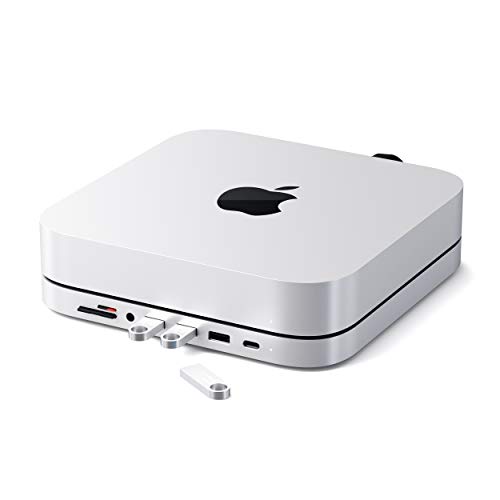
For Mac mini users who need a compact, all-in-one docking solution, this aluminum stand with an integrated USB-C hub gives you four USB ports, SD/microSD readers, and a headphone jack while keeping your setup tidy and cool. You get a refined brushed-aluminum design that matches Mac mini and many Macs and iPads (not compatible with Mac mini M4). The 6-in-1 hub offers one USB-C data port, three USB 3.0 ports, micro/SD card readers, and a 3.5mm jack, all powered at 5W. Built-in vents manage heat, it’s lightweight, backed by a 2-year warranty, and well-reviewed.
Best For: Mac mini and Mac/iPad users who want a compact, matching aluminum stand that adds multiple USB ports, SD/microSD card readers, and a headphone jack while improving airflow and cable management.
Pros:
- Matches Mac mini aesthetic with a brushed-aluminum stand that keeps the setup tidy and adds built-in vents for cooling.
- 6-in-1 hub provides one USB‑C data port, three USB 3.0 ports, SD/microSD card readers, and a 3.5mm headphone jack for versatile connectivity.
- Lightweight, easy to install, backed by a 2-year limited warranty and strong customer reviews.
Cons:
- Not compatible with the Mac mini M4, limiting use for newer Mac mini owners.
- USB‑C port and USB 3.0 ports are data-only (no high-power charging or display output) and hub is limited to 5W.
- Card reader speeds top out around 104 Mbps, slower than some standalone high-speed card readers.
UGREEN Revodok Pro USB-C Hub 6-in-1 (10Gbps, 4K@60Hz HDMI, 100W PD)

If you need a compact hub that keeps fast peripherals, a 4K monitor, and your Mac Mini all fed and connected without fuss, the UGREEN Revodok Pro fits the bill: it gives you multiple 10Gbps ports plus 4K@60Hz HDMI and 100W passthrough so you can transfer large files, drive a high-resolution display, and charge simultaneously. You get two 10Gbps USB-C and two 10Gbps USB-A ports for blistering transfers, plus a dedicated USB-C data-only port. HDMI outputs 4K@60Hz. PD supplies up to 100W but avoid unplugging the charger during transfers to prevent data loss. It’s driver-free and broadly compatible.
Best For: professionals and power users who need a compact USB-C hub that supports high-speed 10Gbps transfers, 4K@60Hz video output, and up to 100W passthrough charging for laptops like MacBook Pro/Air and compact desktops like Mac Mini.
Pros:
- Two 10Gbps USB-C and two 10Gbps USB-A ports deliver very fast file transfers for large media and backups.
- 4K@60Hz HDMI plus driver-free operation makes it easy to connect high-resolution displays without setup.
- Up to 100W PD passthrough keeps laptops charged while using multiple peripherals.
Cons:
- One USB-C port is data-only (no video or charging), which can limit flexibility.
- Risk of data loss if the PD charger is unplugged during active transfers, requiring caution.
- Limited to a single HDMI output and no Ethernet or SD card reader for expanded connectivity.
Satechi Mac mini Hub & Stand with NVMe/SATA M.2 SSD Enclosure and USB‑C/USB‑A Ports (Silver)

Power users who need built-in NVMe/SATA storage will like this Mac mini hub and stand because it combines a 10Gbps M.2 SSD enclosure with multiple high‑speed ports in a compact, ventilated aluminum design. You get 7‑in‑1 expansion: a 10Gbps USB‑C, a 10Gbps USB‑A, two 5Gbps USB‑A, micro/SD card readers (≈104 MB/s) and a 3.5mm jack, plus support for 2242/2260/2280 NVMe or SATA M.2 drives (SSD not included). It fits M1/M2 Mac mini and Mac Studio, offers built‑in vents and a thermal pad, includes screws and a driver, and carries a two‑year warranty.
Best For: Power users with M1/M2 Mac mini or Mac Studio who want integrated high‑speed NVMe/SATA expansion and multiple USB ports in a compact ventilated stand.
Pros:
- Combines a 10Gbps M.2 NVMe/SATA SSD enclosure (2242/2260/2280) with 7‑in‑1 ports for a clean, space‑saving setup.
- Aluminum alloy body with built‑in vents and thermal pad helps dissipate heat for better SSD performance.
- Includes necessary screws, screwdriver, and a 2‑year warranty plus Amazon 30‑day return option.
Cons:
- Not compatible with Mac mini M4, CD/DVD SuperDrive, or iPad charging.
- SSD not included and supports only one bus‑powered device at a time for best results.
- Card reader speeds are limited (~104 MB/s) and total hub throughput may be constrained when multiple high‑speed devices are used.
Factors to Consider When Choosing Mac Mini Usb C Hubs
When picking a USB‑C hub for your Mac mini, think about which ports you actually need and how they’re arranged so cables don’t tangle. Check power delivery to charge peripherals and the Mac, video output compatibility for your monitors, and whether transfer speeds meet your workflow. Also consider build material and finish so the hub matches your desk and holds up to daily use.
Port Selection and Layout
Choose a hub that matches how many and what types of devices you actually use, because port variety and layout determine both convenience and capability. Prioritize hubs with a mix of USB-A, USB-C, and dedicated high-speed ports (5Gbps or 10Gbps) so transfers and peripherals run smoothly. If you drive external monitors, pick one with HDMI or DisplayPort rated for your resolution needs—look for 4K@60Hz support if that’s your workflow. Don’t overlook SD/TF card slots for quick media access and backups. Finally, inspect physical spacing and orientation: well-spaced ports prevent bulky connectors from blocking neighbors and let you use multiple devices at once without adapters fighting for room.
Power Delivery Needs
1 key consideration is how much power the hub can deliver and pass through to your Mac Mini and other devices, since PD ratings determine charging speed and whether you can run peripherals without draining batteries. Check the hub’s maximum PD—many top models support up to 100W, while 85W still gives fast charging for most laptops. Verify compatibility with your Mac Mini model because PD behavior can vary by configuration. Prefer hubs with pass-through charging so the Mac Mini (or connected laptop) stays powered while you use drives, NICs, and docks. Finally, confirm how the hub distributes power across ports; some designs prioritize certain ports, which can slow charging on lower-priority devices when everything’s plugged in.
Video Output Support
Because your Mac Mini will often drive external displays, make sure the hub’s video outputs match your monitor needs—look for HDMI ports rated for 4K@60Hz (not just 4K@30Hz), DisplayPort Alt Mode on USB-C, and multi-output setups if you plan to run more than one screen. Check each hub’s HDMI spec so you get true 4K@60Hz for smooth motion and text clarity. If you prefer USB-C monitors, confirm DisplayPort Alt Mode support so video travels over the same cable. For multi-monitor workflows, pick hubs with multiple independent outputs rather than mirrored-only setups. Finally, verify compatibility with your Mac Mini model—some Macs limit external displays or require specific configurations—so you avoid surprises after purchase.
Data Transfer Speeds
Speed matters when you’re moving large files or streaming high-bandwidth content, so check each hub’s maximum port rates—USB 3.0 tops out around 5Gbps, USB 3.2 can reach 10Gbps, and USB4/Thunderbolt 3 or 4 offer much higher throughput when supported. You should confirm each port’s native maximum, because hubs may split bandwidth across ports or prioritize video over data. For heavy workflows—4K/8K media, VM images, or big datasets—favor hubs with dedicated data ports or explicit per-port ratings to avoid bottlenecks. Also verify host compatibility: your Mac Mini must support the hub’s standard to get advertised speeds. Prioritizing up-to-date standards and clear bandwidth allocation will keep transfers predictable and efficient.
Build Material and Finish
Material matters when you pick a USB‑C hub for your Mac Mini: aluminum or other metals give a premium look, better heat dissipation, and longer lifespan than cheap plastics. You’ll find brushed aluminum finishes that match Apple’s aesthetic, so the hub blends into your desktop instead of standing out. Choose high‑quality metals if you want durability and a weight that feels substantial without being bulky. If portability’s key, look for lighter alloys or mixed‑material designs that balance sturdiness and travel friendliness. Don’t overlook hubs made from recycled materials — they reduce environmental impact and often use the same premium finishes. In short, pick a build that matches your workflow, travel needs, and design taste while prioritizing long‑term reliability.
Thermal Performance and Cooling
When you push a USB‑C hub with multiple drives, displays, or high‑wattage chargers, good thermal design keeps performance steady and prevents long‑term damage. You should prioritize hubs that manage heat actively: vents, internal channels, or advanced cooling tech prevent throttling during sustained transfers and heavy charging. Aluminum alloy bodies help conduct and shed heat far better than plastic, so they’re preferable if you run multiple power‑hungry peripherals. Staying within ideal temperatures not only preserves hub performance but also extends the lifespan of connected devices. Check reviews or thermal test data where available, and avoid compact, sealed housings if you need continuous high throughput. Choosing a well‑cooled hub reduces risk and maintains reliability for power‑user workflows.
Compatibility and OS Support
Good thermal design keeps performance steady, but compatibility and OS support determine whether a hub will actually work with your Mac Mini and the features you need. You should confirm macOS version compatibility—some hubs require macOS 12+—so check before buying. Verify support for USB-C standards like DP Alt Mode and Power Delivery for reliable video output and charging. Prefer hubs that explicitly list USB4 or Thunderbolt 3/4/5 support to get higher transfer speeds and broader device compatibility. Be certain the hub notes compatibility with your specific Mac Mini model; newer chips (M4) can have feature restrictions. Finally, match the hub’s port types and counts to your peripherals and verify drivers or protocols are supported by your macOS to avoid surprises.
Size and Portability
Pick a hub that matches how and where you’ll use it: smaller, lighter units (for example, around 5.17 x 1.46 x 0.47 inches and 67 g) slide into a bag or pocket easily, while hubs with built-in or short (≈2 ft) cables cut clutter and simplify setup. You’ll want a sleek, lightweight design if you move between desks or travel with a Mac Mini setup. Consider hubs that double as a stand to save desk space and lift your Mini for better airflow. Short cables or integrated connections reduce tangles and make packing quicker. Finally, prioritize plug-and-play models that need no drivers so you can connect fast and stay productive without extra setup or compatibility troubleshooting.