If you’re looking to enhance your Raspberry Pi projects, finding the right 7-inch display is essential. With various options available, it can be tough to choose one that meets your needs. From touchscreen capabilities to impressive resolutions, each display offers unique features. In this guide, you’ll discover which models stand out and why they might be the perfect fit for your next endeavor. So, let’s explore these top picks and what makes them remarkable.
Hosyond 7 Inch Touchscreen Display for Raspberry Pi

If you’re looking for a reliable and versatile display for your Raspberry Pi projects, the Hosyond 7 Inch Touchscreen Display stands out with its impressive compatibility across multiple Raspberry Pi models, including the latest 5, 4, and 3 series. This 7-inch IPS screen boasts a resolution of 800×480 pixels and a 60 Hz refresh rate, ensuring smooth visuals. With its capacitive touch technology, you’ll enjoy a responsive experience, whether you’re coding or creating interactive installations. Plus, the plug-and-play functionality means no complicated setup is required. Weighing just 0.73 pounds, it’s perfect for on-the-go projects and learning environments.
Best For: This display is best for Raspberry Pi enthusiasts, educators, and developers looking for a compact and interactive touchscreen solution for their projects.
Pros:
- Plug and play functionality allows for easy setup without configuration.
- Lightweight design makes it ideal for portable projects and educational use.
- Wide compatibility with multiple Raspberry Pi models ensures versatility in applications.
Cons:
- No HDMI port limits compatibility with devices outside the Raspberry Pi ecosystem.
- Single-touch support on some operating systems may restrict functionality.
- No warranty may lead to concerns regarding long-term durability and support.
7 Inch Screen for Raspberry Pi (1024×600 IPS HDMI Capacitive Display)
The 7-Inch IPS HDMI Capacitive Display is an excellent choice for Raspberry Pi enthusiasts who value portability and versatility. With its 1024×600 resolution and 178° viewing angle, you’ll enjoy clear visuals from various positions. This mini portable monitor connects easily via HDMI and USB, making setup a breeze—no drivers needed! It’s compatible with multiple Raspberry Pi models and other devices like game consoles and notebooks. Plus, its 3-in-1 display modes allow you to duplicate, extend, or use it as a second screen. With a 1-year warranty and glowing customer reviews, this display stands out for your projects.
Best For: Raspberry Pi enthusiasts and users looking for a compact and versatile display solution for their projects.
Pros:
- Plug-n-Play: Easy setup with no driver installation required.
- Versatile Compatibility: Works with various Raspberry Pi models and other devices like game consoles and notebooks.
- Multiple Display Modes: Offers duplicate, extend, and second screen options for enhanced productivity.
Cons:
- Non-Touch Screen: Lacks touch functionality, which may limit interactivity.
- Limited Resolution: Native resolution of 1024×600 may not be sufficient for high-definition applications.
- No Support for PS5: Compatibility excludes the latest PlayStation console, which may deter some gamers.
Hosyond 7 Inch IPS LCD Touch Screen Display Panel for Raspberry Pi

For those looking to enhance their Raspberry Pi projects, the Hosyond 7 Inch IPS LCD Touch Screen Display Panel stands out with its impressive 1024 × 600 hardware resolution and vibrant IPS technology. It supports various Raspberry Pi models, including Pi5 and ZERO W, and even works with other mini PCs. The capacitive touch screen offers up to 5-point touch, making interaction seamless. Plus, its plug-and-play functionality means you won’t need to fuss with driver installations. With backlight control for energy efficiency, this display is perfect whether you’re using it as a primary screen or a sub-display for your computer.
Best For: Those seeking a versatile and user-friendly touch screen display for their Raspberry Pi projects or mini PC setups.
Pros:
- High-quality display with 1024 × 600 resolution and vibrant IPS technology for excellent visuals.
- Seamless interaction with capacitive touch support for up to 5-point touch.
- Plug-and-play functionality allows for easy setup without the need for driver installations.
Cons:
- Limited maximum resolution of 1920×1080 may not meet the needs of users requiring higher display fidelity.
- Backlight control feature may not be sufficient for users needing advanced power management options.
- Touch functionality may have limited support for older versions of Windows, only offering single-point touch.
Hosyond 7 Inch IPS LCD Touch Screen Monitor for Raspberry Pi

A standout feature of the Hosyond 7 Inch IPS LCD Touch Screen Monitor is its impressive five-point capacitive touch support, making it ideal for developers and hobbyists who want an interactive experience with their Raspberry Pi projects. With a resolution of 1024×600 and a 178-degree viewing angle, you’ll enjoy vibrant colors and excellent image quality. It connects easily via HDMI and includes adapters for Raspberry Pi models. Plus, the built-in speakers and audio output make it versatile for gaming or as a computer display. Its plug-and-play functionality guarantees you can get started without hassle.
Best For: Developers and hobbyists seeking an interactive touch display for Raspberry Pi projects.
Pros:
- High-resolution 1024×600 display with vibrant colors and excellent image quality.
- Five-point capacitive touch support allows for a responsive and interactive experience.
- Plug-and-play functionality makes setup easy without the need for additional drivers.
Cons:
- Limited screen size may not be suitable for all use cases or detailed tasks.
- Sound quality from built-in speakers may not meet the expectations of audiophiles.
- Requires HDMI connectivity, which may limit compatibility with some devices without additional adapters.
Raspberry Pi Touch Display 2 (7-inch LCD Screen)

Equipped with a 7-inch LCD touchscreen and a crisp resolution of 720 x 1280 pixels, the Raspberry Pi Touch Display 2 stands out as an excellent choice for hobbyists and developers seeking an interactive interface. Its sleek black bezel design enhances your projects, while the responsive touchscreen offers intuitive control and navigation. You’ll appreciate the vibrant and accurate color reproduction, making visuals clear and detailed. Specifically designed for Raspberry Pi boards, it guarantees easy integration into your systems. With optimized functionality, this display elevates user experience, providing a seamless connection between you and your projects.
Best For: Hobbyists and developers looking for an interactive and visually appealing display for their Raspberry Pi projects.
Pros:
- Responsive touchscreen interface for intuitive control and navigation.
- Crisp resolution of 720 x 1280 pixels ensures clear and detailed visuals.
- Easy integration with Raspberry Pi boards, making setup straightforward.
Cons:
- Limited size may not be suitable for all types of projects requiring larger displays.
- Requires Raspberry Pi compatibility, limiting its use with other systems.
- Potential glare on the screen under bright lighting conditions may affect visibility.
HAMTYSAN 7 Inch Portable Monitor for Raspberry Pi

The HAMTYSAN 7 Inch Portable Monitor is an excellent choice for Raspberry Pi enthusiasts seeking a versatile and compact display solution. With an 800×480 IPS resolution and a quick response time of 3-5 ms, it delivers vibrant visuals from any angle. Its lightweight design makes it easy to carry, while the adjustable bracket guarantees stability during use. Compatible with all Raspberry Pi versions and other devices, it features plug-and-play functionality with various operating systems. Enjoy enhanced performance with HDR mode, and take advantage of multiple display modes for your next project. You’ll appreciate its flicker-free experience for long viewing sessions!
Best For: Raspberry Pi enthusiasts and DIY project creators looking for a portable and versatile display solution.
Pros:
- Plug-and-play functionality allows for easy setup without driver installation.
- Lightweight and portable design makes it ideal for on-the-go use and travel.
- Multiple display modes provide flexibility for various applications, enhancing productivity.
Cons:
- Limited resolution (800×480) may not meet the needs of users requiring higher definition displays.
- No protective case or frame could lead to potential damage during transport.
- Small screen size might be insufficient for users who prefer larger displays for detailed work.
ROADOM 7’’ Raspberry Pi Screen (IPS 1024×600, Touch, HDMI Input)

Designed specifically for Raspberry Pi enthusiasts, the ROADOM 7’’ Screen offers an impressive IPS display with a resolution of 1024×600, making it perfect for those who need a compact and portable monitor for their DIY projects. Its smooth touch capabilities and dual built-in speakers enhance your user experience. This monitor is 100% plug and play, compatible with Raspberry Pi 5/4/3/Zero, and various other systems. You can easily mount it using the included stands and corner holes, ensuring a neat setup. With a 178° viewing angle, it delivers vibrant colors and excellent contrast for all your projects.
Best For: Raspberry Pi enthusiasts looking for a compact and portable monitor for their DIY projects.
Pros:
- 100% plug and play with no drivers required, making setup quick and easy.
- IPS display provides a 178° viewing angle with vibrant colors and excellent contrast.
- Includes mounting options and stands for convenient installation and portability.
Cons:
- Requires an extra HDMI adapter for Raspberry Pi 4 connectivity.
- Limited resolution of 1024×600 may not meet the needs of users desiring higher display quality.
- Touch functionality may be less responsive compared to dedicated touch screens.
Raspberry Pi 7-Inch Capacitive Touch Screen Monitor

Ideal for makers and hobbyists, the Raspberry Pi 7-Inch Capacitive Touch Screen Monitor offers an impressive 1024×600 resolution and 5-point touch capability. This IPS monitor features a 16:9 aspect ratio with a 2000:1 contrast ratio, ensuring vibrant visuals from any angle, thanks to its 170° viewing range. It’s compatible with various Raspberry Pi models and even Windows systems, making it versatile for your projects. With plug-and-play functionality, you can easily connect it using HDMI and power it via Micro USB. Weighing just 0.6 pounds, it’s lightweight and perfect for business, gaming, or multimedia tasks.
Best For: Makers and hobbyists looking for a portable and versatile touchscreen display for their Raspberry Pi projects.
Pros:
- High-resolution display with 1024×600 pixels and vibrant colors for enhanced visual experience.
- Lightweight and compact, making it easy to transport and integrate into various setups.
- Plug-and-play functionality allows for quick setup without the need for driver installation.
Cons:
- Limited resolution compared to larger monitors, which may not be suitable for all applications.
- Requires configuration for compatibility with Android/Linux systems, adding complexity for some users.
- Glossy screen finish may lead to glare issues in bright environments.
7 Inch Touchscreen Display for Raspberry Pi
If you’re looking for a compact and versatile display for your Raspberry Pi projects, the 7 Inch Touchscreen Display stands out with its impressive 800×480 pixel resolution and vibrant IPS panel. This display is compatible with various Raspberry Pi models, ensuring seamless integration. With a 60Hz refresh rate and a wide viewing angle of 178 degrees, it delivers crisp visuals. The plug-and-play setup via the DSI port makes installation a breeze. Plus, the 5-point multi-touch support enhances user interaction, though it’s limited to single touch on some operating systems. Enjoy a one-year warranty and responsive technical support for peace of mind.
Best For: Those seeking a compact and user-friendly display solution for Raspberry Pi projects.
Pros:
- High resolution: Offers 800×480 pixels for clear and vibrant visuals.
- Wide compatibility: Works with multiple Raspberry Pi models without the need for drivers.
- User-friendly setup: Plug-and-play installation through the DSI port simplifies the process.
Cons:
- Limited touch support: Multi-touch functionality is restricted on some operating systems.
- Not versatile: Specifically designed for Raspberry Pi, incompatible with other devices like PCs or smartphones.
- Moderate customer ratings: Average customer feedback with a score of 3.8 out of 5 stars.
ELECROW 7 Inch Touchscreen for Raspberry Pi
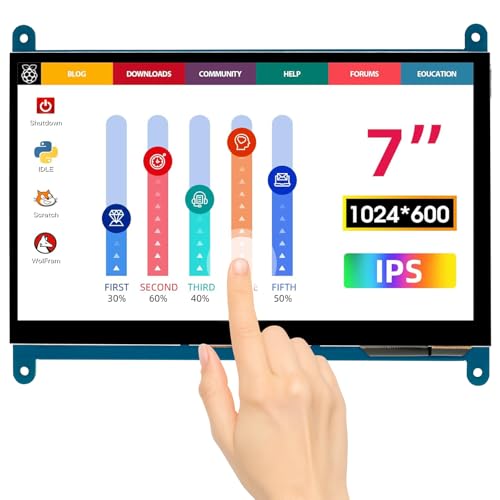
The ELECROW 7 Inch Touchscreen is perfect for Raspberry Pi enthusiasts who crave a portable yet powerful display. With a resolution of 1024×600 and an IPS capacitive touch screen, you’ll enjoy stunning visuals from any angle thanks to its 170° wide viewing angle. It supports up to 5-point touch, making interaction smooth and intuitive. Plus, setup is a breeze—just plug and play using HDMI and Micro USB. Compatible with Raspberry Pi 5/4/3 and various operating systems, this mini monitor consumes only 12.5 watts. With a 1-year warranty and easy return policy, it’s a reliable choice for your projects.
Best For: Raspberry Pi enthusiasts looking for a portable, high-quality touchscreen display for their projects.
Pros:
- High Resolution: Offers a clear display with a resolution of 1024×600.
- Wide Viewing Angle: IPS technology provides a 170° wide viewing angle for enhanced visual experience.
- Easy Setup: Plug and play functionality with no driver installation required.
Cons:
- Limited Brightness: Brightness of 300 lm might not be sufficient for very bright environments.
- Power Consumption: Consumes 12.5 watts, which may be higher compared to some other portable monitors.
- Screen Finish: Glossy finish may lead to reflections in certain lighting conditions.
Factors to Consider When Choosing Raspberry Pi 7 Inch Displays
When choosing a 7-inch Raspberry Pi display, you should think about several key factors. Consider display resolution options, touchscreen versatility, and compatibility with your devices. Also, pay attention to connectivity interfaces and power consumption efficiency to guarantee you get the best performance.
Display Resolution Options
Choosing the right display resolution for your Raspberry Pi 7-inch screen is essential for achieving the best visual experience. Typically, these displays offer resolutions from 800×480 pixels to 1024×600 pixels, with some supporting up to 1920×1080 pixels for enhanced clarity. If you’re working on applications that require detailed graphics or text, opt for a higher resolution like 1024×600, as it provides clearer and more vibrant visuals. Conversely, an 800×480 pixel display may suffice for simple tasks but can compromise image quality for complex interfaces. Keep in mind the aspect ratio, too, as common ratios like 16:9 and 5:3 can influence how your content looks. Always check both the native and maximum supported resolutions for compatibility with your projects.
Touchscreen Versatility
While exploring options for a 7-inch Raspberry Pi display, you’ll find that touchscreen versatility plays a crucial role in enhancing your project’s interactivity. Many displays support varying touch functionalities, with some offering up to 5-point multi-touch, perfect for applications in programming, education, or gaming. This interactivity boosts user engagement compared to traditional monitors. Most touchscreen models utilize IPS technology, delivering wide viewing angles and vibrant colors, which enhances the overall experience. Additionally, plug-and-play compatibility makes setup a breeze, allowing you to connect via HDMI or DSI without driver installation. Don’t forget power management features like backlight control, which improve energy efficiency—ideal for portable projects and long-term use. Choose wisely to maximize your project’s potential!
Compatibility With Devices
Ensuring compatibility with your Raspberry Pi model is essential for getting the most out of a 7-inch display. Many displays only support specific versions, like Raspberry Pi 5, 4, 3, or Zero W. Consider the connection type, as some displays use MIPI DSI connections, which may limit compatibility, while HDMI options generally work with a wider range of devices. Not all displays are driver-free; some need specific configurations or drivers for peak performance on different operating systems like Raspbian or Ubuntu. Additionally, certain displays may only function as single-touch interfaces when used with non-Raspberry Pi systems. Checking for plug-and-play functionality can also simplify your connection process and enhance overall compatibility.
Connectivity Interfaces Available
How do you decide which connectivity interfaces are best for your 7-inch Raspberry Pi display? First, consider MIPI DSI, which offers a driver-free, plug-and-play experience tailored for Raspberry Pi models. If you want versatility, HDMI is a great choice, as it works with various devices like laptops and game consoles. For touch functionality, look for displays with USB interfaces, allowing user interaction without needing extra drivers. Some monitors even combine HDMI and USB options, giving you flexibility in how you use your display, whether for duplication, extension, or as a second screen. Finally, verify the power supply fits your setup, typically using micro USB or dedicated power ports for seamless compatibility with Raspberry Pi devices.
Power Consumption Efficiency
When selecting a 7-inch Raspberry Pi display, it’s crucial to take into account power consumption efficiency, as this can greatly impact your project’s performance and longevity. Look for models that operate efficiently at 5 volts, which is standard for Raspberry Pi devices. Ideally, choose displays with lower power consumption ratings, around 12.5 watts or less, especially if you’re working on battery-operated setups. Features like adjustable backlight control can considerably reduce power usage while maintaining display quality. Additionally, some monitors offer energy-saving modes that minimize consumption during inactive periods or in low-light conditions. Always evaluate the overall power requirements to verify compatibility with your Raspberry Pi and avoid overloading your power supply.
Build Quality and Design
Build quality and design play a pivotal role in selecting a 7-inch Raspberry Pi display that meets your project’s needs. Look for displays with tempered glass, which enhances durability and protects against scratches and impacts. A bezel-free or slim profile not only contributes to a modern aesthetic but also improves usability. Lightweight and portable designs are essential for easy integration into various setups. Consider the available mounting options; adjustable stands or mounting holes provide flexibility in installation and positioning. Finally, evaluate the materials used in the construction. High-quality components guarantee longevity and reliable performance over time, making your display a solid investment for your projects. Choosing wisely will lead to a successful and visually appealing outcome.