Fine-tuning a PC case is easier when you can measure airflow instead of guessing. The right meter helps you see whether your fans, filters, vents, and cable routing are actually working.
These picks focus on practical tools for builders who want better case tuning, clearer readings, and a smoother path to optimizing temperatures and noise.
Best 10 PC Airflow Testers for Case Tuning Picks for 2026
Compact Handheld Meter
BTMETER BT-100 Anemometer for Quick Airflow Checks

- Measures speed, temperature, and wind chill
- 5 wind-speed units with backlit display
- Tripod mount and carry case included
Best For: Quick, portable airflow checks for basic tuning
Telescoping Duct Tool
Triplett AM500 Hotwire Thermo-Anemometer

- Telescoping probe reaches up to 3 ft
- Measures airflow plus temperature
- Magnet mounting and data hold included
Best For: Hard-to-reach airflow checks and repeat measurements
PC-Ready Logger
BTMETER 866A HVAC Anemometer with USB Sync

- USB syncing with PC software for logging
- Displays airflow volume directly
- Measures speed, temp, RH, and dew point
Best For: Computer-based airflow logging and analysis
Wireless Smart Probe
testo 405i Bluetooth Anemometer

- Bluetooth app shows tables, graphs, and reports
- 15-inch telescopic shaft for tight spaces
- Calculates volume flow from duct dimensions
Best For: App-based airflow readings and report generation
USB-Logging Pick

- USB PC software for data storage and monitoring
- Measures wind speed, air volume, and temperature
- Split probe with extendable sensor for reach
Best For: Builders who want stored airflow readings on a PC
Budget-Friendly Meter
AIOMEST Pro HVAC Anemometer AI-826A

- Real-time, max, and average airflow modes
- 79-inch cable and telescopic rod improve reach
- Tripod hole supports steadier measurements
Best For: Users who want a straightforward airflow meter for repeat checks
Bluetooth Logging Upgrade
Elitech ANE-200W HVAC Anemometer
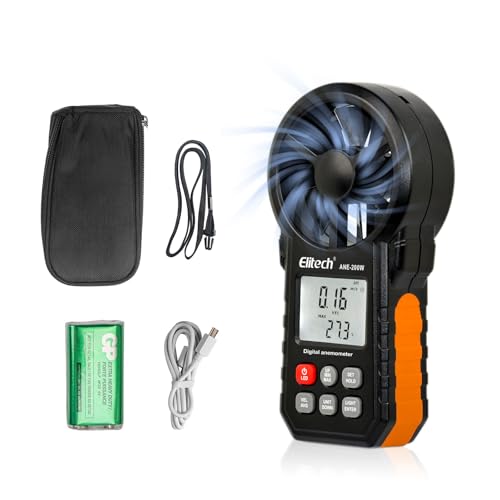
- Measures wind velocity, CFM/CMM airflow, and temperature
- Bluetooth app plus USB PC software for logs and export
- Max/min/average modes with data hold and LED light
Best For: Users who want live monitoring and exportable airflow data
Precision Pick
Hot Wire Anemometer with Telescopic Probe

- Reads extremely low airflow with 0.01 mph resolution.
- Supports wind speed, temperature, CFM, and CMM.
- Telescoping probe helps in tight vent openings.
Best For: users tuning PC airflow who want sensitive low-speed measurements
Data-Friendly Choice
Hotwire Anemometer with PC Export
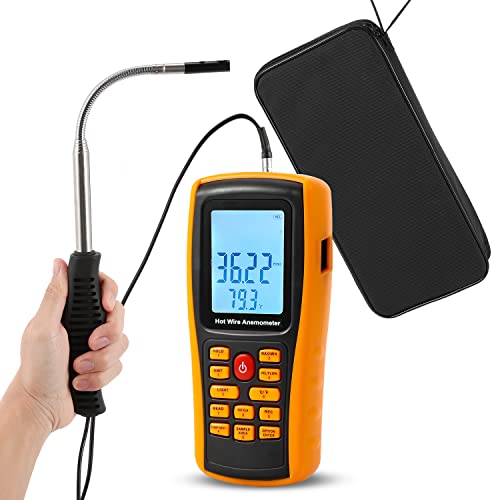
- Logs 350 readings and exports data to a PC.
- Measures airflow, temperature, windchill, max, min, and average.
- Long telescopic probe helps reach case vents.
Best For: people who want to record and analyze PC airflow data
Storage-Rich Option
HVAC Anemometer with Data Logging

- Stores 600 groups of airflow measurements.
- Remote split sensor extends up to 2m.
- Shows airflow, temperature, CFM/CMM, and summary modes.
Best For: repeat testers who want stored readings for airflow balancing
Compact Handheld Meter – BTMETER BT-100 Anemometer for Quick Airflow Checks
For pc airflow testers for case tuning, the BTMETER BT-100 is a simple handheld option when you want a quick look at air speed, wind temperature, and wind chill. It supports five wind-speed units, includes a backlit LCD, and can help with basic CFM calculations when you already know the duct or opening area.
Best For: Builders and hobbyists who want an affordable, portable meter for general airflow checks and quick tuning.
Pros:
- Measures wind speed, temperature, and wind chill on a backlit screen.
- Supports 5 units, including m/s, km/h, ft/min, knots, and mph.
- Tripod thread helps with hands-free readings during repeat checks.
- Includes batteries, carry bag, neck strap, and case.
Cons:
- CFM is not calculated directly; you need duct area for the formula.
- Designed more for general airflow than advanced logging or analysis.
The BT-100 makes sense if you want a compact, easy-to-carry airflow tester for case tuning without extra software or setup. It is practical for spot checks, but it stays in the basic-meter category rather than offering deeper data features.
Telescoping Duct Tool – Triplett AM500 Hotwire Thermo-Anemometer
If you are comparing pc airflow testers for case tuning and want a more specialized probe style, the Triplett AM500 stands out for its telescoping hotwire design. It measures airflow and temperature, extends up to 3 feet, and includes markers plus a magnet for easier hands-free use in ductwork and other hard-to-reach areas.
Best For: Users who need a probe-style meter for awkward access points and repeated airflow measurements.
Pros:
- Telescoping probe extends up to 3 ft for reaching tight spaces.
- Measures and displays airflow or air velocity plus temperature.
- Depth and direction markers help with more consistent probe placement.
- Magnet mounting and data hold support hands-free use.
Cons:
- Less pocket-friendly than a standard handheld meter.
- Focused on airflow and temperature, not broader environmental data.
The AM500 is a strong fit when you care more about probe placement and repeated measurements than ultra-portable simplicity. For case tuning work where access is awkward, the telescoping shaft can make readings easier to capture consistently.
PC-Ready Logger – BTMETER 866A HVAC Anemometer with USB Sync
Among pc airflow testers for case tuning, the BTMETER 866A is the most data-focused choice here because it can sync airflow readings to a computer through USB. It measures wind speed, temperature, relative humidity, and dew point, and it can display air flow volume directly so you do not need to do the math yourself.
Best For: Users who want computer syncing and logged airflow data for more detailed tuning or HVAC-style analysis.
Pros:
- USB sync and PC software support data logging, analysis, and monitoring.
- Displays air flow volume directly, reducing manual CFM calculations.
- Measures wind speed, temperature, %RH, and dew point.
- Tripod mount, backlit screen, and protective case add convenience.
Cons:
- More features than a simple spot-check meter, so it may be more than some users need.
- Humidity and temperature sensors are best used with airflow over them for accurate change response.
If you want airflow readings you can actually track on a computer, the 866A is the most capable option in this set. It is especially useful when you want repeatable measurements, logging, and a clearer picture of how changes affect airflow over time.
Wireless Smart Probe – testo 405i Bluetooth Anemometer
For pc airflow testers for case tuning, the testo 405i is the most polished smart-probe option in this lineup. It measures air velocity, temperature, and in-duct airflow, can calculate volume flow when you enter duct dimensions, and connects by Bluetooth to the Smart Probe App for reading tables, graphs, and reports.
Best For: Users who want app-based readings, remote viewing, and easy report creation.
Pros:
- Bluetooth 4.0 connects to smartphones or tablets.
- App can display measurements as tables and graphs.
- Telescopic shaft extends up to 15″ for tighter spaces.
- Can calculate volume flow when duct dimensions are entered.
Cons:
- Requires a phone or tablet to get the full smart-probe experience.
- More specialized and less straightforward than a basic handheld meter.
The testo 405i is best if you want a modern workflow with app support instead of just a screen and buttons. For case tuning or HVAC-style balancing, its Bluetooth reporting and extendable shaft make it a flexible tool for measured, repeatable airflow checks.
USB-Logging Pick – Kethvoz 856A HVAC Anemometer
If you want pc airflow testers for case tuning that can also double as a serious HVAC tool, the Kethvoz 856A stands out for its direct USB data transfer and PC software. It measures wind speed, air volume, and temperature, with multiple speed units and measurement modes that make it easier to compare intake and exhaust results while dialing in airflow.
Best For: Builders who want airflow readings they can store, review, and manage on a PC.
Pros:
- USB cable and customized PC software support data retention, storage, deletion, and monitoring.
- Measures wind speed, air volume, and temperature with multiple modes like max, min, average, and real-time.
- Split design and extendable wind vane sensor help when reaching awkward vents or higher test points.
- Backlit LCD, data hold, and auto shut-off add convenience during repeated tuning sessions.
Cons:
- Primarily designed for HVAC use rather than a case-tuning-specific workflow.
- Air volume reporting is broad and may be more than some PC builders need.
Overall, this is a strong choice if you value PC connectivity and logged measurements more than a simple handheld readout. It brings a more professional workflow to airflow testing without sacrificing portability.
Budget-Friendly Meter – AIOMEST Pro HVAC Anemometer AI-826A
For pc airflow testers for case tuning where you mainly need dependable wind-speed readings, the AIOMEST AI-826A keeps things focused. It measures airflow velocity, temperature, and basic max/average/current modes, while the long extensible cable and tripod hole make repeat measurements easier during setup work.
Best For: Users who want a straightforward airflow meter for repeatable fan and vent checks.
Pros:
- Measures wind speed and temperature with switchable units for flexible use.
- Supports real-time, maximum, and average modes for comparing airflow changes.
- 79-inch extensible USB cable and telescopic rod help reach higher outlets or vents.
- 1/4-inch tripod hole supports steadier continuous measurements.
Cons:
- It does not display direct CFM values; airflow must be calculated from wind speed and area.
- Fewer data-management features than PC-connected logging models.
This is a practical pick if you want a simple meter for checking airflow patterns without extra software complexity. It gives you the core readings needed for tuning, but leaves advanced logging to other models.
Bluetooth Logging Upgrade – Elitech ANE-200W HVAC Anemometer
If you want pc airflow testers for case tuning with the most complete logging workflow here, the Elitech ANE-200W is the most software-forward option. It measures wind velocity, airflow in CFM/CMM, and temperature, then adds Bluetooth app monitoring plus USB PC software for logging, analysis, and Excel export.
Best For: Users who want live monitoring and exportable airflow data for detailed tuning.
Pros:
- Measures wind velocity, airflow in CFM/CMM, and temperature.
- Bluetooth app support offers real-time monitoring and data curve display.
- USB PC software supports data logging, analysis, and Excel export.
- Useful extras include max/min/average modes, data hold, and an LED work light.
Cons:
- More feature-rich than a basic handheld meter, so it may be overkill for casual checks.
- Bluetooth and PC workflow may be more than some users need for quick spot readings.
For airflow tuning that benefits from records, graphs, and easy exporting, this model offers the strongest digital toolkit. It is the best fit when you want to go beyond a simple reading and actually analyze the data.
Precision Pick – Hot Wire Anemometer with Telescopic Probe
If you want pc airflow testers for case tuning, this handheld hot-wire anemometer is a strong fit because it can read very low airflow and offers CFM/CMM conversion for duct-style calculations. The telescoping probe and non-intrusive design make it easier to measure tight spaces without blocking the flow you are trying to evaluate.
Best For: Builders who want a sensitive handheld meter for checking low-speed airflow and making case fan adjustments.
Pros:
- High-sensitivity hot-wire sensor with 0.01 mph resolution for low airflow readings.
- Supports wind speed, temperature, and airflow in CFM/CMM with multiple unit options.
- Telescoping probe helps reach vents and tight spaces without disturbing airflow.
- Includes a hard carrying case and USB-C charging cable.
Cons:
- Designed mainly around HVAC-style airflow measurement, so PC use is a narrower fit.
- CFM calculations still require entering duct or opening area correctly.
- Long probe may be more tool than some simple case-tuning users need.
Overall, this model makes sense if you want a more precise tester for measuring small airflow changes during case tuning rather than a basic wind-speed gadget. Its sensitivity and probe design are the main reasons to choose it.
Data-Friendly Choice – Hotwire Anemometer with PC Export
For pc airflow testers for case tuning, this hotwire anemometer stands out because it combines airflow, temperature, and data logging in one handheld tool. The long telescopic probe and PC export support make it especially useful if you want to compare readings across different fan or case setups.
Best For: Users who want logged airflow readings and PC-based analysis while tuning case ventilation.
Pros:
- Measures air velocity, airflow, temperature, windchill, and summary values like max, min, average, and 2/3 max.
- Can record 350 sets of data and export them to a PC via USB.
- Includes a 1.08m telescopic rod plus 1m cable for reaching vents and ducts.
- Backlight display and auto power-off add convenience during testing.
Cons:
- Probe tip can be bent, but the overall design is still oriented toward HVAC-style measurement.
- Requires compatible Windows software for data export and graphing.
- Auto backlight shutoff after 7 seconds may be short for some users.
This is a practical choice if your case tuning process involves comparing multiple airflow readings instead of just checking a single number. The data logging and export features make it easier to keep track of changes over time.
Storage-Rich Option – HVAC Anemometer with Data Logging
If you need pc airflow testers for case tuning and want more room to store results, this split-type anemometer is built around logging and repeatable measurement. It offers airflow, temperature, and CFM/CMM readings with a remote sensor that can extend up to 2m, which is useful when you are checking vents, fans, or overhead airflow paths.
Best For: Tinkerers who want a data-logging airflow meter for repeat tests and airflow balancing.
Pros:
- Supports 600 groups of stored measurement data for ongoing comparison.
- Includes Max, Min, 2/3 Max, and Average wind speed modes.
- Remote split sensor extends up to 2m for easier access to test points.
- Backlight LCD and freeze function make readings easier to capture.
Cons:
- More feature-heavy than a simple at-a-glance airflow checker.
- CFM output depends on correctly entering the cross-sectional area.
- Built primarily for HVAC and duct use rather than casual desktop use.
This model is best if you like to document airflow changes as you tune a case or balance fans. The storage capacity and split sensor give it an edge for repeated testing sessions.
How We Picked the Best PC Airflow Testers for Case Tuning
For PC Airflow Testers for Case Tuning, the most useful models are the ones that balance accuracy, readability, and ease of use in tight spaces. We looked for tools with sensible measurement ranges, stable sensors, and features that help you compare intake and exhaust performance rather than just capture a rough breeze reading.
We also favored units with clear displays, portable designs, and optional logging or temperature data where it adds value. In PC tuning, consistency matters more than flashy specs.
Quick Comparison: What Matters Most
If you want a fast answer, choose a compact handheld meter for simple airflow checks, a hot-wire model for more sensitive low-speed readings, or a data-capable unit if you plan to compare fan curves, filter changes, or different case layouts over time.
Key Buying Factors for PC Airflow Testers for Case Tuning
Sensor Type
Hot-wire anemometers are often better for PC work because they can be more responsive at lower airflow levels. Traditional impeller-style meters can still work well, especially when you need a simple all-purpose airflow tool.
Measurement Range and Resolution
Look for fine resolution if you want to spot small changes from fan swaps, grille changes, or dust filters. A meter that reads smoothly at low airflow is especially useful when testing near case vents and radiator exhaust paths.
Probe Reach and Form Factor
A slim probe or telescopic shaft makes it easier to measure inside side-panel openings, front intakes, and top exhaust areas without disturbing airflow too much. Compact handheld designs are usually the most practical for PC bench testing.
Data Features
USB export, Bluetooth, or onboard logging can help if you’re tracking before-and-after results. These features are not required, but they are valuable if you tune multiple systems or document airflow changes.
Who Should Buy Which PC Airflow Testers for Case Tuning?
Choose a basic handheld meter if you only need quick checks on fan direction and relative airflow. Pick a more advanced hot-wire or logging model if you regularly optimize cases, test different fan setups, or compare cooling changes across builds.
If you’re a hobbyist focused on a single gaming PC, simplicity is usually best. If you build often or care about repeatable tuning results, spend more on the meter that gives you the clearest data and the easiest measurements.