If you test graphics cards often, the right open frame setup can save serious time. The best test bench cases for GPU testing make swaps easier, keep airflow unrestricted, and reduce the hassle of repeated installs.
This roundup focuses on practical, open-air designs that suit benchmarking, troubleshooting, and thermal checks across common motherboard sizes.
Best 10 Test Bench Cases for GPU Testing Picks for 2026
Budget Open Bench
DIY Pc Test Bench, ATX/M-ATX/ITX Open Chassis

- Supports ATX, Micro ATX, and ITX boards
- No graphics card length limit
- 0.8mm SPCC steel open-frame build
Best For: Affordable GPU testing and frequent part swaps
Wide-Body Tower Bench

- E-ATX, ATX, M-ATX, and ITX support
- No GPU length or CPU cooler height limit
- Wide-body airflow with 2 SSD and 2 HDD support
Best For: Large GPU testing rigs needing maximum clearance
Compact Open Frame

- ATX, Micro ATX, and ITX support
- No graphics card length limit
- Compact 0.8mm SPCC open-air frame
Best For: Compact GPU test setups with simple storage needs
RGB Test Bench
TGDGAMER Open Chassis DIY Gaming PC

- ATX, M-ATX, and ITX support
- No GPU length or CPU cooler height limit
- Five expansion slots with RGB lighting support
Best For: GPU testing with extra expansion room and RGB
Open-Frame Aluminum Flex Bench
PC Creative Assembly Frame Test Bench

- Supports EATX, ATX, M-ATX, and ITX boards
- Open aluminum frame improves access and airflow
- Can fit ATX/SFX PSUs and dual water cooling
Best For: Frequent GPU testers who need a flexible open bench
Large-Format DIY Test Rack

- Supports EATX, ATX, MATX, and ITX boards
- Unlimited graphics card length support
- Compatible with ATX, SFX, and 1U PSUs
Best For: Oversized GPU builds and highly customizable test rigs
Compact Open-Air Test Platform
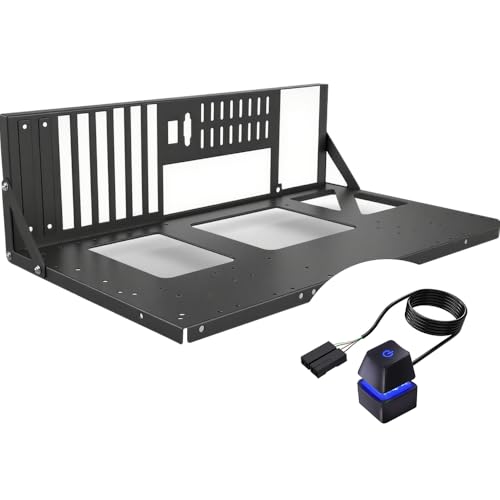
- Supports ATX, MATX, ITX, and X79 builds
- Open-frame layout improves airflow and access
- Tool-free design with dedicated mounting brackets
Best For: Quick GPU swaps and frequent hardware testing
Compact Aluminum Test Bench
Open Air PC Test Bench for ATX/ITX

- Fully open frame for fast heat dissipation
- Compact 30 x 24.6 x 35.5 cm footprint
- Supports ATX, mATX, ITX and 7 slots
Best For: Space-saving bench testing and quick GPU swaps
Heavy-Duty Stackable Bench
Open Frame PC Case for Workstations

- 1.5mm SPCC panels for added rigidity
- Supports EATX, ATX, mATX, ITX boards
- Fits long GPUs and large radiator setups
Best For: Sturdy workstation-style GPU testing and frequent rebuilds
Budget Open Bench – DIY Pc Test Bench, ATX/M-ATX/ITX Open Chassis
If you want test bench cases for gpu testing without paying for a full enclosure, this open chassis rack keeps the build simple and accessible. It supports ATX, Micro ATX, and ITX boards, with no graphics card length limit and room for a standard ATX power supply, making it practical for quick swaps and repeated hardware checks.
Best For: Builders who want a low-cost open frame for frequent GPU testing and general bench work.
Pros:
- Supports ATX, Micro ATX, and ITX motherboards up to 305 x 245 mm
- No graphics card length limit according to the product notes
- Made from 0.8mm SPCC steel with black sand-grain paint
- Supports standard ATX power supplies and includes SSD/motherboard accessory support
Cons:
- Open-frame design offers no dust protection or enclosed cable hiding
- Storage capacity is basic compared with larger bench stations
- Best suited to straightforward test setups rather than polished display builds
Overall, this is a practical, no-frills bench for testing GPUs across common motherboard sizes. Its main appeal is compatibility and open access, while the steel construction should feel sturdy enough for repeated part changes.
Wide-Body Tower Bench – TGDGAMER E-ATX Open Chassis
For test bench cases for gpu testing on larger platforms, this TGDGAMER open chassis stands out for its E-ATX support and wide-body heat dissipation design. It is built for air cooling, allows unlimited GPU length and CPU cooler height, and supports a standard ATX power supply, which makes it a flexible choice for heavy-duty bench setups.
Best For: Users who need an open test bench for larger motherboards and unrestricted GPU fitment.
Pros:
- Supports E-ATX, ATX, M-ATX, and ITX motherboards
- No limit on GPU length or CPU cooler height
- Wide-body airflow design with air cooling support
- Includes support for 2 SSDs and 2 HDDs
Cons:
- Only 2 expansion slots are listed in the supplied details
- Enclosure material is plastic rather than metal
- Air cooling focus may not suit users planning a more complex liquid setup
If your priority is maximum clearance for large GPUs and CPU coolers, this bench is built around that use case. It is especially appealing for oversized test rigs where open access and airflow matter more than enclosure features.
Compact Open Frame – JOYJOM ATX Open Air PC Case
This open frame is a straightforward option for test bench cases for gpu testing when you want easy access and wide compatibility. It supports ATX, Micro ATX, and ITX motherboards, allows unlimited graphics card length, and fits a standard ATX power supply, so it covers the core requirements for fast component changes and hands-on troubleshooting.
Best For: DIY builders who want a compact open-air bench for testing GPUs and basic storage setups.
Pros:
- Supports ATX, Micro ATX, and Mini ITX motherboards
- No graphics card length limit in the supplied notes
- Compact assembled size for a small bench footprint
- 0.8mm SPCC construction with black sandblasted coating
Cons:
- Only 1 HDD or SSD is supported
- Open design provides no enclosure protection
- Best for basic testing rather than feature-heavy workstations
For simple GPU testing, this case keeps the setup compact and accessible while still covering the most common motherboard sizes. The limited storage support is the main trade-off, but that is often acceptable in a bench-style test system.
RGB Test Bench – TGDGAMER Open Chassis DIY Gaming PC
Among test bench cases for gpu testing, this TGDGAMER open chassis adds more expansion room and RGB support while keeping the familiar open-frame layout. It supports ATX, M-ATX, and ITX motherboards, has no limit on GPU length or CPU cooler height, and includes space for a standard ATX power supply, making it a solid pick for testing and showy DIY builds alike.
Best For: Builders who want an open GPU test bench with RGB support and extra expansion flexibility.
Pros:
- Supports ATX, M-ATX, and ITX motherboards
- No limit on GPU length or CPU cooler height
- Five expansion slots give more room for add-in cards
- Includes RGB lighting support and dual storage drive support
Cons:
- Only air cooling is listed in the supplied details
- Open frame still leaves components exposed
- Storage support is limited to 1 SSD and 1 HDD in the bullet notes
This is a good fit if you want a test bench that feels a little more finished without losing the convenience of an open chassis. The extra expansion slots and RGB mention make it more versatile for a mixed test-and-build workspace.
Open-Frame Aluminum Flex Bench – PC Creative Assembly Frame Test Bench
If you’re looking for test bench cases for gpu testing, this open-air aluminum frame is built around flexibility and airflow. It supports EATX, ATX, M-ATX, and ITX motherboards, and it can handle water cooling while keeping hardware easy to access during swaps and troubleshooting.
Best For: Builders who want a flexible open-frame bench for frequent GPU testing and water-cooled setups.
Pros:
- Supports EATX, ATX, M-ATX, and ITX motherboards.
- Open aluminum design helps with heat dissipation and access.
- Supports ATX/SFX power supplies and up to two water-cooling installs.
- Can be adjusted for different GPU and cooling layouts.
Cons:
- Vertical GPU mounting needs extra extension cables.
- ITX and M-ATX can be limiting if using an air-cooled CPU.
This is a practical choice if your testing workflow changes often and you want a bench that can adapt to multiple board sizes and cooling styles.
Large-Format DIY Test Rack – DIY Aluminium Pc Open Case
Among test bench cases for gpu testing, this aluminum open chassis stands out for sheer compatibility and unrestricted graphics card room. It supports EATX, ATX, M-ATX, and ITX motherboards, accepts ATX, SFX, and 1U power supplies, and is designed to work with both air and water cooling.
Best For: Users who want a roomy open chassis for oversized GPUs and mixed test-platform builds.
Pros:
- Supports EATX, ATX, MATX, and ITX motherboards.
- Unlimited graphics card length support adds build flexibility.
- Compatible with ATX, SFX, and 1U power supplies.
- Works with both water and air cooling systems.
Cons:
- Open chassis design offers less enclosure protection than a closed case.
- Details show only two fans included, so cooling may rely on your setup.
If your priority is adapting to different hardware combinations, this rack-style case is a strong match for bench testing and custom workstation builds.
Compact Open-Air Test Platform – PC Test Bench PC Case
If you want test bench cases for gpu testing that keep component access fast and simple, this open-frame ATX rack is a solid fit. It supports ATX, MATX, and ITX boards, includes dedicated mounting brackets for core parts, and is built for easy maintenance during repeated hardware checks.
Best For: Builders who need a lightweight open-air bench for quick GPU swaps, testing, and maintenance.
Pros:
- Supports ATX, MATX, ITX, and X79-style builds.
- Open-frame layout gives superior airflow and easy access.
- Tool-free design speeds up installation and part changes.
- Includes mounting brackets for motherboard, PSU, and storage.
Cons:
- Air cooling only in the supplied details, so it may not suit liquid-cooled test loops.
- It is a compact desktop-style bench, not a full enclosure.
For bench users who value speed over enclosure features, this model keeps the testing process straightforward and efficient.
Compact Aluminum Test Bench – Open Air PC Test Bench for ATX/ITX
If you want test bench cases for gpu testing that stay compact and easy to work with, this open-air frame is built for fast airflow and simple access to components. Its aluminum and acrylic construction keeps the footprint small while leaving plenty of room for a full-size motherboard, graphics card, and standard PSU.
Best For: Builders who want a space-saving open test bench for routine GPU swaps, cooling checks, and general bench work.
Pros:
- Fully open design supports quick heat dissipation during hardware testing.
- Compact 30 x 24.6 x 35.5 cm layout is easier to place on or under a desk.
- Fits ATX, mATX, and ITX motherboards plus 7 expansion card slots.
- Includes bays for 3.5-inch and 2.5-inch drives and a standard PSU.
Cons:
- Open frame design offers less protection than a closed case.
- Only two fan bays, so cooling expansion is more limited than larger benches.
This is a practical pick if you value easy access, solid materials, and a smaller footprint over heavy-duty expansion. The straightforward layout makes it a sensible bench for everyday GPU testing and quick builds.
Heavy-Duty Stackable Bench – Open Frame PC Case for Workstations
Among test bench cases for gpu testing, this steel open-frame chassis stands out for rigidity and expandability. It is sized for larger builds, supports EATX through ITX boards, and gives you enough room for long GPUs, multiple drives, and serious air or water cooling.
Best For: Users building a sturdier bench for workstation-class testing, server-style setups, and frequent component changes.
Pros:
- 1.5mm SPCC panels and 0.8mm base plate add strong structural rigidity.
- Supports up to 10 stacked units in horizontal mode for bench setups.
- Accommodates large cooling setups, including 360mm, 240mm, and 120mm radiators.
- Supports GPUs up to 310mm internally or 335mm with external fan mounting.
Cons:
- Larger footprint is less convenient for small desktops.
- GPU length and cooler clearance still require checking against your build.
This bench is better suited to users who prioritize strength, cooling flexibility, and repeatable access over compact size. If your GPU testing involves frequent parts changes or workstation hardware, the added rigidity is a real advantage.
Flexible Aluminum Bench – Open Frame Techbench for Custom Cooling
If you need test bench cases for gpu testing with maximum layout flexibility, this aluminum open-frame chassis is designed for easy customization. It supports horizontal or vertical GPU mounting, multiple radiator sizes, and a modular setup that makes hardware changes straightforward.
Best For: Builders who want an adaptable open bench for custom cooling, RGB display builds, and oversized graphics cards.
Pros:
- Open aluminum frame promotes strong airflow and heat dissipation.
- Supports ATX, mATX, and ITX motherboards plus ATX, SFX, and SFX-L PSUs.
- Works with horizontal or vertical GPU installation.
- Compatible with multiple fan and radiator sizes, including 280mm water cooling.
Cons:
- Vertical GPU mounting needs an additional riser cable that is not included.
- Measured size excludes handle and feet, so total footprint depends on setup.
This is a versatile choice for enthusiasts who want a bench that can adapt to different cooling and GPU layouts. It is especially appealing if you plan to change hardware often or want an open display build with lots of visual access.
How We Picked the Best Test Bench Cases for GPU Testing
We prioritized layouts that make GPU installs, removals, and repeat benchmarking faster. For Test Bench Cases for GPU Testing, that means open access to the PCIe area, enough clearance for long cards, and stable support so the system stays secure during frequent changes.
We also looked for broad motherboard compatibility, sensible cooling support, and sturdy materials such as aluminum or reinforced steel. Because these cases are meant for repeated use, ease of assembly and cable access matter just as much as raw size.
Quick Comparison
In general, smaller ATX/M-ATX/ITX benches are best for compact lab spaces and quick card swaps, while E-ATX-friendly frames are better if you need room for larger boards, oversized coolers, or more complex test setups. Open-air designs usually offer the most freedom for airflow and component access, but they also expose parts to dust and handling.
Best for Frequent GPU Swaps
Choose a wide open frame with clear PCIe access and minimal obstructions.
Best for Larger Test Builds
Look for E-ATX support, stronger frame rigidity, and extra clearance around power delivery and cooling.
Best for Bench-To-Bench Versatility
A stackable or modular chassis can be useful if you test different platforms regularly.
Key Buying Factors for Test Bench Cases for GPU Testing
Motherboard support: Make sure the case supports the form factors you actually test, whether that is ITX, M-ATX, ATX, or E-ATX. A bench that is too small can make cable routing and GPU retention awkward.
GPU clearance: Length and thickness matter. If you use flagship cards or triple-slot coolers, confirm there is enough physical room and that adjacent components will not block installation.
Cooling and airflow: Open frames naturally help with airflow, but some benches also support liquid cooling or multiple fan placements. That matters when you are comparing temperatures under load.
Build stability: A good test bench should not flex when you insert heavy graphics cards or repeatedly reseat parts. Aluminum frames often strike a good balance between weight and rigidity.
Lab workflow: If you switch GPUs often, prioritize easy-access mounting, visible connectors, and a layout that reduces time spent reaching behind panels.
Who Should Buy Which Test Bench Cases for GPU Testing?
If you are a reviewer, system builder, or hardware tester, choose a full-size open frame with strong motherboard support and generous spacing. If you mainly benchmark consumer GPUs, a simpler ATX or M-ATX bench is usually enough. For engineering labs or mixed-platform testing, a larger modular option offers the most flexibility.
In short, the best Test Bench Cases for GPU Testing are the ones that make your workflow faster, your cooling results clearer, and your hardware easier to handle without introducing unnecessary complications.