WALI Dual Monitor Stand review is best for buyers who want a simple, free-standing way to hold two screens without drilling into a desk.
It targets compact home offices, school desks, and workstations that need a cleaner, more ergonomic setup.
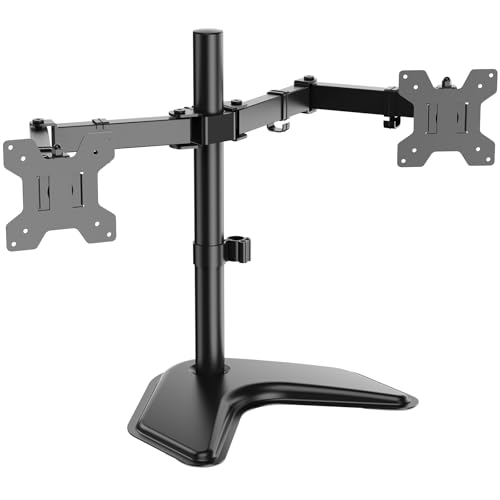
WALI Dual Monitor Stand Review Summary
The WALI Dual Monitor Stand makes sense for people who need a straightforward dual-display solution with broad monitor compatibility and a stable footprint.
It is a strong fit if you want to free up desk space, adjust both screens for better posture, and keep the setup visually tidy without moving to a clamp or grommet mount.
Bottom line: this is a practical, no-nonsense dual monitor stand for buyers who value stability, adjustability, and easy placement over premium aesthetics or advanced cable-management extras.
Review Scorecard
| Category | Score | Buyer assessment |
|---|---|---|
| Compatibility | 8/10 | Fits most flat screens and monitors up to 27 inches, with 75x75mm and 100x100mm VESA support. |
| Stability | 8/10 | The heavy-duty V-base and free-standing design are built for secure desk use. |
| Adjustability | 9/10 | Height adjustment, tilt, swivel, and 360-degree rotation make it flexible for mixed tasks. |
| Desk efficiency | 8/10 | Two arms can reclaim desktop space and reduce clutter compared with separate stands. |
| Ergonomics | 8/10 | Easy repositioning helps bring screens into a more comfortable viewing angle. |
| Setup simplicity | 7/10 | The included hardware kit and detachable plates help, but dual-arm assembly still takes some time. |
| Overall value fit | 8/10 | Best for buyers who want broad compatibility and practical flexibility in one stand. |
Key Features and Specifications of WALI Dual Monitor Stand
The core appeal of the WALI Dual Monitor Stand is that it combines dual-monitor support with a free-standing V-base.
According to the listing, each arm supports monitors up to 22 lbs, and the stand is meant for displays up to 27 inches.
That gives it a fairly wide target range for common office monitors, school screens, and lightweight productivity displays.
The mounting plates are detachable and height adjustable, which matters if your two monitors are not identical or if you want to fine-tune their alignment.
The stand also supports 75x75mm and 100x100mm VESA patterns, which are the most common standards on many flat monitors.
The arm system is designed for flexibility rather than fixed positioning.
The listing calls out plus or minus 90-degree tilt and swivel, plus 360-degree rotation from landscape to portrait orientation.
That means the stand is not just for side-by-side office work; it can also suit reading, coding, reference documents, or a mixed workflow where one screen is turned vertically.
The pole is 16 inches tall, and the heavy-duty base is intended to provide stable support while keeping the workspace looking modern and sleek.
The package also includes mounting hardware and a user manual, along with U.S.-based customer support.
Pros and Cons of WALI Dual Monitor Stand
Pros
- Supports two monitors on one free-standing base, which can simplify a desk setup.
- Fits a practical range of monitor sizes up to 27 inches and up to 22 lbs per arm.
- Adjustable plates and height help with alignment and comfort.
- Tilt, swivel, and rotation give it useful everyday flexibility.
- The V-base design avoids the need for clamping to the edge of the desk.
Cons
- It is not the most minimal option if you want a completely hidden mount system.
- Dual-arm setup usually takes more effort than a single monitor stand.
- Buyers with very heavy or oversized monitors should look elsewhere.
- The listing emphasizes function more than premium materials or advanced cable organization.
Who Should Buy WALI Dual Monitor Stand?
This stand is a good match for someone building a practical two-monitor workstation on a normal desk.
If you want more usable surface space, a more ergonomic viewing angle, and a freestanding mount that is easier to place than a clamp-style arm, this product fits the job.
It is also a sensible choice for shared spaces and multipurpose rooms, because the stand can work in homes, dorms, schools, businesses, offices, IT networks, and manufacturing environments according to the listing.
That broad positioning suggests WALI is aiming for a general-purpose dual-display solution rather than a niche enthusiast product.
Buy it if you have two compatible monitors, want adjustable positioning, and prefer a stable base over desk clamping.
Skip it if you need support for larger, heavier displays, want a very compact mount footprint, or already know you want a more advanced arm system with more premium refinement.
How the WALI Dual Monitor Stand Handles Real Desk Use
Space Saving Without a Clamp
The stand is built around a free-standing V-base, so it can sit on a desk without attaching to the edge.
That is useful when your desk lip is awkward, your workspace is shared, or you do not want to commit to a clamp mount.
The tradeoff is that the base still occupies some surface area, so it saves space mostly by consolidating monitor support rather than disappearing entirely.
Adjustability for Better Viewing Angles
The listing makes adjustability a major selling point, and that is appropriate here.
With tilt, swivel, and rotation, the stand is meant to help users reduce neck and eye strain by moving screens into a more comfortable position.
For productivity work, that is often more important than cosmetic appeal.
Mixed Orientation Setups
The ability to rotate from landscape to portrait mode gives the stand an advantage for people who split tasks across different screen layouts.
One monitor can stay horizontal for normal work while the other can be turned vertical for long documents, code, chat, or web research.
That kind of flexibility is one of the more practical reasons to choose a dual arm stand.
Fit for Everyday Office Hardware
Because the product supports standard 75x75mm and 100x100mm VESA patterns, it should work with many mainstream monitors.
That matters more than flashy marketing language.
In a product like this, compatibility is often the difference between a smooth purchase and a return.
Alternatives to WALI Dual Monitor Stand
If you want to compare similar options, look at other dual monitor arms and stands from established office-accessory brands.
Good alternatives to research on Amazon include VIVO dual monitor stands, HUANUO dual monitor mounts, and ErGear dual monitor arms.
If you prefer a more premium or heavier-duty direction, you can also compare Amazon Basics monitor arms and other adjustable dual monitor desk mounts from brands that focus on office ergonomics.
The main comparison points are usually the same: VESA support, weight capacity, desk footprint, and how much adjustment each arm offers.
In this category, the best alternative is the one that matches your monitor size and desk layout, not the one with the most marketing claims.
Is WALI Dual Monitor Stand Worth It?
Yes, for the right buyer.
The WALI Dual Monitor Stand is worth considering if you want a stable, free-standing dual-monitor solution that supports common monitor sizes, offers broad adjustment, and helps clean up a desk without requiring a clamp.
Its best strengths are practicality and flexibility.
Its main limitations are also practical: it is not meant for heavy or oversized displays, and it does not try to be the most premium or minimalist system on the market.
If your two monitors fit the supported size and weight range, this is a sensible buy.
If they do not, keep shopping.