Choosing the right streaming PC is about more than raw specs. For smooth broadcasts, you need enough CPU headroom, a capable GPU encoder, and fast memory and storage that can keep up during long sessions.
This roundup highlights 10 high-performance live streaming computers for creators who want dependable performance for gaming, multitasking, and content production in 2026.
Best 10 High-Performance Live Streaming Computers Picks for 2026
Turbo-Ready Streaming Tower

- Ryzen 7 4700LE with 8 cores and 16 threads
- RTX 5060 8GB for 1080p/1440p gaming and creation
- 1TB NVMe SSD, 16GB DDR4, and 6 RGB fans
Best For: Streamers who want a capable prebuilt tower for gaming and multitasking
Silent Compact Creator Box

- Ryzen 7 255, 32GB DDR5, and 1TB SSD
- USB4, 2.5G LAN, HDMI/DP, and Wi-Fi 7
- Quiet cooling with compact mini PC design
Best For: Creators and streamers who want a small, quiet PC with modern connectivity
Budget Streaming Starter Tower

- Ryzen 7 4700LE with 8 cores and 16 threads
- RTX 3050 8GB for mainstream gaming and tasks
- 16GB DDR4, 512GB NVMe SSD, and 6 RGB fans
Best For: Buyers who want an affordable prebuilt PC for streaming and everyday use
Flagship Compact Powerhouse

- Ryzen 9 8945HX with 16 cores and 32 threads
- Desktop RTX 5060 8GB GDDR7 for AAA gaming
- 5GbE, Wi-Fi 7, and quad 4K output support
Best For: Serious streamers and creators who want compact desktop-class power
Value-Focused Streaming Starter
STGAubron Core i7 RTX 3050 Desktop

- Core i7 with 16GB RAM handles multitasking and streaming.
- RTX 3050 6GB supports popular games and live video use.
- Includes Wi-Fi 6, Bluetooth 5.0, and RGB peripherals.
Best For: Streamers and budget-minded buyers who want an easy setup
Compact Powerhouse
MINISFORUM G1 Pro Ryzen 9 RTX 5060 Mini PC
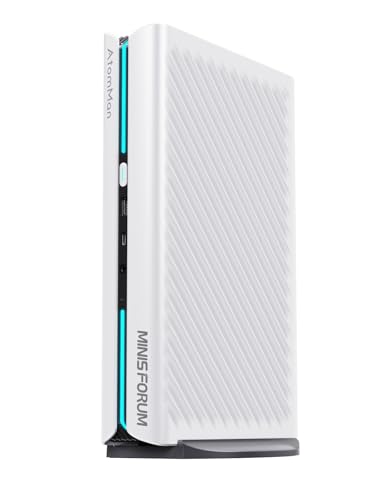
- Ryzen 9 8945HX and RTX 5060 deliver strong performance.
- 32GB DDR5 and 1TB PCIe 4.0 SSD support heavy workloads.
- Wi-Fi 7, 5G LAN, and four-display output improve streaming setups.
Best For: Creators and streamers who want a compact, high-end mini PC
Workstation-Grade Streamer

- Intel Ultra 7-265 with RTX 5060 8GB suits streaming and VR-ready use.
- 32GB DDR5 memory and 1TB NVMe SSD support multitasking.
- Thunderbolt 4, USB-C, HDMI, and DisplayPort offer strong connectivity.
Best For: Streamers and pros who want a full-size, well-connected desktop
Top Pick Mini Powerhouse

- Core i9-13900HK with up to 5.4GHz boost
- RTX 4060 mobile GPU for modern graphics features
- 32GB DDR5, 1TB PCIe 4.0 SSD, dual 4K display support
Best For: Compact streaming and multitasking setups
Best Tower for Streamers
Velztorm White Pilum Z2 RTX 5060

- Ryzen 7 5700X with 8 cores and 16 threads
- RTX 5060 for 1080p and 1440p gaming plus streaming
- 240mm liquid cooler, 32GB RAM, 1TB PCIe SSD
Best For: Ready-to-play tower streaming and gaming
Best Budget Mini Streamer

- Ryzen 5 7640HS with 6 Zen 4 cores and 12 threads
- 32GB DDR5 and 1TB SSD in a compact mini PC
- Triple-display output with USB4, HDMI, and DisplayPort
Best For: Efficient compact streaming and multitasking
Turbo-Ready Streaming Tower – Ryzen 7 RTX 5060 Gaming PC
If you want a high-performance live streaming computer that can juggle gameplay, broadcasting, and background apps, this Ryzen 7 desktop is built for exactly that kind of workload. The 8-core, 16-thread CPU, RTX 5060 graphics, 16GB of DDR4 memory, and 1TB NVMe SSD give it a balanced spec sheet for smooth streaming and fast load times.
Best For: Streamers who want a desktop tower for gaming, multitasking, and creative work.
Pros:
- Ryzen 7 4700LE offers 8 cores and 16 threads for gaming, streaming, and multitasking.
- RTX 5060 8GB supports smooth 1080p/1440p play and helps with editing and 3D workflows.
- 1TB NVMe SSD and 16GB DDR4 RAM help reduce boot and loading times.
- 6 RGB cooling fans and a 650W PSU are designed for sustained full-load use.
Cons:
- Comes with DOS, so you’ll need to set up an operating system yourself.
- 16GB RAM is solid, but heavier creator workloads may eventually call for an upgrade.
Overall, this is a practical pick if you want a prebuilt tower that can handle live streaming while staying responsive during everyday use. The WiFi 6, broad port selection, and reserved drive bays add flexibility for future setup changes.
Silent Compact Creator Box – Ryzen 7 Mini PC with Wi-Fi 7
For a smaller high-performance live streaming computer, this MINISFORUM mini PC focuses on speed, efficiency, and connectivity in a compact footprint. Its Ryzen 7 255 processor, 32GB of DDR5 memory, 1TB SSD, and Wi-Fi 7 support make it well suited to streaming, light gaming, and creator workflows where desk space matters.
Best For: Users who want a compact streaming PC with modern wireless and strong multitasking support.
Pros:
- Ryzen 7 255 with 8 cores and 16 threads handles heavy office work and multimedia tasks.
- 32GB DDR5 RAM and a 1TB M.2 SSD provide fast startup and app loading.
- USB4, HDMI, DisplayPort, 2.5G LAN, and Wi-Fi 7 offer flexible connectivity.
- Quiet cooling is rated to keep noise as low as 45dB under load.
Cons:
- Integrated Radeon 780M graphics are better for light gaming than demanding AAA play.
- OCuLink eGPU support depends on compatible dock and SSD-slot setup.
This mini PC stands out if you want strong everyday and streaming performance without a large tower. It is especially appealing for streamlined desks, multi-display setups, and users who value modern networking and compact design.
Budget Streaming Starter Tower – Ryzen 7 RTX 3050 Desktop
If you are looking for a high-performance live streaming computer on a more accessible spec level, this Ryzen 7 and RTX 3050 desktop keeps the essentials in place. It combines an 8-core CPU, dedicated 8GB graphics, 16GB of RAM, and a 512GB NVMe SSD for everyday streaming, gaming, and content work.
Best For: Budget-conscious buyers who want a ready-to-use streaming and gaming tower.
Pros:
- Ryzen 7 4700LE supports gaming, streaming, and multitasking with 8 cores and 16 threads.
- RTX 3050 8GB handles mainstream games and design tasks.
- 16GB DDR4 RAM and 512GB NVMe SSD improve responsiveness over older storage setups.
- 6 RGB cooling fans and WiFi 6 add practical value for long sessions and flexible networking.
Cons:
- 512GB storage may fill up quickly if you keep large game or media libraries locally.
- RTX 3050 is more modest than newer GPUs for high-end gaming or heavier creation workloads.
As a value-focused option, this tower makes sense when you need reliable streaming performance without jumping to a higher-cost graphics tier. It is a straightforward all-round desktop for home use, learning, and lighter creator tasks.
Flagship Compact Powerhouse – Ryzen 9 RTX 5060 Mini PC
Among high-performance live streaming computers, this MINISFORUM G1 Pro aims much higher than a typical compact system. It pairs a Ryzen 9 8945HX, desktop-class RTX 5060 graphics, 32GB of DDR5 memory, and a 1TB SSD with advanced cooling and high-bandwidth connectivity for demanding gaming and creator workloads.
Best For: Power users who want a compact machine for streaming, gaming, and heavy content creation.
Pros:
- Ryzen 9 8945HX with 16 cores and 32 threads is built for heavy multitasking.
- Desktop RTX 5060 8GB GDDR7 supports AAA gaming and GPU-intensive workloads.
- 245W total performance release and a 350W built-in PSU are designed for sustained output.
- 5GbE, Wi-Fi 7, and quad 4K display support fit advanced multi-monitor setups.
Cons:
- This is a premium compact system, so it is likely more than casual users need.
- Its performance focus may be overkill if you only stream lightly or play less demanding games.
This is the strongest option in the group when compact size and top-tier performance both matter. It should appeal to serious streamers and creators who want desktop-grade power, modern connectivity, and broad display expansion in one small chassis.
Value-Focused Streaming Starter – STGAubron Core i7 RTX 3050 Desktop
If you want a practical entry point into high-performance live streaming computers, this STGAubron desktop brings together a Core i7 CPU, RTX 3050 graphics, 16GB of RAM, and a 512GB SSD. It is positioned as a versatile machine for gaming, streaming, editing, business, and day trading, with enough core hardware to handle everyday content creation without overcomplicating the setup.
Best For: Streamers and creators who want a ready-to-use desktop for gaming, basic editing, and live streaming on a tighter budget.
Pros:
- Intel Core i7 up to 3.9GHz with 16GB memory supports multitasking and streaming use.
- RTX 3050 6GB can handle popular games while maintaining 60+ FPS in the listed titles.
- Includes Wi-Fi 6, Bluetooth 5.0, HDMI, DisplayPort, and RJ-45 for flexible connectivity.
- Comes with RGB mouse and keyboard, plus Windows 11 Home preinstalled.
Cons:
- 512GB SSD may feel limited if you store many games or large video projects.
- RTX 3050 is suitable for streaming and gaming, but it is not the most powerful GPU in this roundup.
Overall, this is the most approachable option here for buyers who want a straightforward streaming PC with gaming capability and included peripherals. It favors convenience and broad usability over top-tier raw performance.
Compact Powerhouse – MINISFORUM G1 Pro Ryzen 9 RTX 5060 Mini PC
The MINISFORUM G1 Pro stands out among high-performance live streaming computers because it pairs a Ryzen 9 8945HX processor with RTX 5060 graphics in a compact mini PC design. With 32GB of DDR5 memory, a 1TB PCIe 4.0 SSD, and support for four displays, it is built for demanding multitasking, streaming, editing, and workstation-style workflows.
Best For: Streamers, creators, and power users who need compact size, strong graphics, and multi-monitor support.
Pros:
- Ryzen 9 8945HX with 16 cores and 32 threads is designed for heavy multitasking.
- RTX 5060 8GB supports ray tracing and DLSS 4 for stronger gaming visuals.
- Supports four ultra HD monitors across HDMI and DisplayPort outputs.
- Includes Wi-Fi 7, Bluetooth 5.4, 5G LAN, and expandable RAM/storage options.
Cons:
- Mini PC form factor may be less familiar to buyers who prefer a full tower.
- Expansion is available, but users should plan carefully around compact chassis limits.
This is the most versatile performance-first pick in the group if you want a small desktop that still behaves like a serious content-creation machine. It is especially appealing for streaming setups that benefit from multiple displays and fast networking.
Workstation-Grade Streamer – Dell Tower Plus EBT2250
For buyers comparing high-performance live streaming computers, the Dell Tower Plus EBT2250 leans into workstation-style power with an Intel Ultra 7-265 processor, RTX 5060 8GB graphics, 32GB of DDR5 memory, and a 1TB PCIe NVMe SSD. It is also well equipped for connectivity and expansion, making it a strong fit for streaming, VR-ready gaming, and productivity-heavy use.
Best For: Streamers and professionals who want a fuller desktop with strong CPU/GPU balance and generous ports.
Pros:
- Intel Ultra 7-265 and RTX 5060 8GB provide a strong balance for gaming and graphics workloads.
- 32GB DDR5 memory and a 1TB NVMe SSD support smooth multitasking and fast storage access.
- Extensive ports include Thunderbolt 4, USB-C, HDMI, DisplayPort, and an SD card reader.
- Comes with Windows 11 Pro, Bluetooth 5.4, Ethernet, keyboard, and mouse.
Cons:
- 460W power supply suggests this is more of a balanced workstation than an extreme enthusiast rig.
- Larger tower design may take up more space than a mini PC.
If you want a desktop that feels more like a production workstation than a compact streaming box, this Dell is an attractive choice. It offers broad connectivity and a modern platform for creators who value flexibility as much as performance.
Top Pick Mini Powerhouse – TOPGRO T1-Pro i9 RTX 4060
If you want a high-performance live streaming computer in a compact chassis, the TOPGRO T1-Pro is built for exactly that kind of workload. The Core i9-13900HK, RTX 4060, 32GB DDR5, and 1TB PCIe 4.0 SSD give it the speed needed for streaming, multitasking, and content work without taking up much desk space.
Best For: Streamers and creators who want a compact Windows 11 Pro desktop with strong CPU/GPU performance and dual-monitor support.
Pros:
- 13th Gen Core i9-13900HK offers 14 cores, 20 threads, and up to 5.4GHz boost
- RTX 4060 mobile GPU adds modern features like ray tracing and DLSS 3.0
- 32GB DDR5 memory and 1TB PCIe 4.0 SSD support fast multitasking and storage speed
- Dual HDMI 2.0 outputs support two 4K 60Hz displays
Cons:
- Mini PC design may be less flexible than a full tower for future expansion
- Graphics card is the mobile RTX 4060 version, not a desktop card
Overall, this is a strong choice if you need a small system that can handle streaming, productivity, and gaming duties together. The adjustable RGB lighting, fan speed control, and 2.5GbE networking add practical value for a live-streaming setup.
Best Tower for Streamers – Velztorm White Pilum Z2 RTX 5060
The Velztorm White Pilum Z2 is a practical pick for high-performance live streaming computers when you want a full desktop tower with stronger cooling headroom. Its Ryzen 7 5700X, RTX 5060, 32GB RAM, and 1TB PCIe SSD make it well suited to gaming, live streaming, and creative workloads that benefit from a balanced CPU/GPU combo.
Best For: Users who want a ready-to-play white tower with liquid cooling and strong streaming-friendly performance.
Pros:
- Ryzen 7 5700X provides 8 cores and 16 threads for multitasking and streaming
- RTX 5060 supports high-FPS gaming and AI-accelerated creative software
- 240mm AIO liquid cooler plus four ARGB fans help keep temperatures under control
- 32GB DDR4 RAM and 1TB PCIe SSD support fast load times and responsiveness
Cons:
- Uses DDR4 rather than newer DDR5 memory
- Specified memory maximum is 32GB, so RAM headroom appears limited
This is a strong all-in-one tower if you want a system that arrives assembled and ready to use. The cooling setup, Gold-rated 750W PSU, and tempered-glass design make it a straightforward option for a polished streaming desk.
Best Budget Mini Streamer – GMKtec M6 Ultra Ryzen 7640HS
The GMKtec M6 Ultra is a compact option for high-performance live streaming computers if your needs lean more toward efficient everyday use, light gaming, and multi-display productivity. Its Ryzen 5 7640HS, 32GB DDR5, and 1TB SSD deliver a responsive base, while the Radeon 760M iGPU adds enough graphics capability for moderate gaming and hardware-encoded video tasks.
Best For: Streamers and multitaskers who want a small, efficient mini PC with strong connectivity and triple-display support.
Pros:
- Ryzen 5 7640HS offers 6 Zen 4 cores, 12 threads, and up to 5.0GHz boost
- 32GB DDR5 RAM and 1TB SSD provide a solid fast-starting platform
- Radeon 760M iGPU supports moderate gaming plus AV1, HEVC, and AVC hardware encode/decode
- Triple-display support includes USB4 8K@60Hz and dual 4K@60Hz outputs
Cons:
- Integrated graphics will not match the performance of a dedicated GPU for demanding streaming and gaming
- PCIe 3.0 SSD is slower than the PCIe 4.0 options found in some rivals
For buyers who prioritize efficiency, compact size, and connectivity, this mini PC is easy to place in a streaming or office setup. It is best viewed as a versatile small system rather than a heavy-duty GPU workstation.
How We Picked These High-Performance Live Streaming Computers
We focused on systems that balance streaming and gameplay without unnecessary bottlenecks. The strongest picks combine modern multi-core processors, current-generation graphics, solid-state storage, and enough RAM to handle OBS, browser sources, chat tools, overlays, and background apps at once.
We also considered upgrade potential, connectivity, cooling, and form factor. That matters because High-Performance Live Streaming Computers need to stay stable during long sessions, not just benchmark well on paper.
Quick Comparison
Desktop towers usually give you the best sustained performance, easier upgrades, and better thermals. Mini PCs can be excellent for compact creator setups, travel streaming, or small desks, but they are more sensitive to heat and typically offer less expansion. If you stream demanding games, prioritize stronger GPUs and higher-core CPUs. If you stream lighter content, podcasts, tutorials, or dual-PC workflows, a compact system may be all you need.
Key Buying Factors for High-Performance Live Streaming Computers
CPU Power
Look for a modern multi-core CPU with strong single-core speed. Streaming, encoding, scene switching, and multitasking all benefit from more cores and better sustained clock speeds.
GPU Encoding Support
A capable GPU matters even if your CPU does most of the work. Hardware encoders can reduce system load and help maintain smoother in-game performance while you stream.
Memory and Storage
For most creators, 32GB of RAM is the safest starting point. A 1TB SSD is also a smart baseline for game installs, recordings, project files, and fast boot times.
Thermals and Noise
Stability is critical during live broadcasts. Good cooling helps prevent throttling, while quieter systems improve mic quality and reduce distraction.
Ports and Networking
Fast Ethernet, USB4, HDMI, and multiple display outputs can simplify capture gear, monitors, audio interfaces, and cameras. If you stream professionally, connectivity can matter as much as raw power.
Who Should Buy Which High-Performance Live Streaming Computers?
Pick a full-size tower if you want the most headroom for gaming plus streaming, along with better upgrade options over time. Choose a mini PC if desk space is tight, portability matters, or you’re building a compact creator station.
If you mainly stream competitive games, favor a stronger GPU and a balanced CPU. If you run heavier multitasking, editing, or production workflows, lean toward systems with more cores, more RAM, and stronger cooling. For most buyers, the best High-Performance Live Streaming Computers are the ones that stay fast, quiet, and flexible under real-world broadcast loads.