The best commercial-grade hard drive docking stations make it easier to access, clone, test, and organize bare SATA drives without installing them in a computer. The right model can streamline recovery work, routine backups, IT maintenance, or multi-drive storage management.
Our roundup compares 10 options across bay count, transfer speed, cloning features, drive compatibility, connectivity, and practical workflow needs so you can choose a dock that fits your workload.
Best 10 Commercial-Grade Hard Drive Docking Stations Picks for 2026
Flexible Four-Drive Workstation

- Four trayless SATA bays for 2.5- and 3.5-inch drives
- Offline cloning without a computer
- USB 3.0 transfers up to 5Gbps
Best For: Multi-drive access, backups, and standalone cloning
IT-Pro Throughput Pick
StarTech SDOCK4U313 4-Bay Dock
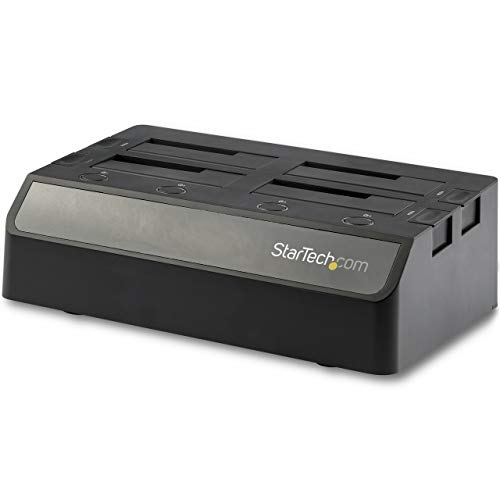
- 10Gbps USB 3.2 Gen 2 host connection
- Independent controllers enable hot-swapping
- Dual fans support drive cooling
Best For: IT workflows requiring fast, frequently swapped drives
High-Capacity Duplication Hub

- Five bays support up to 100TB total
- 1:4 offline duplication with one button
- Aluminum vertical design with USB-C connectivity
Best For: Large storage libraries and multi-copy drive duplication
Simple Hot-Swap Storage Enclosure
CENMATE 647U3-1 4-Bay Enclosure

- Four tool-free bays for SATA HDDs and SSDs
- Hot-swappable drive replacement
- USB 3.0 with USB-A/C cable support
Best For: Plug-and-play multi-drive storage on Windows, Mac, or Linux
Best Dual-Bay Cloner

- Offline 1-to-1 cloning without a computer
- Reads and writes two SATA drives at once
- Tool-free 2.5-inch and 3.5-inch bays
Best For: SATA drive cloning and two-drive file transfers
Best Single-Bay Value

- Supports SATA drives up to 22TB
- UASP and USB 3.0 reach up to 5Gbps
- Tool-free, hot-swappable single-drive bay
Best For: Routine SATA backups and cross-platform drive access
Best Professional Duplicator

- Four bays enable standalone 1:3 duplication
- Quick and Secure Erase modes included
- Supports SATA and IDE drives
Best For: IT teams handling duplication and drive sanitization
Best Multi-Drive DAS

- Five independent 3.5-inch SATA bays
- 10Gbps USB-C connection
- Quiet PWM cooling and hot-swap design
Best For: High-capacity JBOD desktop storage
Best Offline Cloning Dock

- Works with 2.5- and 3.5-inch SATA drives
- Offline cloning without a PC
- UASP-enabled 5Gbps transfers
Best For: Drive migration and two-drive backups
Best IT-Pro Quad-Bay Dock

- Four tool-less 2.5/3.5-inch SATA bays
- Independent controllers support hot swapping
- Dual fans and two-year warranty
Best For: Professional drive imaging and diagnostics
Flexible Four-Drive Workstation – Sabrent DS-U3B4 4-Bay Dock
For straightforward commercial-grade hard drive docking stations use, the Sabrent DS-U3B4 combines four trayless SATA bays with USB 3.0 access and offline cloning. It is a practical choice for backups, drive maintenance, and managing several 2.5-inch or 3.5-inch drives from one powered unit.
Best For: Users who need four-drive access and computer-free drive cloning.
Pros:
- Supports up to four 2.5-inch or 3.5-inch SATA HDDs and SSDs.
- Offline drive-to-drive cloning works without a computer.
- Trayless, tool-free design simplifies drive insertion and removal.
- USB 3.0 provides transfers up to 5Gbps and works with USB 2.0 systems.
Cons:
- Cloning requires the dock to be powered off before drive insertion.
- USB 3.0 is slower than newer 10Gbps docking options.
The DS-U3B4 emphasizes versatility rather than maximum interface speed. Its four bays, external power adapter, and standalone cloning function make it a useful general-purpose dock for small offices, technicians, and home labs.
IT-Pro Throughput Pick – StarTech SDOCK4U313 4-Bay Dock
The StarTech SDOCK4U313 is one of the more performance-focused commercial-grade hard drive docking stations in this group, pairing four hot-swappable SATA bays with a 10Gbps USB 3.2 Gen 2 host connection. Independent controllers and dual fans make it well suited to repeated drive handling and sustained workstation use.
Best For: IT professionals and advanced users who need fast, independently controlled drive bays.
Pros:
- USB 3.2 Gen 2 supports data rates up to 10Gbps.
- Four tool-less, trayless bays accept 2.5-inch and 3.5-inch SATA drives.
- Independent controllers support hot-swapping without interrupting other bays.
- Dual 60mm fans help manage drive temperature.
Cons:
- The unit is relatively large and weighs 4.9 pounds.
- An IDE adapter is sold separately for non-SATA drives.
With USB-A and USB-C cables included, universal power support, and a two-year warranty with lifetime 24/5 multilingual technical assistance, this is a strong fit for professional workflows that prioritize speed and serviceability.
High-Capacity Duplication Hub – ORICO 6656C3-C 5-Bay Dock
The ORICO 6656C3-C stands out among commercial-grade hard drive docking stations for its five-bay layout and 1:4 offline duplication mode. Its aluminum construction, vertical design, and USB-C connectivity suit photographers, professionals, and others managing large collections of SATA storage.
Best For: High-capacity storage management and making multiple drive copies without a computer.
Pros:
- Supports five 2.5-inch or 3.5-inch SATA drives up to 20TB each.
- 1:4 offline duplication can create four copies with one button.
- Aluminum housing and vertical orientation support heat dissipation.
- Includes a USB-C-to-C/A cable for flexible host connections.
Cons:
- USB 3.2 Gen 1 is rated up to 5Gbps, not 10Gbps.
- Offline cloning overwrites target disks, so backups are necessary first.
The ORICO is particularly appealing when capacity and duplication are more important than peak transfer speed. S.M.A.R.T. and TRIM support add useful drive-management functionality, while the anti-vibration pads help stabilize the vertical dock.
Simple Hot-Swap Storage Enclosure – CENMATE 647U3-1 4-Bay Enclosure
The CENMATE 647U3-1 offers a straightforward approach to commercial-grade hard drive docking stations, with four tool-free bays, hot swapping, and USB 3.0 connectivity. It supports up to 20TB per drive and works with Windows, Mac, and Linux systems.
Best For: Users who want plug-and-play access to multiple SATA drives across common operating systems.
Pros:
- Four bays accept 2.5-inch and 3.5-inch SATA HDDs and SSDs.
- Hot-swappable, tool-free design speeds drive changes.
- USB 3.0 supports transfers up to 5Gbps.
- USB-A and USB-C cable support improves host compatibility.
Cons:
- It does not list an offline cloning function.
- USB 3.0 is less bandwidth than 10Gbps alternatives.
For everyday external storage expansion, the CENMATE focuses on convenience and broad platform support rather than advanced duplication features. Its four-bay capacity and hot-swap operation make it useful for organized drive access on a desktop or laptop.
Best Dual-Bay Cloner – Sabrent EC-CH2B
The Sabrent EC-CH2B is a practical choice among commercial-grade hard drive docking stations when you need two SATA drives accessible at once and want offline cloning without a computer. Its tool-free bays accept bare 2.5-inch and 3.5-inch SATA HDDs and SSDs, while USB-C provides up to USB 3.0 transfer speeds.
Best For: Home labs, technicians, and users who regularly clone or transfer data between two SATA drives.
Pros:
- Offline 1-to-1 cloning works without a connected computer.
- Two drives mount as separate volumes for simultaneous file access.
- Tool-free, hot-swappable bays support both 2.5-inch and 3.5-inch SATA drives.
- USB-C connectivity and plug-and-play Windows and Mac support.
Cons:
- Supports SATA drives only; IDE, SAS, M.2, and NVMe drives are unsupported.
- Offline cloning requires the target drive to be the same size as or larger than the source.
- The included cable is USB-C to USB-C, so a USB-C computer port or separate adapter cable may be needed.
With dual-drive access and a dedicated cloning button, this dock is well suited to straightforward SATA backup and migration work. Its limitations are mainly interface-related, so confirm your drives and host port match before buying.
Best Single-Bay Value – ORICO DD18U3-US
The ORICO DD18U3-US is a simple single-drive option for commercial-grade hard drive docking stations, supporting 2.5-inch and 3.5-inch SATA HDDs and SSDs up to 22TB. Its tool-free, hot-swappable design, UASP support, and included USB-A cable make it convenient for backups, disk imaging, and everyday drive access.
Best For: Users who need an affordable, single-drive SATA dock for PCs, laptops, routers, smart TVs, or compatible gaming systems.
Pros:
- Supports 2.5-inch and 3.5-inch SATA I/II/III drives up to 22TB.
- UASP and USB 3.0 support provide transfer rates up to 5Gbps.
- Tool-free hot-swapping with dust protection, LED indicators, and an anti-skid pad.
- Compatible with Windows, macOS, Linux, iPadOS devices with Thunderbolt, and Raspberry Pi.
Cons:
- Only one drive can be docked at a time.
- Does not support IDE or SAS drives.
- New or unallocated drives may need initialization and formatting in Disk Management before recognition.
The ORICO offers broad platform compatibility and a high stated drive-capacity limit in a compact format. It is a sensible pick for routine SATA access, though users needing cloning or simultaneous two-drive operation should choose a more specialized dock.
Best Professional Duplicator – StarTech SATDOCK4U3RE
The StarTech SATDOCK4U3RE is the most capable option here for commercial-grade hard drive docking stations, combining four drive bays with standalone 1:3 duplication and drive-erasure functions. It handles 2.5-inch and 3.5-inch SATA and IDE drives, connects over USB 3.0 or eSATA, and includes menu controls for cloning, wiping, and checking drive information.
Best For: IT professionals, service desks, and deployment workflows that require multi-drive duplication, sanitization, and drive access.
Pros:
- Four-bay design supports standalone 1:3 sector-by-sector duplication.
- Provides Quick Erase and Secure Erase aligned with NIST SP 800-88 Rev. 1 Purge.
- Supports 2.5-inch and 3.5-inch SATA and IDE HDDs and SSDs.
- USB 3.0 and eSATA host connections, LCD menu navigation, and drive eject buttons.
Cons:
- Target drives must be equal to or larger than the source for duplication.
- Its larger 2.4-pound design is less convenient than a compact single-bay dock.
- Standalone duplication is listed at up to 4.2GB per minute, so actual results depend on the drives.
This StarTech model is designed for repeatable professional workflows rather than casual file transfers. The four bays, IDE adapters, and erasure modes justify its more specialized design for teams handling migrations, recovery, or retired-drive sanitization.
Best Multi-Drive DAS – 5-Bay USB-C Enclosure
For buyers comparing commercial-grade hard drive docking stations, the SABRENT DS-SC5B stands out as a five-bay USB-C DAS enclosure for centralized access to multiple 3.5-inch SATA drives. Its independent controllers, 10Gbps connection, tray-less bays, and temperature-controlled cooling suit demanding desktop storage workflows, though the drives must be purchased separately.
Best For: Users who need reliable, high-capacity access to up to five 3.5-inch SATA HDDs or SSDs from one computer.
Pros:
- Five independent bays support up to 100TB total capacity.
- USB-C 10Gbps connectivity and dedicated controllers provide stable multi-drive access.
- PWM-controlled 120mm cooling, hot-swap bays, per-bay switches, and activity LEDs add practical usability.
- Supports Windows, macOS, and Linux, with daisy-chaining and a one-year warranty.
Cons:
- Drives are not included.
- It is JBOD-style DAS, not a hardware RAID system or NAS.
- Designed for 3.5-inch drives rather than a mixed 2.5/3.5-inch bay configuration.
The DS-SC5B is a strong choice when independent drive access, quiet active cooling, and five-bay capacity matter more than built-in RAID. Its USB-C interface and reinforced aluminum housing make it particularly suitable for workstation and backup setups.
Best Offline Cloning Dock – Dual-Bay USB-C Dock
The BENFEI dual-bay dock is a practical option among commercial-grade hard drive docking stations for users who need straightforward drive transfers and offline cloning. It accepts both 2.5- and 3.5-inch HDDs or SSDs, supports simultaneous two-drive operation, and can clone a source drive without a computer.
Best For: Backup, drive migration, and offline cloning involving one source and one target SATA drive.
Pros:
- Dual bays support simultaneous use of 2.5- and 3.5-inch HDDs or SSDs.
- One-button offline cloning works without a connected PC.
- UASP and USB 3.1 Gen 1 provide transfer speeds up to 5Gbps.
- Dedicated 12V/2.5A power and an 18-month warranty support dependable operation.
Cons:
- The target drive must have capacity equal to or greater than the source for cloning.
- USB transfer speeds top out at 5Gbps rather than 10Gbps.
- Users should switch off power before inserting or removing drives.
Choose the BENFEI when simple two-drive management and computer-free cloning are priorities. It is less suited to large multi-drive arrays, but its tool-free dual-bay layout keeps common backup and upgrade tasks uncomplicated.
Best IT-Pro Quad-Bay Dock – Hot-Swap SATA Dock
For IT teams comparing commercial-grade hard drive docking stations, the StarTech.com SDOCK4U33 provides four top-loading SATA bays for quick file transfers, backups, and imaging. Independently powered controllers, tool-free hot swapping, and dual fans make it a practical fit for repeated drive handling in professional environments.
Best For: IT professionals who regularly access, image, or swap multiple 2.5- or 3.5-inch SATA drives.
Pros:
- Four bays accept 2.5- and 3.5-inch SATA HDDs and SSDs of any capacity.
- Independently powered controllers allow hot swapping without interrupting other bays.
- Tool-less top-loading design includes eject buttons and LED activity indicators.
- Dual 40mm fans, TRIM support, a two-year warranty, and lifetime multilingual technical assistance add professional appeal.
Cons:
- Uses a 5Gbps USB 3.2 Gen 1 host connection.
- An IDE adapter is sold separately.
- The included connection is USB-A rather than USB-C.
The SDOCK4U33 is a sensible professional dock for frequent drive swaps and multi-disk diagnostics. Its four independent bays and IT-oriented support are valuable, although users seeking USB-C 10Gbps performance or built-in RAID will need a different design.
How We Picked These Commercial-Grade Hard Drive Docking Stations
We focused on docks and enclosures designed for repeated use with bare 2.5-inch and 3.5-inch SATA hard drives or SSDs. Key considerations included the number of bays, USB or eSATA connectivity, advertised transfer speeds, hot-swapping and tool-free access, offline cloning, cooling, and support for professional storage workflows.
Because “commercial-grade” can describe different use cases, this list includes both compact dual-bay units and higher-capacity four- or five-bay models. Some prioritize direct-attached storage, while others are built for standalone duplication, erasing, or drive testing.
Quick Comparison
- Best for multiple active drives: Four- and five-bay docks provide more simultaneous access and reduce drive swapping.
- Best for cloning: Choose a model with offline clone support when you need drive-to-drive duplication without a computer.
- Best for speed: Look for USB 3.1 or USB-C 10Gbps connectivity, while remembering that actual speed depends on the drive and host system.
- Best for mixed workflows: A dock supporting both 2.5-inch and 3.5-inch SATA drives offers the broadest compatibility.
Key Buying Factors for Commercial-Grade Hard Drive Docking Stations
Bay Count and Drive Format
Two bays are usually sufficient for occasional cloning or backup work. Four or five bays are more practical for technicians, labs, and users who routinely compare, copy, or access several drives. Confirm that the dock supports both 2.5-inch and 3.5-inch SATA devices if your inventory includes desktop hard drives.
Connectivity and Real-World Speed
USB 3.0 supports everyday backups and drive access, while USB 3.1 or USB-C 10Gbps offers more headroom for fast SSDs. The slowest component—the drive, interface, cable, or computer—sets the practical limit. UASP support can also improve performance and reduce overhead with compatible systems.
Cloning, Erasing, and Cooling
Offline cloning is valuable when copying a source drive directly to a destination without running software. Dedicated duplicators may add one-to-many copying or secure erasing features. For long transfers, check for active cooling, ventilation, stable power, and safeguards against accidentally removing an active drive.
Compatibility and Workflow Details
Verify operating-system support, SATA-generation compatibility, included power supplies, cable types, and whether the dock requires separate software. A tool-free design saves time, but a secure drive fit and clear status indicators matter just as much in frequent-use environments.
Who Should Buy Which Commercial-Grade Hard Drive Docking Stations?
Home backup users can typically choose a compact dual-bay dock with USB-C and offline cloning. IT technicians and repair professionals should favor four- or five-bay models, stronger cooling, and fast 10Gbps connectivity. Data-recovery and migration workflows benefit from standalone duplicators or erasers with dedicated controls. Users building temporary external storage should prioritize a multi-bay enclosure or DAS-style dock with dependable cooling and adequate capacity.
Before buying, match the dock to your drive sizes, required bay count, host ports, and security procedures. Also remember that a docking station is not a backup by itself: maintain separate copies of important data and safely eject drives before removal.