Large format scanners make it easier to digitize oversized drawings, artwork, books, maps, and office documents without folding or stitching pages together. The right model depends on your media size, scanning volume, image-quality requirements, and available workspace.
We compared 10 large format scanners across flatbed, sheetfed, wide-format, and overhead designs to help you find a practical fit for professional, educational, creative, and archival use.
Best 10 Large Format Scanners Picks for 2026
Best A3 Flatbed Pick

- 12-by-17-inch scan area
- OCR and batch scanning
- Windows, Mac, and Linux support
Best For: A3 maps, drawings, books, and odd-shaped originals
Best Wide-Format Specialist
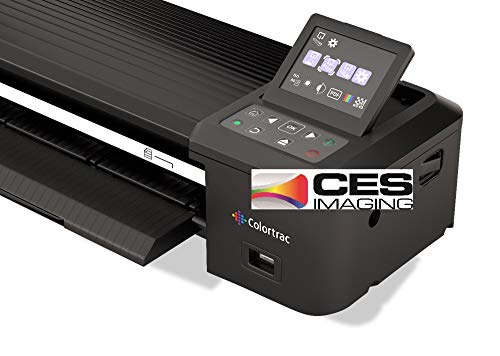
- 36-inch scanning width
- 600 resolution with 24-bit color
- Ethernet connectivity
Best For: Very wide paper documents and networked Windows setups
Best Sheetfed Option

- 600 dpi optical resolution
- 120-sheet capacity
- Supports cards, passports, and postcards
Best For: Office batches and mixed business documents
Best Book-Scanning Camera

- Scans documents up to A3 size
- Book-page flattening technology
- 24MP camera with OCR
Best For: Books, magazines, artwork, and desk-based A3 materials
Fast Tabloid Scanning

- Scans tabloid pages quickly
- Four programmable one-touch buttons
- TWAIN and ICA compatibility
Best For: Offices needing fast, easy tabloid flatbed scanning
High-Resolution A3 Scanning

- Four-second A3 color scans at 200 dpi
- Up to 2400 dpi optical resolution
- Frameless glass and Auto-Scan function
Best For: A3 technical documents, artwork, and flat oversized materials
Office Workflow Pick
Plustek S30 Wide Format Scanner

- Scans documents up to 12 inches wide
- Automatic size and blank-page detection
- Supports carrier sheets for fragile paper
Best For: High-volume offices scanning mixed-size documents
Best A3 Flatbed Value

- A3 scanning area for oversized originals
- 1200 dpi optical resolution and 48-bit color
- Fast scans with auto-scan and one-touch controls
Best For: Flat artwork, books, photos, and office documents
Best Simple A3 Workflow

- Supports A3 documents up to 11.7 x 17 inches
- Approximate nine-second A3 scanning
- Includes OCR and shortcut-button software
Best For: Schools, libraries, and small offices
Best for Books and Oversized Originals

- Captures A2-size books, maps, and documents
- 26MP overhead camera with adjustable A2/A3 height
- Auto-flattening, finger removal, page splitting, and OCR
Best For: Books, manuscripts, maps, and delicate oversized materials
Best A3 Flatbed Pick – Plustek OpticPro A320E
For maps, drawings, bound books, and other oversized originals, the Plustek OpticPro A320E is a practical choice among large format scanners. Its 12-by-17-inch scan area accommodates A3 documents and unusual shapes, while TWAIN and WIA support helps it work with compatible scanning software.
Best For: Home offices, studios, and professionals digitizing A3 artwork, maps, drawings, or bound material.
Pros:
- 12-by-17-inch flatbed scan area handles A3 and wide-format originals.
- OCR can create searchable PDF content.
- Batch scanning supports multiple images and multiple PDF files.
- Supports Windows, macOS, and Linux/SANE with the appropriate driver.
Cons:
- Its 24.53-inch width requires substantial desk space.
- Linux and SANE support may require contacting the seller first.
- Color depth is listed as 8 bpp.
The A320E stands out when a true flatbed surface matters more than compact size. Doc Action shortcuts, OCR, and broad driver support add useful workflow flexibility for regular large-document scanning.
Best Wide-Format Specialist – Colortrac SmartLF 36-inch
The Colortrac SmartLF is designed for users who need a substantially wider capture area than typical A3 large format scanners. With a 36-inch width, 600 resolution, 24-bit color, and Ethernet connectivity, it is suited to wide paper-based originals in a Windows 7 environment.
Best For: Workgroups and technical users scanning very wide paper documents over a network connection.
Pros:
- 36-inch wide scanning accommodates oversized originals.
- 600 resolution supports detailed document capture.
- 24-bit color depth supports color scanning.
- Ethernet connection can suit shared or networked setups.
Cons:
- The supplied specifications list Windows 7 as the minimum system requirement.
- Its 31-pound weight makes it less convenient to move.
- The notes provide limited information about software features and workflow tools.
This model is best evaluated as a dedicated wide-format scanner rather than a general-purpose desktop device. Its main advantage is the 36-inch scanning width, especially where A3-class equipment is not large enough.
Best Sheetfed Option – Epson WorkForce DS-30000
The Epson WorkForce DS-30000 offers a sheetfed approach for users who need to process large documents without using a flatbed. Among large format scanners, it combines 600 dpi optical resolution, 30-bit color depth, and a 120-sheet capacity, with support for varied media such as cards, passports, and postcards.
Best For: Offices scanning batches of large documents and mixed business media.
Pros:
- Sheetfed design is suitable for scanning large document batches.
- 600 dpi optical resolution supports detailed captures.
- 30-bit color depth helps preserve color detail.
- Handles business cards, IDs, passports, plastic cards, and postcards.
Cons:
- The supplied minimum system requirement lists Windows 7 only.
- It is a sheetfed model, so it is less suited to bound books or rigid originals.
- The listed 120-sheet capacity may not fit every high-volume workflow.
Choose the DS-30000 when document throughput and media flexibility matter more than scanning books or unusual rigid items. Its three-year manufacturer warranty is another useful consideration for office buyers.
Best Book-Scanning Camera – CZUR ET24 Pro
The CZUR ET24 Pro takes a camera-based approach to large format scanners, covering documents up to A3 size while adding book-flattening technology and OCR. Its 24MP camera, three-angle lighting, HDMI support, and compatibility with Windows, macOS, and selected Linux systems make it particularly versatile for books and desk-based materials.
Best For: Digitizing books, magazines, artwork, receipts, and A3 documents without placing them on a conventional flatbed.
Pros:
- Scans materials up to A3 size, including books and magazines.
- Flattening technology helps correct curved book pages.
- 24MP camera provides 5696-by-4272 resolution and 320 dpi.
- ABBYY OCR supports editable PDF, Excel, and Word output in over 180 languages.
Cons:
- Very glossy paper is not recommended.
- Some OCR language support is limited, including Thai and Hebrew.
- Linux compatibility is limited to Ubuntu 20.04 through 24.04.
The ET24 Pro is a strong fit when books and three-dimensional materials are central to the job. Its lighting controls and page-flattening features add capability, but buyers should check paper glare and OCR-language requirements before choosing it.
Fast Tabloid Scanning – Plustek OpticSlim 1680
The Plustek OpticSlim 1680 is a practical choice among large format scanners for offices that regularly digitize tabloid or 11.7-by-17-inch documents. It scans tabloid pages in about three seconds at 300 dpi in grayscale or five seconds in color, while four programmable buttons simplify repeat workflows.
Best For: Offices and users who need fast, straightforward tabloid scanning with broad Windows and Mac software compatibility.
Pros:
- Fast tabloid scanning at commonly used 300 dpi settings.
- Four configurable one-touch buttons support repeat tasks.
- 1200 dpi resolution and 48-bit color depth provide detailed captures.
- TWAIN and ICA support works with many Windows and Mac applications.
Cons:
- USB connectivity is the listed connection option.
- Its flatbed design has a one-sheet standard capacity rather than automatic document feeding.
- Maximum supported document size is smaller than some A3 scanners.
The OpticSlim 1680 balances speed, simple controls, and compatibility in a compact flatbed format. It is a strong fit when tabloid scanning is the priority and one-touch operation matters more than batch feeding.
High-Resolution A3 Scanning – VIISAN VF3240 A3 Scanner
The VIISAN VF3240 stands out among large format scanners for A3 documents, CAD drawings, blueprints, and other flat oversized materials. It combines a four-second A3 color scan at 200 dpi with up to 2400 dpi optical resolution, though maximum resolution and driver limits vary by operating system.
Best For: Designers, engineers, schools, offices, and archives digitizing A3 documents, artwork, blueprints, or other flat materials.
Pros:
- Fast four-second A3 color scanning at 200 dpi under specified conditions.
- Frameless glass supports edge-to-edge scanning of large materials.
- Up to 2400 x 2400 dpi optical resolution with 48-bit color depth.
- Auto-Scan and four dedicated buttons streamline repeated workflows.
Cons:
- Designed for flat materials and not recommended for 3D objects or bulky items.
- Windows WIA scanning is limited to 600 dpi, while full A3 2400 dpi requires MacOS with the native ICA driver.
- Actual scan times vary with resolution, document size, and settings.
The VF3240 is a versatile A3 flatbed for users who value both speed and detailed output. Its operating-system-specific resolution limitations are important to check, but its frameless design and large scanning area make it well suited to technical and archival work.
Office Workflow Pick – Plustek S30 Wide Format Scanner
The Plustek S30 is one of the more office-focused large format scanners, handling documents up to 12 inches wide alongside standard A4 or Letter pages. Automatic paper-size detection, blank-page removal, and job-button shortcuts make it useful for offices processing mixed-size paperwork, plans, and thin documents.
Best For: High-volume offices that need to scan mixed standard and wide documents without purchasing a separate wide-format scanner.
Pros:
- Handles documents up to 12 inches wide, including tabloid, ledger, and A3 formats.
- Automatic size detection and blank-page removal simplify mixed-document batches.
- Supports fragile or thin documents with a carrier sheet.
- Can be stored upright to conserve workspace.
Cons:
- Listed resolution is 600 dpi, below the maximum resolution of the other featured models.
- USB is the listed connection type and Windows 7 is the stated minimum system requirement.
- Wide-format handling is limited to documents up to 12 inches wide.
The S30 is a practical productivity choice rather than a specialist high-resolution flatbed. Its strongest advantages are mixed-size paper handling, automatic detection, carrier-sheet support, and a space-conscious design for everyday office scanning.
Best A3 Flatbed Value – VIISAN 3120
For buyers comparing large format scanners for artwork, books, photos, or office documents, the VIISAN 3120 combines an A3 scanning area with 1200 dpi optical resolution. Its frameless design accommodates larger and thicker materials, while auto-scan and one-touch controls help streamline repeated scans.
Best For: Schools, libraries, home offices, graphic designers, and digital publishing projects involving flat A3-size materials.
Pros:
- Scans documents up to approximately 11.98 x 16.8 inches.
- 1200 x 1200 dpi optical resolution with 48-bit color depth.
- Eight-second A3 color scans at 200 dpi, with no warm-up time.
- Works with supported Windows and macOS systems and includes a universal power adapter.
Cons:
- CIS technology is intended for flat items, not three-dimensional objects.
- Windows WIA scanning is limited to 600 dpi; 1200 dpi requires compatible software.
- The scanner has a large desktop footprint.
The VIISAN 3120 is a practical choice when you want fast, detailed A3 flatbed scans without sacrificing access to books, albums, and other oversized originals. It is less suitable for raised or irregular objects.
Best Simple A3 Workflow – Plustek OS1180
The Plustek OS1180 is among the more straightforward large format scanners for digitizing A3 and tabloid documents. Its LED light source avoids warm-up delays, while shortcut buttons and bundled OCR software support repeat scanning and document conversion.
Best For: Libraries, schools, small offices, and users who need an uncomplicated A3 scanner with OCR and file-sharing software.
Pros:
- Handles A3 originals up to 11.7 x 17 inches.
- Scans an A3 document in approximately nine seconds.
- Provides 1200 dpi resolution and 48-bit color depth.
- Includes ABBYY FineReader, PageManager, and DocAction software.
Cons:
- USB 2.0 connectivity may be slower than newer interfaces.
- Designed for single-sheet scanning rather than high-capacity batch work.
- Its substantial A3 footprint requires dedicated desk space.
The OS1180 makes sense for organizations that value a familiar flatbed workflow and bundled OCR tools. It offers useful A3 capability without adding the complexity of an overhead book-scanning system.
Best for Books and Oversized Originals – VIISAN S21 A2 Book Scanner
If your large format scanners shortlist includes books, maps, manuscripts, or objects that cannot lie flat, the VIISAN S21 offers a flexible overhead design. It captures up to A2 size at 26MP and uses software features to flatten curved pages, remove fingers, split spreads, and apply OCR.
Best For: Archives, researchers, libraries, educators, and users digitizing books, newspapers, maps, and other oversized or delicate materials.
Pros:
- Captures A2 originals up to 594 x 420 mm and adjusts for A2 or A3 work.
- 26MP capture with software-enhanced output up to 600 dpi.
- Automatically flattens curved pages and separates facing-page spreads.
- Built-in OCR can export editable Word, Excel, EPUB, and text files.
Cons:
- Bundled OfficeCam software does not support ARM-based devices.
- Glare-prone papers are not recommended, and built-in lighting is less useful in bright conditions.
- Overhead capture requires setup space and software processing.
The S21 is the strongest fit here for non-flat originals and book preservation. Its overhead format and correction tools provide capabilities a conventional flatbed cannot, though buyers should verify computer compatibility before purchasing.
How We Picked These Large Format Scanners
We selected models that cover the main ways buyers scan oversized material: flatbed scanners for rigid originals and detailed images, sheetfed scanners for document-heavy workflows, wide-format units for technical drawings, and overhead book scanners for bound or delicate material. We considered maximum scan area, advertised optical resolution, scan speed, handling convenience, software features, connectivity, and suitability for different workloads.
Specifications can vary by operating system, scan mode, document type, and resolution. Treat quoted speeds as best-case figures, especially when scanning in color or at high detail.
Quick Comparison
| Scanner Type | Best For | Typical Strength | Main Limitation |
|---|---|---|---|
| A3 or tabloid flatbed | Photos, artwork, documents, and occasional oversized originals | Consistent image quality and simple operation | Requires manual page placement |
| Wide-format scanner | CAD plans, maps, posters, and technical drawings | Handles long or wide originals | Usually larger and more specialized |
| Large-format sheetfed scanner | High-volume office document capture | Faster batch processing | Less suitable for fragile or rigid originals |
| Overhead book scanner | Books, bound volumes, and delicate materials | Non-contact capture with page-flattening tools | Needs controlled lighting and positioning |
Key Buying Factors for Large Format Scanners
Maximum Scan Size
Confirm the actual bed or capture area before buying. A3 and 11-by-17-inch models suit most ledger documents and artwork, while architectural and engineering users may need a 36-inch wide scanner or a system designed for longer media.
Resolution and Image Quality
Optical resolution matters more than interpolated resolution. For ordinary documents, 300 to 600 dpi is usually sufficient. Photos, line art, film, and detailed illustrations benefit from higher optical resolution, accurate color reproduction, and a sensor that produces even results across the scan bed.
Speed and Workflow
Look beyond a single advertised scan time. Automatic document feeding, duplex scanning, one-touch controls, batch software, and reliable paper handling can matter more than peak resolution speed. Overhead scanners may be faster for books because they avoid repeated page removal and repositioning.
Original Handling
Flatbeds are the safest choice for rigid, thick, fragile, or unusual originals. Sheetfed designs are convenient for loose pages but require compatible media. Book scanners are preferable for bound volumes, especially when features such as automatic page flattening, finger removal, or curved-page correction are included.
Space, Software, and Connectivity
Measure the scanner, lid clearance, cable reach, and workspace needed to load large originals. Also check driver support, OCR, file-format options, color management, and compatibility with your operating system. These details can determine whether a scanner fits smoothly into an existing workflow.
Who Should Buy Which Large Format Scanners?
- Choose an A3 flatbed if you need an adaptable scanner for artwork, photos, books opened flat, and occasional oversized documents.
- Choose a wide-format model if your primary work involves CAD plans, maps, posters, or other originals wider than tabloid size.
- Choose a sheetfed scanner if your priority is processing stacks of loose documents quickly and consistently.
- Choose an overhead book scanner if you digitize bound books, archives, receipts, or delicate pages that should not pass through a feeder.
- Choose a higher-resolution model if you need detailed reproductions for design, photography, artwork, or archival projects.
For occasional home or small-office use, prioritize manageable size and straightforward software. Professional studios, libraries, archives, and engineering departments should prioritize duty cycle, service availability, workflow automation, and the cost of accessories or replacement parts.