The best electronic writing tablets for home offices make quick notes, reminders, sketches, and checklists easier to manage without constantly using paper. This roundup covers simple reusable LCD pads, large memo boards, and advanced digital notebooks that sync with phones.
Use the buying guide below to match screen size, erase controls, portability, battery design, and smart note-taking features to the way you work at home.
Best 10 Electronic Writing Tablets for Home Offices Picks for 2026
Simple Desk Notes
Boogie Board Basics Writing Pad

- 8.5-inch high-contrast LCD writing surface
- One-button erase with no software required
- Single-battery operation without charging cables
Best For: Temporary reminders, lists, and quick home-office notes
Connected Paper Notes
XPPen Note Plus Digital Notebook

- Writes on real A5 paper and syncs to a phone
- Bluetooth 5.3 captures strokes without scanning
- Exports notes as PNG or PDF and supports tagging
Best For: Meetings and paper-first workflows with digital backups
Shared Note Station
TIQUS 9.25-Inch LCD Tablet 2-Pack

- Two 9.25-inch reusable LCD writing boards
- Lock button preserves notes from accidental erasure
- Supports stylus or finger writing
Best For: Multiple rooms, shared reminders, and simple offline notes
Full-Featured Digital Workpad

- 10.95-inch color LCD with 90Hz refresh rate
- 16,384-pressure-level battery-free smart pencil
- Android note app with handwriting, PDF, and cloud tools
Best For: Advanced note-taking, meetings, reading, and study workflows
Best Rechargeable Pick
12-Inch Covered Writing Tablet

- Spacious 12-inch writing screen
- Rechargeable via USB Type-C
- Foldable cover and erase lock
Best For: Portable home-office notes and sketches
Best for Shared Desks
16-Inch LCD Writing Tablet 2-Pack

- Extra-large 16-inch writing area
- Two-tablet bundle for shared use
- Offline design supports note privacy
Best For: Shared desks and large-format office notes
Best Multi-Pack Value
TIQUS 8.5-Inch Writing Tablets

- Three compact tablets included
- Slim design for multiple locations
- One-year warranty listed
Best For: Shared household reminders and short office notes
Best Paper-Saving Pick
Double-Sided 10.5-Inch LCD Writing Tablet

- Double-sided full-screen writing area
- Thin, lightweight 6.8-ounce design
- One-click erase and one-year assurance
Best For: Portable home-office notes and reusable scratch work
Best Compact Memo Board
Mafiti 8.5-Inch LCD Writing Tablet
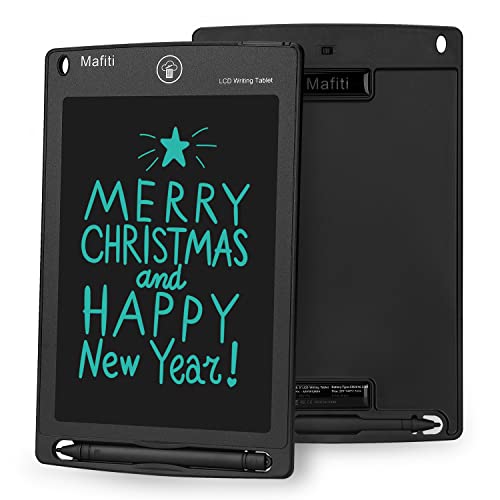
- Compact 8.5-inch writing surface
- Stylus works as a kickstand
- Replaceable CR2016 battery and erase button
Best For: Small-desk reminders and displayed messages
Best Large-Screen Pick
22-Inch Type-C LCD Writing Tablet

- Expansive 22-inch planning canvas
- Rechargeable through Type-C
- Lock switch and one-click erase
Best For: Home-office presentations, mind maps, and shared planning
Simple Desk Notes – Boogie Board Basics Writing Pad
For quick reminders and lists, the Boogie Board Basics is a low-maintenance option among electronic writing tablets for home offices. Its 8.5-inch LCD writing surface needs no software or charging cable, and the screen clears with a button press.
Best For: Around-the-house notes, task lists, and quick desk reminders.
Pros:
- Works with the included stylus or another scratch-free stylus.
- Instant erase requires only a button press.
- Runs on a single battery and needs no cord or charger.
- Bright, high-contrast LCD is easy to read.
Cons:
- Designed primarily for writing and erasing rather than saving or syncing notes.
- Its 8.5-inch surface may feel limited for longer notes.
This is a straightforward reusable writing pad rather than a connected digital notebook. Choose it when convenience, zero setup, and clutter-free temporary notes matter more than digital storage.
Connected Paper Notes – XPPen Note Plus Digital Notebook
The XPPen Note Plus brings handwritten paper notes into a phone-based workflow, making it a flexible choice among electronic writing tablets for home offices. You write on real A5 paper with its dedicated ink pen, while Bluetooth 5.3 sends strokes to a compatible Android or iOS device.
Best For: Meetings, handwritten planning, and users who want searchable, shareable digital copies of paper notes.
Pros:
- Captures handwriting on real A5 paper without manual scanning.
- Supports offline writing, then syncs when reconnected.
- Offers editing, tagging, search, and PNG/PDF sharing tools.
- Provides up to 14 hours of continuous writing and 50 days of standby.
Cons:
- Requires the matching electronic ink pen for digital capture.
- Phone compatibility is limited to Android 10 or later and iOS 14 or later.
- It does not provide a built-in electronic display for viewing notes.
This model suits people who prefer the feel of paper but need digital backups and sharing. Its replaceable A5 notebook core also helps avoid being locked into a proprietary refill format.
Shared Note Station – TIQUS 9.25-Inch LCD Tablet 2-Pack
The TIQUS two-pack offers a simple way to place reusable note boards in multiple rooms, making it a practical value pick among electronic writing tablets for home offices. Each 9.25-inch LCD pad supports handwriting, finger input, and one-button removal, with a lock function to preserve important notes.
Best For: Families, shared workspaces, and keeping separate reminder boards at home.
Pros:
- Includes two 9.25-inch LCD writing tablets.
- Brighter display and thicker handwriting than the older version, according to the supplied notes.
- Lock button helps prevent accidental erasure.
- Can be used with the stylus or a finger.
Cons:
- Standalone design does not provide note syncing or digital storage.
- The supplied warning says it is intended for users over 15 and adults.
- Best suited to temporary writing rather than saved documents.
The main advantage is quantity: one board can stay by a desk while another handles kitchen, family, or school reminders. Select it if basic reusable writing and a two-board setup are more useful than connectivity.
Full-Featured Digital Workpad – XPPen Magic Note Pad
The XPPen Magic Note Pad is the most capable option here for users who want a full Android device for writing, reading, and meetings. Its 10.95-inch color LCD, 90Hz refresh rate, battery-free X3 Pro Pencil 2, and built-in note software place it well beyond basic electronic writing tablets for home offices.
Best For: Professionals and students who want handwriting conversion, PDF work, cloud uploads, and a general Android tablet.
Pros:
- Offers 16,384 pressure levels with the included X3 Pro Pencil 2.
- 10.95-inch AG nano-etched LCD reduces ambient-light interference and supports three color modes.
- XPPen Notes supports handwriting-to-text conversion, audio recording, PDF editing, and automatic saving.
- Supports cloud uploads to OneDrive or Google Drive and includes 6GB RAM with 128GB storage.
Cons:
- It is a conventional Android tablet, not an e-ink device.
- Its broader tablet features may be more than needed for simple reminders.
- Some listed AI and handwriting features require a system upgrade to 1PAE.
This is the strongest fit when handwritten notes are part of a larger digital workflow. Its color display and Android ecosystem add flexibility, while the paper-like etched surface is intended to reduce glare rather than replicate an e-ink screen.
Best Rechargeable Pick – 12-Inch Covered Writing Tablet
For shoppers comparing electronic writing tablets for home offices, this 12-inch model offers a spacious screen, a notebook-like slim profile, and a rechargeable design. Its foldable PU cover adds portability and protection for meeting notes, lists, and sketches.
Best For: Home-office users who want a large, reusable writing surface with rechargeable USB Type-C power.
Pros:
- Large 12-inch full-screen writing area
- Rechargeable battery with USB Type-C charging
- Foldable cover helps protect the tablet during transport
- Lock switch helps prevent accidental erasure
Cons:
- Standalone design does not provide connectivity or file storage
- The screen is erased as a whole rather than saving individual notes
This is a practical choice for paperless jotting when portability, screen size, and rechargeable convenience matter more than digital file management.
Best for Shared Desks – 16-Inch LCD Writing Tablet 2-Pack
This 16-inch two-pack stands out among electronic writing tablets for home offices when you need an expansive workspace or a spare device. The large erasable surface suits meeting minutes, task lists, and drafting, while its offline design keeps notes from being transmitted or stored online.
Best For: Shared home offices, users who want two tablets, and anyone needing an extra-large memo surface.
Pros:
- Extra-large 16-inch screen for detailed notes and lists
- Two tablets support office sharing or separate work areas
- No internet connection or file storage for offline privacy
- Included replaceable coin batteries keep it ready to write
Cons:
- Notes are erased rather than saved as digital files
- Only a one-month warranty is listed
- The larger format may be less convenient for compact bags
Choose this bundle if workspace and quantity are priorities. It is less suited to users seeking synchronization, backups, or rechargeable operation.
Best Multi-Pack Value – TIQUS 8.5-Inch Writing Tablets
For compact electronic writing tablets for home offices, this TIQUS package provides three lightweight 8.5-inch pads for checklists, reminders, and quick notes. Their extra-slim design makes it easy to place one in the office, kitchen, or another frequently used area.
Best For: Households and small workspaces that need multiple compact writing pads for reminders and communication.
Pros:
- Three-tablet package supports use in multiple locations
- Portable, extra-slim 8.5-inch design
- Pressure-sensitive screen is free of glare and blue light
- One-year warranty is listed
Cons:
- Smaller screen offers less room for long notes or drawings
- Designed for writing and erasing rather than storing files
- Notes indicate use is intended for adults and children over 15
This is a sensible value option for distributed reminders and short notes. Consider a larger model if your home-office workflow involves extensive meeting minutes or detailed sketches.
Best Paper-Saving Pick – Double-Sided 10.5-Inch LCD Writing Tablet
For shoppers comparing electronic writing tablets for home offices, this Ksequ model is a lightweight option for quick notes, message-board use, editing marks, and sketches. Its double-sided full-screen design offers extra writing capacity, though it works best in brighter light.
Best For: Home-office notes, reusable scratch work, office messages, and portable planning.
Pros:
- Double-sided full-screen design provides expanded writing space.
- At 0.2 inches thick and 6.8 ounces, it is easy to carry.
- One-click clearing supports repeated use and can reduce paper waste.
- Includes a one-year quality assurance promise.
Cons:
- Handwriting may be difficult to see in weak light.
- It does not list connectivity or a supported operating system.
This is a practical choice if your home office needs a reusable note surface rather than a connected digital display. Its portability and two-sided screen are useful advantages, but brightness should be considered before buying.
Best Compact Memo Board – Mafiti 8.5-Inch LCD Writing Tablet
The Mafiti 8.5-inch pad is a compact choice among electronic writing tablets for home offices, especially when you need a simple memo board for short reminders. It includes a stylus, lock-protection switch, built-in stylus storage, and a replaceable coin-cell battery.
Best For: Small-desk reminders, shared messages, quick lists, and portable home-office notes.
Pros:
- One-button erase makes clearing notes quick.
- Lock-protection switch helps prevent accidental deletion.
- Stylus doubles as a kickstand, with a built-in storage dock.
- Thin, lightweight construction weighs 3.84 ounces.
Cons:
- The 8.5-inch screen provides less writing space than larger models.
- It uses a replaceable CR2016 coin-cell battery rather than USB charging.
Choose this model when desk space and portability matter more than a large canvas. The kickstand and lock switch make it especially convenient for displaying a short message or keeping a small task list visible.
Best Large-Screen Pick – 22-Inch Type-C LCD Writing Tablet
For home offices that need a broad planning or presentation surface, this 22-inch Szhsk tablet stands out among electronic writing tablets for home offices. Its giant canvas supports mind mapping, drafting, note-taking, and shared writing, while Type-C recharging eliminates disposable batteries.
Best For: Large-format planning, presentations, mind maps, shared writing, and desktop whiteboard use.
Pros:
- 22-inch canvas offers substantially more room than standard smaller pads.
- Built-in battery recharges through a Type-C port.
- One-click erase clears the screen quickly.
- Screen-lock switch helps protect notes and artwork from accidental deletion.
Cons:
- The large 22-inch footprint may require considerable desk space.
- The supplied warranty description is limited to one month.
- It is a writing and drawing pad, not a listed computer-connected display.
This is the strongest fit for users who want a visible desktop whiteboard for planning or presentations. Its rechargeable design is convenient, but the oversized format and short stated warranty make it less suitable for compact workspaces or buyers seeking a conventional monitor.
How We Picked the Best Electronic Writing Tablets for Home Offices
We grouped these Electronic Writing Tablets for Home Offices by their intended use: quick disposable-style notes, reusable household lists, large-format writing, and digital notebooks designed for saving or syncing work. We also considered screen size, writing comfort, portability, erasing methods, power requirements, included accessories, and whether a tablet offers connected features such as phone synchronization.
Because these products vary substantially, the “best” option depends less on a single specification and more on how you plan to capture and retrieve information.
Quick Comparison
| Best For | What to Look For | Recommended Type |
|---|---|---|
| Daily reminders and short notes | Fast erase, lightweight design | Small LCD writing pad |
| Household checklists | Reusable screen and simple controls | Multi-pack or mid-size tablet |
| Meetings and project notes | Stylus precision and storage | Digital notebook |
| Visible shared notes | Large screen and sturdy cover | 12- to 22-inch tablet |
| Travel or flexible workspaces | Low weight and rechargeable power | Portable rechargeable model |
Key Buying Factors for Electronic Writing Tablets for Home Offices
Screen Size and Writing Area
Small tablets are convenient beside a keyboard, on a refrigerator, or in a bag. Larger models are better for calendars, brainstorming, teaching, and shared family messages, but they need more desk or wall space.
Erase and Power Design
One-touch erase is convenient for temporary notes, while a lock switch can prevent accidental deletion. Check whether the product uses a replaceable coin cell, rechargeable battery, or no rechargeable power at all. Rechargeable models are useful for frequent writing, but they may need charging before use.
Basic LCD Pad or Smart Notebook
Most LCD writing tablets are designed for write-and-erase use and do not automatically save content. If you need searchable notes, phone syncing, or digital backups, choose a connected notebook and confirm its app compatibility, storage method, and included pen.
Pen, Pressure, and Comfort
Look for a stylus that feels secure in the hand and stores with the tablet. Pressure sensitivity matters more for drawing and expressive handwriting than for checklists. A magnetic folio or protective cover can improve portability and help protect the screen.
Who Should Buy Which Electronic Writing Tablets for Home Offices?
Choose a compact LCD pad if you mainly write phone numbers, reminders, shopping lists, or short messages and want the lowest-maintenance option.
Choose a multi-pack if several people need separate tablets or you want dedicated boards for the kitchen, office, entryway, and home-school area.
Choose a large-format tablet if visibility is more important than portability. These are useful for schedules, collaborative brainstorming, and reminders that need to be seen from across a room.
Choose a rechargeable model if you write frequently and prefer not to depend on disposable batteries. Check charging connectivity and expected battery behavior before buying.
Choose a synced digital notebook if your notes need to move beyond the screen. These models are the better fit for meetings, study, project planning, and anyone who wants a digital record rather than a temporary memo.