The best electronic writing tablets for professionals make handwritten notes easier to organize, search, edit, and carry between meetings, projects, and creative work.
This roundup compares 10 notable options, including distraction-free e-paper notebooks, color digital note-taking tablets, and pen tablets designed for detailed creative workflows.
Best 10 Electronic Writing Tablets for Professionals Picks for 2026
Color Android Note-Taking Powerhouse

- 10.95-inch anti-glare color LCD with three display modes
- Battery-free stylus with 16,384 pressure levels
- Android 14 with note, PDF, AI, and cloud features
Best For: Professionals needing color, apps, and advanced digital note-taking
Focused E Ink Work Companion

- 11-inch glare-free display with adjustable front light
- Paper-like writing surface with included no-charge pen
- AI note tools and cloud document markup support
Best For: Professionals focused on reading, writing, and distraction-free review
Creative Color Sketching Tablet

- 10.95-inch anti-glare color display with three modes
- 16,384 pressure levels and tilt-supporting battery-free pen
- Android 14 with XPPen Notes and Google Play access
Best For: Creative professionals combining sketching, annotation, and notes
Premium Paper-Like Color Notebook

- 11.8-inch color E Ink display with adjustable reading light
- Marker Plus includes built-in eraser and spare tips
- Folders, PDF markup, and handwriting-to-text conversion
Best For: Professionals wanting a focused, premium digital notebook
Best Focused E-Reader Notebook

- 10.2-inch glare-free, 300 ppi display
- AI handwriting conversion and note summaries
- Reads, writes, and marks up documents
Best For: Distraction-free reading, writing, and PDF annotation
Best Ultraportable Color Notebook
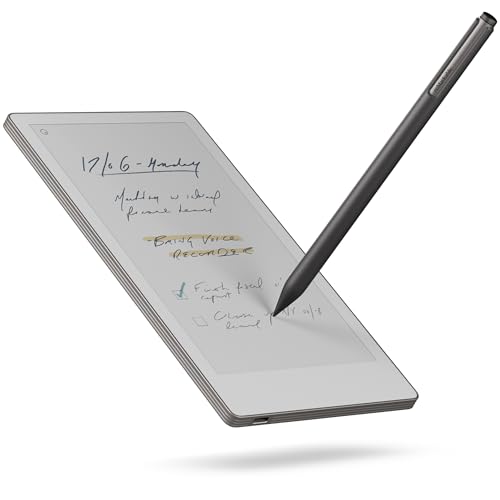
- Compact 7.3-inch color paper-like display
- Handwriting conversion and cloud synchronization
- Folders, tags, and search for organization
Best For: Travel, meetings, and distraction-free note taking
Best Feature-Rich Android E-Ink Notebook

- 10.3-inch 300 ppi E Ink display
- Handwriting, voice-to-text, and note summaries
- Android 14, 128GB storage, and broad file support
Best For: Document-heavy work and flexible Android-based note taking
Color E-Ink Workstation

- 11.8-inch color display with adjustable reading light
- Marker Plus stylus and leather folio included
- Organizes notes, annotates PDFs, and converts handwriting
Best For: Focused professional writing, reading, and PDF review
Shortcut-Ready Drawing Pad
XPPen Deco 01 V3 Drawing Tablet

- 10-by-6.25-inch drawing area
- 16,384-level battery-free stylus with tilt support
- Eight customizable keys and broad OS compatibility
Best For: Connected digital art, design, and annotation
Paper-to-Phone Notebook
XPPen Note Plus Digital Notebook

- Writes on real A5 paper with Bluetooth 5.3 syncing
- Works offline and supports Android and iOS
- Exports notes as PNG or PDF and accepts replacement paper cores
Best For: Paper-first meeting notes, sketches, and mobile sharing
Color Android Note-Taking Powerhouse – XPPen Magic Note Pad
For professionals comparing electronic writing tablets for professionals, the XPPen Magic Note Pad stands out as a full Android tablet with flexible color modes, strong handwriting support, and generous 6GB RAM plus 128GB storage. Its 10.95-inch LCD uses an AG nano-etched surface rather than E Ink, so it offers smooth 90Hz performance and full color while retaining a paper-like, anti-glare feel.
Best For: Professionals who want one device for handwritten notes, PDF work, reading, meetings, and Android apps.
Pros:
- Three display modes, including monochrome, light color, and natural color.
- X3 Pro Pencil 2 provides 16,384 pressure levels without requiring battery charging.
- Native note app supports handwriting-to-text, audio recording, PDF editing, AI tools, and cloud uploads.
- Android 14, 90Hz refresh rate, and TÜV-certified eye-comfort features add everyday versatility.
Cons:
- It is a standard Android LCD tablet, not an E Ink device.
- The LCD experience may not suit buyers specifically seeking an E Ink appearance.
This is the most versatile choice of the group for users who need professional note-taking plus a broader Android ecosystem. Choose it when color, app access, and responsive performance matter more than a distraction-free E Ink workflow.
Focused E Ink Work Companion – Amazon Kindle Scribe
The newest Kindle Scribe is a focused option among electronic writing tablets for professionals who prioritize reading, writing, and minimal distractions. Its 11-inch glare-free display, adjustable front light, included rechargeable-free pen, and weeks-long battery life make it well suited to extended document review and handwritten work.
Best For: Professionals who want a purpose-built reading and writing device with Kindle books, notebooks, and document markup.
Pros:
- Glare-free 11-inch display with automatic brightness adjustment and warmth control.
- Textured surface and responsive writing experience provide a paper-like feel.
- AI tools can search notes, create summaries, clean up handwriting, and convert it to text.
- Supports importing documents from Google Drive and OneDrive and exporting marked-up PDFs.
Cons:
- It is purpose-built for reading and writing rather than a general-purpose tablet.
- Its main ecosystem centers on Kindle books, notebooks, and supported document services.
The Kindle Scribe is a strong fit when focus and eye-friendly reading matter more than app flexibility. It is particularly practical for professionals who annotate books, review documents, and want fewer notifications competing for attention.
Creative Color Sketching Tablet – XPPen Standalone Note Pad
For professionals seeking electronic writing tablets for professionals with a creative edge, this standalone XPPen combines handwritten notes, sketching, and Android app access. Its 10.95-inch anti-glare X-Paper display, 90Hz refresh rate, and 16,384-level battery-free stylus are designed for fluid lines, shading, and everyday annotations.
Best For: Designers, illustrators, educators, and business users who want note-taking and light drawing in one portable tablet.
Pros:
- AG nano-etched display creates friction intended to mimic a traditional sketchbook.
- Three color modes support reading, annotation, and light-color sketching.
- 16,384 pressure levels and tilt support provide control for drawing and shading.
- Android 14, Google Play access, and a lifetime-free XPPen Notes app broaden its uses.
Cons:
- The supplied details list USB connectivity and do not specify broader wireless features.
- At 495g, it is portable but heavier than some dedicated note devices.
This model makes the most sense for users whose professional workflow includes visual thinking, diagrams, or sketching alongside written notes. Its color LCD and Android platform offer more creative flexibility than a monochrome paper tablet.
Premium Paper-Like Color Notebook – reMarkable Paper Pro
The reMarkable Paper Pro offers a focused, paper-like experience for professionals comparing electronic writing tablets for professionals. Its 11.8-inch color E Ink display, adjustable reading light, Marker Plus stylus, and low-glare surface support comfortable writing, sketching, reading, and PDF annotation without the feel of a conventional tablet.
Best For: Professionals who want a premium digital notebook for organized notes, color sketches, PDF work, and comfortable reading.
Pros:
- Large 11.8-inch color E Ink display with adjustable reading light.
- Marker Plus includes a built-in eraser and is designed for natural, friction-based writing.
- Folders, tags, PDF markup, and handwriting-to-text conversion help organize work.
- Low-glare display is designed for comfortable outdoor and night reading.
Cons:
- The Linux-based device is more focused than a general-purpose Android tablet.
- The included storage is 64GB, which may be limiting for very large document libraries.
Choose the Paper Pro when writing feel, organization, and low-glare reading are central to your workflow. Its color E Ink screen adds visual flexibility while preserving the dedicated digital-notebook experience reMarkable is built around.
Best Focused E-Reader Notebook – Kindle Scribe
For professionals seeking electronic writing tablets for professionals, the Kindle Scribe combines a distraction-free writing environment with comfortable reading and document markup. Its 10.2-inch, 300 ppi glare-free display and included Premium Pen make it practical for notes, PDFs, and books.
Best For: Professionals who want one device for handwriting, reading, and annotating documents without notifications or social media.
Pros:
- Built-in AI tools can convert handwriting, summarize notes, and adjust note length and tone.
- Imports and marks up documents and PDFs through Send to Kindle.
- Front-lit display supports reading and writing indoors or outdoors.
- Long battery life supports reading for months and writing for weeks on one charge.
Cons:
- Designed around writing and reading rather than general-purpose apps.
- Its 10.2-inch display may be less portable than smaller digital notebooks.
The Kindle Scribe is a strong fit when focused work, document annotation, and extended reading matter more than broad tablet functionality.
Best Ultraportable Color Notebook – reMarkable Paper Pro Move
The reMarkable Paper Pro Move is a compact option for professionals comparing electronic writing tablets for professionals who want handwriting without laptop notifications. Its 7.3-inch color display, reading light, cloud sync, and lightweight design suit meetings, travel, and quick idea capture.
Best For: Mobile professionals who prioritize a small, distraction-free digital notebook for meetings, travel, and organized handwritten notes.
Pros:
- Lightweight 248.4 g design fits into a bag or jacket pocket.
- Color Canvas display is designed to look, feel, and sound like paper.
- Converts handwriting to typed text and syncs notes with mobile and desktop apps.
- Folders, tags, and search help organize notes and documents.
Cons:
- Searching handwritten notes requires a Connect subscription.
- The 7.3-inch screen provides less writing area than larger tablets.
- A one-year manufacturer warranty is listed.
Choose the Paper Pro Move if portability and meeting focus are your priorities, especially when a smaller writing surface is an acceptable trade-off.
Best Feature-Rich Android E-Ink Notebook – Penstar eNote 2
For professionals evaluating electronic writing tablets for professionals with broader file and app needs, the Penstar eNote 2 offers a 10.3-inch 300 ppi E Ink screen, Android 14, 128GB of storage, and support for third-party apps. It also adds handwriting recognition, voice-to-text, and split-screen reading and note taking.
Best For: Users who need a large paper-like display, extensive document-format support, AI-assisted organization, and Android-based flexibility.
Pros:
- 10.3-inch 300 ppi screen is designed for clear reading, including in sunlight.
- 8,192 pressure levels and a non-charging stylus support precise writing.
- Converts handwriting and speech to text, and can summarize and organize notes.
- 128GB storage, Android 14, third-party app support, and more than 35 listed file formats offer flexibility.
Cons:
- Listed weight is 0.97 kg, making it less portable than smaller notebooks.
- Battery-life estimates vary in the supplied specifications, from up to four weeks to an average of two weeks.
- Its many controls and functions may require more setup than a simpler writing tablet.
The eNote 2 is the most versatile choice here for document-heavy workflows, provided you value Android features and storage over minimum weight.
Color E-Ink Workstation – reMarkable Paper Pro Bundle
For professionals seeking electronic writing tablets for professionals, the reMarkable Paper Pro is built around focused writing, reading, and document organization. Its 11.8-inch color display, adjustable reading light, handwriting recognition, and included Marker Plus make it suited to notes, PDFs, and creative work without the distractions of a conventional laptop or phone.
Best For: Professionals who want a premium paper-like notebook for meetings, PDF markup, reading, and organized digital notes.
Pros:
- Color display with adjustable reading light for writing and reading in varied conditions.
- Marker Plus includes a built-in eraser and six spare tips.
- Supports folders, tags, PDF annotation, and handwriting-to-text conversion.
- Includes a premium black leather Book Folio.
Cons:
- Designed primarily for focused writing, reading, and sketching rather than general laptop-style computing.
- The included bundle is larger and heavier than a bare tablet because it includes the folio and accessories.
The Paper Pro stands out when a natural writing feel and distraction-reduced workflow matter more than broad app functionality. Its color e-ink display, reading light, and document tools make it a strong premium option for professional note-taking and review.
Shortcut-Ready Drawing Pad – XPPen Deco 01 V3 Drawing Tablet
The XPPen Deco 01 V3 is a practical choice among electronic writing tablets for professionals who create on a connected computer, Android device, or compatible operating system. Its 10-by-6.25-inch active area, battery-free pressure-sensitive stylus, and eight customizable keys support drawing, design, annotation, and digital handwriting workflows.
Best For: Digital artists, designers, and professionals who want a large connected drawing surface with programmable shortcuts.
Pros:
- 16,384 pressure levels and up to 60 degrees of tilt support smooth lines and shading.
- Battery-free stylus requires no charging.
- Eight customizable shortcut keys work for right- and left-handed users.
- Compatible with Windows, macOS, Android, Chrome OS, Linux, and major creative software.
Cons:
- It is a pen tablet that connects to another device, not a standalone screen-based tablet.
- Android support requires Android 10.0 or later and use of the recommended XPPen Tools application.
Choose the Deco 01 V3 if precision input, software compatibility, and shortcut access are your priorities. It offers a generous work area and responsive stylus control, while the connected design keeps the tablet lightweight and portable.
Paper-to-Phone Notebook – XPPen Note Plus Digital Notebook
The XPPen Note Plus takes a different approach to electronic writing tablets for professionals: you write on real A5 paper with its dedicated ink pen, while your notes sync to a phone through Bluetooth 5.3. It is designed for meetings, lectures, sketches, and mobile note management, with offline storage and export options for continued organization.
Best For: Professionals who prefer physical paper but want searchable, editable, and shareable digital copies of their notes.
Pros:
- Captures handwriting on real A5 paper and syncs it to Android or iOS devices.
- Supports offline writing, automatic syncing after reconnection, and Google Cloud backup.
- Accepts any A5 inner core up to 8 mm thick.
- Offers up to 14 hours of continuous writing and 50 days of standby time.
Cons:
- Requires the dedicated matching ink pen and a compatible phone for the digital workflow.
- It has no electronic writing screen; notes are written on physical paper.
- Its 2.5-hour charging time may require planning for frequent intensive use.
The Note Plus is particularly compelling for users who do not want to give up the tactile feel of paper. Its cross-platform syncing, editing tools, and one-click PNG or PDF sharing make it useful for turning handwritten meeting records and sketches into manageable digital files.
How We Picked the Best Electronic Writing Tablets for Professionals
We focused on the features that matter in real professional workflows: writing feel, display clarity, pressure sensitivity, portability, battery design, file handling, software support, and accessory value. The selection includes dedicated e-ink notebooks such as reMarkable and Kindle Scribe models, standalone color tablets from XPPen, an AI-enabled e-note option, and a traditional computer-connected drawing tablet.
Because “professional” can mean very different things, we considered both structured office work and creative work. A tablet for meeting notes has different priorities from one used for illustration, annotation, or design.
Quick Comparison
| Best For | Look For | Standout Options |
|---|---|---|
| Distraction-free notes | E-ink display, long battery life, focused software | Kindle Scribe, reMarkable Paper Pro |
| Color notes and sketching | Color screen, tilt support, high pressure sensitivity | XPPen 3-in-1, XPPen Magic Note Pad |
| Creative computer work | High pressure sensitivity, shortcut keys, desktop compatibility | XPPen Deco 01 V3 |
| Portable professional workflows | Lightweight design, document support, phone syncing | Penstar eNote 2, XPPen Note Plus |
Key Buying Factors for Electronic Writing Tablets for Professionals
Display and Writing Experience
E-ink screens are comfortable for extended reading and writing and generally minimize distractions. Color LCD-style displays are better for diagrams, visual notes, highlighting, and sketching. Check screen size, front-light availability, texture, glare, and whether the included pen supports tilt or pressure sensitivity.
Pen Performance and Power
Battery-free styluses reduce interruptions and charging requirements. Pressure sensitivity is especially important for artists and designers, while ordinary note-taking users may benefit more from low latency, palm rejection, and a natural pen tip. A folio or magnetic attachment can also make the tablet easier to carry safely.
Software, Syncing, and File Support
Confirm that the tablet can export notes in the formats your team uses, such as PDF or image files. Cloud synchronization, phone access, document annotation, handwriting conversion, and AI summarization can save time, but some features may require an account or subscription. Compatibility with your computer and preferred productivity apps should come before extra features.
Portability and Battery Life
For frequent travel, prioritize weight, thickness, durable covers, and dependable battery life. Larger screens are more comfortable for documents and diagrams but take up more room. Consider whether you need a standalone tablet or a pen tablet that depends on a connected computer.
Who Should Buy Which Electronic Writing Tablets for Professionals?
Choose a Kindle Scribe if reading and annotating documents or books is central to your work. Select a reMarkable Paper Pro model for a focused, paper-like workspace with a polished digital notebook experience. Pick an XPPen color tablet if you create visual notes, diagrams, or sketches directly on the display.
For designers who already work at a computer, the XPPen Deco 01 V3 is the more practical choice because it emphasizes desktop drawing controls rather than standalone note-taking. The Penstar eNote 2 may suit professionals interested in AI-assisted organization, while the XPPen Note Plus is useful for those who want handwritten notes available on a phone. Before buying, match the tablet’s operating model, file workflow, and pen experience to your daily tasks—not just its screen size or pressure rating.