The best electronic writing tablets for content creators make it easier to capture ideas, annotate drafts, sketch concepts, and organize research without carrying stacks of paper.
This roundup compares ten standout options, including E Ink notebooks, full-featured Android tablets, and pen displays, so you can match your workflow to the right screen, stylus, and software.
Best 10 Electronic Writing Tablets for Content Creators Picks for 2026
Best Android Writing Tablet

- 10.95-inch anti-glare color LCD with three display modes
- 16,384-pressure-level pencil and robust note app
- Android 14 with 6GB RAM and 128GB storage
Best For: Creators who need Android apps, color, and advanced digital notes
Best Large-Screen Creator Tablet

- 14.3-inch 2.4K paper-like display with three modes
- Included 4,096-level stylus and adjustable flip case
- Android 15, 256GB storage, and 10,000mAh battery
Best For: Creators who want a spacious screen for drawing and multitasking
Best Paper-Based Smart Notebook

- Writes on real A5 paper while syncing to a phone
- Bluetooth 5.3, offline storage, and 14-hour writing battery
- Exports notes as PNG or PDF and supports A5 cores up to 8mm
Best For: Creators who prefer paper but want digital backups and sharing
Best E Ink AI Notebook

- 8.2-inch E Ink screen with 4,096 pressure levels
- AI summaries, transcription, translation, and note Q&A
- Lightweight 8.1-ounce design with adjustable front lighting
Best For: Professionals needing portable, organized, multilingual meeting notes
Color E Ink Creative Notebook

- 11.8-inch color E Ink display with adjustable reading light
- Marker Plus stylus with built-in eraser and spare tips
- Folders, PDF markup, and handwriting-to-text tools
Best For: Color note-taking, sketching, PDF review, and focused content planning
Beginner Drawing Pad

- 16,384-pressure-level battery-free stylus with tilt support
- 10-by-6.25-inch drawing area and eight shortcut keys
- Works with major desktop platforms, Android, and creative software
Best For: Beginner digital artists and creators working with connected devices
Focused Black-and-White Notebook

- 10.3-inch high-contrast black-and-white E Ink display
- 21 ms digital ink response for responsive handwriting
- Organizes notes and connects with cloud and productivity tools
Best For: Lightweight meeting notes, drafting, document review, and focused work
Best AI-Enhanced E-Ink Notebook

- 10.3-inch, 300 PPI paper-like E Ink display
- AI voice and handwriting-to-text tools
- 128GB storage with broad file-format support
Best For: Research-heavy writers and organized content workflows
Best Ultraportable Creative Notebook
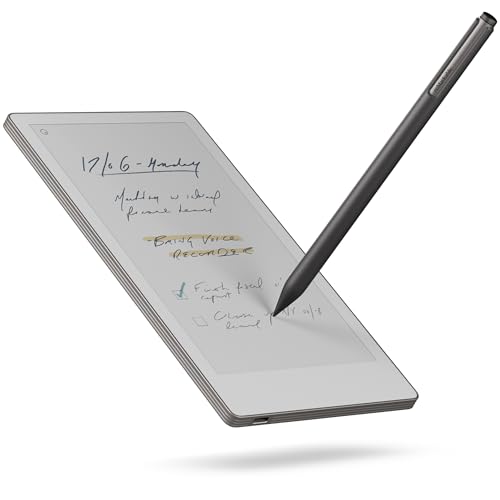
- Lightweight 248.4 g portable design
- 7.3-inch color display with reading light
- Handwriting conversion and cloud-connected organization
Best For: Distraction-free brainstorming and mobile note capture
Best Portable AI Reading Tablet
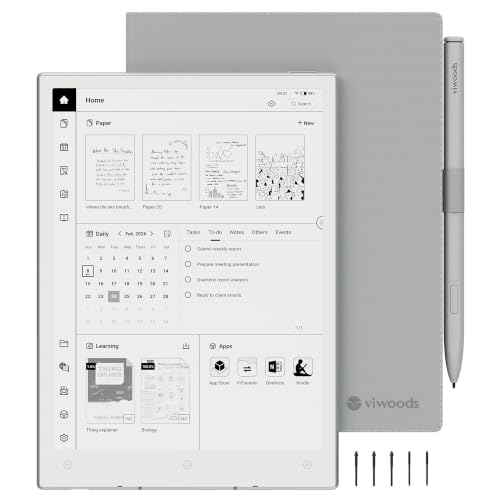
- Lightweight 230 g E Ink tablet with warm light
- 4,096-level stylus for notes and PDF annotation
- 128GB storage with versatile sync and transfer options
Best For: Mobile reading, planning, and meeting-note workflows
Best Android Writing Tablet – XPPen Magic Note Pad
For creators who want electronic writing tablets for content creators with full Android flexibility, the XPPen Magic Note Pad combines a 10.95-inch color LCD, included pressure-sensitive pencil, and note-focused software. It is not an E Ink tablet, but its AG nano-etched display offers anti-glare viewing and three selectable color modes.
Best For: Content creators, students, and professionals who want handwriting tools, PDF annotation, Android apps, and cloud-connected notes in one device.
Pros:
- 16,384 pressure levels support expressive writing and annotations.
- XPPen Notes offers handwriting-to-text, audio recording, PDF editing, AI tools, and automatic saving.
- 90Hz refresh rate, 6GB RAM, and 128GB storage support smooth everyday use.
- Low-blue-light and paper-like display certifications support more comfortable viewing.
Cons:
- Uses a normal LCD rather than an E Ink display.
- Color display and Android hardware may be less paper-like than dedicated e-paper devices.
The Magic Note Pad is the most feature-rich choice here for creators who need a versatile Android tablet rather than a focused e-paper notebook. Choose it when app access, color, and advanced note conversion matter more than an E Ink appearance.
Best Large-Screen Creator Tablet – TCL NXTPAPER 14
The TCL NXTPAPER 14 is a strong option among electronic writing tablets for content creators who need a spacious canvas for notes, sketches, sheet music, and media. Its 14.3-inch 2.4K display, included stylus, and multi-window Android setup favor productivity and visual work.
Best For: Artists, musicians, students, and creators who prefer a large screen for drawing, reading, split-screen work, and video calls.
Pros:
- Large 14.3-inch 2.4K NXTPAPER 3.0 display supports Standard, Color Paper, and Ink Paper modes.
- Included 4,096-level T-PEN stylus supports drawing and handwritten notes.
- 8GB RAM, 256GB storage, Android 15, and floating-window or split-screen tools support multitasking.
- 10,000mAh battery, 33W charging, and reverse charging add practical flexibility.
Cons:
- Charger is not included.
- Built-in storage cannot be expanded with a microSD card.
- The larger 1.67-pound design is less portable than compact writing tablets.
This TCL is best when screen size and general-purpose tablet performance are priorities. It is a practical creator workstation for viewing references, writing, and multitasking, though its size makes it better for desk or stand use than quick handheld note-taking.
Best Paper-Based Smart Notebook – XPPen Note Plus
Unlike screen-based electronic writing tablets for content creators, the XPPen Note Plus lets you write on real A5 paper while syncing each stroke to a phone. It suits creators who prefer the feel and flexibility of physical notebooks but want searchable, editable, and shareable digital copies.
Best For: Writers, sketchers, meeting users, and creators who want real-paper handwriting with Bluetooth phone synchronization.
Pros:
- Captures handwriting from real A5 paper and syncs it through Bluetooth 5.3.
- Works offline, then synchronizes notes after reconnecting.
- Supports any A5 notebook core up to 8mm thick, reducing dependence on proprietary refills.
- Offers editing tools, tagging, search, Google Cloud backup, and PNG/PDF sharing.
Cons:
- There is no electronic screen for viewing notes on the device.
- The supplied electronic pen must be used to capture strokes.
- Requires a compatible Android or iOS phone for digital syncing and management.
The Note Plus is a distinctive choice for creators who do not want to give up paper. It is less suitable for screen-based reading or on-device editing, but its flexible notebook support and phone sync make it convenient for ideas, sketches, and meeting notes.
Best E Ink AI Notebook – iFLYTEK AINOTE Air 2
The iFLYTEK AINOTE Air 2 stands out among electronic writing tablets for content creators who prioritize distraction-free E Ink writing and AI-assisted organization. Its compact 8.2-inch display supports handwriting, voice transcription, translation, meeting summaries, and note-based questions.
Best For: Professionals, writers, and meeting-heavy creators who need portable notes, multilingual transcription, and structured follow-up tools.
Pros:
- 8.2-inch E Ink display with a matte surface and 4,096 pressure levels delivers a paper-like writing experience.
- AI tools provide voice-to-text transcription, meeting summaries, note Q&A, and schedule management.
- Supports voice transcription in 18 languages and handwriting-to-text in more than 100 languages.
- Warm and cool front lights offer 24 brightness levels for adjustable reading.
Cons:
- Voice transcription and handwriting-to-text cannot run simultaneously.
- The 8.2-inch screen provides less writing space than larger tablets.
- Its specialized E Ink format is less suited to general Android tablet tasks than LCD alternatives.
The AINOTE Air 2 is the focused productivity pick for users who want E Ink comfort and strong capture tools rather than a general-purpose entertainment tablet. Its compact design is especially useful for meetings, travel, and reviewing documents on the go.
Color E Ink Creative Notebook – reMarkable Paper Pro
For content creators who want a focused workspace, the reMarkable Paper Pro combines an 11.8-inch color E Ink display with paper-like writing, sketching, reading, and document organization. Its low-glare screen, adjustable reading light, and handwriting-to-text conversion make it a versatile option among electronic writing tablets for content creators.
Best For: Creators who want a distraction-free digital notebook for color notes, sketches, PDF markups, and remote work.
Pros:
- Color E Ink display supports writing, sketching, and reading in color.
- Marker Plus includes a built-in eraser, with six spare tips included.
- Folders, tags, PDF markup, and handwriting-to-text conversion help organize work.
- Low-glare display and adjustable reading light support comfortable daytime and nighttime use.
Cons:
- The 11.8-inch size may be less convenient for users seeking an especially compact tablet.
- It uses a Linux-based operating system and is primarily designed for writing, reading, and focused work rather than general laptop tasks.
The Paper Pro is a strong fit when color and a paper-like writing experience matter more than app-heavy functionality. It offers a polished, organized environment for developing ideas and reviewing content.
Beginner Drawing Pad – XPPen Deco 01 V3
The XPPen Deco 01 V3 is a screenless drawing tablet for creators who work with a computer, Android device, or compatible software. Its battery-free 16K stylus, generous 10-by-6.25-inch drawing area, and customizable shortcut keys make it a practical entry point for electronic writing tablets for content creators.
Best For: Beginner and amateur illustrators, note-takers, and designers using Photoshop, Illustrator, Clip Studio, or similar software.
Pros:
- Battery-free stylus offers 16,384 pressure levels and up to 60 degrees of tilt support.
- Eight customizable shortcut keys work for both right- and left-handed users.
- Supports Windows, macOS, Android, Chrome OS, and Linux, subject to listed version requirements.
- Includes useful accessories such as spare nibs, a stand, glove, protective film, and adapters.
Cons:
- It has no built-in display, so users must view their work on a connected device.
- Setup requires compatible software and a wired USB connection.
- The tablet is aimed at beginners and may be less suitable for creators seeking a standalone writing device.
The Deco 01 V3 is best viewed as an affordable, flexible input surface rather than an independent notebook. Its pressure sensitivity and shortcut controls give new digital artists room to build skills without adding stylus charging.
Focused Black-and-White Notebook – reMarkable Paper Pure
The reMarkable Paper Pure is a lightweight 10.3-inch black-and-white E Ink tablet designed for handwriting, document review, sketching, and focused meetings. For content creators comparing electronic writing tablets for content creators, it emphasizes distraction-free thinking, quick digital ink, and tools for organizing and sharing notes.
Best For: Writers, teachers, and remote workers who need a lightweight notebook for meetings, drafts, PDF markups, and handwritten idea development.
Pros:
- Whiter, higher-contrast third-generation 10.3-inch display is designed for comfortable reading and writing.
- Digital ink appears in 21 ms, supporting responsive handwriting and sketching.
- Folders, tags, templates, and handwriting-to-text tools help manage ideas and documents.
- Apps and plugins connect with services including Google Drive, Dropbox, Microsoft Word, Slack, and Miro.
Cons:
- The black-and-white display is less suitable for creators who need color notes or artwork.
- Some expanded features, including unlimited cloud storage, require a Connect subscription.
- Its reMarkable OS is focused on writing and document workflows rather than general-purpose tablet apps.
The Paper Pure is a focused choice for creators who prefer handwriting over typing and want their notes to move into connected work tools. Choose it over the Paper Pro when color is not essential and portability is a higher priority.
Best AI-Enhanced E-Ink Notebook – Penstar eNote 2
For content creators seeking electronic writing tablets for content creators, the Penstar eNote 2 combines a large paper-like display with handwriting tools, document support, and built-in AI features. Its 10.3-inch, 300 PPI E Ink screen is designed for comfortable reading and writing, including PDF annotation in bright surroundings.
Best For: Writers, researchers, and note-heavy creators who want AI transcription, handwriting conversion, split-screen reading, and generous file storage.
Pros:
- 10.3-inch 300 PPI E Ink display with a clear, anti-glare paper-like view.
- 8,192 pressure levels and a non-charging stylus support precise writing.
- AI voice-to-text, handwriting-to-text, summaries, folders, tags, and split-screen notes.
- 128GB storage, Android 14, third-party app support, and more than 35 file formats.
Cons:
- At 0.97 kg, it is less portable than smaller writing tablets.
- The feature-rich Android interface may be more than minimalist note-takers need.
The Penstar eNote 2 is a strong all-around option when content work involves long-form reading, research files, and organized notes. Choose it over a smaller model if screen size, storage, and AI-assisted workflows matter most.
Best Ultraportable Creative Notebook – reMarkable Paper Pro Move
The reMarkable Paper Pro Move is a compact choice among electronic writing tablets for content creators who want fewer distractions while capturing ideas. Its 7.3-inch Canvas Color display is designed to look and feel like paper, while cloud syncing helps move notes between the tablet, mobile apps, and desktop apps.
Best For: Creators who prioritize portable brainstorming, handwritten notes, and a focused writing environment over broad tablet functionality.
Pros:
- Lightweight 248.4 g design fits easily into a bag or jacket pocket.
- 7.3-inch color display with a reading light and paper-like writing experience.
- Converts handwriting to typed text and supports searchable, organized notes.
- Includes Marker Plus, six spare tips, and cloud syncing to mobile and desktop apps.
Cons:
- Its smaller screen provides less workspace for large documents and layouts.
- Searching handwritten notes requires a Connect subscription.
- reMarkable OS is more specialized than a general-purpose Android tablet.
The Paper Pro Move stands out for creators who want to capture ideas anywhere without a wall of notifications or laptops. Its compact size is convenient for travel, though users needing extensive file flexibility or a larger canvas may prefer a bigger device.
Best Portable AI Reading Tablet – VIWOODS AiPaper Mini
The VIWOODS AiPaper Mini is a practical pick among electronic writing tablets for content creators who read and annotate on the go. Weighing 230 g, it combines an 8.2-inch, 292 PPI E Ink display with adjustable warm lighting, a pressure-sensitive stylus, and flexible file-transfer options.
Best For: Commuting writers, students, remote workers, and creators who need a lightweight tablet for reading, PDF markup, planning, and meeting notes.
Pros:
- Compact 230 g design is easy to carry with other daily essentials.
- Adjustable warm light offers 20 levels for reading in varied lighting.
- Included W2 Stylus Pro supports 4,096 pressure levels for notes, sketches, and annotations.
- 128GB storage plus Wi-Fi, Bluetooth, USB, cloud, and WLAN transfer options.
Cons:
- The 8.2-inch display offers less workspace than a 10.3-inch notebook.
- E Ink refresh latency is a normal part of the reading experience.
- It runs Android 13 rather than the newer Android version found on some competitors.
The AiPaper Mini balances portability with useful creator features, including handwriting-to-text, AI meeting summaries, and calendar synchronization. It is a sensible middle ground for users who want a travel-friendly reader and writing tablet without carrying a full-size device.
How We Picked the Best Electronic Writing Tablets for Content Creators
We evaluated these tablets by focusing on the tasks creators perform most: handwritten notes, outlining, PDF markup, brainstorming, sketching, reading, and moving work between devices. We also considered display comfort, pen responsiveness, portability, battery-free stylus designs, storage, operating system flexibility, and included accessories.
The selection spans purpose-built digital notebooks, E Ink tablets, Android devices, and computer-connected drawing tablets. That range matters because no single format is ideal for every creator. A minimalist writer may prefer a distraction-free paper-like screen, while a designer or video producer may need color, apps, and a larger workspace.
Quick Comparison
| Best For | Tablet Type | What to Look For |
|---|---|---|
| Focused writing | E Ink notebook | Low distraction, comfortable reading, long battery life |
| Research and app-based workflows | Android tablet | Color display, multitasking, storage, app support |
| Digital illustration | Drawing tablet | Pressure sensitivity, shortcut keys, computer compatibility |
| Portable note capture | Compact digital notebook | Lightweight design, synchronization, handwriting conversion |
Key Buying Factors for Electronic Writing Tablets for Content Creators
Display and Writing Feel
E Ink provides a paper-like, low-distraction experience and is often preferable for long reading or writing sessions. LCD and Android screens offer color, animation, video, and broader app support, but may be more distracting. If you sketch frequently, prioritize a larger active area and accurate pen tracking.
Stylus Performance
Pressure sensitivity affects line weight and brush control, especially for illustration and visual planning. Battery-free pens reduce maintenance, while magnetic storage or an included folio helps prevent losing the stylus. Check whether the pen is included and whether replacement nibs are readily available.
Software and File Compatibility
Think about where your work needs to go next. Android tablets can run productivity and creative apps directly. Digital notebooks may emphasize handwriting capture, cloud synchronization, OCR, and PDF export. Drawing tablets typically require a connected computer but can work with professional creative software.
Portability, Battery, and Storage
Choose a compact model for meetings, travel, and quick idea capture; choose a larger display for layouts, scripts, and detailed drawings. Check internal storage if you keep many PDFs or notebooks locally, and confirm battery expectations for your typical workday.
Who Should Buy Which Electronic Writing Tablets for Content Creators?
Choose an E Ink notebook if you want focused writing, reading, and planning with minimal notifications. These are strong choices for authors, journalists, students, and researchers.
Choose an Android tablet if your workflow includes web research, email, video, cloud tools, or creative apps. It is the most flexible option for creators who need one device for more than handwriting.
Choose a drawing tablet if illustration, photo editing, lettering, or visual design is your priority. These models usually make the most sense alongside a computer and compatible creative software.
Choose a compact AI or digital notebook if you want fast capture, handwriting conversion, organization, or phone synchronization in a portable format. Before buying, verify export options and the services required for syncing or AI features.