Clear shelf labels help pickers find inventory quickly and reduce avoidable errors. But a printer that handles 4×6 shipping labels may not be the best fit for narrow rack tags or small bin IDs.
These 10 options span portable label makers, desktop models, and shipping-label printers. Start with the label size and material your shelves require, then consider how your team will print and update them.
Best 10 Label Printers for Warehouse Shelves Picks for 2026
Wireless Warehouse Pick

- Wi-Fi printing from iOS and Android
- Accepts 0.75–4.25-inch-wide labels
- Windows-only warehouse label software included
Best For: Mixed shelf and shipping labels with mobile printing
USB Workstation Pick
- USB support for multiple computer platforms
- Roll and rear-fed fanfold media
- Windows-only barcode design software included
Best For: Fixed stations printing shelf, product, and shipping labels
Portable Template Pick
- Prints 10 stored templates offline
- 300 dpi for compact barcode labels
- Supports labels up to 1.96 inches wide
Best For: Repeat shelf identifiers printed away from a workstation
Handheld Tape Pick

- Built-in QWERTY keyboard
- Includes three 1/2-inch D1 tapes
- Portable for on-the-spot text labels
Best For: Narrow shelf-edge and bin labels
Best for High-Volume Labeling
Rollo USB Shipping Label Printer

- Up to 150 mm/s printing
- Supports 1.57–4.1-inch label widths
- USB connection for Windows and Mac
Best For: Shipping and barcode labels from a computer
Best for Durable Shelf Markers
Makeid D50 Industrial Label Maker

- 300 DPI thermal-transfer printing
- Automatic cutter
- Prints labels up to 2 inches wide
Best For: Durable, narrow shelf and asset labels
Best for Shared Wireless Printing

- Built-in Wi-Fi for shared printing
- Desktop and mobile label apps
- Media up to 2-5/16 × 4 inches
Best For: Shared printing of smaller warehouse labels
Best Wireless Option
Rollo Wireless Shipping Label Printer

- Wi-Fi, AirPrint, and USB connectivity
- Prints labels 1.57–4.1 inches wide
- App supports barcodes and QR codes
Best For: Mixed-device teams printing shelf and shipping labels
Best Portable Option
lopevi D1 Bluetooth Label Maker

- Portable Bluetooth design
- Supports tape up to 2 inches wide
- 300 dpi printing with app-based editing
Best For: Small shelf markers and storage-bin labels
Best Wired Warehouse Option
Westinghouse WHTP203E Thermal Printer

- USB and Ethernet connectivity
- Accepts rolls and fanfold labels
- Supports media 0.78–4.6 inches wide
Best For: Stationary warehouse and package-label workstations
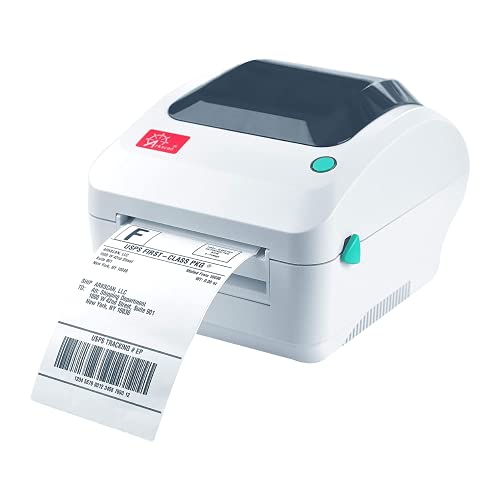
Wireless Warehouse Pick – Arkscan 2054K-WF
Among label printers for warehouse shelves, the Arkscan 2054K-WF is a practical choice if the same workstation also prints shipping and product labels. It accepts labels 0.75–4.25 inches wide, feeds internal rolls or rear-loaded fanfold stock, and prints at 5 inches per second.
Best For: Warehouses that want one printer for wider shelf or barcode labels and shipping labels, with Wi-Fi printing from a phone or tablet.
Pros:
- Wi-Fi printing supports iOS and Android; USB supports Windows, Mac, Chromebook, and Android.
- Included BarTender UltraLite software can design warehouse labels with text, graphics, and barcodes.
- Direct thermal printing requires no ink or toner.
Cons:
- BarTender UltraLite is Windows-only.
- The 4.25-inch maximum label width may not suit wider shelf signs.
Choose this model when wireless mobile printing matters. For shelf-label design on a computer, check that the Windows-only bundled software fits your workflow.
USB Workstation Pick – Arkscan 2054A
For buyers comparing label printers for warehouse shelves, the Arkscan 2054A suits a computer-based labeling station that also handles shipping labels. It prints on stock 0.75–4.25 inches wide at 5 inches per second, using an internal roll or fanfold labels fed from the back.
Best For: A fixed warehouse workstation producing barcode, product, and shipping labels over USB.
Pros:
- USB connection supports Windows, Mac, Chromebook, and Android.
- Included BarTender UltraLite software offers text, graphics, barcode, and serialization design features.
- Direct thermal printing avoids ink and toner refills.
Cons:
- Connectivity is USB, rather than the Wi-Fi option offered by the 2054K-WF.
- The included design software runs on Windows only.
This is the straightforward Arkscan option if labels are printed beside a computer. Its flexible media feed helps with different label supplies, but the bundled design workflow favors Windows users.
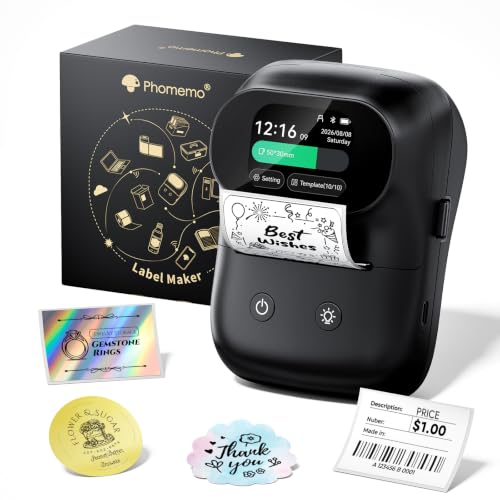
Portable Template Pick – Phomemo M20Pro
The Phomemo M20Pro brings a different approach to label printers for warehouse shelves: create labels in the Print Master app, then store up to 10 custom templates for later printing from its 2-inch touchscreen without a phone or internet connection. Its 0.75–1.96-inch label-width range is geared toward compact shelf identifiers rather than wide signs.
Best For: Staff who need to print repeat barcode or text labels at different locations without returning to a workstation.
Pros:
- Stored templates can be printed offline from the device.
- 300 dpi output supports barcodes, QR codes, logos, and text.
- RFID-equipped label rolls are detected automatically, removing manual size setup.
Cons:
- Custom templates must first be made and uploaded through the app.
- The 1.96-inch maximum width limits larger shelf-label formats.
Its touchscreen and reusable templates are useful for repeated labels around a warehouse. Confirm that its narrow media and template-based workflow match the shelf labels you plan to print.
Handheld Tape Pick – DYMO LabelManager 160 Bundle
If you need label printers for warehouse shelves mainly to mark locations with short text, the handheld DYMO LabelManager 160 keeps the process simple. Its QWERTY keyboard and one-touch keys let you compose labels at the point of use, and this bundle includes three black-on-white, 1/2-inch D1 tape cassettes.
Best For: Quick, narrow text labels for shelf edges, bins, and other organization tasks.
Pros:
- Portable handheld design with a built-in keyboard and display.
- More than 20 text formats and 200 symbols offer layout choices.
- Three 1/2-inch D1 tape cassettes are included.
Cons:
- Supported D1 tape widths top out at 1/2 inch, limiting the size of shelf labels.
- The supplied features focus on text and symbols, not a dedicated barcode-label workflow.
Pick this bundle for straightforward location names and short identifiers rather than broad shipping-style labels. The included tape makes it ready for small labeling jobs, while wider formats call for another printer.
Best for High-Volume Labeling – Rollo USB Shipping Label Printer
If your search for label printers for warehouse shelves includes barcode labels and shipping labels, the Rollo USB handles both from a Windows or Mac computer. Its direct thermal print head produces 203 DPI monochrome labels without ink or toner.
Best For: Warehouses printing barcodes, product labels, and shipping labels from a USB-connected computer.
Pros:
- Prints at up to 150 mm/s, or about one 4-by-6-inch label per second.
- Accepts label widths from 1.57 to 4.1 inches.
- Works with major shipping platforms and marketplaces.
Cons:
- USB connection requires a nearby Windows or Mac computer.
- Direct thermal printing may not suit shelf labels that need the longer-lasting thermal-transfer output offered by some alternatives.
Choose the Rollo when shipping and barcode output are your priorities. Check that its supported label widths fit your shelf-label format before buying.
Best for Durable Shelf Markers – Makeid D50 Industrial Label Maker
For label printers for warehouse shelves where durable identification matters, the Makeid D50 offers 300 DPI thermal-transfer printing and labels up to 2 inches wide. It is also designed for warehouse marking, asset tracking, and equipment identification.
Best For: Narrow shelf, asset, and equipment labels where long-lasting print and automatic cutting are useful.
Pros:
- Thermal-transfer labels are rated in the supplied product information to stay clear for up to 10 years.
- Automatic cutter helps with bulk label runs.
- Supports mobile-app editing and PC software.
- Integrated label-and-ribbon cartridges simplify consumable changes.
Cons:
- Maximum 2-inch label width rules out wider shelf signs.
- Auto-template matching uses the printer’s exclusive consumables.
The D50 is the stronger fit when shelf markings need crisp, durable identification rather than wide shipping labels. Factor its cartridge system into your ongoing supply plans.
Best for Shared Wireless Printing – DYMO LabelWriter Wireless
The DYMO LabelWriter Wireless is worth considering among label printers for warehouse shelves when several people need to print labels over Wi-Fi. It supports label creation from Macs and PCs through DYMO software, plus smartphones and tablets through the DYMO Connect app.
Best For: Teams sharing one wireless printer for smaller shelf, barcode, asset, and mailing labels.
Pros:
- Built-in Wi-Fi lets multiple users access one networked printer.
- Direct thermal printing needs no ink or toner.
- Desktop software, Office plugins, and a mobile app provide several ways to create labels.
Cons:
- Maximum listed media size is 2-5/16 by 4 inches, so it cannot print standard 4-by-6-inch shipping labels.
- Direct thermal output may be less appropriate than thermal transfer for shelf markings that must remain legible for years.
Its main advantage is shared, cable-free access rather than oversized labels. Confirm that its supported media dimensions match your shelf-label layout.
Best Wireless Option – Rollo Wireless Shipping Label Printer
For label printers for warehouse shelves, the Rollo Wireless is worth considering when you need to print shelf labels and shipping labels from multiple devices. It handles label widths from 1.57 to 4.1 inches and supports Wi-Fi and USB connections.
Best For: Teams that want wireless printing for shelf, barcode, and shipping labels.
Pros:
- Prints from iPhone, iPad, and Mac via AirPrint, with Wi-Fi support for Android, Windows, Chromebook, and Linux.
- App supports custom labels, barcodes, and QR codes.
- Direct thermal printing needs no ink or toner and reaches a stated 150 mm/s.
Cons:
- Maximum label width is 4.1 inches.
- 203 dpi resolution is lower than the 300 dpi portable model in this roundup.
Its flexible device support makes it a practical choice for mixed-device work areas. Check that your planned shelf-label stock fits its width range.
Best Portable Option – lopevi D1 Bluetooth Label Maker
If you’re comparing label printers for warehouse shelves and only need compact labels, the lopevi D1 offers a portable, app-based option. It connects by Bluetooth and supports label tape up to 2 inches wide.
Best For: Small shelf markers, storage-bin labels, and on-the-go labeling.
Pros:
- Compact Bluetooth design is easy to carry between labeling tasks.
- 300 dpi thermal print head supports crisp text and graphics without ink or toner.
- App offers fonts, icons, and barcode design options.
Cons:
- Two-inch tape limit makes it less suitable for wider shelf labels.
- Bluetooth app workflow may not suit teams seeking a USB or network-connected desktop printer.
Choose this model for short, narrow labels rather than a 4-by-6-inch shipping-label workflow. Its portability is the main advantage when labeling locations away from a desk.
Best Wired Warehouse Option – Westinghouse WHTP203E Thermal Printer
For buyers looking at label printers for warehouse shelves alongside package labeling, the Westinghouse WHTP203E is a wired desktop model with USB and Ethernet connections. It supports media widths from 0.78 to 4.6 inches and accepts fanfold labels or rolls.
Best For: Desktop warehouse workflows needing a range of label widths and wired connectivity.
Pros:
- USB and Ethernet connections suit a fixed workstation.
- Supports rolls and fanfold labels, with a maximum print width of 4.25 inches.
- Direct thermal printing needs no ribbon or toner; starter labels and a holder are included.
Cons:
- No Bluetooth connection.
- Driver installation is required, and the Ethernet cable is sold separately.
This is the strongest fit of the three for a stationary, wired labeling station. Confirm your label dimensions and follow the setup instructions before putting it into daily use.
How We Picked the Best Label Printers for Warehouse Shelves
We considered the jobs warehouse labels need to do: identify shelves and bins, print readable text or barcodes, and support repeatable updates. The selection covers handheld and desktop label makers alongside USB and wireless thermal shipping printers. Features such as cutters, touchscreens, and wireless connections matter only when they fit the labels and workflow you actually use. Check current specifications before purchasing, especially supported label widths, supplies, and device compatibility.
Quick Comparison by Labeling Job
For compact shelf-edge or bin labels, start with a label maker designed for narrower tape or label stock, such as the DYMO LabelManager 160, Phomemo M20Pro, lopevi portable label maker, or Makeid D50. For larger location signs or 4×6 inventory and shipping labels, compare the Arkscan, Rollo, and Westinghouse thermal models. The DYMO LabelWriter Wireless is another desktop option to investigate if its available label formats suit your shelves. A 4×6 printer is not automatically a substitute for a narrow-label maker: paper size, adhesion, and placement all matter.
Key Buying Factors for Label Printers for Warehouse Shelves
Label Size and Shelf Fit
Measure the usable surface on shelf lips, bins, and uprights. Leave room for readable location codes and any barcode quiet zones. Before choosing a printer, confirm it accepts stock in the widths and lengths you need; a model marketed for shipping may primarily target larger labels.
Material and Durability
Match the label and adhesive to the surface and conditions. High-touch locations, dusty racks, cold storage, and frequently relabeled bins may need different stock. Check supply specifications for durability claims rather than assuming every thermal label or tape will resist abrasion, moisture, or temperature changes.
Barcode Workflow and Connections
If staff scan shelf locations, confirm your label design software can produce the barcode format your inventory system expects. Print a sample and test it with your actual scanners at normal working distance. USB suits a dedicated workstation; wireless printing may help shared stations, provided your devices and network are supported. Also consider template setup and how easily staff can reprint a damaged tag.
Ongoing Supply Cost
Compare the price and availability of compatible labels or cassettes, not just the printer. Estimate cost per usable shelf label, accounting for wasted space when printing small tags on large-format stock.
Who Should Buy Which Label Printers for Warehouse Shelves?
Choose a portable label maker for small batches of bin IDs made near the racks. Consider a desktop label maker when you need consistent narrow tags at a fixed station. Pick a 4×6 thermal printer if larger shelf identifiers and outbound shipping labels share a workflow—but verify that its supported media fits both jobs. If multiple employees print from different devices, prioritize documented connection and software compatibility over wireless capability alone. For any option, test a sample label on your actual shelving before committing to supplies in bulk.