A useful productivity gift can make everyday work feel more organized, whether she plans on paper, works from a laptop, or moves between home and the office. This collection pairs practical desk tools with portable tech and thoughtful ways to focus.
13 Christmas Gifts for a More Productive Workday
1. VIWOODS AiPaper E Ink Tablet with Stylus
For Focused Reading and Note-Taking
VIWOODS AiPaper E Ink Tablet with Stylus

- 10.65-inch E Ink display is designed for reading documents with reduced screen glare.
- Included stylus supports handwriting, PDF annotation, sketches, and signatures.
- Bundle includes folio cover, replacement nibs, and USB-C charging cable.
Best For: A reader or note-taker who wants a digital workspace for documents and ideas.
2. Smart Pen and Reusable Digital Notebook
For Paper-First Planners
Smart Pen and Reusable Digital Notebook

- Smart pen captures handwritten notes and syncs them to the Noteorius app.
- App can send notes to Google Drive, OneNote, Evernote, or Dropbox.
- Reusable writing surface can be cleared for another page.
Best For: Someone who likes writing by hand and organizing notes digitally.
3. HP Compact Duplex Document and Photo Scanner
For a Paperwork Reset
HP Compact Duplex Document and Photo Scanner

- Automatic feed tray handles multiple pages for batch scanning.
- Duplex scanning captures both sides of a document in one pass.
- Connects by USB to PC or Mac and includes HP WorkScan software.
Best For: A home-office user who wants to digitize receipts, records, or paperwork.
4. Anker Prime 14-in-1 USB-C Docking Station
For a More Connected Desk
Anker Prime 14-in-1 USB-C Docking Station

- Provides 14-in-1 connectivity, including dual HDMI ports and audio options.
- Offers up to 160W total output to charge multiple devices.
- Supports USB-C, USB4, and Thunderbolt connections; check laptop display support.
Best For: A compatible laptop user building a multi-device home workstation.
5. Plaud Note Pro AI Voice Recorder
For Meetings on the Move
Plaud Note Pro AI Voice Recorder

- Captures audio, typed notes, images, and marked key moments.
- Includes a Starter Plan with 300 transcription minutes per month.
- Syncs through Plaud Desktop, Web, or the mobile app.
Best For: Someone who records meetings, interviews, or ideas away from her desk.
6. SOLAKAKA KI99 Pro Quiet Mechanical Keyboard
For a Quieter Typing Setup
SOLAKAKA KI99 Pro Quiet Mechanical Keyboard

- Connects by Bluetooth, 2.4G wireless, or USB-C.
- Compact 96% layout includes a knob for volume, media, and lighting adjustments.
- Hot-swappable switches and customizable RGB lighting allow personalization.
Best For: A frequent typist who enjoys a customizable desk setup.
7. TRALT Ergonomic Mesh Office Chair
For Long Desk Sessions
TRALT Ergonomic Mesh Office Chair

- Adjustable lumbar support and breathable mesh backrest are designed for desk use.
- Seat height adjusts from 17.7 to 21.7 inches.
- Product notes specify a 19.7-inch-wide seat and 17.3-inch seat depth.
Best For: Someone who spends long stretches working at a desk and wants adjustable support.
8. AOC 16-Inch Portable Monitor
For an Extra Screen Anywhere

- Full HD 1920 × 1080 display provides a portable second-screen option.
- Connects through USB-C or Mini HDMI; no drivers are required per product notes.
- Includes a smart cover, USB-C cable, and user manual.
Best For: A remote worker or traveler who wants a second screen on the go.
9. ProtoArc EM11 NL Vertical Wireless Mouse
For a Different Mouse Grip
ProtoArc EM11 NL Vertical Wireless Mouse

- Vertical shape is designed to keep the wrist in a more natural position.
- Connects to up to three devices through Bluetooth or a USB-A receiver.
- Rechargeable battery and Type-C charging cable are included.
Best For: A right-handed user with small to medium hands who wants to try a vertical mouse.
10. LOXP Adjustable Laptop Stand with Rotating Base
For a Flexible Laptop Position
LOXP Adjustable Laptop Stand with Rotating Base

- Height and angle can be adjusted for seated or standing work.
- 360-degree rotating base makes it easy to turn the laptop.
- Foldable design fits laptops from 10 to 16 inches.
Best For: Someone who uses a laptop as her main work computer.
11. Varhomax Glass Weekly Desk Planner
For Visible Weekly Priorities
Varhomax Glass Weekly Desk Planner

- Glass writing surface lays out days Monday through Sunday with a notes area.
- Storage caddy has five compartments for desk supplies.
- Package includes a dry-erase pen with eraser.
Best For: A planner who likes keeping tasks and reminders in view.
12. Nelko P21 Bluetooth Label Maker
For a Tidy Workspace
Nelko P21 Bluetooth Label Maker

- Pairs by Bluetooth with iOS and Android phones through the Nelko app.
- Prints monochrome labels using direct thermal technology, without ink or toner.
- App templates support labels for supplies, storage, notebooks, and more.
Best For: Someone who organizes office supplies, storage, or small-business inventory.
13. Beats Studio Pro Wireless Headphones
For Focus During Busy Days
Beats Studio Pro Wireless Headphones
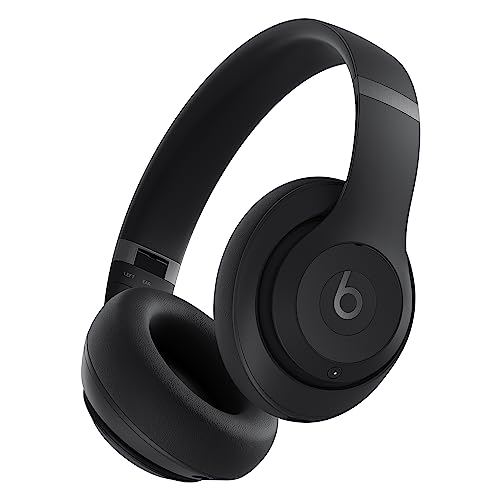
- Active Noise Cancelling and Transparency modes support different listening settings.
- Offers up to 40 hours of battery life according to the product title and notes.
- Includes a carrying case, 3.5 mm audio cable, and USB-C charging cable.
Best For: A woman who works in a shared space or travels and wants listening options.
How to Choose a Productivity Gift for Her
Start with the kind of friction she mentions most. If she has piles of receipts or forms, a document scanner addresses that specific chore. If she repeats meeting notes or ideas, a smart notebook or voice recorder may suit her routine. For someone whose main challenge is a cramped desk, a dock, portable monitor, laptop stand, or keyboard changes the way she uses the equipment she already has. A weekly glass planner is a lower-tech way to keep priorities in view, while a label maker can help turn a cluttered supply area into a system.
Consider how she likes to work before choosing a digital tool. The E Ink tablet is aimed at reading and handwritten annotation, while the reusable notebook keeps the familiar act of writing and adds app syncing. The recorder captures audio and supports transcription, so it fits someone who reviews spoken conversations. Headphones offer noise control and listening modes; they can help create a more focused routine, though they are not a substitute for the workspace itself. Think about whether the gift will support an existing habit or ask her to adopt a new one.
Set a Budget That Matches the Need
A practical productivity gift does not have to be a major workstation upgrade. A planner or label maker can make everyday organization more visible. A mouse or laptop stand is a targeted improvement to a setup she already owns. Larger purchases such as an office chair, portable monitor, scanner, tablet, or docking station make sense when you know there is a recurring need and the recipient has room to use them.
Think in terms of the problem solved rather than the number of features. For example, a second screen can be worthwhile for someone who regularly compares documents, while a rotating laptop stand may matter more to someone who shifts position during the day. Avoid buying a high-spec accessory just because it looks impressive; an item that fits her habits is more likely to be used.
Check Compatibility and Personalization
For electronics, confirm the devices she uses before purchasing. The Anker dock needs a compatible USB-C, USB4, or Thunderbolt connection and laptop display support; its two external displays mirror each other on macOS. The portable monitor lists USB-C and Mini HDMI inputs, so check the ports available on her computer. The HP scanner connects by USB and lists PC and Mac support. The label maker pairs with iOS or Android phones, but the notes say it is not compatible with Google Pixel phones running Android 14 and does not work with computers.
Fit matters for ergonomic gifts. The vertical mouse is designed for small to medium hands and right-handed use, and its shape may take time to get used to. The laptop stand is listed for laptops from 10 to 16 inches. For the chair, compare its stated seat dimensions and height range with the recipient’s desk and seating preferences. A mechanical keyboard can be personalized through hot-swappable switches and RGB settings; its listed OS compatibility is Windows, so check before gifting to a Mac user.
Personal touches can make a work tool feel considered. Add a favorite pen to a planner, write a note about why you chose a focus tool, or pair a desk organizer with a small handwritten list of ways she might use it. Keep the gift centered on her routines rather than suggesting that her current system needs fixing.
Timing and Last-Minute Decisions
For Christmas shopping, choose an item whose setup burden matches the time available. A planner, stand, keyboard, or headphones can be understood quickly, while devices that rely on apps, software, ports, or computer compatibility benefit from a little checking in advance. Review the recipient’s current equipment or ask someone close to her if you are unsure about connections or operating systems.
If you are deciding close to the holiday, prioritize certainty over complexity: choose a gift that fits a known desk, device, or habit. For a less certain pick, include a gift receipt where available and keep the packaging intact until she has confirmed fit. Consider whether the item needs a suitable place to live, such as desk space for a glass planner or chair, or a bag for portable gear. The strongest productivity Christmas gift ideas for women are simply useful tools that make a regular part of her workday easier to manage.