Choosing the right fanless mini pc for digital signage comes down to more than size alone. You need stable playback, the right display outputs, and dependable networking for long-running screens.
Below, we focus on compact models that balance silence, efficiency, and value for kiosks, menu boards, lobbies, and retail displays.
Best 9 Fanless Mini PC for Digital Signage Picks for 2026
Best for 24/7 Signage

- Silent fanless design for 24/7 operation
- Commercial features like Wake on LAN and auto power on
- Gigabit Ethernet and dual-band Wi‑Fi for steady connectivity
Best For: Retail, kiosk, and other signage setups that need a compact always-on PC.
Best Budget
MeLE Cyber X1 N150 Fanless Mini PC
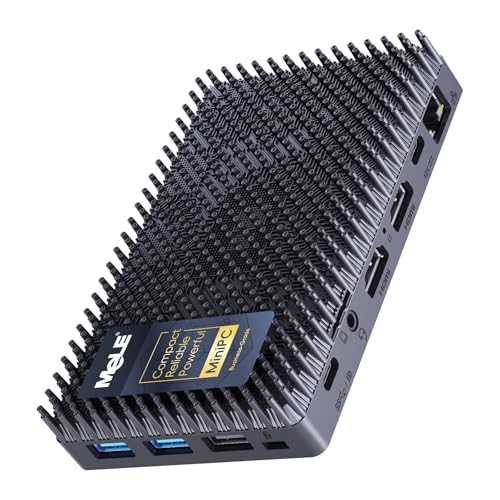
- Silent 0dB fanless operation for always-on displays
- Triple-display support with dual HDMI and USB-C
- Compact, VESA-mountable design for clean installs
Best For: Retail, lobby, and menu-board setups that need quiet, reliable signage playback.
Best for 24/7 Displays

- Silent fanless operation for always-on signage
- 4K@60Hz output with Gigabit Ethernet
- Tiny stick design mounts cleanly behind screens
Best For: Retail, classroom, and kiosk displays that need quiet, compact, always-on playback.
Best Fanless Value Pick
MeLE Mini PC Quieter 4C N150 16GB/512GB

- Silent fanless operation for 24/7 signage
- Triple 4K output for multi-screen setups
- 16GB RAM and 512GB SSD for smooth everyday use
Best For: Small businesses and installers needing a quiet, compact signage PC with multiple display outputs.
Best for Hidden Signage Setups
MeLE PCG02 Pro Fanless N100 Mini PC Stick

- Fanless 0dB design for silent 24/7 use
- Dual HDMI 2.0 with 4K@60Hz output
- Compact stick form factor with VESA mount
Best For: Retail, kiosk, and office signage installs that need a tiny, quiet, hidden PC.
Best for Comfort
MeLE Cyber X1 Fanless N150 Mini PC

- Silent fanless operation for public or quiet spaces
- Dual 4K display support with USB-C and HDMI
- BIOS tools for auto power and remote wake
Best For: Retail, lobby, and kiosk signage that needs quiet 24/7 operation.
Best for Dual-Network Signage
MeLE QuieterDL Fanless N100 Mini PC

- Silent fanless operation for 24/7 signage
- Dual 2.5GbE ports for network separation
- Triple-display support with VESA mounting
Best For: Retail, lobby, kiosk, and multi-screen signage deployments that need silent operation and dual-network connectivity.
Best Silent 24/7 Pick
MINIX NEO Z300 Fanless Mini PC

- Fanless cooling for truly quiet operation
- Built for 24/7 use in signage and kiosk roles
- 4K dual-display support with 2.5G LAN
Best For: Quiet, always-on digital signage and kiosk deployments in offices, stores, and lobbies.
Best for 24/7 Signage – MeLE N100 Fanless PC Stick
If you need a fanless mini pc for digital signage, the MeLE PCG02 is built around the right mix of quiet operation, always-on features, and compact size. Its Intel N100 chip, Windows 11 Pro, dual-band Wi‑Fi, Gigabit Ethernet, and 24/7-capable fanless design make it a practical choice for screens, kiosks, and lightweight commercial workloads.
Best For: Retail displays, kiosk setups, and other small signage installations that need silent, low-maintenance operation.
Pros:
- Fanless cooling supports silent 24/7 use in signage environments
- Wake on LAN, PXE, auto power on, and RTC wake are useful for commercial deployment
- Gigabit Ethernet plus dual-band Wi‑Fi help keep content delivery reliable
- Windows 11 Pro preinstalled with Linux/Ubuntu support for flexibility
Cons:
- 8GB RAM and 128GB storage are modest for heavier multitasking
- Runs warm by design, so placement and airflow around the body still matter
- Not intended for demanding media editing or high-end 3D workloads
As a fanless mini pc for digital signage, this MeLE stick stands out more for reliability and deployment-friendly features than raw power. If your priority is a small, silent system that can stay on and drive a display with minimal fuss, it fits the job well.
Best for Always-On Signage – Mini PC Stick J3455, 4GB/64GB
If you need a fanless mini pc for digital signage that can run quietly around the clock, this mini PC stick is a practical plug-and-play option. It turns any HDMI display into a compact Windows 10 Pro workstation, with Gigabit LAN for stable networking and 4K output support for presentations or signage layouts.
Best For: Retail displays, lobby screens, classrooms, and other always-on signage setups that need silent operation and simple deployment.
Pros:
- Fanless design runs silently and is suitable for 24/7 use
- Gigabit Ethernet helps keep signage content stable and reliable
- 4K HDMI output and Windows 10 Pro support flexible display setups
- Compact stick form factor saves space behind monitors and TVs
Cons:
- 4GB RAM and 64GB storage are enough for light signage, not heavy multitasking
- Performance is better suited to 1080P playback than demanding 4K video workloads
- Limited expandability compared with larger mini PCs
For buyers prioritizing silence, simplicity, and always-on reliability, this fanless mini pc for digital signage is a solid fit. It is not the most powerful choice, but its combination of fanless cooling, wired networking, and HDMI convenience makes it well matched to basic display installations.
Best Budget – MeLE Cyber X1 N150 Fanless Mini PC
If you need a fanless mini pc for digital signage that can run quietly around the clock, the MeLE Cyber X1 is a practical fit. Its N150 processor, dual HDMI outputs, and USB-C display support make it easy to drive 4K screens in retail, lobby, or menu-board setups without adding much heat or noise.
Best For: Businesses that want a compact, silent signage player with strong everyday reliability and triple-display flexibility.
Pros:
- 0dB fanless design for silent 24/7 operation
- Dual HDMI plus USB-C for up to three displays
- Small footprint with VESA mount for clean installations
- Wi-Fi 5, Gigabit Ethernet, and Windows 11 Pro included
Cons:
- 8GB RAM may feel limited for heavier multitasking
- Storage is modest at 256GB before expansion
- Not meant for demanding content creation or gaming
Overall, this is a smart fanless mini pc for digital signage when quiet operation and simple mounting matter more than raw horsepower. It balances low power draw, 4K output, and business-friendly features well for always-on display use.
Best for 24/7 Displays – Mini PC Stick Fanless J3455
If you need a fanless mini pc for digital signage that can stay quiet and compact behind a screen, this stick-style Windows 10 mini PC is an easy fit. It focuses on simple playback, basic office workloads, and always-on operation rather than heavy multitasking.
Best For: Retail displays, classroom screens, kiosks, and other small digital signage setups where silent operation and low power draw matter most.
Pros:
- Fanless design keeps operation silent for 24/7 signage and office use.
- 4K@60Hz output with Intel UHD 600 is strong for crisp display playback.
- Built-in Gigabit Ethernet, WiFi, and Bluetooth 5.0 add flexible connectivity.
- Ultra-compact stick form factor mounts neatly behind monitors or TVs.
Cons:
- 4GB RAM and 64GB eMMC are modest for multitasking or larger apps.
- Celeron J3455 is suited to light workloads, not demanding performance tasks.
For buyers prioritizing silence, small size, and straightforward deployment, this fanless mini pc for digital signage makes sense. It’s not the fastest option, but it covers the essentials well for content looping, presentations, and basic business use.
Best Fanless Value Pick – MeLE Mini PC Quieter 4C N150 16GB/512GB
If you want a quiet, low-power fanless mini pc for digital signage, the MeLE Quieter 4C is built around practical basics: a modern N150 chip, 16GB of RAM, 512GB of storage, and support for triple 4K output. It’s a strong fit for menus, lobby screens, kiosk loops, and other always-on display tasks where silence and compact size matter more than heavy workstation performance.
Best For: Small businesses and installers who need a silent, compact signage PC with multiple display outputs and easy 24/7 operation.
Pros:
- Fanless design keeps noise out of quiet signage and kiosk environments
- Triple 4K display support helps drive multiple screens from one box
- 16GB RAM and 512GB SSD offer solid headroom for everyday signage software
- Wi-Fi 5, Bluetooth 5.1, and USB-C add flexible connectivity
Cons:
- N150 is efficient, but not ideal for demanding creative or heavy multitasking workloads
- Fanless chassis can run warm under sustained use
- Not the best choice if you need lots of wired ports or enterprise-grade expansion
For buyers comparing a fanless mini pc for digital signage, this MeLE model stands out for its balance of silence, triple-display support, and sensible storage/memory specs. It’s especially appealing when you need a dependable always-on system without paying for more performance than the job requires.
Best for Hidden Signage Setups – MeLE PCG02 Pro Fanless N100 Mini PC Stick
If you need a fanless mini pc for digital signage, the MeLE PCG02 Pro is built for discreet, always-on installs where space, noise, and power draw matter. Its N100 chip, dual 4K HDMI output, and VESA-mount form factor make it a practical fit for kiosks, menu boards, lobby displays, and other mounted screens.
Best For: Retail, office, and kiosk signage that needs a compact, quiet system with dual-display support and simple hidden mounting.
Pros:
- Fanless 0dB design is ideal for quiet signage environments
- Dual HDMI 2.0 supports 4K@60Hz on two displays
- Very small stick form factor with included VESA mounting
- Low-power N100 platform is suitable for 24/7 operation
Cons:
- eMMC storage is less flexible than a full SSD-based mini PC
- Only WiFi 5, not newer WiFi 6/6E
- Performance is fine for signage, but not for heavier creative workloads
For buyers prioritizing a fanless mini pc for digital signage, this model stands out for its tiny footprint, dual 4K display support, and easy hidden installation. It is a strong choice when reliability, silence, and clean mounting matter more than upgrade room.
Best for Comfort – MeLE Cyber X1 Fanless N150 Mini PC
If you need a fanless mini pc for digital signage, the MeLE Cyber X1 is built around the right mix of silence, small size, and always-on reliability. The N150 chip is modest but efficient, while dual 4K output, Wi‑Fi, Ethernet, and BIOS tools like Auto Power On and Wake on LAN make it practical for kiosk and signage deployments.
Best For: Retail displays, lobby screens, kiosks, and other 24/7 signage setups that need quiet, low-power operation.
Pros:
- Fanless design keeps it silent for public-facing and noise-sensitive spaces.
- Dual 4K HDMI output plus USB-C gives flexible display and device connections.
- Enterprise BIOS features help with remote power control and unattended startup.
- Compact footprint makes it easy to hide behind a monitor or in tight enclosures.
Cons:
- Performance is tuned for signage and light workloads, not heavy computing.
- Storage and OS options may need careful selection depending on your deployment.
For buyers prioritizing quiet operation and straightforward remote-management features, this is a strong fanless mini pc for digital signage. It is less about raw speed and more about dependable uptime, simple mounting, and flexible display support.
Best for Dual-Network Signage – MeLE QuieterDL Fanless N100 Mini PC
If you need a fanless mini pc for digital signage, the MeLE QuieterDL stands out for quiet 24/7 operation, dual 2.5GbE networking, and triple-display support. It’s a compact option for mounted displays, kiosks, and light-duty edge setups where low noise and reliable uptime matter more than raw power.
Best For: Retail, lobby, kiosk, and multi-screen signage deployments that need silent operation and dual-network connectivity.
Pros:
- Fanless N100 design keeps it silent and maintenance-light for always-on use
- Two 2.5GbE ports are useful for separating signage and internal networks
- HDMI, USB-C, and DP 1.4 support up to three displays
- Very compact with VESA mounting for clean behind-screen installs
Cons:
- 4GB RAM is modest for heavier multitasking or more demanding apps
- 128GB eMMC is fine for basic use, but power users may want an SSD upgrade
- Not aimed at high-end creative workloads or advanced media playback
For a fanless mini pc for digital signage, this model is especially appealing if you want silence, simple mounting, and network flexibility in a tiny chassis. It’s a practical pick for straightforward signage systems that need to run reliably without a lot of upkeep.
Best Silent 24/7 Pick – MINIX NEO Z300 Fanless Mini PC
If you need a fanless mini pc for digital signage, the MINIX NEO Z300-0dB is built for quiet, always-on use with enough power for dashboards, menus, kiosk screens, and light multitasking. Its 12th Gen Intel N300 processor, 16GB of RAM, and 512GB SSD make it a practical choice when reliability and silence matter more than raw performance.
Best For: Retail displays, lobby signage, and other always-on setups that need silent operation and 4K output.
Pros:
- Fanless design keeps noise out of quiet public or office spaces
- 24/7 operation support suits continuous signage and kiosk use
- 4K dual-display support and 2.5G LAN add flexibility for business setups
- 16GB RAM and a 512GB PCIe SSD help keep Windows 11 Pro responsive
Cons:
- Passive cooling means the top cover can run warm
- N300 performance is fine for signage, but not ideal for heavy creative work
- Single-user business focus makes it less compelling for gamers
For buyers who want a fanless mini pc for digital signage without extra noise or maintenance, this MINIX model hits a smart middle ground between compact size, stable networking, and dependable all-day operation.
How We Picked the Best Fanless Mini PC for Digital Signage
For digital signage, the most important factors are smooth 4K playback, continuous uptime, strong thermal design, and practical I/O. We favored systems with fanless cooling, modern Intel low-power chips, at least 8GB of RAM where possible, and storage options that support reliable local media or app caching.
We also looked for connectivity that fits real-world signage setups, including HDMI, USB-C, dual-display support, and wired networking. A Fanless Mini PC for Digital Signage should be easy to hide, easy to mount, and less likely to fail in dusty or quiet environments.
Quick Comparison: What Matters Most
If your signage is simple, such as a single lobby screen or looping promotion board, an entry-level stick-style mini PC can be enough. If you need higher-resolution content, multiple screens, or more demanding signage software, step up to a model with more RAM, a faster SSD, and dual or triple display support.
For networked deployments, prioritize Ethernet over Wi-Fi whenever possible. Wired connections are more consistent for remote management and scheduled content updates.
Key Buying Factors for Fanless Mini PC for Digital Signage
Display Output and Resolution
Check that the device supports the resolution and number of screens you need. Many signage installs benefit from 4K output, while some setups may require dual or triple display support for menus, promotions, or dashboard-style content.
Performance and Memory
Basic playback is manageable on lower-power chips, but heavier HTML signage, browser tabs, or motion graphics run better with newer processors and more memory. As a rule, 8GB is a practical minimum, while 16GB gives more headroom for multitasking and longer lifespan.
Storage and Reliability
Choose enough storage for your operating system, local media, and app files. SSD-based systems are generally preferable for endurance and faster updates, especially if the device will be managed remotely.
Networking and Ports
Look for Gigabit Ethernet or faster, plus enough USB ports for peripherals, storage, or touch controllers. If your installation uses USB-C or DisplayPort, confirm compatibility before buying.
Thermals and Uptime
A true fanless design helps reduce noise and maintenance, but chassis quality still matters. For 24/7 use, prioritize systems designed to dissipate heat well and operate reliably under load.
Who Should Buy Which Fanless Mini PC for Digital Signage?
If you want the simplest, lowest-cost setup, a stick-style model is best for single-display, lightweight signage. If you need a better balance of speed and flexibility, a compact mini PC with more RAM and SSD storage is the safer all-around choice.
If you’re running multiple screens, higher-resolution content, or a more demanding signage platform, choose a newer N150, N300, or similar system with stronger connectivity and more memory. For business deployments, the best Fanless Mini PC for Digital Signage is usually the one that matches your workload first, then your budget.