Choosing the right workstation PC for mechanical engineering can make a major difference in CAD fluidity, rendering speed, and simulation turnaround times. The best systems also stay stable under long workloads and leave room for future upgrades.
Below, we focus on practical desktop picks that fit a range of budgets and project needs, from solid all-around towers to extreme-performance workstations built for heavy 3D and analysis work.
Best 10 Workstation PC for Mechanical Engineering Picks for 2026
Best for Heavy Multitasking
Dell Pro Tower i7-14700 Desktop
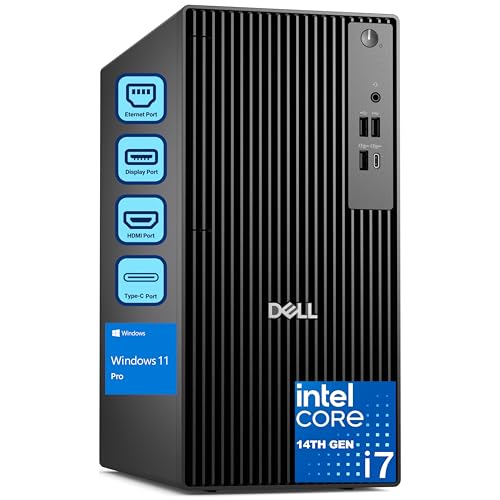
- 20-core i7-14700 handles demanding CAD and multitasking
- 64GB RAM and 2TB SSD support large projects and fast access
- Dual 4K display support helps with engineering workflows
Best For: Mechanical engineering professionals who need a dependable desktop for CAD, analysis, and heavy multitasking.
Best for AI-Accelerated CAD
Corsair AI Workstation 300 Desktop PC

- Compact 4.4L chassis for small desks and labs
- 64GB LPDDR5X memory for multitasking and large files
- Ryzen AI Max platform with strong AI acceleration
Best For: Engineers who want a compact, AI-ready desktop for CAD and technical workloads.
Best for Heavy Simulation

- Dual Xeon setup with 48 cores and 96 threads
- Massive RAM support up to 1.5TB DDR4
- 1TB NVMe SSD plus 4TB HDD storage
Best For: Mechanical engineers and CAD professionals running simulation-heavy, memory-intensive workloads.
Best for Everyday CAD Work
Dell Tower Desktop with Core Ultra 7

- Core Ultra 7 processor for responsive engineering workflows
- 32GB RAM and 1TB SSD handle multitasking well
- Simple tower setup includes keyboard, mouse, and Windows 11 Home
Best For: Students and professionals who need a dependable desktop for CAD and general engineering tasks.
Best for Heavy CAD & Simulation
Sentinel Threadripper PRO 9995WX Workstation

- 96-core Threadripper PRO for extreme parallel workloads
- 384GB ECC RAM for large assemblies and heavy multitasking
- RTX PRO 6000 with 96GB VRAM for pro graphics and rendering
Best For: Mechanical engineers and CAD professionals running simulation-heavy, memory-hungry projects.
Best for Everyday Use
Lenovo ThinkStation P2 Tower AI PC

- 64GB DDR5 handles large multitasking loads smoothly.
- 2TB SSD gives fast boot and file access.
- Supports up to 3 displays for engineering productivity.
Best For: Engineers who need a responsive tower for CAD, multitasking, and multi-monitor work.
Best for Heavy Multi-Tasking
Dell Precision 5820 Xeon W Workstation

- Xeon W-2223 for stable pro workstation performance
- 64GB RAM and dual SSDs for fast multitasking
- Quadro RTX 4000 supports CAD and visual workflows
Best For: Engineers who want a refurbished tower for CAD, modeling, and multitasking.
Best for Multitasking Value

- 10-core i7 plus 32GB DDR5 for smooth multitasking
- 1TB SSD helps keep projects and software loading quickly
- HDMI and DisplayPort support efficient dual-monitor work
Best For: Mechanical engineering students and office users who need a fast, practical Windows 11 Pro tower.
Best for CPU-Heavy Work
Core i9 RTX 5060 Ti Workstation Tower

- Very strong Core i9 multi-threaded performance
- RTX 5060 Ti for smooth visualization and light rendering
- 1TB NVMe SSD and DDR5 for fast, responsive workflows
Best For: Mechanical engineering users who prioritize CPU speed for CAD, analysis, and multitasking.
Best for Heavy CAD Loads
Dell Tower Plus EBT2250 Workstation Desktop

- Ultra 7-265 CPU handles CAD and multitasking well
- RTX 5060 improves graphics-heavy engineering workflows
- 32GB DDR5 and 1TB SSD keep projects moving fast
Best For: Mechanical engineering users who need a powerful, ready-to-run desktop for CAD and GPU-accelerated work.
Best for Heavy Multitasking – Dell Pro Tower i7-14700 Desktop
If you need a workstation pc for mechanical engineering that can handle CAD, simulation, and everyday office work without slowing down, this Dell Pro Tower is built around strong CPU performance, generous memory, and fast SSD storage. It is a practical fit for engineers who run multiple applications and want a business-class desktop that can scale with their workload.
Best For: Mechanical engineering professionals, CAD users, and power users who want a reliable tower for multitasking, design work, and data-heavy projects.
Pros:
- 20-core Intel Core i7-14700 delivers strong performance for demanding engineering workflows
- 64GB DDR5 RAM and 2TB PCIe SSD help with large files, fast boot times, and smooth multitasking
- Dual 4K display support is useful for CAD layouts, reference material, and productivity setups
- Windows 11 Pro adds business security and remote desktop features for professional environments
Cons:
- No built-in Wi-Fi, so you may need wired Ethernet or an adapter
- Not a portable system, since this is a tower desktop
- Graphics-focused users may want to confirm whether the integrated setup fits their 3D workload
For buyers comparing a workstation pc for mechanical engineering, this Dell stands out more for CPU speed, memory capacity, and dependable business features than for flashy extras. It is a smart choice if your priority is stable performance for CAD, analysis, and multitasking in a professional setting.
Best for AI-Accelerated CAD – Corsair AI Workstation 300 Desktop PC
If you want a compact workstation pc for mechanical engineering, the Corsair AI Workstation 300 is built around fast unified memory, a modern AMD Ryzen AI processor, and integrated Radeon graphics that can handle AI-assisted workflows, light 3D work, and engineering tools without taking up much desk space.
Best For: Engineers and technical users who want a small, AI-ready desktop for CAD, simulations, prototyping, and local model workflows.
Pros:
- Compact 4.4L design fits easily into tight workspaces.
- 64GB LPDDR5X memory helps with large projects and multitasking.
- Ryzen AI Max platform adds strong CPU and NPU acceleration for modern workflows.
- Up to 48GB of shared graphics memory can help with demanding creative and AI tasks.
Cons:
- Integrated graphics are not a substitute for a true high-end discrete GPU in heavy 3D rendering.
- 1TB SSD may feel limiting for large engineering datasets and project archives.
- Compact form factor can mean less upgrade flexibility than a tower workstation.
For buyers prioritizing size, responsiveness, and AI-ready hardware, this is a compelling workstation pc for mechanical engineering—especially if your workload mixes CAD, analysis, and local AI tools more than GPU-heavy rendering.
Best for Heavy Simulation – PCSP 7920 Tower Workstation
If you need a workstation pc for mechanical engineering that can handle serious multitasking, this dual Xeon tower is built for dense CAD assemblies, simulation work, rendering, and other CPU-heavy engineering tasks. Its huge memory ceiling and fast NVMe storage make it a strong fit for users who keep large project files and multiple apps open at once.
Best For: Mechanical engineers, CAD users, and simulation-heavy workflows that benefit from lots of cores and massive RAM.
Pros:
- 48 cores and 96 threads from dual Intel Xeon Platinum 8160 CPUs
- Up to 1.5TB DDR4 RAM support for demanding models and simulations
- 1TB NVMe SSD plus 4TB HDD for fast loading and large file storage
- Quadro P2000 graphics with 4 DisplayPort outputs for multi-monitor setups
Cons:
- Renewed system, so it is not a brand-new workstation
- Quadro P2000 is solid for productivity, but not ideal for top-tier GPU rendering
- Large tower design may be more machine than casual users need
For buyers prioritizing core count, memory headroom, and dependable pro-grade expansion, this is a compelling workstation pc for mechanical engineering. It is especially attractive if your workload is more about complex simulations and CAD productivity than gaming or flashy graphics power.
Best for Everyday CAD Work – Dell Tower Desktop with Core Ultra 7
If you need a practical workstation pc for mechanical engineering without jumping into a bulky gaming tower, this Dell desktop is a straightforward fit. The Core Ultra 7 processor, 32GB of memory, and 1TB SSD give you a solid base for CAD, multitasking, and managing typical engineering workloads.
Best For: Students, interns, and professionals who want a reliable desktop for CAD, modeling, and everyday engineering productivity.
Pros:
- Core Ultra 7 and 32GB RAM support smooth multitasking
- 1TB SSD provides fast boot times and plenty of local storage
- Compact tower design is easier to place in an office or dorm setup
- Includes keyboard, mouse, and Windows 11 Home for quick setup
Cons:
- UHD Graphics are not ideal for heavy 3D rendering or GPU-accelerated simulation
- No discrete graphics card included
- Windows 11 Home may be less flexible than Pro for some business users
This is a sensible workstation pc for mechanical engineering if your work leans more toward CAD, documentation, and day-to-day productivity than demanding visualization tasks. It offers strong core specs and a clean setup, but buyers who need serious graphics performance should look higher up the stack.
Best for Heavy CAD & Simulation – Sentinel Threadripper PRO 9995WX Workstation
If you need a workstation pc for mechanical engineering that can handle huge assemblies, simulation workloads, and dense multi-app multitasking, this Threadripper PRO tower is built for the job. The 96-core CPU, 384GB ECC RAM, and RTX PRO 6000 GPU give it the headroom for demanding CAD, rendering, and analysis tasks without feeling boxed in.
Best For: Mechanical engineers, CAD teams, and technical users who want maximum compute, memory capacity, and workstation-class reliability for complex design and simulation work.
Pros:
- 96-core Threadripper PRO CPU delivers exceptional parallel performance for rendering and simulation
- 384GB ECC DDR5 memory is ideal for large assemblies and heavy multitasking
- RTX PRO 6000 with 96GB VRAM is well suited for professional 3D and visualization workloads
- Fast 4TB Gen5 SSD plus 12TB HDD provides a strong mix of speed and bulk storage
Cons:
- Very expensive compared with typical engineering desktops
- Overkill for basic CAD, drafting, or light office use
- Large, high-end configuration may be more power and space than some desks need
For a workstation pc for mechanical engineering, this is a serious no-compromise option if your workflow includes heavy simulation, rendering, or massive project files. It makes the most sense when performance and expandability matter more than price.
Best for Everyday Use – Lenovo ThinkStation P2 Tower AI PC
If you need a workstation pc for mechanical engineering that can keep CAD, analysis tools, and dozens of browser tabs open at once, this ThinkStation P2 is built around high memory capacity and fast storage. The Core Ultra 5 225, 64GB of DDR5, and 2TB SSD make it a practical fit for everyday engineering workflows, especially when you want a responsive Windows 11 Pro desktop with modern connectivity.
Best For: Engineers, designers, and power users who want a roomy, multitasking-friendly tower for CAD work, documentation, and dual- or triple-monitor setups.
Pros:
- 64GB DDR5 memory is well-suited to heavy multitasking and large project files.
- 2TB PCIe SSD helps speed up boot times, file access, and software loading.
- Three-display support with HDMI and dual DisplayPort outputs adds flexibility for engineering desks.
- Wi-Fi 7, Bluetooth, and plentiful front/rear ports improve day-to-day connectivity.
Cons:
- Intel integrated graphics are fine for productivity, but not ideal for demanding 3D rendering or GPU-accelerated simulation.
- Core Ultra 5 is capable, though serious workstation users may prefer a higher-tier CPU for heavier engineering workloads.
Overall, this is a well-rounded workstation pc for mechanical engineering if your priority is memory, storage, and smooth office-to-CAD productivity rather than discrete-graphics performance. It makes the most sense for users who want a dependable tower that can handle multitasking and multiple displays with minimal friction.
Best for Heavy Multi-Tasking – Dell Precision 5820 Xeon W Workstation
If you want a workstation pc for mechanical engineering that can handle CAD projects, simulation tools, and lots of open files at once, this refurbished Dell Precision 5820 is built around proven pro-grade parts. The Xeon W CPU, 64GB of RAM, and dual NVMe SSD storage make it a practical pick for demanding day-to-day engineering workflows.
Best For: Engineers and students who need a reliable, expandable tower for CAD, modeling, and multitasking on a tighter budget than a new workstation.
Pros:
- Xeon W-2223 processor is tuned for stable workstation performance
- 64GB DDR4 RAM helps with large projects and heavy multitasking
- Dual SSD setup offers fast boot times and roomy storage capacity
- Quadro RTX 4000 graphics add solid pro-app support for visual workloads
Cons:
- Only 4 CPU cores, so it is not ideal for very CPU-heavy simulations
- No built-in Wi-Fi or Bluetooth card
For buyers seeking a workstation pc for mechanical engineering without jumping to a brand-new high-end system, this Precision 5820 delivers a strong mix of memory, storage, and professional graphics. It is especially appealing if your workflow values responsiveness and expandability more than raw core count.
Best for Multitasking Value – ASUS V500 i7 Tower Desktop
If you want a practical workstation pc for mechanical engineering, the ASUS V500 is a strong fit for CAD work, document-heavy projects, and everyday multitasking. Its 10-core Intel Core i7 processor, 32GB of DDR5 memory, and 1TB SSD give it the speed and headroom needed for smoother workflow in a compact business tower.
Best For: Mechanical engineering students and professionals who need a capable Windows 11 Pro desktop for CAD, modeling, and general productivity.
Pros:
- 10-core Intel Core i7-13620H handles multitasking and productivity apps well
- 32GB DDR5 RAM and 1TB SSD support fast load times and responsive everyday use
- DisplayPort and HDMI make it easy to run dual monitors for a cleaner workstation setup
- Windows 11 Pro adds business-friendly security and management features
Cons:
- Intel UHD Graphics limits performance for heavy 3D rendering or GPU-accelerated workloads
- More demanding engineering software may benefit from a dedicated graphics card
- The bundle focuses on core productivity, not a fully expanded workstation package
Overall, this ASUS tower is a sensible midrange pick if you need a workstation pc for mechanical engineering without jumping into a high-end desktop class. It is best suited to users who value fast everyday performance, solid memory capacity, and dual-monitor support over advanced graphics power.
Best for CPU-Heavy Work – Core i9 RTX 5060 Ti Workstation Tower
If you want a workstation pc for mechanical engineering that leans hard on CPU throughput, this prebuilt is built around a Core i9-14900HX and 16GB DDR5 for fast multitasking, CAD, simulation prep, and other demanding workflows. The RTX 5060 Ti adds modern GPU acceleration for visualization and lighter rendering, while the 1TB NVMe SSD keeps project loading and boot times snappy.
Best For: Mechanical engineering students and professionals who need strong CPU performance, quick storage, and solid graphics for CAD, modeling, and mixed productivity work.
Pros:
- Core i9-14900HX offers very strong multi-threaded performance for engineering workloads
- RTX 5060 Ti helps with visualization, viewport smoothness, and creative apps
- 1TB NVMe SSD and DDR5 memory support fast boot and responsive multitasking
- WiFi 6 and multiple display outputs make it easy to build a productive desk setup
Cons:
- 16GB RAM may feel tight for larger simulation or rendering projects
- The HX-class processor is powerful, but not the same as a full desktop i9
- Not the most specialized choice for certified pro visualization workflows
For buyers comparing a workstation pc for mechanical engineering, this model stands out more for raw CPU speed and fast everyday responsiveness than for workstation-certified graphics. It makes the most sense if your work blends CAD, analysis, and general productivity, and you want a prebuilt system that is ready to go without a lot of setup.
Best for Heavy CAD Loads – Dell Tower Plus EBT2250 Workstation Desktop
If you want a workstation pc for mechanical engineering that can handle CAD, simulation, and multitasking without feeling overmatched, this Dell Tower Plus is a strong all-around option. The Intel Ultra 7-265, 32GB of DDR5 memory, and GeForce RTX 5060 give it the kind of headroom engineers need for models, assemblies, and visual workloads.
Best For: Mechanical engineering students and professionals who need a responsive desktop for 3D modeling, technical design, and GPU-accelerated workflows.
Pros:
- Powerful Ultra 7 CPU with 20 cores for demanding engineering software and multitasking
- RTX 5060 graphics help with viewport performance and GPU-assisted workloads
- 32GB DDR5 and a 1TB PCIe SSD provide fast load times and smooth everyday use
- Generous display and I/O support, including 3 DisplayPort and 2 HDMI outputs
Cons:
- 460W power supply may limit major future GPU upgrades
- Not a portable option for users who need a mobile engineering setup
For buyers comparing a workstation pc for mechanical engineering, this Dell stands out for balancing strong CPU performance, capable graphics, and practical connectivity in a ready-to-use tower. It is a smart pick if you want a desktop that can grow with more advanced coursework or professional design work.
How We Picked the Best Workstation PC for Mechanical Engineering
We prioritized systems that make sense for real engineering workflows: strong multi-core CPU performance, enough RAM for large assemblies, fast NVMe storage, and graphics hardware suited to 3D modeling, viewport acceleration, and light-to-heavy simulation tasks. We also looked at upgrade potential, connectivity, and workstation-class reliability.
Quick Comparison
For most users, a balanced Workstation PC for Mechanical Engineering will pair a modern Intel Core Ultra, Core i7, or Ryzen-class processor with 32GB to 64GB of RAM and a fast SSD. Higher-end options in this roundup step up to Xeon or Threadripper PRO platforms, which are better for massive assemblies, parallel processing, and compute-heavy analysis.
Key Buying Factors for a Workstation PC for Mechanical Engineering
CPU Performance
Mechanical engineering workloads can be both single-threaded and multi-threaded. CAD navigation often benefits from fast boost clocks, while simulation, rendering, and preprocessing scale with more cores. Choose the CPU based on your primary software mix rather than core count alone.
Memory Capacity
16GB is the practical floor, but 32GB is the safer minimum for most professionals. For larger assemblies, multiple applications, or finite element analysis, 64GB or more is a smarter long-term choice.
GPU and Certification
A dedicated GPU helps with 3D viewports and visualization. Workstation cards are often preferred for stability and certified drivers, but some modern consumer GPUs can still be effective for value-focused buyers. If your software is picky, check compatibility before buying.
Storage and Expandability
Fast SSD storage improves loading, saving, and project responsiveness. A second drive for archives or scratch space is useful, and tool-free access or spare slots make upgrades easier as project demands grow.
Ports, Networking, and Displays
Look for enough video outputs, USB-C, and high-speed networking if you use multiple monitors, peripherals, or remote collaboration tools. Support for two or three displays is especially helpful for design and analysis workflows.
Who Should Buy Which Workstation PC for Mechanical Engineering?
If you need a dependable all-round system, choose a balanced tower with a modern Intel Core or equivalent CPU, 32GB to 64GB RAM, and an SSD. If you handle very large assemblies, simulation-heavy work, or long compute jobs, step up to Xeon or Threadripper PRO models with more memory and stronger expansion options. If your work is mostly CAD, documentation, and moderate 3D design, a midrange Workstation PC for Mechanical Engineering will usually deliver the best value.
For students and small studios, the best choice is often the machine that leaves budget for a quality monitor, mouse, and software licenses. For power users, reliability and upgrade headroom matter more than headline specs alone.