A reliable hard drive docking station can make backups, drive upgrades, and file transfers far easier than installing disks inside a desktop. The best models give home-office users flexible access to 2.5-inch and 3.5-inch SATA drives without requiring an enclosure for every disk.
This roundup compares 10 docking stations across dual-bay, multi-bay, USB-C, cloning, and NVMe designs so you can choose the right balance of speed, capacity, convenience, and compatibility.
Best 10 Hard Drive Docking Stations for Home Offices Picks for 2026
Best Dual-Bay Cloner

- Supports two 2.5-inch or 3.5-inch SATA drives
- Offline cloning without a computer
- USB 3.0 transfer speeds up to 5Gbps
Best For: Home offices handling standard SATA drives and occasional cloning
Best Multi-Format Dock
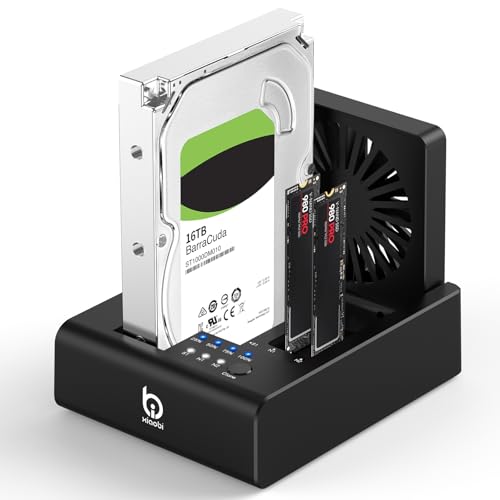
- Supports SATA drives and two M.2 NVMe SSDs
- USB-C 3.2 Gen 2 up to 10Gbps
- Built-in fan and offline cloning controls
Best For: Mixed NVMe and SATA storage workflows
Best USB-C SATA Dock

- Dual-bay access for 2.5-inch and 3.5-inch SATA drives
- Offline one-to-one cloning
- USB-C connection with up to 5Gbps
Best For: USB-C home offices using standard SATA drives
Best Single-Bay Value

- Supports one 2.5-inch or 3.5-inch SATA drive
- Up to 22TB capacity and 5Gbps USB 3.0
- Works across Windows, macOS, and Linux
Best For: Simple single-drive access, backups, and file transfers
Best Multi-Drive Pick

- Access up to four SATA HDDs or SSDs
- Offline cloning works without a computer
- Trayless design with USB 3.0 connectivity
Best For: Multi-drive backups and home-office storage management
Best Hub-Equipped Option

- Supports two 2.5-inch or 3.5-inch SATA drives
- Includes offline cloning with progress LEDs
- Adds three USB 3.0 Type-A hub ports
Best For: Drive cloning plus USB accessory connectivity
Best Simple Single-Drive Pick

- Reads one 2.5-inch or 3.5-inch SATA drive
- Tool-free swapping with plug-and-play support
- Includes a 12V adapter for 3.5-inch drives
Best For: Occasional SATA drive access and backups
High-Capacity Cloner

- Five bays for 2.5- and 3.5-inch SATA drives
- Offline duplication for up to four copies
- Up to 100TB total capacity
Best For: Photographers and home offices with extensive storage needs
Fast Single-Drive Dock

- 10Gbps USB 3.2 Gen 2 connection
- Tool-free hot-swapping for SATA drives
- Supports 2.5- and 3.5-inch drives
Best For: Fast, occasional access to individual SATA drives
Budget Dual-Bay Cloner

- Two bays for simultaneous SATA drive access
- Computer-free offline cloning
- USB 3.0 speeds up to 5Gbps
Best For: Home-office backups and two-drive migrations
Best Dual-Bay Cloner – Sabrent USB 3.0 HDD Dock
For home offices needing a straightforward way to access or duplicate drives, the SABRENT EC-HD2B is a practical pick among hard drive docking stations for home offices. It accepts bare 2.5-inch and 3.5-inch SATA HDDs or SSDs, connects over USB 3.0, and requires no drivers.
Best For: Home-office users who need dual-bay SATA drive access and occasional offline cloning.
Pros:
- Supports two 2.5-inch or 3.5-inch SATA drives.
- Handles drives up to 10TB, with up to 20TB total storage capacity listed.
- Offers offline cloning, plug-and-play setup, and USB 3.0 speeds up to 5Gbps.
Cons:
- Supports SATA drives, not the broader range of M.2 or NVMe formats.
- Offline cloning is listed at up to 60Mbps, slower than the USB connection’s maximum.
This dock balances simple operation with useful duplication features. It is a sensible choice when your home-office workflow centers on standard SATA drives rather than newer M.2 storage.
Best Multi-Format Dock – Xiaobi 3-Bay NVMe/SATA Dock
The Xiaobi 3-bay model stands out among hard drive docking stations for home offices by combining support for 2.5-inch and 3.5-inch SATA drives with two M.2 NVMe slots. Its USB-C 3.2 Gen 2 connection, offline cloning controls, and built-in cooling fan suit storage-heavy workflows.
Best For: Home-office users working with both M.2 NVMe SSDs and conventional SATA drives.
Pros:
- Supports 2.5-inch and 3.5-inch SATA drives plus two M.2 NVMe SSDs.
- Provides USB-C 3.2 Gen 2 connectivity with transfer speeds up to 10Gbps.
- Includes one-touch offline cloning and an 80mm foldable cooling fan.
Cons:
- Does not support SATA NGFF or mSATA SSDs.
- Does not support reverse cloning from an M.2 NVMe SSD to a SATA HDD.
- Offline cloning requires the target drive to be at least as large as the source.
This is the most flexible option in the group for mixed storage formats. Confirm your SSD type and intended cloning direction before buying, since compatibility is specific to M-Key or B+M Key NVMe drives.
Best USB-C SATA Dock – Sabrent Dual-Bay Cloner
The SABRENT EC-CH2B is a compact choice for home offices that use standard SATA storage. Among hard drive docking stations for home offices, it offers two simultaneous drive bays, USB-C connectivity, tool-free hot-swapping, and offline one-to-one cloning without a computer.
Best For: USB-C-equipped computers and users who regularly move or clone 2.5-inch and 3.5-inch SATA drives.
Pros:
- Reads and writes two SATA drives at once when connected to a computer.
- Supports offline cloning at the press of a button.
- Includes a USB-C cable and supports USB 3.0 speeds up to 5Gbps.
Cons:
- Does not support IDE/PATA, Molex-powered, M.2, or NVMe drives.
- The included cable uses USB-C at the dock end, so a computer without USB-C may need another cable.
- Drives are not included.
Choose this model when your storage collection is SATA-based and your computer has a suitable USB-C port. Its dual-bay layout is useful for file transfers, while the standalone cloning mode simplifies drive upgrades.
Best Single-Bay Value – ORICO USB 3.0 SATA Dock
The ORICO DD18U3-US keeps things simple for home offices that need quick access to one bare SATA drive. It supports 2.5-inch and 3.5-inch HDDs or SSDs, includes a power adapter and USB-A cable, and adds UASP support for compatible systems.
Best For: Users who need a simple single-drive reader for backups, disk imaging, and file transfers.
Pros:
- Supports 2.5-inch and 3.5-inch SATA I/II/III drives up to 22TB.
- Offers USB 3.0 speeds up to 5Gbps with UASP and TRIM support.
- Works with Windows, macOS, Linux, iPadOS devices with Thunderbolt, and Raspberry Pi systems.
Cons:
- Holds one drive at a time, so it is not designed for dual-drive cloning.
- Does not support IDE or SAS drives.
- New or unallocated drives may need initialization and formatting in Disk Management.
This ORICO dock is a practical everyday reader rather than a dedicated cloner. Its broad platform support and 22TB capacity make it well suited to straightforward home-office backups and drive access.
Best Multi-Drive Pick – 4-Bay SATA Docking Station
For home offices managing several bare drives, the SABRENT DS-U3B4 is a flexible choice among hard drive docking stations for home offices. Its four trayless bays accept 2.5-inch and 3.5-inch SATA HDDs or SSDs, while USB 3.0 supports transfers up to 5Gbps.
Best For: Home offices that need simultaneous access to multiple SATA drives or convenient drive-to-drive cloning.
Pros:
- Holds up to four 2.5-inch or 3.5-inch SATA drives.
- Supports offline cloning without a computer.
- Trayless, tool-free drive insertion simplifies swaps.
- Includes external power for stable multi-drive operation.
Cons:
- Designed for SATA drives rather than M.2 or other interfaces.
- Its four-bay design takes more desk space than a single-drive dock.
The DS-U3B4 stands out when capacity and drive access matter more than a compact footprint. LED indicators and plug-and-play operation make it practical for backups, migrations, and routine drive management.
Best Hub-Equipped Option – Dual-Bay Drive Cloner
The MAIWO dual-bay dock combines SATA drive access, offline cloning, and a three-port USB 3.0 hub. For home offices comparing hard drive docking stations for home offices, it offers a useful balance of drive duplication and everyday peripheral connectivity.
Best For: Users who want to clone SATA drives while also connecting USB accessories or charging a phone.
Pros:
- Supports two 2.5-inch or 3.5-inch SATA HDDs or SSDs.
- Offers offline cloning with 25%, 50%, 75%, and 100% progress indicators.
- Provides three USB 3.0 Type-A hub ports.
- Includes a 12V 3A power adapter for stable operation.
Cons:
- Limited to two installed drives at a time.
- Uses USB Type-A connectivity, which may require an adapter for some newer computers.
With dual-drive support and extra USB ports, the MAIWO is more versatile than a basic reader. Its offline copier is especially helpful for straightforward drive backups without installing software.
Best Simple Single-Drive Pick – USB 3.0 SATA Dock
For straightforward access to one bare drive, the SABRENT EC-DFLT is a compact option among hard drive docking stations for home offices. It supports 2.5-inch and 3.5-inch SATA HDDs and SSDs, with tool-free insertion, hot-swapping, and USB 3.0 connectivity.
Best For: Home-office users who need a simple reader for occasional SATA drive access, backups, or upgrades.
Pros:
- Works with SATA I, II, and III 2.5-inch and 3.5-inch drives.
- Tool-free lay-flat design makes drive swapping easy.
- Plug-and-play support is available on Windows 10/11, macOS, and Linux.
- Includes the required 12V adapter for 3.5-inch drives.
Cons:
- Supports only one drive at a time.
- Does not support IDE/PATA, M.2 NVMe, M.2 SATA, or SAS drives.
- Uses a USB Type-A host cable rather than a USB-C port.
The EC-DFLT is a practical low-complexity solution when you do not need cloning or multiple bays. Its broad operating-system support and included power adapter make it easy to use, provided your drive is a compatible bare SATA model.
High-Capacity Cloner – ORICO 5-Bay Hard Drive Dock
For home offices managing large photo, video, or backup libraries, the ORICO 5-bay dock is a high-capacity option among hard drive docking stations for home offices. It supports up to five 2.5- or 3.5-inch SATA SSDs or HDDs, with a stated maximum capacity of 100TB total.
Best For: Photographers, content creators, and advanced home-office users who need multiple drive bays and offline duplication.
Pros:
- Supports up to five SATA drives with up to 20TB per drive.
- Can duplicate four copies at once without a computer.
- Aluminum construction and vertical design support heat dissipation.
- Includes USB-C to USB-C and USB-C to USB-A connectivity.
Cons:
- The offline cloning process overwrites the target disk, so backups are essential.
- USB 3.2 Gen 1 is slower than the 10Gbps connection offered by some competing docks.
- The five-bay design may be more than a basic single-drive setup requires.
The ORICO stands out when capacity and cloning flexibility matter more than a compact footprint. Its multiple bays and aluminum enclosure make it a strong choice for organized local storage, while the cloning features require careful drive identification before use.
Fast Single-Drive Dock – SABRENT USB-C SATA Dock
The SABRENT DS-UC1B is a straightforward choice for home offices that frequently swap one SATA drive at a time. Its USB 3.2 Gen 2 connection supports up to 10Gbps, and it works with both 2.5- and 3.5-inch SATA SSDs and HDDs.
Best For: Users who want fast, tool-free access to individual SATA drives for backups, transfers, and storage expansion.
Pros:
- 10Gbps USB-C connection is designed for high-speed SATA transfers.
- Supports 2.5- and 3.5-inch SATA drives, including capacities of 20TB and larger.
- Tool-less, hot-swappable design makes drive changes quick.
- Includes both USB-A and USB-C to USB-C cables.
Cons:
- Its single bay does not support simultaneous access to multiple drives.
- The enclosure is plastic rather than aluminum.
- It requires a power adapter for 3.5-inch drives.
For most routine home-office tasks, the SABRENT offers a useful balance of speed and simplicity. It is especially practical if you already have several loose SATA drives and want to connect them without installing them in an enclosure.
Budget Dual-Bay Cloner – FIDECO Offline Clone Dock
The FIDECO dual-bay dock is a practical option for home offices that need to connect or clone two SATA drives. As one of the more flexible hard drive docking stations for home offices, it supports 2.5- and 3.5-inch SATA HDDs and SSDs, with USB 3.0 transfer speeds up to 5Gbps.
Best For: Home-office users who need simultaneous two-drive access and occasional computer-free cloning.
Pros:
- Two bays allow simultaneous connection of compatible SATA drives.
- Offline cloning works without a computer.
- Plug-and-play operation requires no drivers.
- Compatible with Windows, macOS, and Linux systems.
Cons:
- It supports SATA drives only, not other drive interfaces.
- USB 3.0 tops out at 5Gbps, below newer 10Gbps docks.
- New drives may need to be initialized before the computer recognizes them.
FIDECO makes sense when two bays are useful but a larger multi-drive station would be excessive. Its offline cloning feature adds convenience for migrations and backups, while the SATA-only limitation should be checked against your existing drives.
How We Picked the Best Hard Drive Docking Stations for Home Offices
We focused on the features that matter most in a home-office storage setup: drive compatibility, connection type, bay count, cloning support, ease of use, and practical capacity. The selection includes simple single-drive docks, dual-bay models for copying or comparing disks, and larger stations for users managing several drives.
We also considered whether each design supports 2.5-inch and 3.5-inch SATA HDDs or SSDs, whether it offers USB-C or USB 3.0 connectivity, and whether its controls and power requirements are suitable for routine desktop use.
Quick Comparison
- Best for straightforward drive access: Single-bay SATA docks are compact and simple for occasional transfers.
- Best for cloning: Dual-bay stations can copy one drive to another without using a computer, when the source and target drives meet the model’s requirements.
- Best for multiple disks: Four- and five-bay docks suit media libraries, backup rotations, and small office workflows.
- Best for modern laptops: USB-C models reduce adapter dependence and can offer higher interface bandwidth.
- Best for newer solid-state storage: An M.2 NVMe and SATA dock provides broader compatibility than a SATA-only station.
Key Buying Factors for Hard Drive Docking Stations for Home Offices
Drive Compatibility
Check whether the dock accepts both 2.5-inch and 3.5-inch SATA drives. A 3.5-inch HDD usually needs the included external power adapter, while a 2.5-inch SSD or laptop drive may draw less power. NVMe M.2 drives require a compatible M.2 slot and should not be assumed to work in a SATA-only dock.
Connection Speed and Ports
USB 3.0 is sufficient for many hard drives, while USB-C models may provide a faster or more convenient connection depending on the computer and dock. Real-world transfer speeds still depend on the drive, USB controller, cable, and host port. Extra USB hub ports can be useful, but they share bandwidth with the dock.
Cloning and Backup Features
Offline cloning is convenient for replacing a drive, but it generally requires a target drive at least as large as the source and erases existing data on the target. For regular backups, computer-based cloning or imaging software may provide more control and verification.
Capacity, Cooling, and Workspace
Multi-bay stations take more desk space but reduce cable clutter when several drives are used. Look for stable drive slots, clear status indicators, adequate ventilation, and a power supply rated for the number of installed disks.
Who Should Buy Which Hard Drive Docking Stations for Home Offices?
Choose a compact single-bay dock if you occasionally recover files or connect spare drives. A dual-bay model is a better fit for home-office upgrades, drive-to-drive copying, and maintaining separate source and backup disks. Select a four- or five-bay dock if you manage multiple archives, rotating backups, or several project drives. USB-C is especially worthwhile for newer laptops and desktops with limited USB-A ports, while an NVMe/SATA model makes sense if your storage collection includes both M.2 and traditional SATA drives.