A reliable network is essential for content creators managing IP cameras, wireless access points, streaming equipment, NAS storage, and smart studio devices. The right Power over Ethernet (PoE) switch can reduce cable clutter while delivering both data and power from one central point.
We selected 10 models covering compact studios, multi-camera setups, high-speed workflows, and larger production spaces. The guide below explains which specifications matter most, from PoE budget and port speed to uplinks, management features, and installation flexibility.
Best 10 PoE Network Switches for Content Creators Picks for 2026
Best for Expandable Studios

- 16 total Gigabit ports, including eight PoE+ ports
- 150W PoE budget with automatic device recovery
- VLAN, QoS, IGMP Snooping, and LAG support
Best For: Growing studios needing many wired connections
Best for High-Speed NAS Workflows
GigaPlus 6-Port 10Gb PoE Switch
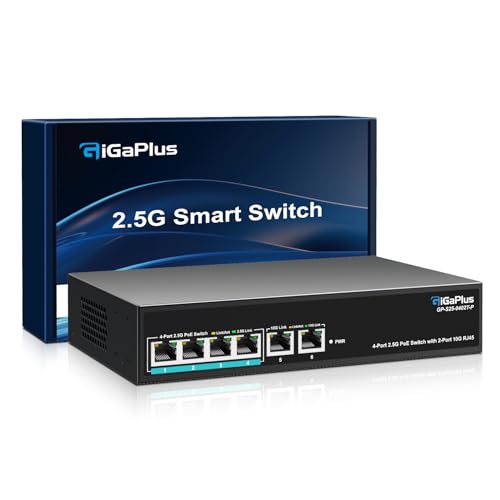
- Four 2.5G PoE ports plus two 10G RJ45 uplinks
- 60Gbps switching capacity for fast transfers
- Fanless metal design with desktop or wall mounting
Best For: Compact studios using 2.5G or 10G NAS storage
Best for Multi-Gig Studio Builds

- Eight 2.5G PoE++ ports
- 230W PoE budget and 40Gbps switching capacity
- Fanless, wall-mountable design with lifetime protection
Best For: Quiet multi-gigabit studios with multiple PoE devices
Best for Managed Production Networks

- 20 ports with 16 Gigabit PoE+ connections
- 250W PoE budget and auto recovery
- Omada cloud management, VLAN, and port separation
Best For: Growing studios needing centralized network control
High-Power Silent Pick

- 16 Gigabit PoE+ ports
- 183W shared PoE budget
- Fanless desktop or wall-mount design
Best For: Creators needing many powered devices and quiet operation
Feature-Rich Budget Option

- 16 Gigabit PoE+ ports
- Priority, Isolation, and Auto Recovery modes
- Fanless metal housing with 120W budget
Best For: Creators wanting useful traffic and device-management features
Compact Streaming Hub

- 8 PoE+ ports plus 2 Gigabit uplinks
- 120W total PoE budget
- VLAN support and fanless metal design
Best For: Small studios and streamers with up to eight powered devices
High-Capacity Pick

- 16 PoE+ Gigabit ports with a 250W budget
- QoS and IGMP Snooping for media traffic
- Rack-mountable metal design with SFP options
Best For: Large studios with multiple powered network devices
Flexible Small-Studio Pick

- Eight PoE+ ports and two Gigabit uplinks
- Extend mode reaches up to 820 feet
- Auto recovery and port isolation modes
Best For: Small studios with cameras or access points
Managed Silent Pick

- Eight PoE+ Gigabit ports with a 120W budget
- VLAN, QoS, monitoring, and port mirroring tools
- Fanless metal design for quiet studio use
Best For: Small studios needing quiet, configurable networking
Best for Expandable Studios – TP-Link TL-SG1016PE
The TP-Link TL-SG1016PE is a practical choice among PoE network switches for content creators who need plenty of Gigabit ports for cameras, access points, computers, and other studio equipment. It provides eight PoE+ ports with a 150W total budget, plus eight non-PoE Gigabit ports for additional wired devices.
Best For: Larger home studios and small production spaces that need many wired connections, VLAN support, and straightforward web-based management.
Pros:
- Eight PoE+ ports support up to 30W per port, with a 150W total PoE budget.
- Eight additional Gigabit ports accommodate non-PoE computers, servers, and network devices.
- Includes VLAN, QoS, IGMP Snooping, LAG, and automatic PoE device recovery features.
- Metal construction, shielded ports, a three-year warranty, and free technical support add confidence.
Cons:
- PoE power is limited to 150W, so lower-priority ports may be disabled when the budget is reached.
- It offers Gigabit connectivity rather than 2.5G or 10G speeds.
- Its 16-port design is larger than necessary for a small setup.
Choose this switch when port count and flexible network management matter more than multi-gigabit speeds. Its automatic recovery and traffic-prioritization features can also reduce hands-on maintenance in a busy content workspace.
Best for High-Speed NAS Workflows – GigaPlus 6-Port 10Gb PoE Switch
The GigaPlus six-port switch stands out among PoE network switches for content creators working with fast NAS storage, 2.5G computers, or Wi-Fi 6 access points. Four PoE ports support up to 2.5Gbps connections, while two 10G RJ45 uplinks provide higher-speed links for storage or network backbone connections.
Best For: Creators editing large video files from a 2.5G or 10G NAS who want simple, quiet, plug-and-play networking.
Pros:
- Four auto-sensing PoE ports support 10/100/1000/2500Mbps devices.
- Two 10G RJ45 ports and a 60Gbps switching capacity suit high-speed storage and workstation links.
- Fanless operation keeps the switch quiet in recording, editing, or streaming spaces.
- Rugged metal housing, 4KV lightning protection, and desktop or wall mounting support flexible installation.
Cons:
- Only four ports provide PoE, and the supplied notes do not specify the total PoE power budget.
- As an unmanaged switch, it lacks VLAN and traffic-management controls.
- There are only six total ports, which may limit expansion.
This is a strong fit for a compact, performance-focused creator network. Its 10G uplinks and fanless design are particularly useful when fast file transfers and quiet operation are priorities, but users needing segmentation or extensive expansion should consider a managed, larger model.
Best for Multi-Gig Studio Builds – TRENDnet TPE-BG380
The TRENDnet TPE-BG380 is a compelling option among PoE network switches for content creators upgrading beyond standard Gigabit networking. All eight RJ45 ports support 2.5Gbps connections and PoE++ standards, while the 230W power budget gives creators room to power multiple compatible devices.
Best For: Multi-gigabit studios with several PoE devices, Wi-Fi access points, cameras, or other equipment that benefits from higher bandwidth and substantial power capacity.
Pros:
- Eight 2.5GBASE-T PoE++ ports provide faster wired connections over Cat5e or better cabling.
- The 230W PoE budget supports multiple powered devices, with over-current and short-circuit protection.
- Fanless operation avoids disruptive noise in recording and streaming environments.
- Includes 40Gbps switching capacity, jumbo-frame support, wall mounting, and lifetime manufacturer protection.
Cons:
- It is an unmanaged switch, so advanced VLAN and traffic-control features are not included.
- There are no dedicated 10G uplink ports.
- Lifetime protection is specified for the U.S. and Canada only.
For creators building a fast, quiet, and power-capable wired network, the TPE-BG380 offers a balanced eight-port layout. It is best suited to plug-and-play installations where 2.5G performance matters but centralized management is not required.
Best for Managed Production Networks – TP-Link Omada ES220GMP
The TP-Link Omada ES220GMP is designed for content creators who need more than plug-and-play connectivity. It combines 16 Gigabit PoE+ ports with two additional Gigabit RJ45 ports and two Gigabit SFP ports, while Omada SDN support enables centralized cloud access and remote management.
Best For: Production spaces with many PoE devices that need VLANs, remote administration, port separation, and a rack-mountable metal enclosure.
Pros:
- Provides 20 ports: 16 Gigabit PoE+ ports, two Gigabit RJ45 ports, and two Gigabit SFP ports.
- A 250W PoE budget supports up to 30W per PoE port.
- Omada SDN enables centralized cloud management and remote access.
- Features PoE auto recovery, port separation, durable metal construction, and rack-mounting capability.
Cons:
- Gigabit ports may be limiting for high-speed NAS or multi-gigabit video workflows.
- Its larger 20-port layout may be excessive for a compact creator setup.
- The supplied notes do not mention a warranty term.
This switch is a strong fit for organized studios that need segmentation and centralized oversight rather than basic connectivity alone. Its 250W power budget and broad port selection make it well suited to a growing production network, provided Gigabit speeds meet your workflow needs.
High-Power Silent Pick – NETGEAR GS316PP
For content creators building a studio, editing workstation, or streaming setup, the NETGEAR GS316PP is a straightforward choice among PoE network switches for content creators. It provides 16 Gigabit Ethernet ports, with PoE+ power on every port and a shared 183W budget, so multiple powered devices can connect without a complicated setup.
Best For: Creators who need many PoE connections, strong shared power capacity, and silent operation in a studio or home office.
Pros:
- 16 Gigabit Ethernet ports support high-speed wired connections.
- 16 PoE+ ports provide up to 30W per port within a 183W total budget.
- Fanless, energy-efficient design operates quietly.
- Metal housing supports desktop or wall-mounted placement.
Cons:
- Unmanaged design does not provide advanced network configuration.
- It has no dedicated non-PoE uplink ports.
The GS316PP is a practical option when you want high PoE capacity and quiet, plug-and-play performance. Its unmanaged design keeps installation simple, while the 16-port layout leaves room for cameras, access points, and other network equipment.
Feature-Rich Budget Option – TP-Link TL-SG116P
The TP-Link TL-SG116P combines 16 Gigabit PoE+ ports with practical traffic and troubleshooting features, making it a flexible option among PoE network switches for content creators. Its 120W PoE budget can power compatible cameras, access points, and other devices, while Priority, Isolation, and PoE Auto Recovery modes add useful control.
Best For: Creators who want 16 ports plus video-priority, device-isolation, and automatic PoE recovery features.
Pros:
- 16 PoE+ ports support 10/100/1000 Mbps connections and up to 30W per port.
- Priority Mode can help prioritize video or voice traffic on ports 1–4.
- PoE Auto Recovery can detect and reboot dropped or unresponsive powered devices.
- Fanless metal design offers quiet operation and durable construction.
Cons:
- Its 120W total PoE budget is lower than the NETGEAR option in this roundup.
- Extend Mode reaches up to 250 meters but reduces speed to 10 Mbps.
- Some advanced functions require configuration.
For creators managing several video-oriented devices, the TL-SG116P offers more network-management flexibility than a basic plug-and-play switch. The lower total PoE budget is worth considering if many connected devices will draw power simultaneously.
Compact Streaming Hub – Tenveo 8-Port PoE Switch
The Tenveo 8-Port PoE Switch is designed for smaller creative networks that need powered cameras, access points, or streaming equipment without taking up much space. It offers eight Gigabit PoE+ ports, two additional non-PoE Gigabit uplinks, a 120W total PoE budget, and VLAN capability for more advanced network separation.
Best For: Streamers and small studios connecting up to eight powered devices while keeping router or switch uplinks separate.
Pros:
- Eight PoE+ ports deliver up to 30W per port, with a 120W total budget.
- Two non-PoE Gigabit uplink ports help connect to a router or another switch.
- VLAN capability can segment cameras and other network devices.
- Fanless metal construction supports quiet desktop or wall-mounted use.
Cons:
- Eight PoE ports provide less expansion capacity than the 16-port models.
- The supplied notes do not specify a warranty duration.
The Tenveo is a strong fit for a focused streaming or small-studio setup. Its dedicated uplinks and VLAN support are useful additions, while the compact, silent design suits noise-sensitive creative spaces.
High-Capacity Pick – TP-Link TL-SG1218MP
For content creators building a multi-camera studio, streaming setup, or media workspace, the TP-Link TL-SG1218MP is a high-capacity option among PoE network switches for content creators. It combines 16 PoE+ Gigabit ports with a 250W power budget, plus additional uplink options for expanding your network.
Best For: Large creator studios with multiple PoE cameras, access points, phones, or other powered network devices.
Pros:
- Sixteen PoE+ ports support up to 30W per port, with a 250W total PoE budget.
- Two Gigabit non-PoE ports and two combo SFP slots provide flexible high-speed connections.
- 802.1p/DSCP QoS and IGMP Snooping help prioritize video and voice traffic.
- Rack-mountable metal construction and plug-and-play setup suit permanent installations.
Cons:
- The 17.3-inch-wide chassis is less suitable for compact desktop setups.
- Its large port count may be more than a small creator workspace needs.
The TL-SG1218MP is a practical choice when your production network needs substantial PoE capacity and room to grow. Its simple setup favors creators who want strong connectivity without configuring complex network software.
Flexible Small-Studio Pick – UGREEN 10-Port PoE Switch
The UGREEN 10-Port PoE Switch offers a compact way to connect powered cameras, access points, or other studio equipment. For creators comparing PoE network switches for content creators, its eight PoE+ ports, two Gigabit uplinks, and selectable operating modes provide useful flexibility for smaller installations.
Best For: Small studios, home offices, and creator setups using several PoE devices over short or extended cable runs.
Pros:
- Eight PoE+ Gigabit ports support up to 30W each, with two additional Gigabit uplinks.
- Port Isolation mode can separate ports 1–8 to help prevent network storms.
- Extend mode supports PoE transmission up to 820 feet and enables auto recovery on ports 1–6.
- Intelligent power management independently shuts down short-circuited ports.
Cons:
- The total PoE budget is 60W, so simultaneous high-power loads require careful planning.
- Its listed modes are simpler than the extensive controls found on a fully managed switch.
UGREEN’s switch is well suited to creators who value easy deployment and practical automation. The mode button, auto recovery, and long-distance Extend setting are especially useful for distributed cameras or access points.
Managed Silent Pick – STEAMEMO 8-Port PoE+ Switch
The STEAMEMO 8-Port PoE+ Switch is aimed at creators who want more control over a compact network. It combines eight Gigabit PoE+ ports and a 120W budget with VLAN, QoS, traffic monitoring, and fanless operation, making it one of the more configurable PoE network switches for content creators.
Best For: Home studios and small businesses that need network segmentation, traffic prioritization, and quiet operation.
Pros:
- Eight PoE+ ports deliver up to 30W each, with a 120W total PoE budget.
- Web, desktop, and mobile management support QoS, 802.1Q VLANs, and traffic monitoring.
- Fanless metal construction provides quiet operation for recording and streaming spaces.
- It can operate in managed or unmanaged mode and supports desktop or wall mounting.
Cons:
- Configuration features may be unnecessary for creators who only need plug-and-play networking.
- The supplied notes specify a one-year replacement warranty, shorter than some competing coverage.
This switch is a strong fit when silence and control matter as much as PoE capacity. Its VLAN and QoS tools can help organize production devices, while dual-mode operation keeps basic deployments straightforward.
How We Picked the Best PoE Network Switches for Content Creators
We evaluated these PoE Network Switches for Content Creators based on the features that have the greatest effect on real studio use: total PoE budget, number of powered ports, Ethernet speed, uplink capacity, management controls, reliability, and installation flexibility. The selection includes unmanaged plug-and-play models, easy-managed switches, higher-speed 2.5GbE and 10GbE options, and larger switches for multi-device production networks.
We also considered practical details such as metal housings, fanless or low-noise operation, VLAN and QoS support, automatic recovery, SFP connectivity, and compatibility with common 802.3af and 802.3at PoE devices. Always verify the manufacturer’s specifications before buying, particularly the available power budget and per-port limits.
Quick Comparison
- Best for straightforward expansion: Unmanaged Gigabit switches offer simple installation for cameras, access points, phones, and other standard PoE devices.
- Best for growing studios: 16- and 20-port models provide room for multiple cameras, wireless access points, control surfaces, and networked storage.
- Best for faster workflows: 2.5GbE and 10GbE switches are better suited to high-bitrate transfers, modern workstations, and fast network-attached storage.
- Best for network control: Managed or easy-managed models add VLANs, QoS, monitoring, and troubleshooting tools.
Key Buying Factors for PoE Network Switches for Content Creators
PoE Budget and Port Count
Add the power requirements of every connected device, then leave headroom for startup demand and future expansion. A switch with eight PoE ports does not necessarily have enough total wattage to power eight demanding cameras or access points simultaneously.
Speed and Uplinks
Gigabit Ethernet is sufficient for many cameras and streaming devices, but 2.5GbE or 10GbE can make a noticeable difference when transferring large video files or connecting fast NAS hardware. Check whether high-speed ports are available for both powered devices and uplinks to the main network.
Management Features
Unmanaged switches are easiest to install. Choose a managed or easy-managed model if you need VLANs to separate cameras and guest devices, QoS for traffic prioritization, port monitoring, or remote troubleshooting.
Noise, Heat, and Placement
Fanless designs are attractive for recording rooms and small studios, while fan-cooled switches may handle heavier loads more effectively. Confirm rack-mounting, ventilation, and noise specifications before placing a switch near microphones.
Who Should Buy Which PoE Network Switches for Content Creators?
Choose a compact unmanaged model for a small creator setup with a few cameras or access points. Pick a 16-port switch when you expect the studio to grow or need to connect several wired production devices. For demanding editing and storage workflows, prioritize 2.5GbE or 10GbE connectivity. Choose an easy-managed switch if your network includes multiple rooms, isolated camera traffic, or equipment that needs prioritization and monitoring. Finally, compare the PoE budget—not just the port count—to ensure the switch can power every device reliably.